


Anonymity thresholds in employee surveys: What right vendors can do

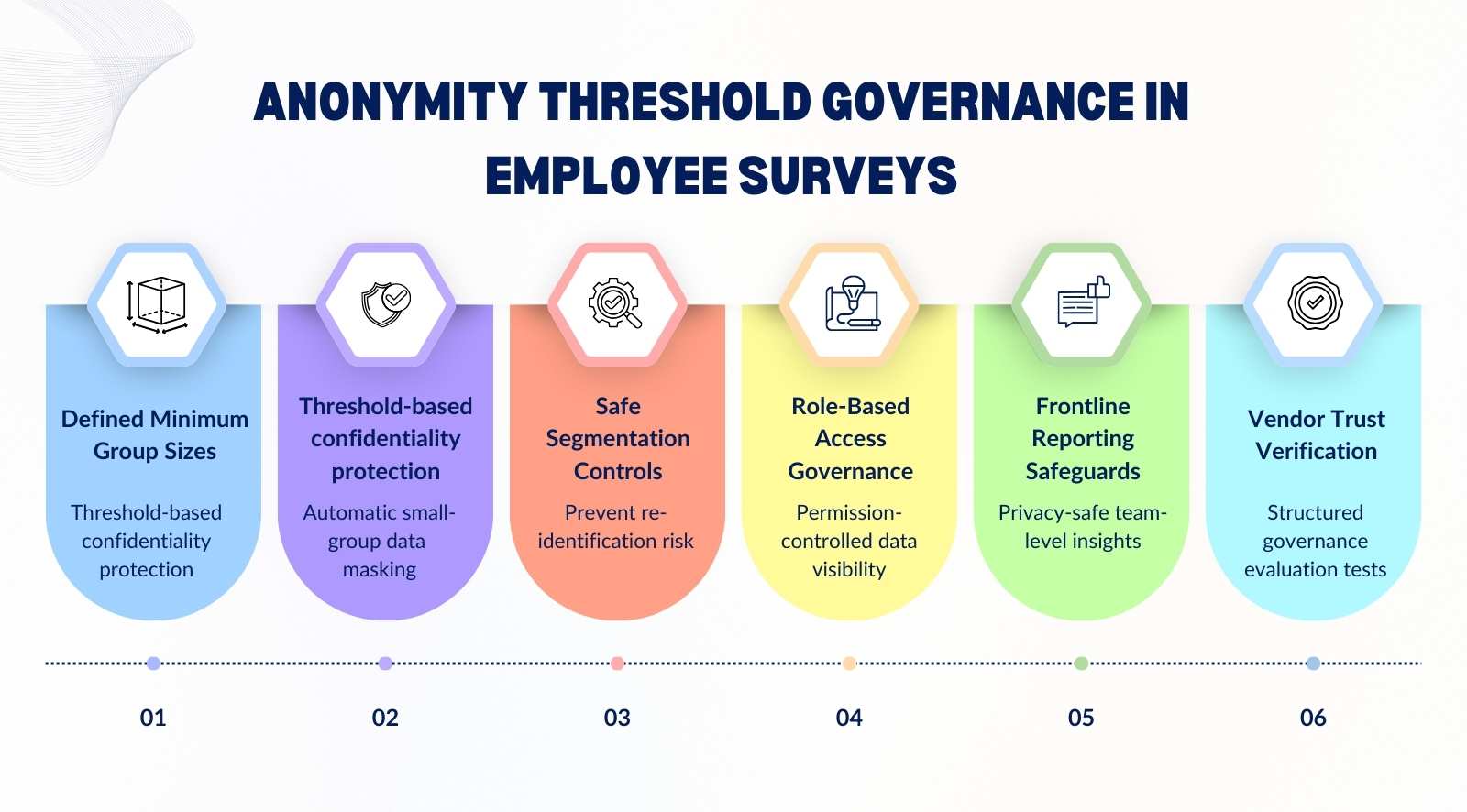
Anonymity thresholds in employee surveys determine the minimum number of responses required before results are displayed. For management teams, this is not a technical setting. It is a governance decision that directly influences trust, participation, and data credibility. If thresholds are too low, employees may fear identification. If they are too high, leaders may lose visibility into smaller teams.
Getting anonymity thresholds right ensures feedback remains both protected and actionable. It safeguards confidentiality while preserving meaningful segmentation. When designed properly, thresholds strengthen psychological safety, improve response quality, and protect long-term participation across cycles.


- Defines what an anonymity threshold in employee surveys is and explains how minimum group size and suppression rules protect confidentiality.
- Explores how over-segmentation and small-team reporting increase re-identification risk and weaken employee trust.
- Outlines how to segment survey data safely using structured grouping rules and threshold enforcement.
- Clarifies role-based access controls, reporting permissions, and how thresholds must apply across all visibility levels.
- Provides frontline reporting best practices and 7 vendor trust tests to evaluate governance, not just anonymity claims.
What is the anonymity threshold in employee surveys?

An anonymity threshold in employee surveys defines the minimum number of responses required before results are shown for any group. It exists to protect identity while still allowing segmented reporting. When thresholds are configured correctly, employee feedback remains confidential without limiting meaningful insight.
- Plain-English definition: An anonymity threshold is the minimum response count required before a confidential employee survey shows scores, themes, or comments for a group. Below that number, reporting is suppressed so an anonymous employee cannot be inferred from small samples.
- What it looks like in dashboards: In employee engagement surveys, a team with fewer than the threshold shows “insufficient data,” not averages. This keeps employee surveys working while preventing managers from drilling into tiny groups and guessing who said what.
- Anonymous vs thresholded: An anonymous employee survey removes direct identifiers, but a threshold controls what gets displayed in reports. Together, they reduce the exposure of personally identifiable information that can surface through filters, rare roles, or one-off comments.
- Why it boosts participation: When people believe anonymous surveys stay anonymous, they share honest feedback with less self-censoring. Clear thresholds signal that leaders value confidentiality, which raises completion rates and improves the quality of survey data you act on.
- What gets protected: Strong confidential surveys block risky metadata from being visible or exportable in reports, including ip addresses, device details, and small-group comment trails. Vendors should separate response storage from reporting views so privacy holds even for admins.
- Quick example you can use: If a five-person unit gets only three responses, results should not appear, even if leadership wants speed. Roll it up to a larger group, then report trends. That is how employee surveys stay trusted.
How minimum group size and suppression rules work in practice
Minimum group size and suppression rules determine when survey results are displayed and when they are hidden. If response counts fall below the defined threshold, reporting is automatically suppressed. This ensures employee feedback confidentiality remains intact even when filters are applied.
- Minimum group size defined: The minimum response threshold for surveys sets how many survey responses must exist before data appears in anonymous engagement surveys. Typical numbers range from five to ten, depending on the structure and sensitivity of the employee data involved.
- What suppression actually means: Suppression hides results when survey responses fall below the threshold. Instead of showing partial data, the system blocks individual responses from view, protecting confidential data and preventing anyone from attempting to identify respondents through small samples.
- When counts drop below the threshold: If filters reduce group size, anonymous responses disappear from reporting views. Survey answers remain stored, but dashboards display “insufficient data,” maintaining survey data confidentiality and reinforcing employee feedback confidentiality across all reporting layers.
- Dynamic suppression with filters: When a survey administrator applies filters like location or tenure, the system recalculates instantly. If the filtered segment fails the minimum response threshold for surveys, results hide automatically to protect candid responses and avoid exposing individual responses.
- Suppression cascade explained: If one segment is suppressed, related drill-downs also stay hidden. This prevents patterns from emerging across anonymous engagement surveys that could indirectly identify respondents by combining small filtered views of employee data.
- Why automation matters: Fixed spreadsheets increase risk because manual exports expose confidential data without guardrails. Automated systems enforce thresholds consistently, preserving candid feedback while reducing the chance that a survey administrator unintentionally reveals sensitive survey answers.
Why over-segmentation can undermine employee trust

Over-segmentation occurs when survey data is broken down into groups that are too small to preserve anonymity. While segmentation improves analysis, excessive granularity increases identification risk. Even technically anonymous surveys can feel identifiable when reporting becomes too narrow.
- What segmentation really means: Segmentation breaks responses collected into smaller groups by tenure, location, or manager inside the survey platform. While useful for actionable insights, excessive slicing reduces data quality and increases the risk of identifying information surfacing unintentionally.
- Micro-group reporting risk: When only a few people contribute feedback on sensitive topics, negative comments become traceable through context. Even without an employee id number displayed, patterns across data collection points can compromise employee survey privacy standards.
- Perception versus technical anonymity: A system may be strictly anonymous and managed by an independent third party, yet employees feel identifiable if segments are too narrow. Survey participation trust depends as much on perception as technical safeguards.
- Reverse-engineering identities: In small teams, leaders may connect employee sentiment with recent events or shifts. Cross-referencing employee experience details with responses collected can unintentionally identify respondents, weakening anonymity in engagement surveys.
- Impact on participation next cycle: When employee voice feels exposed, accurate feedback declines. Employee engagement drops, and survey participation trust erodes, reducing both data quality and the reliability of future actionable insights.
How to segment survey data safely without compromising anonymity
Safe segmentation balances insight with privacy protection. It requires clear grouping rules, threshold enforcement, and structured reporting levels. When implemented correctly, segmentation strengthens decision-making without exposing individual feedback.
- Start with safe cut lines: Set survey response grouping rules per business unit so small teams roll up automatically. This protects psychological safety, reassures employees, and keeps employee survey data protection consistent, even when human resources wants details for action.
- Use third-party separation: Use a third-party provider or third-party administrator to run the survey and host results. It reduces suspicion, strengthens the confidential employee feedback process, and makes it easier for teams to speak freely about sensitive issues.
- Lock risky filters: Limit demographic questions to what you will actually use, then lock them behind access controls. Prevent filter stacking by default in the survey platform. This reduces re-identification risk and keeps engagement surveys focused on patterns.
- Choose the right reporting level: Report at the business unit or region first, then allow managers to view only when thresholds are met. This balances actionable insights with privacy. It also often prevents leaders from triangulating identities through tiny segments.
- Protect comment visibility: Apply the same suppression logic to open text as to scores. Hide or delay comments in small groups. This supports mental health discussions without exposing individuals and maintains confidence in the anonymous feedback system over time.
- Audit who can see what: Review access controls every cycle, including exports and shared links. Document who in human resources can view which segments. Clear governance reinforces employee survey data protection and keeps the confidential employee feedback process credible.
Who should see what? Role-based access controls explained
Role-based access controls determine who can view, export, and analyze survey data. Different roles require different levels of visibility. Proper access configuration ensures thresholds are enforced consistently and confidential data remains protected.
- What role-based access control means: Role-based access control defines who can see which survey data, based on job level and responsibility. It prevents a single employee’s responses from surfacing while keeping reports fully anonymous and aligned with HR survey compliance requirements.
- HR vs manager vs executive visibility: The HR team may see organization-wide trends, while managers view only their eligible teams. Executives typically access aggregated data. This layered access reduces self-censorship and ensures respondents feel safe sharing honest feedback.
- Why open dashboards are risky: When everyone can access raw data, sensitive information may be exposed or misinterpreted. Open systems increase the risk of non-anonymous insights emerging, especially when filters narrow responses to small groups.
- Download and export permissions: Strong systems restrict data exports to protect confidential records. Limiting downloads prevents offline analysis that could identify respondents or reveal patterns tied to a single employee.
- Audit trails and accountability: Every access action should be logged. Audit trails document who viewed or exported data, strengthening governance and reinforcing trust among employees participating in anonymous feedback processes.
- How access controls work with thresholds: Even when someone has reporting access, the minimum response count for anonymous employee surveys must still apply. This ensures that an anonymity threshold in employee surveys is enforced consistently across all user roles.
Preventing re-identification in small teams and filtered reports

Re-identification risk increases when survey results are filtered into very small groups. Combining demographic filters or open-text analysis can unintentionally reveal identities. Strong suppression logic and reporting guardrails are necessary to prevent this exposure.
- What re-identification really means: Re-identification happens when answers from a small department can be connected to a specific person through context. Even if names are removed, identity may still be identified through patterns, timing, or manager-level insights.
- Cross-filter stacking risk: When analysis combines gender, shift, and tenure within one department, data slices shrink quickly. That creates conditions where honest feedback can be traced back, especially in a small company or specialized team.
- Small team reporting exposure: In tight units, a manager may already know who raised concerns about workload. When survey insights mirror recent events, anonymity weakens, and employees hesitate to create candid responses in the next cycle.
- Open-text comment clues: Written answers often contain style, project references, or personal context. These details can be linked back to identity during analysis, even if dashboards hide direct identifiers.
- AI clustering concerns: Automated analysis tools group comments by theme, but clusters in small groups may indirectly expose who said what. Strong confidentiality controls must prevent overly granular breakdowns.
- Vendor-level safeguards: Good systems block reporting below safe counts, restrict manager access, and monitor how data is analyzed. These guardrails protect anonymity across the organization and preserve honest participation.
Reporting best practices for frontline-heavy organizations
Frontline-heavy organizations face higher anonymity risk due to smaller operational units and fluctuating headcount. Reporting must prioritize aggregation before drill-down analysis. Clear threshold ranges and roll-up strategies protect trust while preserving operational insight.
- Why frontline sites are higher risk: Plants, warehouses, and branches often operate with tight teams and visible roles. When results are broken down too finely, patterns become obvious. Reporting must prioritize safe aggregation before drilling into smaller operational groups.
- Shift-based participation gaps: Different shifts respond at different rates, which skews visibility. If one shift crosses the threshold and another does not, managers may infer who contributed. Roll up by site first, then analyze shift trends cautiously.
- Seasonal workforce volatility: Temporary staffing changes respond quickly. A team's safety one quarter may fall below the threshold next quarter. Recalculate reporting groups every cycle to maintain consistency and protect anonymity.
- Multi-site rollup strategy: Start with region or network-level reporting before isolating a single site. This balances operational insight with privacy. It also reduces the risk of one location becoming overly exposed due to low headcount.
- Roll up before you break down: If a business unit sits near the threshold, aggregate results upward. Only allow breakdowns when stable response counts are met. This approach reflects the best anonymity threshold for small teams in surveys.
- Build participation trust visibly: Communicate how thresholds work and when results are hidden. When frontline teams understand the guardrails, participation improves, and reporting becomes both safer and more credible.
7 Trust tests to run during an employee survey vendor demo

A vendor demo is like a safety briefing before you hand out keys to a secure site. The result is either trust at scale or doubt that spreads fast. The cause is simple: when controls are vague, people expect exposure, and follow-up actions lose credibility with every cycle.
1. Default threshold clarity
Ask for the default anonymity threshold and where it applies across teams, sites, and comments. A strong vendor explains the logic, not just the number, and shows how it holds during manager-level reporting.
2. Override controls
Confirm whether anyone can override thresholds. If the employer can “turn it off” for speed, trust will drop. Good platforms restrict overrides, log them, and require governance approval.
3. Filter behavior under pressure
Test what happens when filters reduce group size. Results should disappear automatically, not degrade into partial views. Ask them to demonstrate suppression live, not describe it.
4. Open-text protection
Ask how comments are handled when groups are small. Strong systems suppress, delay, or redact risky details. Weak ones show comments too early, making identification easy.
5. Export and download limits
Check whether managers can export raw results. If exports bypass thresholds, it is a hidden backdoor. A good vendor limits downloads and applies the same rules to offline files.
6. Audit logs and traceability
Ask for audit logs showing who accessed what and when. This matters for HR governance and builds confidence that misuse will be detected, not guessed after damage is done.
7. Cross-filter re-identification prevention
Ask how they prevent stacking filters that reveal individuals. Good vendors block risky combinations and roll results up. Weak vendors rely on “user discretion,” which fails during real follow-up.
Red flags to watch for: Vague answers, “trust us” language, manual exports, and admin-only workarounds. These gaps become visible to employees quickly.
Where to go next: Link to your vendor hub and enterprise survey requirements. Use them as a demo scorecard so the employer evaluates governance, not just UI.
Conclusion
Anonymity thresholds in employee surveys are not a technical checkbox. They are a governance safeguard that determines whether employees truly trust the process.
When thresholds are weak, participation drops, feedback becomes filtered, and leadership loses access to honest insight. When they are structured correctly, organizations gain accurate data without compromising confidentiality.
CultureMonkey is built with anonymity thresholds, dynamic suppression rules, and role-based access controls embedded into the reporting framework. CultureMonkey helps organizations protect identity, prevent re-identification, and maintain compliance while still delivering actionable insights. The result is sustained participation, credible data, and feedback leaders can confidently act on.
FAQs
1. What is an anonymity threshold in employee surveys?
An anonymity threshold in employee surveys is the minimum number of responses required before results are displayed for any group. If responses fall below that count, reporting is suppressed. This protects individual identity while still allowing leaders to analyze trends at an aggregated level.
2. What is the minimum response count required for anonymous employee surveys?
The minimum response count typically ranges between five and ten, depending on organizational structure and sensitivity of data. The exact number should reflect team size and reporting complexity. Strong systems also apply dynamic suppression when filters reduce groups below the defined threshold.
3. Can managers override anonymity thresholds in survey reports?
In well-governed systems, managers should not be able to override anonymity thresholds. Allowing overrides increases identification risk and weakens trust. Enterprise-grade platforms restrict such controls, log access actions, and ensure suppression rules apply consistently across all reporting levels.
4. How do suppression rules prevent re-identification in small teams?
Suppression rules automatically hide results when response counts drop below the required threshold. They also block filtered drill-downs that reduce group size. This prevents patterns from emerging that could indirectly reveal who submitted specific feedback in smaller departments or teams.
5. Does segmentation increase the risk of exposing individual responses?
Yes, excessive segmentation can increase exposure risk. When survey data is broken into very small groups, contextual details may make identities easier to infer. Safe segmentation practices enforce thresholds, limit filter stacking, and prioritize aggregated reporting before detailed breakdowns.
6. How can I evaluate whether a survey vendor enforces anonymity properly?
Ask vendors to demonstrate threshold enforcement during filtering, comment protection in small groups, export restrictions, and audit logs. Strong providers show how suppression works in real scenarios. Governance mechanisms matter more than interface design when evaluating anonymity safeguards.