



How to create an anonymous feedback form template?

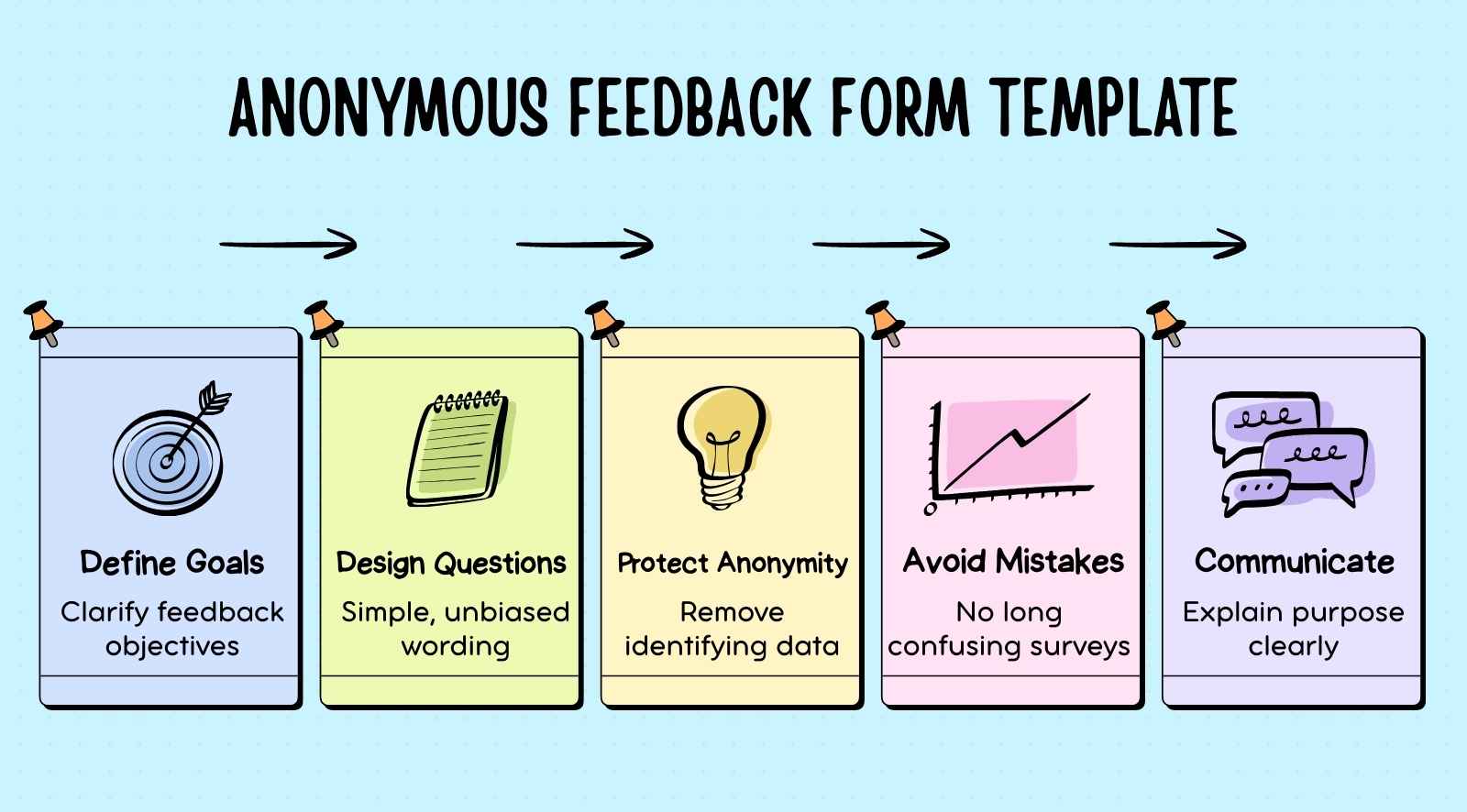
An anonymous feedback form template is a structured questionnaire designed to collect honest opinions without revealing the respondent’s identity. Organizations use anonymous feedback forms to gather candid insights, identify issues early, and more accurately understand overall sentiment.
If you're wondering how to create anonymous feedback form templates that encourage honest responses, the process starts with clear objectives, relevant survey questions, a platform that protects anonymity, and a structured launch plan.In this guide, we explain how to create anonymous feedback form templates, avoid common mistakes, choose the right questions, and launch the form effectively to collect useful feedback.


- Anonymous feedback forms collect honest opinions without revealing identities, helping organizations understand employee sentiment and workplace concerns clearly.
- Creating an anonymous feedback form involves defining goals, choosing a platform, designing questions, ensuring anonymity, testing carefully, and launching thoughtfully.
- Common mistakes in anonymous feedback templates include collecting identifying information, asking too many questions, using confusing language, and having an unclear survey structure.
- Choosing relevant anonymous feedback questions requires clear objectives, focusing on key workplace areas, avoiding bias, and maintaining logical survey flow.
- Launching anonymous feedback forms with proper communication and reliable tools helps organizations gather insights and improve employee engagement effectively.
What is an anonymous feedback form?
An anonymous feedback form is a structured questionnaire used to collect feedback without revealing the respondent’s identity. Organizations use an anonymous feedback form to collect anonymous responses, understand employee satisfaction, and gather valuable feedback about workplace practices, leadership, or processes through an anonymous employee feedback survey or employee feedback form.
Organizations use anonymous feedback tools or an anonymous feedback tool to create and distribute surveys that help teams collect anonymous feedback consistently. These platforms make it easier to run an anonymous feedback survey, manage anonymous responses, and analyze employee feedback trends across teams.
When organizations collect anonymous responses regularly through an anonymous employee feedback form, they gain clearer insights into employee satisfaction and engagement. Continuous anonymous employee feedback helps leaders identify concerns early and act on valuable feedback that improves the overall employee experience.
How do you create an anonymous feedback form?
Anonymous feedback forms are a powerful tool for organizations to gather feedback and drive positive change, impacting their bottom line. Here are the steps to create your own anonymous survey template.
1) Define the purpose and goals
Start by clearly defining the purpose and goals of your anonymous feedback form. Determine what specific information or insights you want to gather from your respondents. Is it employee satisfaction, product feedback, or customer experience? Understanding the purpose will help shape the questions and structure of the form.
2) Select a feedback platform
Choose an employee engagement software or custom form builder that allows you to create anonymous survey forms. There are various options available, such as online survey tools or dedicated feedback management software. When selecting a platform, consider factors like ease of use, customization options, and data analysis capabilities.
3) Craft relevant questions
Create a set of relevant questions that align with your form's purpose. Ensure that the questions are clear, concise, and easy to understand. Consider using a mix of multiple-choice, rating scales, and open-ended questions to gather diverse feedback. Remember, the goal is to encourage honest and thoughtful responses.
4) Focus on anonymity
When designing the form, ensure you do not collect any personally identifiable information. Remove fields that ask for names, email addresses, or any other data that could reveal the identity of the respondents. This will maintain the anonymity of the feedback.
5) Customize the form
Customize the form's design and layout to reflect your organization's branding and aesthetics. Add your logo design, choose color schemes, and adjust the visual elements to create a cohesive and professional-looking form. This personal touch can make the form feel more trustworthy and engaging for the respondents.
6) Test the form
Before launching the form, thoroughly test it to ensure it functions properly. Check for any technical issues, validate question logic, and test the anonymous feature. Run through the form as if you were a respondent to identify potential hiccups or improvement areas.
7) Launch and promote the form
Once you're satisfied with the form, it's time to launch it and start gathering feedback. Share the form's link with your employees. Utilize various communication channels such as email, internal messaging systems, or even social media to promote the form and encourage participation.
8) Monitor and analyze responses
As responses start pouring in, monitor and analyze the feedback regularly. Most feedback platforms offer built-in analytics tools that allow you to track response rates, analyze trends, and identify key insights. Pay attention to common themes, recurring feedback, and actionable suggestions that can guide decision-making and improvement efforts.
9) Act on the feedback
The most crucial step is to take action based on the survey results. Share the insights with relevant stakeholders, address concerns, celebrate successes, and implement changes where necessary. Communicate to the respondents that their feedback was heard and appreciated, fostering a culture of transparency and continuous improvement.
Common mistakes in structuring your anonymous feedback template

When it comes to structuring your anonymous feedback template, there are a few common mistakes that can hinder its effectiveness. Let's explore these pitfalls so you can avoid them:
1) Asking for identifying information
The primary goal of an anonymous feedback form is to ensure confidentiality. Asking for identifying information, such as names or employee IDs, defeats the form builder very purpose and makes respondents hesitant to provide honest feedback. Keep the form anonymous by eliminating any fields that could reveal the respondent's identity.
2) Overloading with too many questions
While gathering comprehensive feedback is important, bombarding respondents with an excessive number of questions can lead to survey fatigue and reduced response rates. Keep your feedback form concise and focused on the most critical aspects you want to explore. Prioritize quality over quantity to ensure higher engagement and thoughtful responses.
3) Using jargon or complex language
Clear communication is key to obtaining meaningful feedback. Avoid using technical jargon or complex language that might confuse or alienate respondents. Opt for simple, easily understandable language that everyone can grasp. This approach encourages broader participation and ensures that respondents accurately comprehend the questions.
4) Lack of clarity or ambiguity
Unclear or ambiguous questions can result in inconsistent or misleading survey responses. Ensure that each question is precise and unambiguous, leaving no room for interpretation. Provide clear instructions or examples, if necessary, to guide respondents and maintain the accuracy and relevance of the feedback.
5) Neglecting to include open-ended questions
While multiple-choice and rating scale questions provide valuable quantitative data, don't overlook the power of open-ended questions. These questions allow respondents to express their thoughts, suggestions, and concerns in their own words, providing rich qualitative insights. Balancing both types of questions creates a well-rounded feedback form.
6) Ignoring follow-up or clarification options
Sometimes respondents may need to elaborate or provide additional context for their answers. Failing to include follow-up or clarification options limits the depth of feedback you receive. Consider including a comment box or an option for respondents to provide feedback, further explanations or offer solutions to the issues raised.
7) Neglecting to Communicate Results and Actions:
One of the most critical mistakes is failing to communicate the feedback outcomes to the respondents. Lack of transparency can lead to reduced trust and future participation. Share the results, highlight the key findings, and communicate the actions taken due to the feedback. This builds confidence and reinforces the value of providing feedback.
Avoiding these common mistakes will help you create a well-structured and effective anonymous feedback template. Remember, the goal is to create a safe and open space for honest feedback, enabling you to gather valuable insights and drive positive change within your organization.
How to choose relevant survey questions for your anonymous feedback form?
If your feedback survey form doesn’t have relevant questions, then the outcome of the survey would not be beneficial for your organization. So, here are some pointers to help you choose relevant survey questions for your anonymous feedback form.
1) Clearly define your objectives
Start by clearly defining the objectives of your feedback form. What specific information or insights do you want to gather? Are you focused on employee satisfaction, product feedback, customer experience, or another area? Having a clear objective will guide your question selection process.
2) Prioritize key areas
Identify the key areas or topics that align with your objectives. What aspects of the organization or experience do you want feedback on? It could be communication, teamwork, leadership, product features, customer support, or other relevant factors. Prioritize these specific areas when crafting your survey questions.
3) Ask about specific experiences or scenarios
To gather targeted feedback, ask participants about specific experiences or scenarios. For example, instead of asking, "Do you like the product?" ask, "How satisfied are you with the product's ease of use?" or conditional logic questions like "If this, then what would you have done?" This approach encourages respondents to provide specific feedback and helps them identify areas for improvement.
4) Avoid leading or biased questions
Ensure your questions are neutral and unbiased to obtain genuine feedback. Avoid leading or loaded questions that steer respondents toward a particular answer. Keep your questions balanced and objective to collect unbiased business insights.
5) Consider logical flow and order
Structure your questions in a logical flow to create a smooth survey experience. Start with broad or general questions and gradually move towards more specific ones. This helps respondents ease into the feedback process and ensures a logical progression of topics.
How to launch your anonymous feedback form for your employees?
Launching an anonymous workplace feedback form requires clear communication, the right feedback tool, and a structured rollout plan. When people understand the purpose and trust the anonymity, they are more likely to share honest employee input. A well-planned launch helps organizations collect responses consistently and gather qualitative feedback that improves company culture.
- Choose the right feedback tool: Select a reliable feedback tool that supports anonymous surveys and protects respondents' identities. The right platform helps teams collect anonymous responses efficiently while managing anonymous feedback collection across departments and ensuring the process stays simple for participants.
- Communicate purpose and expectations: Clearly explain why the employee anonymous feedback survey is being launched and how the feedback will be used. When people understand the goal, they are more likely to provide detailed feedback, constructive criticism, and honest employee input.
- Promote the form across channels: Share the anonymous workplace feedback form through multiple communication channels so everyone can participate. Wider promotion helps organizations collect anonymous insights from different groups and gather balanced qualitative feedback about company culture.
- Encourage honest and balanced responses: Invite participants to share both positive feedback and negative feedback without hesitation. A well-launched anonymous employee feedback system makes it easier for people to offer constructive feedback that highlights opportunities for improvement.
- Connect feedback to key metrics: Link insights from surveys to measurable indicators like employee net promoter score, customer satisfaction trends, and themes emerging from performance reviews or customer feedback to understand broader patterns.
- Review and act on responses: After you collect responses, analyze the anonymous feedback collection carefully to identify recurring concerns and opportunities. Acting on employee input shows the organization values constructive criticism and strengthens trust in the feedback process.
5 Popular free tools to create anonymous feedback form template

Several free tools allow organizations to create an anonymous feedback template and collect feedback quickly. These platforms help teams run anonymous surveys, gather actionable data, and understand employee experience without large investments. Many tools support pulse surveys, suggestion boxes, and anonymous staff feedback form formats while helping leaders generate actionable insights that guide informed decisions.
1. Google Forms
Google Forms is one of the most widely used tools for creating an anonymous feedback template because it is user-friendly and simple to deploy. Teams can add multiple-choice questions, collect feedback, and export results to Google Sheets for analysis. It works well for pulse surveys, suggestion boxes, and quick employee experience checks that provide actionable data.
2. Typeform
Typeform is designed to make surveys more engaging, which can encourage employees to complete feedback forms more willingly. Its clean interface supports real-time feedback collection and works well for pulse surveys, employee experience checks, and anonymous staff feedback form distribution. Teams can use it to gather detailed feedback that supports continuous improvement and better workplace culture.
3. Microsoft Forms
Microsoft Forms integrates easily with Microsoft 365 environments and is commonly used for anonymous surveys. Organizations can collect feedback from teams, run exit interviews, and measure net promoter score or employee experience trends. When configured correctly, responses can remain completely anonymous, helping organizations gather honest feedback while protecting employee trust.
4. JotForm
JotForm provides flexible options for building an anonymous employee suggestion form with customized layouts and structured questionnaires. It allows teams to build a step-by-step guide-style survey using multiple-choice questions and open fields. This flexibility helps organizations collect feedback that provides valuable insights about workplace culture, individual performance trends, and employee experience.
5. LimeSurvey
LimeSurvey is an open-source platform suited for organizations that want more control over surveys and anonymous systems. It supports advanced feedback collection, enabling teams to gather detailed feedback and actionable data across departments. The tool can help leaders analyze workplace culture patterns, improve employee experience, and make informed decisions that strengthen continuous improvement initiatives.
Conclusion
Understanding how to create anonymous feedback form templates is important for organizations that want honest input and better decisions. When people can share opinions without fear of negative repercussions, leaders gain clearer insights into employee experience, workplace culture, and improvement opportunities.
Consistent anonymous employee feedback also helps identify patterns, address concerns early, and build stronger employee trust. However, collecting feedback alone is not enough; organizations also need tools that turn responses into actionable insights.
CultureMonkey helps organizations run secure, anonymous surveys, pulse surveys, and continuous feedback programs. With real-time analytics and structured feedback tools, CultureMonkey helps leaders transform employee feedback into meaningful workplace improvements.
Book a demo with CultureMonkey.
FAQs
1. What is an anonymous feedback form, and how does it work?
An anonymous feedback form lets team members share opinions without revealing identity. Responses are collected through surveys that avoid storing personal data like ip addresses. This helps organizations discuss sensitive topics safely, understand overall satisfaction, and share insights that support conflict resolution and organizational change.
2. How do organizations collect anonymous feedback from employees?
Organizations collect anonymous feedback using digital surveys, suggestion channels, and customizable templates. These tools allow team members to submit thoughts about the work environment, raise sensitive topics, and answer follow-up questions. The goal is to gather actionable insights that support conflict resolution and organizational change.
3. What tools can be used to create an anonymous feedback form?
Organizations often use survey tools with customizable templates to create anonymous feedback forms. These platforms allow leaders to add their own questions, protect identities by limiting IP address tracking, and collect responses from team members. The results help share insights and support organizational change.
4. What questions should be included in an anonymous employee feedback form?
An anonymous employee feedback form should include questions about overall satisfaction, work environment, team collaboration, and leadership support. You can also add your own questions and follow-up questions to explore sensitive topics. These responses help generate actionable insights and support professional development.
5. Why do companies use anonymous feedback forms in the workplace?
Companies use anonymous feedback forms to encourage honest input from team members without fear of negative consequences or repercussions. Anonymous feedback helps leaders understand the work environment, improve a positive work environment, support professional development, and drive organizational change using actionable insights.