


Best tools for customizable employee surveys: How to customize without breaking data quality

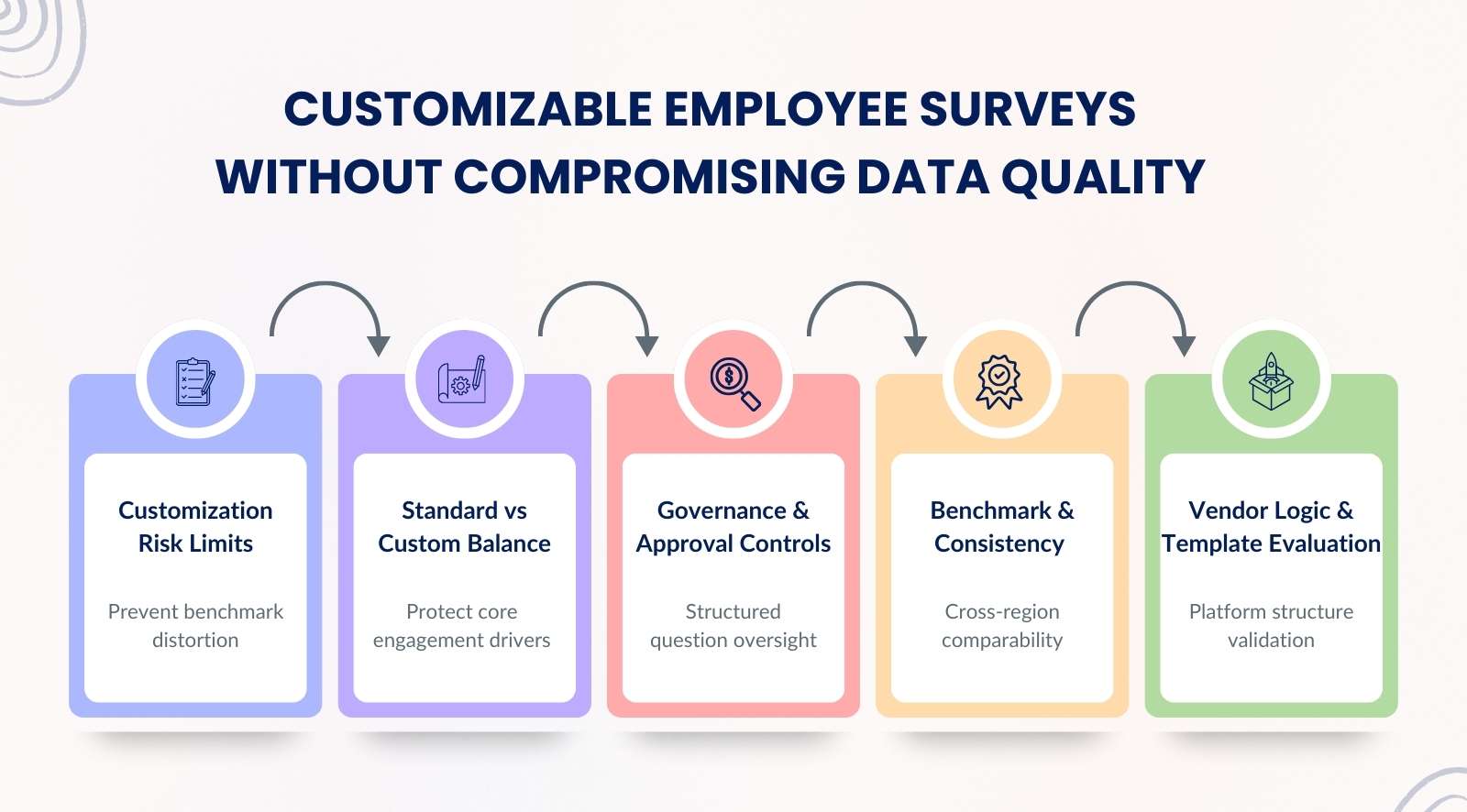
Customization is often the deciding factor when choosing the best tools for employee surveys. Leadership teams want flexibility to tailor questions to strategy, culture, and evolving business priorities. However, customization without structure can weaken data quality, disrupt benchmarks, and reduce long-term comparability. The goal is not to customize everything, but to customize with control.
The best tools for customizable employee surveys protect validated engagement drivers while allowing modular flexibility. They maintain statistical integrity, preserve benchmarking, and support governance over question changes. Smart customization balances adaptability with consistency, ensuring insights remain reliable, comparable, and actionable across survey cycles.


- Understand when customization starts weakening survey reliability and distorting benchmarks.
- Define what must remain standard versus what can be safely customized.
- Establish governance rules to control custom questions and protect data quality.
- Preserve benchmarks and cross-region consistency while adapting surveys.
- Evaluate templates, vendor logic, and comparison scorecards to choose the right platform.
5 Best tools for customizable employee surveys
Quick comparison of enterprise engagement platforms
| Name | G2 Score | Best For | Survey Types |
|---|---|---|---|
| CultureMonkey | 4.7 | Enterprise and mid-market HR teams | Engagement, pulse, lifecycle, manager effectiveness |
| Culture Amp | 4.5 | Mid-market and enterprise organizations | Engagement, pulse, performance, lifecycle surveys |
| Lattice | 4.7 | Mid-market tech and SaaS teams | Engagement, pulse, performance, and feedback surveys |
| SurveyMonkey | 4.4 | SMB and mid-market companies | Engagement, pulse, satisfaction, custom surveys |
| Workday Peakon | 4.6 | Workday-based enterprises | Continuous listening, engagement, lifecycle surveys |
When does customization start undermining survey reliability?

Customization starts undermining reliability when it weakens consistency in your employee engagement platform. Frequent edits, scale changes, and uncontrolled modules reduce comparability and make it harder to track employee feedback accurately.
- Trend drift from constant edits: Frequent rewrites in employee survey software with custom questions break like-for-like comparisons, so month-over-month signals lose meaning.
- Core drivers getting replaced: Swapping validated engagement drivers for local preferences can blur what truly moves employee satisfaction across teams and time.
- Mixed scales, mixed truth: Changing response scales creates uneven survey data, so scores look different even when employee sentiment stays the same.
- Too many “nice to have” items: Overloading employee survey tools with extra questions increases drop-offs and weakens actionable insights from the responses you do get.
- Logic that hides the baseline: Complex branching in employee survey software can reduce shared questions, limiting reliable benchmarks across pulse surveys and annual cycles.
- Unclear ownership of changes: Without review rules, flexible employee engagement survey platforms become “anything goes,” and the employee experience story becomes harder to defend.
- Customization without action: If edits do not lead to clearer decisions, employee engagement tools create more noise, not better outcomes in employee engagement software.
What should stay standard vs what can be customized

To customize effectively without breaking data quality, organizations must separate structural consistency from contextual flexibility. Core engagement drivers and scoring logic should remain fixed within the employee engagement platform, while situational questions can adapt to business needs.
This balance allows teams to track employee feedback reliably while supporting performance management and culture-specific priorities.
| What to decide | Keep standard | Can be customized | How to control it |
|---|---|---|---|
| Core engagement drivers | Keep the same driver core in every employee survey to protect trend lines and segmentation. | Customize only examples or labels, not the meaning of the driver. | Lock driver wording, scale, and scoring. Track changes in a simple version log. |
| Rotational modules | Keep module format consistent so engagement data stays readable across cycles. | Rotate topics by business rhythm, like workload, enablement, or leadership support. | Limit to 1–2 modules per cycle. Freeze modules for at least two cycles when tracking trends. |
| Situational questions | Keep a small standard block for baseline comparison. | Add short questions for a project, merger, or policy shift to capture near-term employee feedback. | Timebox the module and define the decision it supports. Retire it when the decision window closes. |
| Structural vs contextual customization | Keep the structure fixed: scales, response options, and question types. | Customize context: role-specific wording, site terms, and local examples without changing intent. | Use a translation and review step to protect meaning. Avoid mixing scales across teams. |
| Version control and documentation | Keep naming, tagging, and ownership rules the same across every engagement survey. | Customize notes for what changed, why, and what action it triggered for team insights. | Record date, owner, change type, and expected impact. Tie changes to outcomes, like customer satisfaction or risk reduction. |
How to build a governance model for custom survey questions: step-by-step

A governance model ensures customization decisions are intentional, documented, and aligned with outcomes. Without clear ownership and review workflows, survey changes dilute data credibility and reduce meaningful insights. A structured model protects benchmark integrity, supports performance management alignment, and keeps employee engagement survey platforms comparison focused on measurable impact.
Step 1: Define proposal ownership
Limit question creation to HR and a small lifecycle council, so even the best employee survey software for HR teams does not become unstructured. Tie each proposal to a decision it supports and how it will measure employee engagement.
Step 2: Create a structured review workflow
Use a two-step review where HR checks clarity and bias, and a business sponsor confirms relevance to engagement drivers. Approvals should validate scale, audience, timing, and readiness of communication tools before launch.
Step 3: Set add-or-retire criteria
Introduce only items that improve meaningful insights or clarify survey results. Retire questions that fail to boost engagement, duplicate the core, or stop influencing decisions after repeated cycles in custom employee pulse survey tools.
Step 4: Implement version tracking
Log every edit with owner, date, reason, and segment impact. Clear records help interpret shifts in survey responses and protect credibility when analyzing survey results across quarters.
Step 5: Add a business alignment checkpoint
Map each custom block to a metric and accountable owner before launch. This ensures employee feedback tools with advanced customization drive action, not just data collection, and strengthens employee engagement survey platforms comparison during vendor evaluation.
How to handle multi-language and cultural nuance in custom questions
Multi-language customization must protect meaning, scale consistency, and psychological safety. Literal translations can distort engagement signals and weaken cross-region comparability. Enterprise teams using an employee engagement platform need structured translation reviews to preserve deeper insights, maintain trust in anonymous responses, and ensure workplace culture metrics remain aligned across locations.
- Translate meaning, not words: Literal translation can change intent, so customizable survey templates must be adapted forthe local context. Use a reviewer to check tone and clarity, then confirm key features and response options appear in each language.
- Phrase for safety: Some cultures avoid direct criticism, so employees feel exposed by blunt wording. Pair culturally softer phrasing with anonymous employee survey tools so honest feedback stays high. Test with a small group to catch loaded terms before launch.
- Keep scales identical: Do not swap agree scales for satisfaction scales across regions, or engagement analytics will mislead key driver analysis. Keep labels, anchors, and direction consistent, so leaders can make informed decisions from comparable pulse survey data.
- Back-translate to verify intent: Translate to the target language, then back to the source to spot meaning drift. In employee survey tools with branding options, lock approved wording in a central library so local edits do not reintroduce errors.
- Watch for local bias: Avoid adding culture-specific assumptions that tilt scores, especially around employee recognition or performance reviews. If you use peer-to-peer recognition wording, keep it explanatory, not leading, so results help improve employee engagement fairly.
How do you maintain benchmarks while customizing surveys?
Benchmarks remain intact when core items are protected, and custom modules are clearly separated. Organizations must freeze validated questions inside their employee engagement platform to preserve trend accuracy. Controlled customization supports performance management reporting, helps track employee feedback consistently, and enables deeper insights without disrupting year-over-year comparability.
- Lock the benchmark core: Protect benchmark-aligned items inside employee experience survey software so engagement scores remain comparable across cycles. These science-backed pulse surveys must keep wording, scales, and order stable, even when other sections shift to capture continuous feedback from direct reports.
- Separate index from custom modules: Create a global index for data-driven engagement, then layer optional blocks for specific initiatives. This separation allows leaders to identify trends in workplace satisfaction without custom experiments distorting the core engagement scores.
- Understand wording impact: Small wording tweaks change how people interpret items, especially in user-friendly interface environments. Before editing, test with a pilot group and compare distributions, so survey platforms for internal feedback do not skew results unintentionally.
- Track year over year consistently: Freeze the benchmark section for at least two full cycles to measure employee performance reliably. Avoid rotating core questions, or you lose the ability to identify trends across business units and direct reports.
- Define when to reset benchmarks: If strategy shifts dramatically, document the break clearly. Archive the old baseline inside employee experience survey software, communicate the reset, and compare like-for-like going forward rather than blending incompatible data across all the tools.
Which customizable survey templates should you prioritize

Prioritize templates that influence measurable outcomes across the employee lifecycle. Onboarding, manager effectiveness, change readiness, safety pulses, and well-being check-ins directly impact workplace culture and performance management.
When structured correctly within an employee engagement platform, these templates help track employee feedback continuously and generate deeper insights without creating survey fatigue.
- Onboarding experience surveys: Capture early impressions within the first 30, 60, and 90 days to reduce avoidable exits. Use employee survey analytics tools to track patterns in employee comments and adjust enablement quickly before disengagement spreads.
- Manager effectiveness surveys: Focus on coaching quality, clarity, and peer recognition to strengthen team performance. Segmented views help a sales team or support unit compare real-time feedback without exposing individual responses.
- Change readiness assessments: Measure understanding, trust, and workload before and after major shifts. Continuous listening here reduces rumor cycles and gives leaders evidence to refine communication during transformation efforts.
- Workplace safety pulse surveys: Short, recurring check-ins surface risk signals early and prevent compliance gaps. Clear engagement features and segmentation ensure frontline voices are heard without creating survey fatigue.
- Burnout and well-being check-ins: Track workload, energy, and support perception to protect long-term talent management. Combine scaled responses with optional employee comments to gather insights that drive continuous improvement.
- Exit surveys: Capture themes at departure to strengthen retention strategy. Structured analytics from employee survey analytics tools connect exit data back to ongoing real-time feedback loops.
What should you check in a vendor demo for custom survey logic?
A vendor demo should prove that customization is controlled, scalable, and secure. Evaluate whether the employee engagement platform supports branching, segmentation, governance controls, and sandbox testing. Avoid being distracted by surface features or basic recognition add-ons; focus on whether the system delivers deeper insights and reliable performance management data before you contact sales.
- Conditional branching and skip logic: Ask them to build a live path based on responses, not show a static slide. Strong logic protects anonymous feedback, reduces survey fatigue, and helps hr teams gather valuable insights without overloading employees.
- Question piping and dynamic fields: Check if names, roles, or project tags can auto-populate cleanly. In employee survey software with customizable templates and branding, dynamic fields should feel seamless and protect sentiment analysis quality.
- Segmentation-based targeting: Request a demo showing different questions for managers versus direct contributors. The system should support real-time insights while keeping company culture data comparable across segments.
- Role-based access controls: Confirm who can edit templates, view raw data, and export reports. Governance controls protect anonymous feedback and ensure only approved hr teams have access real time analytics.
- Testing and sandbox environment: Insist on a staging area to preview logic, translations, and branding before launch. Enterprise buyers often consult organizational psychologists, so the platform must validate flows before survey links reach employees.
How to use a vendor comparison scorecard to evaluate customization
A structured scorecard allows teams to compare customization capabilities objectively. Evaluate how each employee engagement platform balances flexibility with governance, protects benchmarks, and supports seamless integration.
A clear scoring model prevents decisions based on marketing claims alone and ensures you select a solution that strengthens workplace culture and delivers deeper insights at scale.
- Customization depth vs governance balance: Rate how far you can tailor surveys without breaking controls. The best tools allow flexibility while protecting data quality, instead of offering a flashy free plan that collapses under enterprise rules.
- Analytics flexibility: Score dashboards, filters, and drill-down views for real decision use. Real value lies in turning feedback collection into usable reporting, not just surface charts bundled into annual billing tiers.
- Template library strength: Evaluate the breadth of ready-to-use templates and how easily they adapt. A strong library accelerates rollout, especially when teams need rapid deployment inside a unified platform.
- Benchmark protection features: Check whether the system separates core metrics from custom modules. This protects year-over-year comparisons and keeps analytics credible across cycles.
- Integration and reporting capabilities: Assess seamless integration with HRIS and collaboration tools. Reporting should move smoothly across systems, ensuring survey insights feed broader planning without manual exports.
Conclusion
Choosing the best tools for customizable employee surveys is not about flexibility alone. It is about protecting data quality while adapting to real business needs. In the workplace, structured customization helps measure employee engagement consistently, preserve benchmarks, and generate meaningful insights that leaders can trust. Without governance and clarity, customization quickly weakens comparability and decision-making.
CultureMonkey, an employee engagement survey vendor, helps organizations strike this balance. Its employee engagement platform protects core drivers, supports controlled custom modules, and delivers deeper insights through structured analytics.
With built-in governance, segmentation, and benchmarking safeguards, CultureMonkey enables teams to customize confidently while keeping survey results reliable, actionable, and aligned with performance goals.
FAQs
1. What are the best tools for customizable employee surveys without compromising data quality?
The best tools protect validated engagement drivers while allowing modular flexibility. They maintain consistent scales and include governance controls for edits. Strong platforms separate core metrics from custom modules, ensuring survey results remain comparable and meaningful across cycles while still adapting to evolving business priorities.
2. How much customization is too much in an employee engagement platform?
Customization becomes excessive when core questions, scales, or benchmarks are frequently altered. If edits prevent trend comparison or distort survey responses across teams, reliability declines. The right balance keeps structural elements stable while allowing contextual adjustments that support decisions without weakening long-term comparability.
3. Can I customize survey questions and still maintain benchmark comparability?
Yes, if core engagement drivers remain unchanged and custom questions are layered separately. Benchmarks stay intact when wording and scoring logic are frozen. Controlled customization supports local insights while protecting year-over-year analysis and preserving trust in survey results.
4. How do custom employee pulse survey tools affect long-term trend analysis?
Custom employee pulse survey tools support agility, but frequent structural changes disrupt trend visibility. When pulse modules rotate without clear separation from the core index. Structured version tracking and fixed benchmark sections ensure trends remain measurable over time.
5. What governance controls should exist in employee feedback tools with advanced customization?
Governance should define proposal ownership, review workflows, approval checkpoints, and version tracking. Each custom question must link to a business objective and a documented metric. Clear audit logs protect data credibility and ensure edits generate meaningful insights rather than confusion.
6. How do I evaluate customization features during an employee engagement survey platform comparison?
Evaluate how each platform balances flexibility with benchmark protection. Assess segmentation, branching logic, version control, and analytics depth. The strongest platforms allow controlled customization while maintaining reliable trend analysis, clear reporting, and actionable insights across multiple survey cycles.