

Data privacy and deletion requests in CultureMonkey
How to handle a GDPR-style privacy or deletion request in CultureMonkey - deactivating versus deleting an employee, what happens to their survey responses, how anonymity protects the data, and a practical process for responding to a formal request.
On this page
If an employee asks you to remove their personal data, or your legal or people team needs to honor a privacy request under a regulation like the GDPR, you'll want to know exactly what CultureMonkey stores, what you can remove, and what happens to the survey answers that person left behind. This guide walks through all of it: the difference between deactivating and deleting a person, what deletion actually does to their record, how anonymity protects historical responses, and a clear, repeatable process for handling a formal deletion request.
The short version is that CultureMonkey gives you a delete action that strips a person's identifying details from their record while keeping your aggregate survey results intact and honest. That balance - removing the individual's personal data without corrupting the anonymous, historical insight your organization relies on - is at the heart of how privacy requests are handled here.
Deleting an employee removes their identifying details (name, work email, phone number, employee ID, and similar identifiers) from their record and marks the record as deleted. Their past survey answers stay in your aggregate reports because those results are reported anonymously and in groups, never as one identifiable person. If you only need to stop surveying someone, use deactivate instead. For anything beyond what the product does automatically, confirm the details with your CultureMonkey contact before you promise a specific outcome to an employee.
What CultureMonkey stores about a person
Before you can respond to a privacy request, it helps to know what data actually exists. Broadly, CultureMonkey holds two kinds of information about an employee:
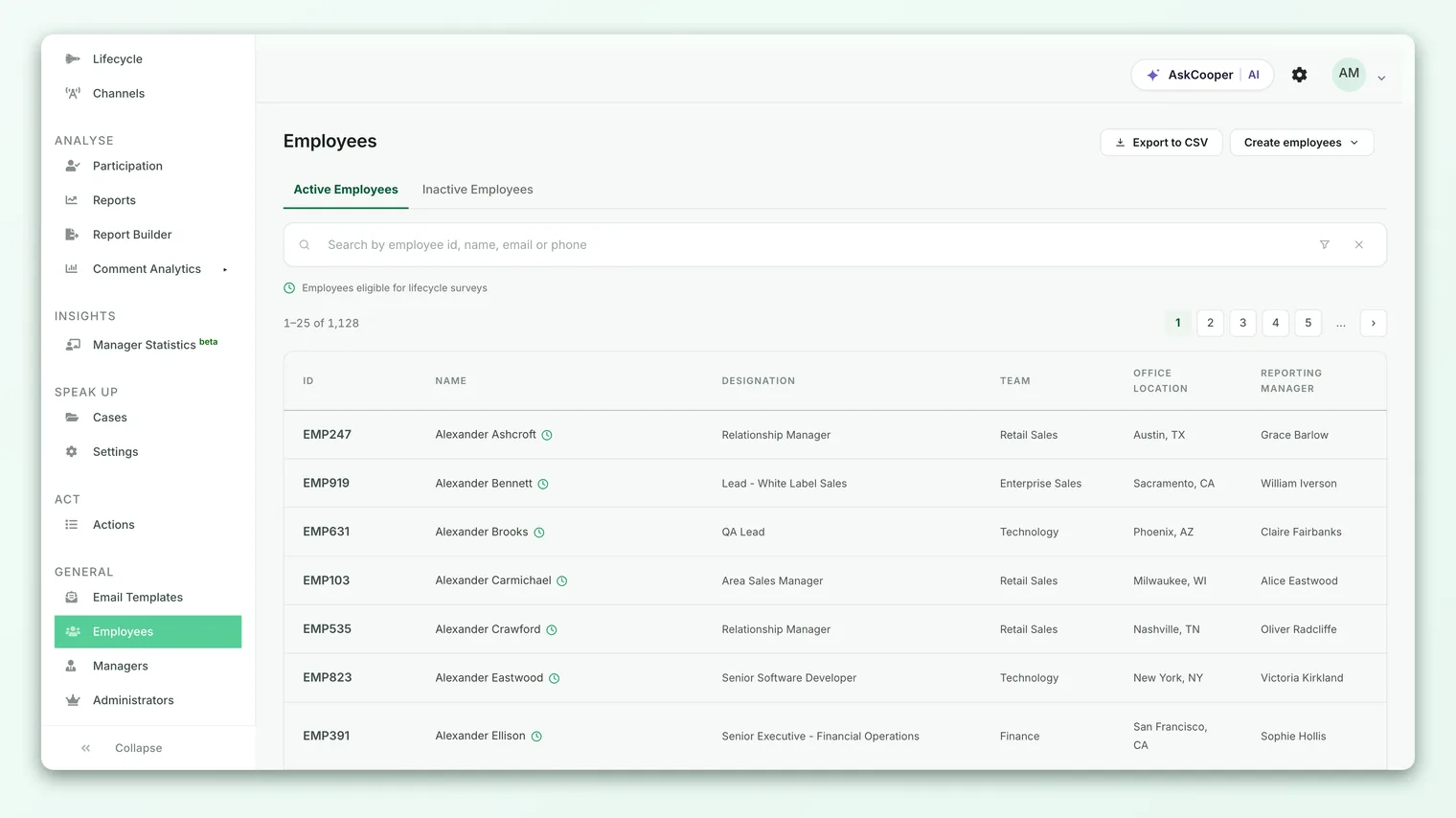
- Identifying data on the employee record. This is the profile you manage under General → Employees: name, work email address, phone number, employee ID, designation, team, location, manager, and any custom attributes you've mapped. It also includes any external identifier used to sync the person from an HRIS or import.
- Survey and feedback data. These are the answers, ratings, eNPS scores, and open-text comments the person submitted over time. Crucially, this data feeds your reports as aggregated, group-level results, and in anonymous surveys it is deliberately decoupled from an identifiable individual in what you and your managers can see.
A privacy request almost always targets the first category - the personal, identifying data. The second category is where anonymity does the heavy lifting, and understanding that split is the key to handling requests correctly.
Deactivate versus delete
CultureMonkey gives you two distinct actions for an employee, and they exist for different reasons. This is the single most important distinction to get right when someone asks you to "remove" them.
| Deactivate | Delete | |
|---|---|---|
| What it's for | The person has left or should no longer be surveyed | A privacy request, or permanently removing someone's personal data |
| Identifying data | Kept on the record | Stripped from the record and replaced with placeholders |
| Future surveys | Excluded from all future surveys | Removed from any pending or draft surveys, and excluded going forward |
| Login and admin access | Login access removed | Login access removed and any admin role deleted |
| Reversible | Yes - you can reactivate the person | No - the identifying details are overwritten |
| Past responses | Remain in reports | Remain in aggregate reports (see below) |
Use deactivate for the everyday case: someone leaves the company, goes on long leave, or moves into a role you don't survey. Their profile stays intact so you can bring them back later, and they simply drop out of future survey audiences. For the full walkthrough of that flow, including bulk actions and reactivation, see Deactivate or delete an employee.
Use delete when the goal is to remove the person's personal data - most often in response to a formal privacy or erasure request.
Deactivation is reversible; deletion is not. If you're not yet certain a formal deletion is required, deactivate the person to stop surveying them, then delete only once the request is confirmed. You can always delete a deactivated employee later.
What deletion actually does
When you delete an employee, CultureMonkey doesn't leave a blank space where a person used to be. Instead, it pseudonymizes the record - it overwrites the fields that could identify the individual and flags the record as deleted. Concretely, deleting a person does the following:
- Replaces the name with a generic placeholder (a "deleted user" label) so the record no longer carries a real identity.
- Clears the work email address and replaces it with a system-generated placeholder address that can't be used to contact or identify the person.
- Removes the phone number, employee ID, designation, and external identifier used for syncing.
- Marks the record as deleted, which removes it from your active employee list and your active-employee counts.
- Pulls the person out of pending surveys. Any survey that is still in draft or published-but-open has that person removed as a participant, so they won't receive further invitations or reminders for work in progress.
- Revokes access. Login access is removed, and if the person held an admin or manager role, that access is deleted too.
Once you delete an employee, their identifying details are overwritten in place. There is no "restore" that brings back the original name, email, or employee ID. If you might need the person's profile again, deactivate instead. Treat delete as final.
What happens to their survey responses
This is the question that worries people most: if I delete someone, do I lose the feedback they gave, or does deleting them expose it? The answer is neither, and the reason is anonymity.
Most engagement surveys in CultureMonkey are anonymous. Results are only ever shown to you and your managers as aggregated, group-level numbers - an eNPS for a team, a driver score for a location, a set of themed comments - and never as "here is what this one named person said." To protect that, CultureMonkey applies an anonymity threshold: a group's results stay hidden until enough people have responded (a floor that starts at 3 for anonymous surveys, and is often set higher). No individual answer can be pulled back out and pinned to a name.
Because of this design, a person's historical answers can stay in your aggregate reports after their identifying data is removed, without compromising their privacy. The number they contributed to a team's eNPS is still part of that team's history, but there is no longer a name attached that you or anyone else can see. Removing those answers would actually distort your historical trends without adding any privacy benefit, since the answers were never identifiable in the first place.
In anonymous surveys the link between a response and an identifiable person is deliberately kept out of what admins and managers can view. That's why past responses can safely remain: the privacy protection was built in when the response was collected, not bolted on at deletion time.
For non-anonymous surveys, or any feature where responses are intentionally attributable, the identity is tied to the employee record, so the pseudonymization that deletion performs is what removes the personal identifier from those responses.
How to delete an employee
Here is the practical, step-by-step flow for a single person. For deleting several people at once, use the bulk actions covered in Deactivate or delete an employee.
- 1Open the employee list. Go to General → Employees and find the person, using search or a filter to locate them quickly.
- 2Confirm this is a deletion, not a deactivation. If you only need to stop surveying the person, choose deactivate instead. Deletion is permanent.
- 3Delete the record. Open the person's record and choose the delete action. CultureMonkey will strip the identifying fields, mark the record as deleted, and remove the person from any pending surveys.
- 4Verify. Confirm the person no longer appears in your active employee list. Their record now shows as a deleted, placeholder entry rather than their real details.
- 5Log the request. Record who requested the deletion, when, and that you completed it, so you have an internal audit trail for the request.
Deleting employees is an administrative action on the employee list, so it's available to Account Admins (and roles you've granted employee-management permissions). Managers and standard employees can't delete records.
Handling a formal deletion request
A privacy or erasure request usually arrives from an employee, a former employee, or your own legal or people team. Because the request may carry legal weight, treat it as a small, defined process rather than a one-click action.
- 1Verify the requester. Confirm the request genuinely comes from the person (or an authorized representative). This protects you from acting on a fraudulent request.
- 2Scope the request. Clarify what's being asked. "Delete my data" can mean removing the person from active surveying, removing their identifying details, or both. Deactivate and delete map to those needs.
- 3Check obligations first. Confirm with your legal or people team whether any data must be retained for a legitimate reason (for example, an ongoing investigation) before you remove anything. Privacy regulations generally allow retention where there's a lawful basis.
- 4Act in the product. Deactivate to stop surveying, delete to pseudonymize the record. Do both if the request covers both.
- 5Confirm and record. Tell the requester what you did, and keep an internal record of the request and its resolution.
- 6Escalate anything the product doesn't cover. If the request reaches beyond what the delete action does, raise it with your CultureMonkey contact rather than promising an outcome you can't verify.
This article describes what the CultureMonkey product does to a person's record. Whether a given action fully satisfies a specific legal obligation (GDPR erasure, a data subject access request, a regional privacy law) is a legal judgment for your organization, often in partnership with CultureMonkey's team. Describe to the requester what was done in the product, and route the legal determination to the people who own it.
Data retention and backups
Two practical questions come up whenever data is deleted: how long is data kept, and what about backups?
- Live data. Once you delete an employee, the identifying fields on their record are overwritten immediately. The record persists in a pseudonymized, deleted state so that aggregate history stays consistent, but it no longer carries the person's real identity.
- Backups and retention windows. Operational backups and any contractual retention windows are governed by CultureMonkey's data-processing terms, not by a setting inside the admin app. There isn't a self-serve "purge from all backups now" control in the product.
If a request specifically requires certainty about backups or a hard, irreversible purge beyond the in-app delete, treat that as an escalation to your CultureMonkey contact. For the broader picture of how your data is stored and protected, see Data security and how your data is protected.
Best practices
- Standardize the process. Keep a short internal runbook: verify the requester, scope the request, check retention obligations, act in the product, confirm, and log. Consistency is what keeps you defensible.
- Prefer deactivate for routine offboarding. Reserve delete for genuine privacy requests or when you specifically need personal data removed. This keeps your history usable and avoids irreversible actions taken by habit.
- Keep an internal audit trail. Record each request and its resolution outside the product. If a regulator or auditor asks, you'll want a clear paper trail.
- Loop in legal early. For anything touching a regulation, let your legal or people team make the compliance call and own the response to the requester.
- Educate your admins. Make sure everyone with employee-management access understands that delete is permanent, and when to use it versus deactivate.
Frequently asked questions
If I delete someone, do I lose their survey feedback?
No. Their past answers remain part of your aggregate, group-level reports, because anonymous results were never tied to an identifiable person in what you can see. Deletion removes the identifying details from the record, not the anonymous data points behind your trends.
Is deletion reversible?
No. Deleting overwrites the identifying fields (name, email, phone, employee ID, and similar) in place, and there's no restore for the original values. If you might need the profile again, deactivate instead - that's fully reversible.
What's the difference between deactivating and deleting?
Deactivating stops surveying a person while keeping their profile and history intact and reversible. Deleting strips their identifying data and marks the record as deleted for good. Use deactivate for offboarding, delete for privacy requests.
Does deleting an employee count as GDPR erasure?
It performs the product-side removal of a person's identifying data. Whether that fully satisfies a specific legal obligation is a determination for your legal or people team, sometimes in partnership with CultureMonkey. Describe what the product did, and let the legal owners make the compliance call.
Who can delete an employee?
Account Admins (and roles you've granted employee-management permissions). Managers and standard employees can't delete employee records.
Can I remove someone's data from backups immediately?
There isn't a self-serve control in the app to purge data from backups on demand. Backups and retention are governed by CultureMonkey's data-processing terms. If a request requires certainty about backups, escalate it to your CultureMonkey contact.
Where to go next
- The full deactivate-versus-delete walkthrough: Deactivate or delete an employee
- How your data is stored and protected: Data security and how your data is protected
- Why small groups stay hidden: Why can't I see results yet?
Your feedback helps us improve the Help Center.