

Why can't I see results yet?
If a report or dashboard shows no data, greyed-out scores, or a "not enough responses" message, the anonymity threshold is almost always why. Here's exactly what's happening, how to diagnose it, and what to do.
On this page
- Why results are hidden in the first place
- The anonymity threshold, explained
- Exactly what gets hidden - and what doesn't
- The most common causes
- How to diagnose it, step by step
- What you can do to fix it
- Managers vs. account admins: who can do what
- Checking and adjusting the configured threshold (admins)
- The anonymity-by-submission nuance
- What you should *not* do
- Worked scenarios
- Frequently asked questions
- Where to go next
You've opened a report, a dashboard card, or a filtered view, and the scores are blank, greyed out, zeroed, or you see a message that there aren't enough responses. It's a frustrating moment - especially when you know people have replied. But in almost every case, this is CultureMonkey working exactly as designed. It's protecting your employees' anonymity by refusing to show a result that a small group of people could be identified from.
This guide walks you through what's really happening, how to tell which cause you're hitting, and the practical steps that fix it - plus the one thing you should never do to get around it.
CultureMonkey keeps results for any group hidden until enough people have responded to that specific group - the anonymity threshold. This stops anyone from working out who said what in a small team. If a view is empty, you're usually just below the threshold, not looking at a bug.
Why results are hidden in the first place
Honest feedback depends on trust. Employees will only tell you what they really think if they're confident their individual answers can't be traced back to them. If a manager could open a report for a team of three and read comments or scores, it would take almost no effort to guess who said what - and once people suspect that's possible, they stop being candid.
To make that guarantee real, CultureMonkey only reveals a group's results once enough responses have come in for that exact group. Below that line, the platform deliberately shows nothing rather than risk exposing an individual. The protection isn't a side effect or an accident - it's the core promise that makes the feedback you do see worth trusting.
So when a view is empty, the right first thought is almost never "the tool is broken." It's "this group hasn't crossed the threshold yet" - either because it's small, because it's narrowly filtered, or because the survey has only just launched and responses are still arriving.
The anonymity threshold, explained
The anonymity threshold is the minimum number of respondents a group needs before CultureMonkey will display any results for it. There are actually two related floors at work, and knowing which one you're bumping into helps you diagnose the problem.
- The survey minimum. Anonymous surveys carry a baseline minimum of 3 responses before any result for a segment is shown. This is the floor that governs individual reports, filtered views, and demographic breakdowns.
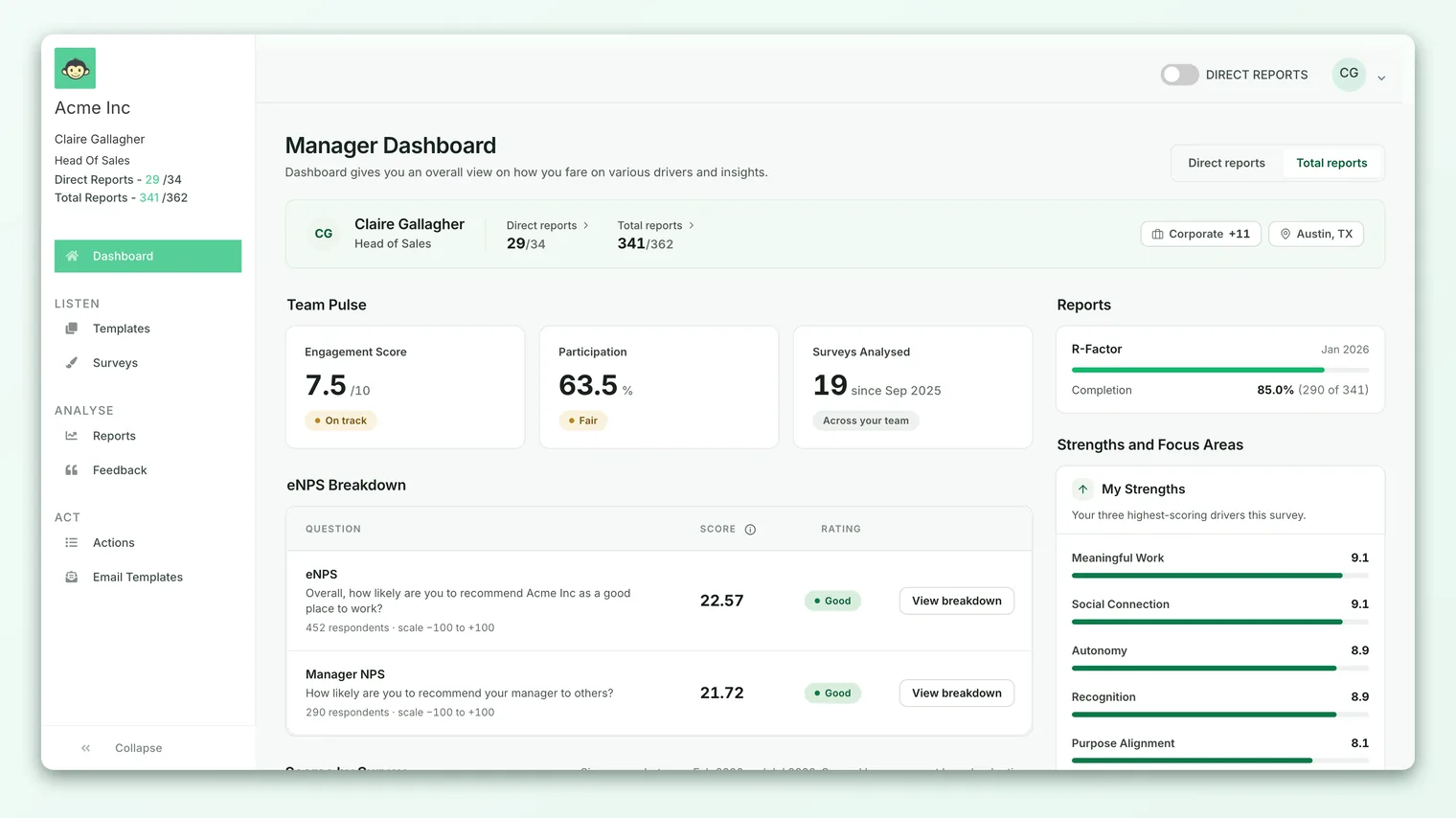
- The manager dashboard threshold. For a manager's own dashboard, there's a separate, usually higher floor - the dashboard anonymity threshold. By default this is 5 employees, and your account admin can adjust it (never below a hard minimum of 3).
Both exist for the same reason: the smaller the group, the easier it is to de-anonymize. A team of 4 that all responded is far more exposed than a department of 400. The threshold draws a clear line under which results simply won't render.
The exact number depends on where you're looking (a survey report vs. your manager dashboard) and how your account is configured. But the principle never changes: too few respondents in a group means no result for that group. More responses - or a broader view - is the fix.
Exactly what gets hidden - and what doesn't
When a group is below threshold, CultureMonkey doesn't just hide a single number - it suppresses everything that could leak individual sentiment. On a manager dashboard that hasn't met the threshold, you'll typically see:
- Overall and driver scores blanked or zeroed rather than shown.
- eNPS suppressed for that group (internally it's flagged as "no score," which is why it can look empty rather than showing a real value).
- Participation rate hidden for the group.
- Feedback distribution (the count and mix of comments) zeroed out.
- Strengths and weaknesses returning nothing.
- Benchmarks and scores-over-time trends coming back empty.
- Free-text answers and comments showing a count of zero.
What is not affected: results for larger groups you have access to. If your whole department clears the threshold but one small sub-team inside it doesn't, the department view works fine - only the tiny sub-team stays hidden. The suppression is always scoped to the specific group that's too small, not to you as a viewer.
The most common causes
Nearly every "I can't see results" case comes down to one of a handful of situations. Use this table to spot yours.
| What you're seeing | Most likely cause | What to do |
|---|---|---|
| Whole report is empty right after launch | Too few responses have arrived so far | Wait as more people respond, then refresh |
| A filtered view is blank while the unfiltered one works | The filtered group is below the threshold | Broaden or remove the filter |
| One team or segment is hidden but others show | That segment is too small on its own | Roll up to a parent team or combine segments |
| A single eNPS or driver breakdown is missing | That specific slice is below threshold | View the overall score instead of the narrow slice |
| Your whole manager dashboard is empty | Fewer than the dashboard threshold (default 5) have responded across your team | Boost participation, or check with your admin on the configured threshold |
| A small team's report never fills in | The team is smaller than the threshold and can't reach it alone | Combine with a peer team or view at the parent level |
Notice the pattern: the narrower the thing you're asking for - a single team, a single driver, a single demographic slice - the more likely it is to fall below the line. Broad views clear the threshold easily; narrow ones are where results disappear.
How to diagnose it, step by step
Before assuming something's wrong, walk through this quick check. It'll tell you almost immediately whether you're looking at a threshold issue or something else.
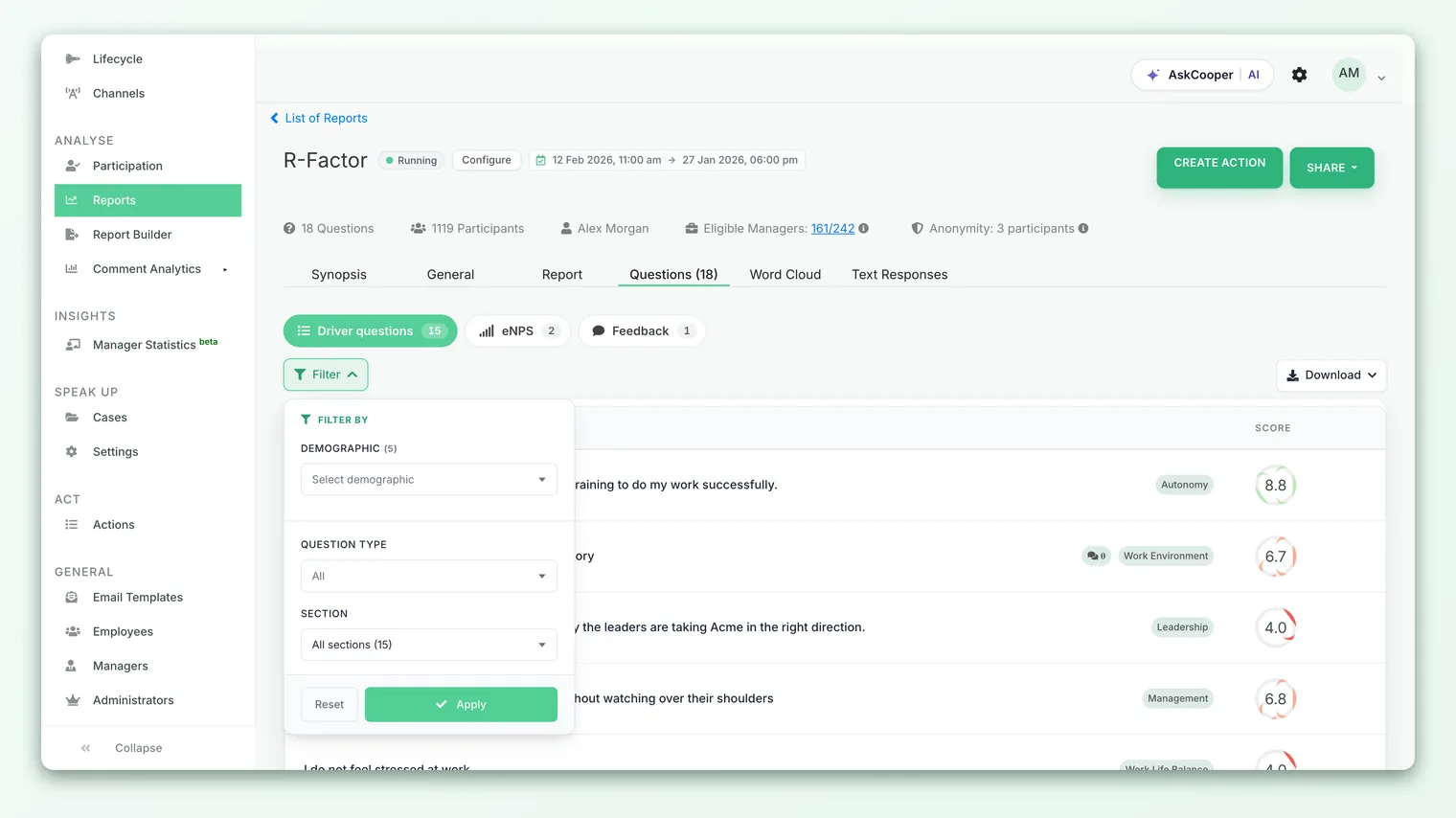
- 1Look at the broadest view first. Open the report or dashboard with no filters applied. If the overall numbers show but a slice doesn't, you've confirmed it's a threshold-on-the-slice problem, not a broken report.
- 2Check when the survey launched. If it went out recently, responses are still trickling in. Give it time before concluding anything is missing.
- 3Check participation for the group. Look at how many people were invited versus how many have responded for that team or segment. If the response count is tiny, you've found your answer.
- 4Remove filters one at a time. If a filtered view is empty, strip filters until results appear. The filter you removed to reveal data is the one that dropped you below the threshold.
- 5Compare against a larger peer group. If a sibling team of similar size shows results and yours doesn't, the difference is usually response count, not a bug.
What you can do to fix it
Once you know it's a threshold issue, the fixes are straightforward - and they're all about getting more responses into the group or widening the group itself.
- 1Give it time. Right after launch, responses are still arriving. Check back once participation climbs. This alone resolves most "empty report" moments.
- 2Boost participation. A few more responses often crosses the line. Managers can nudge their own team; survey admins can send reminders across channels to non-responders.
- 3Widen your view. Remove a narrow filter, or select a larger group, so more responses pool together. A department will clear the threshold long before a single sub-team does.
- 4Roll segments up. Instead of viewing one four-person team, view its parent team or combine it with a peer team so the numbers add up.
- 5Check who was invited. If very few people were included in the survey for that group, it may never reach the threshold on its own - the real fix is widening who's surveyed next time.
Managers vs. account admins: who can do what
It's worth being clear about where your control ends and your admin's begins, so you don't waste time hunting for a setting you can't change.
| Manager | Account Admin | |
|---|---|---|
| Nudge your own team to respond | Yes | Yes |
| Send reminders across channels | - | Yes |
| Broaden or roll up your own view | Yes | Yes |
| See the configured anonymity threshold | Usually not directly | Yes |
| Change the dashboard anonymity threshold | No | Yes |
| Enable/disable the manager-dashboard anonymity gate | No | Yes |
As a manager, your levers are participation and scope - get more responses, or look at a wider group. Everything about the threshold value itself lives with your account admin.
Checking and adjusting the configured threshold (admins)
If a group is clearly large and well past a reasonable number of responses but still shows nothing, the threshold may be set higher than you'd expect. This is an account-level setting.
- The dashboard anonymity threshold controls the minimum number of respondents needed before a manager's dashboard displays results. It defaults to 5 and can be raised or lowered by an admin - but not below a hard floor of 3, because any lower would undermine the anonymity guarantee.
- A separate switch controls whether the manager-dashboard anonymity gate is enforced at all. When it's off, dashboards aren't gated by this threshold; when it's on, the threshold applies. Most accounts keep it on.
- These live in your account's anonymity settings, alongside related controls for exports and comments.
Reducing the threshold makes more results visible sooner - but it also makes small groups easier to de-anonymize. If you drop it, do so deliberately and communicate it, so the promise you've made to employees still holds.
The anonymity-by-submission nuance
One setting quietly changes how the threshold is counted, and it's worth understanding because it explains some confusing cases.
By default, the count that's compared against the threshold is based on participants - the people included in (invited to) the survey for that group. With the anonymity-by-submission setting turned on, the count switches to submissions - only people who actually responded.
That distinction matters. With submission-based counting, a ten-person team where only two people replied is treated as a group of two, and stays hidden - because only two individuals are actually represented in the data. With the default participant-based counting, the same team may clear the threshold on invitation numbers even before everyone responds. Neither is "more correct"; submission-based counting is simply stricter, tying the protection to who genuinely answered.
If you're an admin puzzling over why a well-staffed team still shows nothing, check whether this setting is on - it may be that few people have actually submitted, even though many were invited.
What you should not do
There's one temptation worth naming directly, because it defeats the entire purpose of the system.
Don't stack narrow filters, cross-reference tiny segments, or combine views specifically to isolate who said what. The threshold is deliberate. Working around it - even out of harmless curiosity - breaks the trust that makes your feedback honest in the first place. If employees suspect their answers can be unmasked, they stop being candid, and you lose the very signal you were trying to read.
The right response to a hidden result is always to get more responses or look at a broader group - never to slice your way down to an individual.
Worked scenarios
Scenario 1 - the survey just launched. You send a pulse on Monday morning and open the report at lunchtime to find it empty. Nothing's wrong: only a handful of people have answered so far, and you're below the minimum. By Wednesday, with most of the team having responded, the scores appear. Fix: patience, plus a friendly reminder to boost early participation.
Scenario 2 - the filtered view goes blank. Your department report looks great, but the moment you filter to "Location: Austin office," it empties out. Only three people from Austin have responded - below the threshold for that slice. The overall department number still holds because it pools everyone. Fix: remove the location filter, or wait for more Austin responses before slicing that finely.
Scenario 3 - a small team that never fills in. You manage a five-person specialist team. Even weeks after the survey closed, its dedicated view shows nothing. With submission-based counting on, only four of the five actually responded - one short of the threshold. This team may never clear the line on its own. Fix: view results rolled up to the parent team, where the numbers combine with peers and cross the threshold.
Frequently asked questions
How many responses do I actually need?
It depends on where you're looking and your account's configuration, but the common defaults are 3 responses for a survey segment and 5 for a manager dashboard. Your account admin can confirm the exact numbers for your CultureMonkey workspace.
The report worked yesterday and is empty today - what changed?
Almost always the view changed, not the data. Check whether a filter is applied, whether you're looking at a narrower segment, or whether an admin adjusted the threshold. Removing filters usually brings the results back.
Everyone on my team replied, so why is it still hidden?
If your team is smaller than the threshold, even 100% participation won't cross it - the floor is about the number of people, not the percentage. Roll the view up to a larger group. Also check with your admin whether submission-based counting is on, which counts only actual responders.
Can I ever see an individual's answers?
No - and that's by design. Results are only ever shown for groups large enough that no single person can be identified. CultureMonkey has no manager view that exposes one employee's responses.
Who do I contact if it still doesn't add up?
If a genuinely large group with plenty of responses still shows nothing, start with your account admin to confirm the configured threshold and whether the data has finished processing. If it still doesn't make sense, contact support with the survey name and the exact view you're trying to open.
Where to go next
- Understand the protection itself: How anonymity works
- A common place scores go missing: What is eNPS?
- Get oriented on your own view: Manager dashboard overview
"No data" almost always means "not enough responses yet," not "something is broken." More responses - or a broader view - is nearly always the fix.
Your feedback helps us improve the Help Center.