

What's new - release notes
Where to find CultureMonkey product updates, how each dated release is laid out on the Product Updates page, how new features and fixes are communicated, and how to request something you'd like to see.
On this page
CultureMonkey ships improvements continuously - new features, refinements to existing ones, and bug fixes. This article is not the list of those updates itself. Instead, it's a pointer: it tells you where the up-to-date list lives, how we communicate what's changed, and how to ask for something you'd like us to build next.
If you're wondering "did that button always work like this?" or "when did this new report appear?", Product Updates is the place to look. Bookmark it once and you'll always have a dated record of what shipped and when.
Every CultureMonkey release is published, with its date, on the public Product Updates page at culturemonkey.io/product-updates. Releases are grouped by quarter, newest first, and each one has its own page. For help using any of it, or to suggest a feature, go through support.
Where to find product updates
The list of what's changed in CultureMonkey is the public Product Updates page. You can also reach it from Resources > Product Updates in the site menu, or from the footer of any page on culturemonkey.io.
It's a public page, so you don't need to be logged in to view it, and you can share a link to any release with a colleague who doesn't have a CultureMonkey account.
How a release is laid out
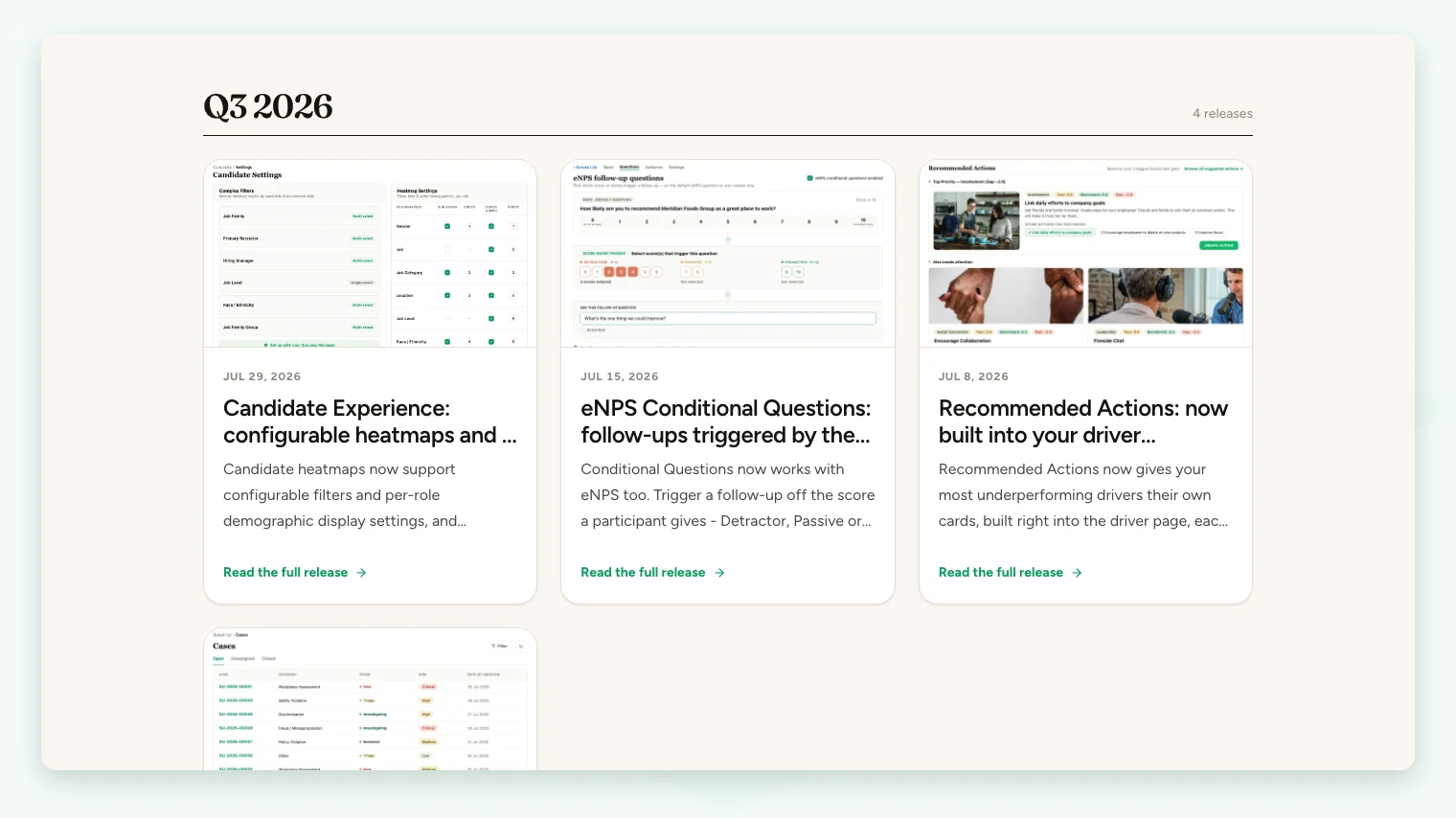
Each release appears on the Product Updates page as a card with its date, its title and a short summary of what shipped. Click the card to open the full release on its own page.
Inside a release page you'll find:
- The release date and what shipped, in the opening lines.
- The changes themselves, each tagged New (a new capability), Improved (a change to something you already use) or Fixed (a bug that was resolved). Larger releases also include a full walkthrough with screenshots.
- Availability, when a feature is switched on per account. Those releases say so and include a Talk to your success manager button that starts an email to your Success Manager.
- Learn more links to the product page and the Help Center article for that feature.
- Related releases in the same feature area, and links to the next newer and older release.
Finding a specific change
Every release sits on one page, so the quickest way to find a specific change is your browser's find-in-page: press Ctrl+F (Windows) or Cmd+F (Mac) on the Product Updates page and type a feature name, such as "eNPS" or "PDF". The quarter headings help you narrow things down by time.
For how a feature works today, rather than when it changed, search this Help Center instead. Feature articles link to the release that introduced or changed the feature.
How CultureMonkey communicates releases
We use a small, deliberate set of channels so that updates reach you without becoming noise. Here's what to expect from each.
- Product Updates. The dated record of what has shipped. If you only follow one channel, follow this one.
- This Help Center. When a release changes how a feature works, or introduces a feature significant enough to need its own guide, the relevant Help Center article is updated or added. So the article you're reading reflects current behavior, and Product Updates tells you when that behavior changed.
- Email and in-app announcements. For larger or especially useful updates, CultureMonkey may also highlight them through email to account admins and/or an announcement inside the product. These are used selectively for the changes most worth your attention, rather than for every release.
Product interfaces evolve. Rather than trying to remember when something changed, check Product Updates. Every release carries its date, which is far more reliable than recollection when you need to confirm exactly what shipped.
How to request a feature
Good product ideas often come from the people using the product every day. If there's something you wish CultureMonkey did, we want to hear it.
The most reliable way to get a request in front of the right people is through support. Reach out using any of the methods in Getting help and contacting support, and frame your request so it's easy to act on:
- 1Describe the outcome you want, not just the mechanism. "I need to see participation by department in a single view" is more useful than "add a dropdown here".
- 2Explain the why. The problem you're trying to solve, and how often it comes up, helps us prioritize. A request tied to a real, recurring pain point carries more weight.
- 3Note who it affects. Is this just for you, for all your admins, for managers, or for employees? Scope helps us understand impact.
- 4Include an example. A screenshot, a sample of the data, or a walk-through of the steps you take today makes the request concrete.
We can't promise every request will be built, and we generally don't commit to timelines for individual ideas. But every request is heard, and requests that solve a common problem for many customers are exactly the kind of thing that ends up in a future release, which you'll then see land on Product Updates.
If something is broken rather than missing - an error, a number that looks wrong, an email that didn't send - that's a bug, not a feature request. Report it through support so it can be investigated and, once fixed, it'll show up as Fixed in a future release on Product Updates. See also Frequently asked questions for common issues you can often resolve yourself first.
Staying current: a simple routine
You don't need to check for updates constantly. A light routine keeps you informed without effort:
- Bookmark Product Updates so it's one click away when you need it.
- Skim it every few weeks, or whenever you notice something in the product looks different, to catch the New and Improved items relevant to how you work.
- Watch for emails and in-app announcements for the bigger changes, and open the linked release for details.
- Check before you ask. If you think a feature might already exist, a quick find-in-page on Product Updates (and a search of this Help Center) often answers the question faster than a support ticket.
Frequently asked questions
Where is the "what's new" section inside the app?
The complete, dated list of updates lives on the public Product Updates page rather than as a permanent panel inside the product. Larger updates may be highlighted with an in-app announcement or an email when they ship, but Product Updates is the place to browse the full history any time.
Do I need to log in to read the release notes?
No. Product Updates is a public page, so anyone with the link can read it, and you can freely share a specific release with colleagues who don't use CultureMonkey.
Is there a search box?
Not on the page itself. Because every release is listed on one page, your browser's find-in-page (Ctrl+F or Cmd+F) finds any feature name straight away.
Will I be told when something I use changes?
For significant changes, yes, through email and/or an in-app announcement, and the related Help Center article is updated to match. Product Updates remains the dated record of what shipped.
How do I know if my feature request was built?
When a request ships, it appears on Product Updates tagged New (for a new capability) or Improved (for a change to an existing one). If you'd like a status update on a specific request in the meantime, ask support.
I found something that looks like a bug. Is that a feature request?
No - a bug is something that isn't working as intended, and it should be reported to support so it can be fixed. Fixes are published as Fixed in a future release. A feature request is for something the product doesn't do yet.
Where to go next
- See everything that has shipped: Product Updates
- Reach the team for help or to request a feature: Getting help and contacting support
- Answers to common questions: Frequently asked questions
- New to the platform? What is CultureMonkey?
Your feedback helps us improve the Help Center.