



Your BambooHR directory, always survey ready
Connect BambooHR once and let CultureMonkey keep your employees, teams, locations and reporting lines current on a schedule, so every engagement survey reaches the right people.
Book a free, no-obligation product demo call with our experts.
How does the CultureMonkey BambooHR integration work?
CultureMonkey reads your BambooHR directory through a secure sync service and mirrors it into your employee list. A full sync runs the moment the connection is established, and after that incremental syncs carry across only what has changed. The connection is one-way: BambooHR stays your source of truth, and CultureMonkey never writes anything back to it.
The schedule is fixed rather than instant, which matters when you are timing a survey launch around an org change. Here is the shape of it:
- What you enterYour BambooHR subdomain, the part before .bamboohr.com in your BambooHR web address. That is the only value you type in.
- What authenticatesA BambooHR API key, held on the CultureMonkey side and put in place when the integration is enabled for your account.
- First syncA full read of your directory. Teams, locations and business units land first, then employees, then reporting lines.
- Ongoing cadenceAn incremental refresh twice a week by default. Accounts that need fresher data can be moved to a daily sync. More frequent than daily is not part of the standard schedule.
- DirectionOne-way and read-only, from BambooHR into CultureMonkey.
- Employee matchingIncoming records match on a unique ID first, then work email, so people you added by hand are updated rather than duplicated.
What syncs from BambooHR, and how often
Type of integration
HRIS employee sync
Direction
One-way, read only
Sync cadence
Twice weekly, daily on request
Employee matching
Unique ID, then work email
Connecting takes one field
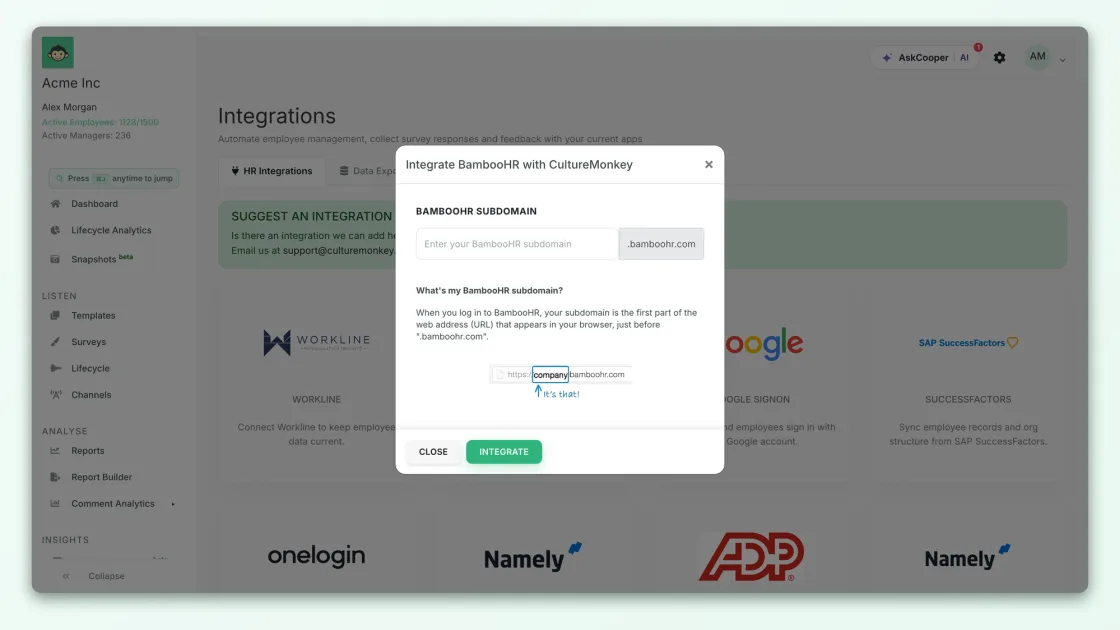
Once BambooHR is enabled for your account, the connection itself is a single dialog. Your subdomain is the only value you type in, because the API key that authenticates the connection is held on the CultureMonkey side.
- Open Integrations from the main navigation and find the BambooHR tile.
- Click Connect to open the Integrate BambooHR with CultureMonkey dialog.
- Enter your subdomain, the part before .bamboohr.com in your BambooHR web address.
- Click Integrate. CultureMonkey authenticates and starts the first sync.
Accurate people data, without the spreadsheet round trip
Your employee list is the foundation every survey, segment and manager dashboard rests on. Keeping it in step with BambooHR is what makes the rest trustworthy.
Keep your employee list current without a spreadsheet
Joiners, movers and leavers flow through on the next scheduled sync, so your engagement survey audience reflects who actually works here.
- New joiners in BambooHR appear as new employees on the next sync.
- Team moves, manager changes and title changes update the existing record.
- Leavers are marked inactive rather than deleted, once BambooHR reports them inactive.
Map BambooHR fields to the attributes you report on
Field mapping decides how each BambooHR field lands in CultureMonkey, including custom fields, so your team-level and demographic cuts match how your organization is actually structured.
- Departments, offices and divisions become the segments you filter results by.
- Custom BambooHR fields can come across as custom employee attributes.
- First name, work email, team and location are mandatory. A record missing one is skipped and logged, and the rest of the feedback sync continues.
Reporting lines that resolve after every sync
Managers are linked once everyone has loaded, so manager dashboards show the right team without anyone maintaining a hierarchy by hand.
- Employees load first, then each person is linked to their manager.
- A manager who is not in the synced set cannot be linked, which is usually why a line comes back blank.
- Synced teams and locations only show results once they meet your anonymity threshold, a minimum group size of 5 by default, so finer org data never exposes an individual.
A live connector versus a CSV import
Both get your people into CultureMonkey. The difference is what happens after the first load.
| Live HRIS connector | CSV import | |
|---|---|---|
| Setup | Connect and map fields once | None, but you rebuild the file each time |
| Staying current | Automatic, on a schedule | Only as fresh as your last upload |
| New hires and exits | Flow through on the next sync | You remember to re-upload |
| Effort over time | Near-zero once connected | Recurring, every change |
| Best for | Organizations on a supported HRIS | One-time loads, or unsupported systems |
Built for enterprise security, recognized for performance





Frequently asked questions
How often does the BambooHR integration sync?
Do I need to enter my BambooHR API key in CultureMonkey?
Can I connect BambooHR myself, or does support have to do it?
Will connecting BambooHR overwrite employees I added manually?
Why did some employees not come across?
Does CultureMonkey write anything back to BambooHR?
Does removing someone in BambooHR deactivate them in CultureMonkey?
Can we start with a CSV import and move to the BambooHR sync later?
See the BambooHR sync running on your own directory
Book a free, no-obligation product demo call with our experts.