



Darwinbox and CultureMonkey, always in step
Sync employees, their mapped profile attributes, your team structure and your reporting hierarchy from Darwinbox, so every survey reaches the right people in the right teams.
Book a free, no-obligation product demo call with our experts.
How does the CultureMonkey Darwinbox integration work?
CultureMonkey reads your employee records from Darwinbox's data APIs and mirrors them into your employee list. It is a one-way sync: Darwinbox stays your system of record, and CultureMonkey holds only the parts of it needed to survey people and report on the results. Nothing is written back.
Setup is a short handshake with your Customer Success contact rather than a self-serve form, because the connection needs API credentials scoped to your employee dataset:
- Credentials neededYour Darwinbox domain, the auth type (typically Basic Auth), an integration username and password, an API key and a dataset key.
- Who sets it upCustomer Success stores the credentials against your account. There is no admin-facing form for them in the app.
- First syncA dedicated full pass that pulls the complete employee dataset, rather than the recent changes a routine refresh looks for.
- Ongoing cadenceTwice a week, on Tuesday and Friday early morning. If daily sync is enabled for your account, Darwinbox refreshes once a day instead.
- LeaversInactive employees sync as a separate dataset, and only when the optional inactive API key and dataset key are provided.
- Employee matchingRecords match on work email, so keeping email addresses stable across both systems is what prevents duplicates.
What syncs from Darwinbox, and how often
Type of integration
HRIS employee sync
Direction
One-way, read only
Sync cadence
Tuesday and Friday, or daily
Employee matching
Work email
Setup is a short handshake, then a mapping
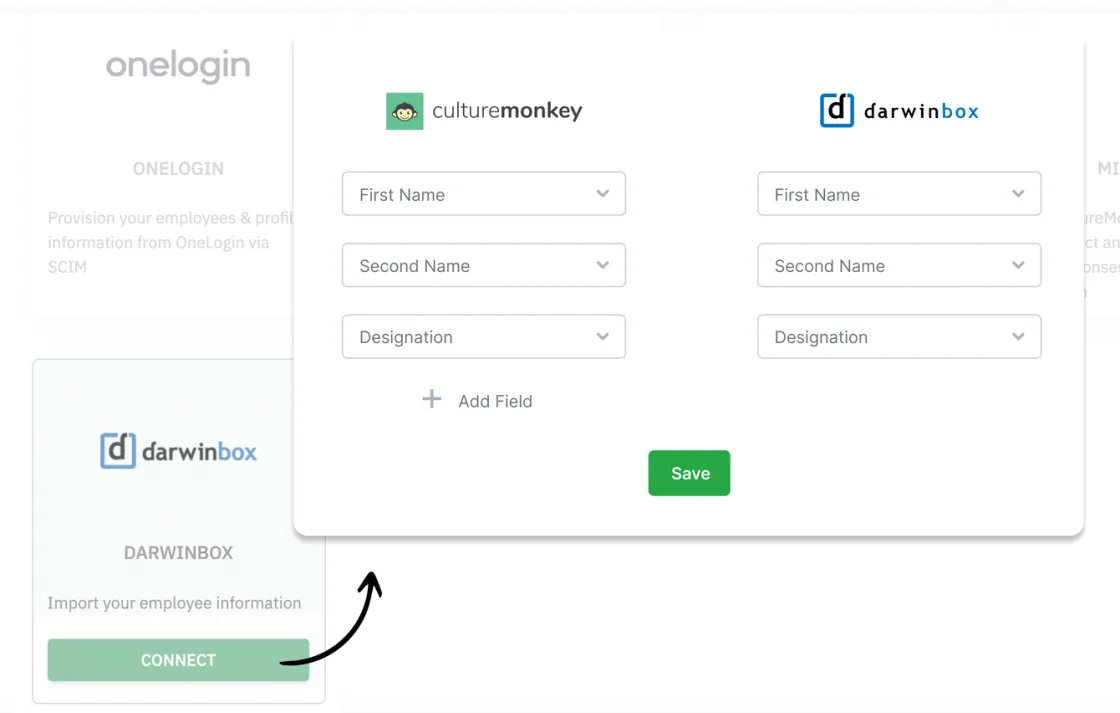
Darwinbox credentials are provisioned by Customer Success rather than typed into a form, so connecting is a hand-off followed by a field mapping you confirm together.
- Collect your Darwinbox domain, Basic Auth username and password, API key and dataset key, plus the inactive pair if you want leavers to sync.
- Share them with your Customer Success contact through a secure channel. They configure the connection against your account.
- Confirm your field mapping so teams, hierarchy and custom fields land where you expect.
- Start the first sync from the Integrations page, then spot-check a few records for names, teams and managers.
People data that matches your org, run after run
If people are missing, sitting in the wrong team or reporting to the wrong manager, both your participation numbers and your segment-level insights suffer. A scheduled sync is what keeps that from drifting.
Sync employees and the attributes you segment by
Each Darwinbox record becomes a CultureMonkey employee, carrying whichever mapped attributes your engagement survey reporting depends on.
- Identity fields create or match each person: name, work email and employee ID.
- Mapped attributes follow, including department, designation, location, business unit and date of joining.
- Custom Darwinbox attributes can come across too, so demographic cuts match how you actually report.
Field mapping decides where every value lands
Darwinbox can express nested structure, and mapping is what turns that into the segments you slice feedback by. Almost every wrong-data question traces back to a mapping rather than the connection.
- Departmental and team structure comes across as mapped attributes.
- A combined field can be split, or one side of a hierarchy string picked, during mapping.
- Unmapped fields are simply not pulled across.
An org tree that follows your hierarchy
Manager relationships come across through the mapped manager field, so manager dashboards and rolled-up reporting reflect the real reporting hierarchy.
- Reporting lines build from the manager reference on each employee record.
- Team-level results roll up the hierarchy for larger organizations without manual list maintenance.
- Synced teams and locations only show results once they meet your anonymity threshold, a minimum group size of 5 by default, so finer org data never exposes an individual.
A live connector versus a CSV import
Both get your people into CultureMonkey. The difference is what happens after the first load.
| Live HRIS connector | CSV import | |
|---|---|---|
| Setup | Connect and map fields once | None, but you rebuild the file each time |
| Staying current | Automatic, on a schedule | Only as fresh as your last upload |
| New hires and exits | Flow through on the next sync | You remember to re-upload |
| Effort over time | Near-zero once connected | Recurring, every change |
| Best for | Organizations on a supported HRIS | One-time loads, or unsupported systems |
Built for enterprise security, recognized for performance

Frequently asked questions
How often does the Darwinbox integration sync?
Can I set up Darwinbox myself from the Integrations page?
What credentials does the Darwinbox integration need?
What exactly comes across from Darwinbox?
Why is an employee in the wrong team or under the wrong manager?
Can I still edit employees manually in CultureMonkey?
What happens if an employee's email address changes in Darwinbox?
Does CultureMonkey write anything back to Darwinbox?
See the Darwinbox sync running on your own directory
Book a free, no-obligation product demo call with our experts.