



Surveys that reach people where they work
Deliver invites and reminders as Slack direct messages from a bot that can find the right person and nothing else. No access to your channels, files or conversations.
Book a free, no-obligation product demo call with our experts.
What does connecting Slack to CultureMonkey actually give access to?
Connecting Slack is a single OAuth authorization, and the mental model that matters is this: it is a permission grant, not a data sync. Nothing about your Slack conversations, channels or files flows into CultureMonkey. The connection gives a bot just enough to find the right person and send them a message when a survey goes out.
Slack shows the exact scopes during the flow. CultureMonkey requests four, and they are deliberately narrow:
- users:readRead basic profile information of people in the workspace, to resolve a person to their Slack user ID.
- users:read.emailLook up a user by email address. This is the join that matches an employee's work email to their Slack account.
- chat:writeSend messages as the CultureMonkey bot, to deliver survey invites and reminders as direct messages.
- chat:write.publicPost without first being manually added to a conversation, so the bot can DM each participant without someone adding it every time.
- What is not requestedNo access to read your channel messages, your files, your calls, or the content of any conversation.
- What is storedA bot token tied to your workspace, not to the personal account of whoever set it up, so the connection survives that person leaving.
What the Slack connection covers
Type of integration
Delivery channel
Connection
One-time OAuth, account admin
Employee matching
Work email to Slack profile email
Data flow
Permission grant, not a data sync
Connecting takes one click and one approval
An account admin starts the connection from the Channels page in CultureMonkey, and Slack's own OAuth screen does the rest. There is nothing to configure per survey afterwards.
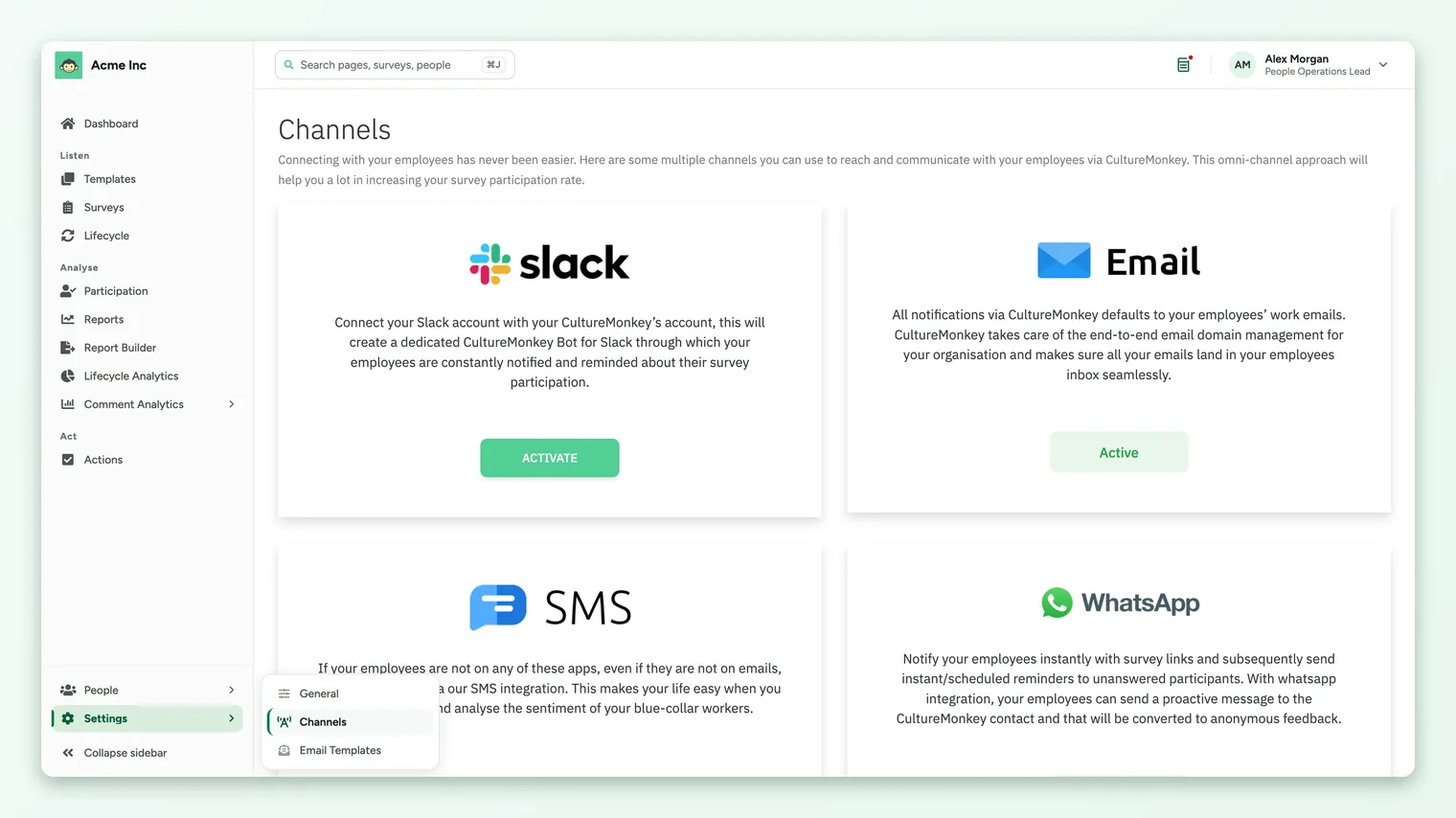
- In CultureMonkey, open Settings in the left navigation and choose Channels.
- Click Activate on the Slack card. Slack's authorization screen opens.
- Pick the workspace to install the CultureMonkey bot into, review the four permissions, and click Allow.
- Back in CultureMonkey, a confirmation appears and the Slack card switches to its connected state.
A delivery route, scoped to the job
Chat lifts participation because it meets people where they already are. It only stays worth it if the connection is narrow enough to explain to a security review in one sentence.
Invites that land where people already are
A survey invite arriving as a direct message tends to get opened and answered sooner than one sitting in a crowded inbox, which is the whole case for running engagement surveys over chat.
- A one-time welcome message introduces the bot the first time someone opens the CultureMonkey app in Slack.
- The survey invitation goes out when a survey launches on the Slack channel.
- Reminders nudge only the people who have not responded yet, which keeps feedback volume up without pestering everyone.
A bot that cannot read anything
The bot is a one-way, one-to-one notifier. It knows enough to reach the right person and nothing about what that person says back, which is the answer your security team will want in writing.
- It can look up a Slack user ID from a work email and send that person a direct message.
- It cannot read channels, DMs, files or conversation content, and it never sees survey answers, which stay subject to anonymity rules in CultureMonkey.
- It cannot post to public channels on its own initiative. It messages individual participants, not broadcast channels.
Connect once, disconnect cleanly
Connecting is a one-time, account-level setup. Once Slack is connected, it is simply a channel option on any survey, alongside lifecycle sends and email.
- No reconnecting per survey. You choose Slack per survey from then on.
- Deactivate on the card uninstalls the bot from your workspace and stops Slack delivery.
- If a Slack admin removes the app instead, Slack notifies CultureMonkey and the stored token is cleared automatically, so the two stay in step.
How the delivery channels compare
Chat lifts participation for the people who live in it. It works best as one channel in a mix, because no single route reaches everyone.
| Channel | Best for | How it works |
|---|---|---|
| The default for most workforces | Always on. CultureMonkey manages delivery for your domain end to end | |
| Slack | Teams that live in Slack | A CultureMonkey bot DMs invites and reminders; responses are collected in CultureMonkey |
| Microsoft Teams | Organizations standardized on Teams | The CultureMonkey bot delivers surveys inside Teams |
| SMS | Deskless staff without regular email | Text-message invites and reminders |
| Reaching people on their phones | Employees can also message in to raise anonymous feedback |
Built for enterprise security, recognized for performance




Frequently asked questions
Does connecting Slack give CultureMonkey access to our messages?
Who can connect Slack?
Do I have to reconnect Slack for every survey?
How does CultureMonkey know which Slack account belongs to which employee?
Will people get a message the moment I connect?
What happens if a Slack admin removes the app?
How do we disconnect Slack?
Does the Slack connection work for EU-hosted accounts?
The Slack card says Contact Us instead of Activate. Why?
See survey delivery running in your own workspace
Book a free, no-obligation product demo call with our experts.