

Configure pulse cadence in CultureMonkey
How to set and change a pulse survey's frequency and send day in CultureMonkey, what happens to the current cycle when you change it, and how to pick a rhythm that keeps response rates high.
On this page
A pulse survey works by drip-feeding a small number of questions to your people on a regular rhythm, so you get a continuous read on sentiment without ever running a long survey. That rhythm is the cadence: how often a question goes out, and on which day. This guide shows you exactly which cadence options CultureMonkey offers, where to change them, what happens to the questions already in flight when you do, and how to choose a rhythm your people will actually keep answering.
Pulse cadence is controlled by one setting: frequency. You can run a pulse every week, every 2 weeks, or every month. CultureMonkey sends questions on a fixed weekday (Wednesday by default) at mid-morning in your account's timezone. Changing the frequency restarts the pulse cycle from scratch, so change it deliberately, not casually.
What "cadence" means for a pulse
Before you change anything, it helps to know what the cadence actually drives under the hood.
A pulse survey doesn't send everyone a long questionnaire. Instead, one question is sent at a time, split randomly across two groups of employees, so no single person is asked too often and you still get broad coverage. The cadence decides how quickly CultureMonkey works through that queue of questions.
Two settings define the cadence:
- Frequency - the gap between one send and the next (weekly, every 2 weeks, or monthly).
- Send day - the weekday each pulse launches. By default this is Wednesday.
Everything else (which question goes out, who gets it, when the cycle ends) is derived from these two values plus your question list. That's why getting the cadence right up front matters: it shapes the entire schedule.
The frequency options that exist
CultureMonkey offers three cadence choices for a live pulse survey:
| Option (as shown in the app) | Gap between sends | Best when you want... |
|---|---|---|
| Every Week | 7 days | The tightest feedback loop and fast-moving signal |
| Every 2 Weeks | 14 days | A steady rhythm with lower survey load |
| Every Month | 28 days | A light-touch, low-fatigue cadence over a longer horizon |
These are the only frequencies available to configure. There is no custom "every N days" field, and there is no separate quarterly option - if you want a slower beat than monthly, monthly is the floor.
Internally, monthly is defined as 28 days (four weeks), not a calendar month. That keeps every pulse landing on the same weekday, so your team always knows which day to expect it. Over a year that's 13 cycles rather than 12, which is a feature, not a bug: a fixed weekday is far easier to build a habit around than a drifting calendar date.
Where to change the cadence
The cadence lives on the pulse survey's edit screen, alongside the enable and disable controls.
- 1Open Pulse. In the left navigation under Listen, go to Pulse.
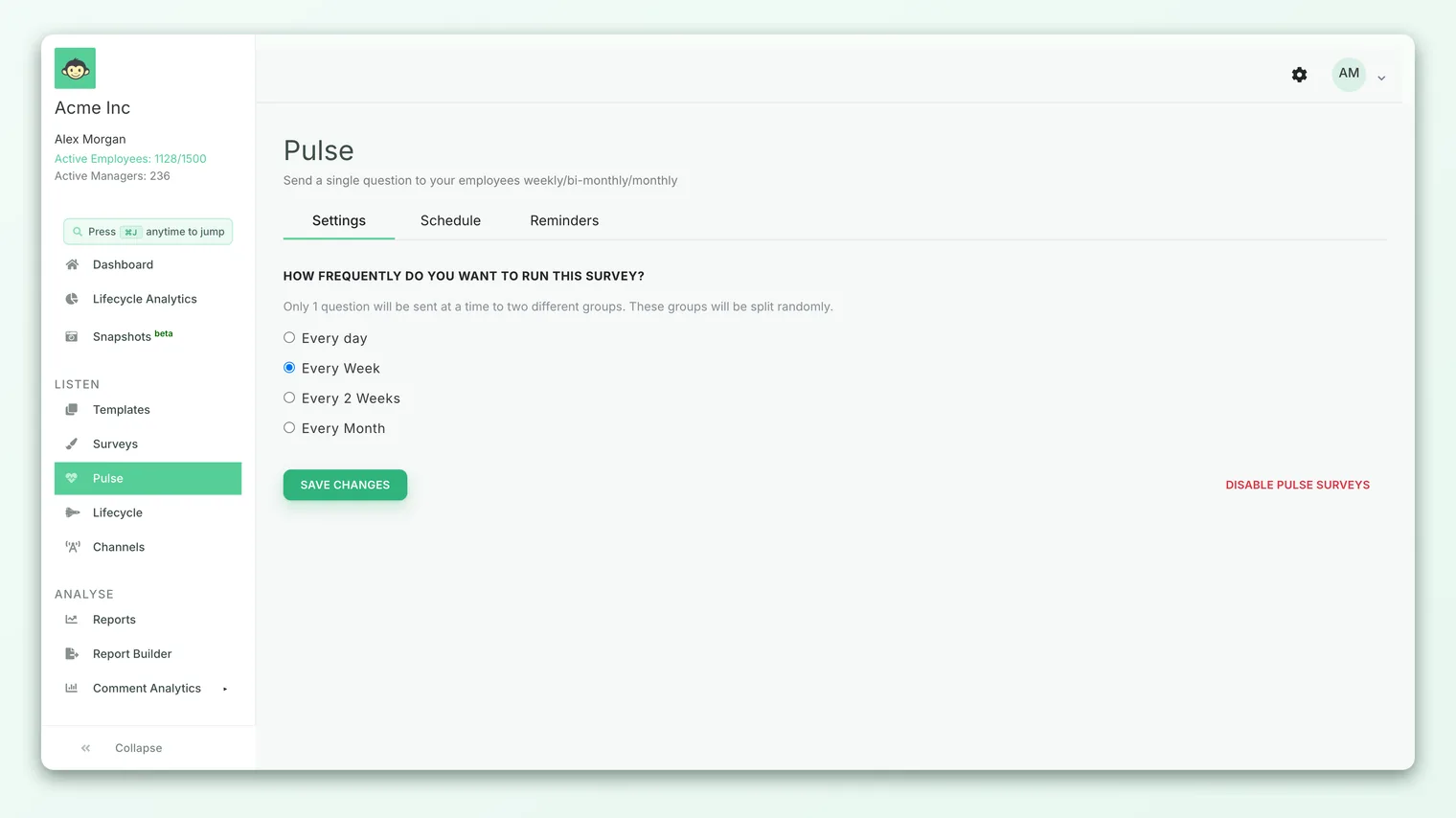
- 2Open the pulse settings. Go to the edit screen for your active pulse survey (the same screen where you enable or disable pulse). You'll see the question "How frequently do you want to run this survey?" with the frequency options beneath it.
- 3Choose a frequency. Select Every Week, Every 2 Weeks, or Every Month.
- 4Save. Click Save Changes and confirm the prompt. That's it - the new cadence takes effect immediately for the next cycle.
If you're setting a pulse up for the very first time rather than changing an existing one, start with Set up a pulse survey, which walks through enabling the pulse and picking your first cadence.
The send day and time
Alongside frequency, every pulse has a send day: the weekday on which each cycle launches.
By default, pulses run on Wednesday. When you enable a pulse, the confirmation even spells this out: automated pulse emails start going out "this Wednesday." Wednesday is a deliberate default - mid-week tends to catch people when they're settled into work, away from the Monday backlog and the Friday wind-down, which lifts response rates.
Each pulse is scheduled to send at mid-morning (around 10:00) in your account's timezone, so it lands during working hours wherever your primary team is based rather than in the middle of the night.
In the current app, the weekday is set behind the scenes rather than exposed as a dropdown on the settings screen, and Wednesday is the standard. If you have a strong reason to move your pulse to a different weekday (for example, your workforce is mostly weekend-shift), raise it with CultureMonkey support so it can be adjusted for your account.
What happens when you change the cadence
This is the part to slow down for. Changing the frequency doesn't just tweak the interval on the current run - it restarts the pulse cycle.
When you save a new frequency, CultureMonkey:
- Marks the current pulse survey inactive and creates a fresh one with your new cadence.
- Cancels every pending (not-yet-sent) question in the old cycle.
- Rebuilds the schedule from scratch, starting on the next send day, working through the same set of questions again in a new queue.
The app tells you this before you commit. When you click Save Changes on an active pulse, you'll see a confirmation like:
> "All pending surveys of the current cycle will be cancelled and a new cycle will begin from scratch. This will include the same questions covered in the first cycle. Do you still want to proceed?"
Any questions that were scheduled but hadn't gone out yet are cancelled, and the pulse starts over from question one. Questions that have already been sent keep their responses - your historical data is safe - but the upcoming schedule is wiped and rebuilt. Don't change frequency mid-cycle unless you're happy to restart the rotation.
Because a change restarts the cycle, the best time to adjust cadence is at a natural break: when you're first rolling pulse out, or once a full rotation of questions has completed and you're about to begin the next one. Mid-rotation changes mean some questions get asked twice before others get asked at all.
How a cycle is timed
Within a cycle, each pulse's window runs right up to the day before the next one. So on a weekly pulse, a question is live for six days before the next question replaces it; on a monthly pulse, it's live for 27 days. That long-open window on slower cadences is deliberate: it gives people who don't check email daily a fair chance to respond before the question closes.
Choosing the right rhythm
There's no universally correct cadence - the right one balances signal (how quickly you want to see change) against fatigue (how much you can ask before people tune out). Use these guidelines:
- Start slower than you think you need. If you're new to pulse, every 2 weeks is a safe, sustainable default. It's frequent enough to show trends within a quarter, but light enough that people don't feel surveyed to death.
- Go weekly only when you'll act weekly. A weekly pulse is powerful during a change program, a reorg, or a post-survey action push - but only if managers are genuinely reviewing and responding to what comes in. A tight loop with no follow-through just breeds cynicism.
- Use monthly for steady-state. Once your culture work is in a stable rhythm, every month keeps a finger on the pulse without demanding much attention. It's ideal for mature programs or smaller teams.
- Match the cadence to your action capacity, not your curiosity. The temptation is always to measure more. But data you can't act on isn't insight, it's noise. Pick the fastest cadence you can genuinely keep up with, and no faster.
A good rule of thumb: if you can't confidently say what you'll do with the feedback between one pulse and the next, your cadence is too fast. Slow it down until every cycle earns a response from you.
Whatever rhythm you choose, consistency beats frequency. A predictable monthly pulse that people trust and answer is worth far more than an erratic weekly one that trains people to ignore it. Pick a cadence, stick with it for a few cycles, and let the trend build.
Frequently asked questions
Can I run a pulse more often than weekly?
Not through the standard settings. Every Week is the fastest configurable cadence. If you need higher-frequency, event-based check-ins, that's usually a job for a targeted survey or a lifecycle touchpoint rather than the recurring pulse.
Will changing the frequency delete my past responses?
No. Responses to questions that have already been sent are kept, and your pulse reports stay intact. What gets cancelled is the set of upcoming, not-yet-sent questions, which are then rebuilt into a new schedule.
Can I pick a different day than Wednesday?
Wednesday is the standard send day and isn't exposed as a self-service option in the settings screen today. If your workforce genuinely needs a different weekday, ask CultureMonkey support to adjust it for your account.
What time of day does the pulse go out?
Around mid-morning (approximately 10:00) in your account's configured timezone, so it lands during working hours for your primary team.
How many questions go out at once?
Just one per cycle, split randomly across two groups of employees. This keeps each individual's survey load tiny while still covering your whole population over the full rotation.
Does a slower cadence mean fewer total responses?
Not necessarily. Slower cadences leave each question open longer (right up to the day before the next one), so people who respond infrequently still get a chance to answer. You may get fewer cycles per quarter, but each one can gather solid participation.
Where to go next
- Setting up your first pulse: Set up a pulse survey
- Understand the format: What is a pulse survey?
- Nudge non-responders: Send survey reminders
Your feedback helps us improve the Help Center.