

What is a pulse survey?
A plain-English guide to pulse surveys - what they are, how they differ from a full engagement survey, why teams run them, what CultureMonkey's Pulse module does, and when to reach for a pulse instead of an annual.
On this page
- What makes a survey a "pulse"
- Pulse vs a full engagement survey
- Why teams run pulse surveys
- What CultureMonkey's Pulse module does
- Cadence: how often a pulse runs
- Setting up a pulse in CultureMonkey
- Changing or pausing a pulse
- When to use a pulse vs an annual survey
- Frequently asked questions
- Where to go next
A pulse survey is a short, recurring check-in that asks employees a small number of questions on a regular schedule - weekly, every two weeks, or monthly - instead of a long questionnaire once or twice a year. The idea is right there in the name: you take the pulse of your organization frequently and lightly, so you always have a current read on how people feel rather than a single yearly snapshot that's out of date the moment it lands.
This guide explains what a pulse survey actually is, how it differs from a full engagement survey, why teams run them, and exactly what CultureMonkey's Pulse module does. By the end you'll know when a pulse is the right tool and when a full survey serves you better.
A pulse survey sends one question at a time to your employees on a repeating cadence (weekly, bimonthly, or monthly in CultureMonkey). It trades depth for frequency: fewer questions, but asked often enough to reveal trends and keep the feedback loop alive between your bigger engagement surveys.
What makes a survey a "pulse"
Three characteristics separate a pulse survey from other survey types:
- It's short. A pulse asks one question, or occasionally two, per cycle. It takes seconds to answer, not fifteen minutes. In CultureMonkey's Pulse module, exactly one question is sent per cycle, drawn automatically from a curated question bank.
- It's recurring. A pulse runs on a fixed schedule and keeps going until you turn it off. It isn't a one-time event with a start and an end date - it's an always-on rhythm.
- It rotates. Because it repeats so often, a pulse cycles through different questions over time rather than asking the same thing every week. This lets you cover many engagement themes across a quarter while only ever showing one question at a time.
Put those together and you get a lightweight instrument designed for momentum. A pulse is less about producing one definitive report and more about maintaining a steady, living stream of signal you can watch move.
Pulse vs a full engagement survey
The clearest way to understand a pulse is to compare it with a full engagement survey (what CultureMonkey calls a custom Survey). They are genuinely different tools that answer different questions, and most organizations use both.
| Pulse survey | Full engagement survey | |
|---|---|---|
| Length | One question per cycle | Many questions across all engagement drivers |
| Cadence | Recurring: weekly, bimonthly, or monthly | One-time, on demand (often quarterly or annual) |
| Purpose | Track trends, keep the loop warm | Deep, diagnostic read of engagement |
| Time to answer | Seconds | 10 to 20 minutes |
| Best output | A trend line over many cycles | A rich, point-in-time report by driver and segment |
| Lifecycle | Stays active until switched off | Draft, publish, run, end |
A full engagement survey is your comprehensive health check. It measures every driver of engagement at once and gives you a detailed, segmentable report you can act on for months. A pulse is the fitness tracker you wear in between those check-ups: it won't diagnose everything, but it tells you, continuously, whether things are trending up or down.
They complement each other. Run a thorough engagement survey to understand the why in depth, then use pulses to keep a finger on the direction until the next big survey comes around.
Pulses don't replace your annual or quarterly engagement survey - they fill the long silence between them. The most common mistake is treating a pulse as a "mini engagement survey." It isn't. Its job is frequency and trend, not breadth.
Why teams run pulse surveys
If you already run a full engagement survey, why add pulses on top? Three reasons come up again and again.
Frequency catches things early. Sentiment doesn't wait for your survey calendar. A reorg, a leadership change, a rough quarter, or a return-to-office policy can shift how people feel in a matter of days. A pulse that's already running picks up that movement in its next cycle, giving you a chance to respond while it still matters instead of discovering it in a report six months later.
Momentum keeps the loop alive. Employee feedback works as a loop: ask, listen, act, tell people what changed, then ask again. A single annual survey stretches that loop across a whole year, and employees quietly conclude that nothing happens with their input. A regular pulse keeps the conversation visible and ongoing, which signals that you're genuinely listening.
Trend data beats a single snapshot. One measurement is noisy - it can be thrown off by the timing, the mood of the week, or a one-off event. A pulse produces many data points over time, and a trend is far more trustworthy than any single number. A score of 7.2 tells you little on its own; a score that has climbed from 6.5 to 7.2 over eight weeks tells you something is working.
Because a pulse asks so little of each person, response rates tend to hold up well over time. People will answer one quick question far more readily than commit to a long form, which is exactly what you want when you're relying on repeated participation to build a trend.
What CultureMonkey's Pulse module does
In CultureMonkey, Pulse is a distinct product with its own home under Listen > Pulse in the left navigation. It's built specifically around the lightweight, recurring model described above, so it behaves differently from a regular Survey by design.
Here's what it handles for you.
One question per cycle, chosen for you. You don't hand-build a pulse questionnaire. When a pulse runs, CultureMonkey pulls a single question from a built-in pulse question bank - a curated library of questions, each mapped to an engagement driver. It rotates through these over successive cycles so your people see fresh questions and you gradually cover many drivers without ever sending a long form.
Automatic scheduling and dispatch. Once your pulse is active, CultureMonkey sends each cycle automatically on the chosen cadence and day, then schedules the next run. You set it up once; the rhythm continues on its own until you disable it.
Two randomly split groups. For each cycle, employees are split into two groups at random, and the question goes out to them. This keeps the sample fresh across the population rather than always leaning on the same people every time.
Reminders for non-responders. CultureMonkey tracks who has and hasn't answered the current cycle and can send email reminders to nudge the people who haven't responded yet, which helps protect your response rate.
eNPS on a pulse cadence. Pulse can also carry the eNPS question, letting you track your Employee Net Promoter Score on a rolling basis between full surveys. See What is eNPS and how is it calculated? for how that score works.
A dedicated reporting view. Pulse has its own report, separate from your survey reports, built around trends over time: an engagement score with a delta versus the previous pulse, driver performance, per-question scores, and pulse feedback with sentiment. Because pulses run continuously, the reporting emphasis is on movement across cycles rather than a single fixed report.
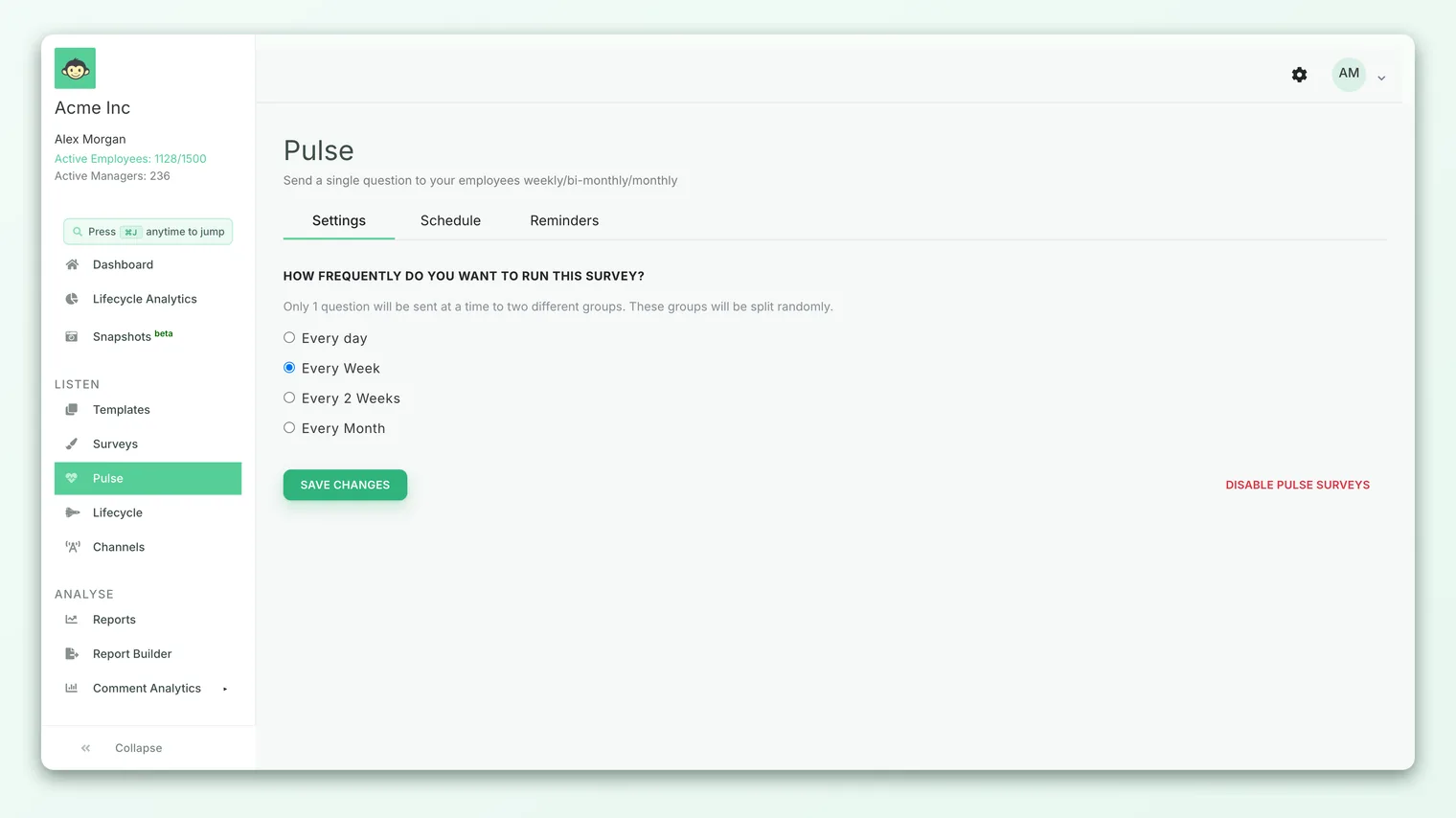
Cadence: how often a pulse runs
Cadence is the single most important choice you make when setting up a pulse, and in CultureMonkey it's essentially the only setup decision. You pick a frequency:
| Cadence | What it means | Good for |
|---|---|---|
| Every week | A question every 7 days | High-change periods, fast feedback loops, smaller teams |
| Every 2 weeks | A question every 14 days (bimonthly) | A balanced, sustainable default for most teams |
| Every month | A question every 28 days | Larger organizations, or when you want a gentler touch |
New pulses default to running on a Wednesday, a deliberately mid-week choice - far enough from the Monday scramble and the Friday wind-down that people are more likely to actually respond. The pulse then repeats on that same rhythm.
There's a genuine trade-off buried in this choice. More frequent pulses give you a finer-grained trend and catch changes sooner, but they ask more of your people over time and risk survey fatigue if the feedback never seems to lead anywhere. Less frequent pulses are gentler and easier to sustain, but they respond more slowly to change. For most teams, every two weeks is a sensible starting point: frequent enough to build a real trend, light enough to keep going indefinitely.
The fastest way to kill a pulse program is to ask often and act rarely. If employees answer every week and never see anything change, participation - and trust - erode. Pick a cadence you can genuinely keep up with and respond to. A monthly pulse you act on beats a weekly pulse you ignore.
Setting up a pulse in CultureMonkey
Getting a pulse running is deliberately quick. You choose a cadence, and CultureMonkey takes care of the rest.
- 1Open Pulse. Go to Listen > Pulse in the left navigation. If this is your first pulse, you'll see an empty state that walks you into setup.
- 2Choose a frequency. Pick every week, every two weeks, or every month. This is the core setup decision - CultureMonkey selects and rotates the questions for you.
- 3Save to activate. Saving makes the pulse active. Its first cycle is scheduled automatically, and the recurring rhythm begins.
- 4Let it run. From here, each cycle sends on schedule, reminders go to non-responders, and the next run is queued up for you.
- 5Watch the trend. As cycles accumulate, open the Pulse reports to see your engagement score, driver performance, and how sentiment is moving over time.
You need at least five active employees to enable a pulse - the same anonymity-protection principle that governs all CultureMonkey results, so no individual's answer can be traced back to them in a small group.
The Pulse module is available on plans where it's enabled for your account. If you don't see Pulse under Listen, it isn't switched on for your plan.
Changing or pausing a pulse
A pulse isn't set in stone. If you change the frequency, CultureMonkey starts a fresh pulse on the new cadence and retires the old one, so your rhythm updates cleanly.
You can also disable a pulse at any time. Disabling stops all future sends immediately - any cycles that were queued simply won't fire - and marks the upcoming schedule as no longer active. Later, you can re-enable a pulse to pick the rhythm back up. Because a pulse has no "end date," this on/off toggle is how you pause and resume it rather than letting it expire on its own.
When to use a pulse vs an annual survey
Both belong in a healthy listening strategy. The question is which to reach for, and when.
Reach for a full engagement survey when you need depth. If you want to measure every engagement driver, benchmark thoroughly, segment results in detail, and produce a report leadership can plan against for the next few months, that's a full survey. It's your comprehensive diagnostic - typically run quarterly or annually. Start there in Create a survey from scratch.
Reach for a pulse when you need continuity. If you want to keep a live read on sentiment between those bigger surveys, watch a trend build, monitor how a specific change lands, or simply keep the feedback loop warm so employees know you're listening, that's a pulse.
The strongest programs layer the two. A common pattern:
- Run a full engagement survey once or twice a year to get the deep, driver-level picture and set your priorities.
- Keep a pulse running continuously in between to track whether the things you're working on are actually moving.
- Use the pulse trend to know when your next full survey is worth running - if the pulse flags a slide, you don't have to wait for the calendar.
Used this way, the pulse and the annual survey aren't competitors. The annual gives you the map; the pulse tells you, week after week, whether you're heading in the right direction.
Frequently asked questions
How many questions does a pulse survey ask?
In CultureMonkey's Pulse module, one question is sent per cycle, chosen automatically from a curated question bank and rotated over time so employees see fresh questions and you gradually cover many drivers.
Is a pulse survey anonymous?
Yes. Pulse follows the same anonymity protections as the rest of CultureMonkey, and you need at least five active employees to run one so that no individual's response can be identified in a small group.
How is a pulse different from just running short surveys often?
The difference is that Pulse is built for the recurring model. It schedules and dispatches each cycle automatically, rotates questions from a bank, splits employees into groups, chases non-responders with reminders, and reports on trends across cycles - none of which you'd want to reassemble by hand from one-off surveys.
Can I track eNPS with a pulse?
Yes. Pulse can carry the eNPS question so you can watch your Employee Net Promoter Score move on a rolling basis between full surveys. See What is eNPS and how is it calculated?.
What cadence should I choose?
For most teams, every two weeks is a good default - frequent enough to build a meaningful trend, light enough to sustain and act on. Choose weekly during high-change periods and monthly if you want a gentler touch or have a very large organization.
Do pulse results show up in my regular survey reports?
No. Pulse has its own dedicated reporting view, separate from survey reports, because it's organized around trends over many cycles rather than a single point-in-time report.
Where to go next
- Build a full engagement survey: Create a survey from scratch
- Track advocacy on a pulse cadence: What is eNPS and how is it calculated?
- Understand the fuller picture: Understand the overall engagement score
Your feedback helps us improve the Help Center.