

Assign cases to investigators
How to route a Speak Up case to the right handler - assigning an investigator, reassigning, avoiding conflicts of interest, and understanding what the assignee can see.
On this page
Every Speak Up report needs a clear owner. Assigning a case to an investigator (the person who will read it, respond to the reporter, and drive it to a conclusion) is the single most important step in running your program well. An unassigned case is a case nobody is accountable for, and in a whistleblowing context that gap can carry real legal and cultural cost.
This guide covers how assignment works in CultureMonkey: how a case gets its first assignee, how to assign or reassign one by hand, how to think about conflicts of interest, and exactly what the person you assign can and cannot see.
Open a case in CultureMonkey Speak Up, use the Assignee dropdown in the case sidebar, pick an active Speak Up member, and save. Only members with the Admin or Member role can assign cases. The assignee gets an email, the change is written to the case audit trail, and what they can see is still governed by their role and category scope, not by the assignment itself.
Who can be an investigator
Anyone you can assign a case to is a Speak Up member: someone who has been granted access to the module from your portal settings. You cannot assign a case to a general CultureMonkey admin who has not been added to Speak Up, and you cannot assign it to the reporter or to an ordinary employee.
Each member has one of three roles, and the role sets both what they can do and whether they can be assigned meaningful work:
| Role | What they can do with cases |
|---|---|
| Admin | Full module access: view every case, assign and reassign, change stage, respond, and close. |
| Member | View, respond, assign, change stage, and close cases within their category scope. |
| Viewer | View and respond to cases in their scope or assigned to them. Cannot change stage or close. |
You can assign a case to a member of any role, including a Viewer. Just remember that a Viewer cannot advance the case through its stages or close it, so if you make a Viewer the primary handler, an Admin or Member still has to perform those steps. For a full breakdown of what each role unlocks, see Speak Up roles and access.
For most investigations, assign to an Admin or Member. Reserve Viewer for people who need visibility (a stakeholder, a second reviewer) rather than end-to-end ownership.
Who is allowed to assign
Assigning and reassigning is itself a permissioned action. Only Admin and Member roles can change a case's assignee. If you hold the Viewer role and open the assignment controls, you will not see the editable sidebar form at all - you will see the current assignee as read-only text instead, and the platform blocks any attempt to submit a change.
This is deliberate. Routing a sensitive report to the right person is a decision with consequences, so CultureMonkey keeps it in the hands of the people accountable for the program.
How a case gets its first assignee
A case can pick up its first investigator in one of two ways.
Automatically, at intake. If auto-assignment is turned on for your portal, then the moment a reporter submits a case, Speak Up routes it to an eligible member using a round-robin rotation. "Eligible" means the member monitors the case's category and has Include in auto-assignment switched on in their member settings. The rotation spreads new cases evenly: each new report in a category goes to the next member in line after whoever received the previous one.
Manually, after intake. If auto-assignment is off, or if no eligible member exists for the category, the case arrives unassigned and waits for an Admin or Member to route it by hand. You will also assign by hand any time you want to override the automatic choice, hand a case to a specialist, or move work off someone's plate.
Auto-assignment only ever sets the assignee on brand-new submissions. Turning it on later does not reshuffle cases that already have an owner, and turning it off does not strip existing assignees. Existing assignments are always left exactly as they are.
You control auto-assignment from your portal configuration under the members and permissions area. See Configure your Speak Up portal for the toggle and the per-member Include in auto-assignment setting.
Assign or reassign a case by hand
Manual assignment lives on the case itself, in the sidebar next to Stage, Category, and Due date.
- 1Open the case - from the Speak Up cases list, click into the report you want to route.
- 2Find the Assignee dropdown - in the right-hand sidebar, look for the Assignee field. It lists every active member, each shown with their name and role, plus an Unassigned option at the top.
- 3Pick the investigator - select the member who should own the case. To reassign, just pick a different member; to unassign entirely, choose Unassigned.
- 4Save changes - click Save changes at the bottom of the sidebar. You will see a confirmation, the new assignee's name appears in the sidebar, and the change is recorded.
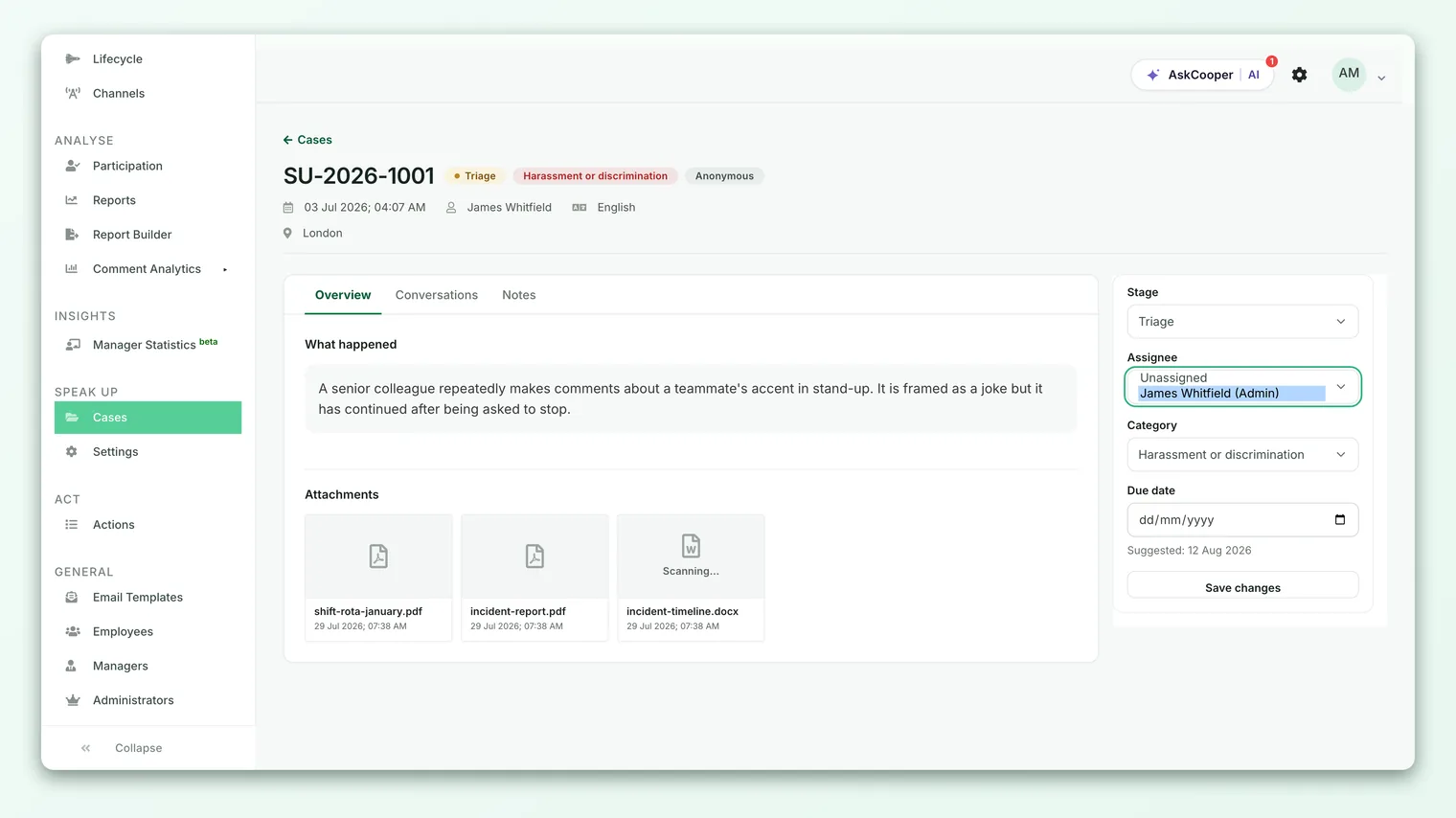
The Assignee dropdown sits in the same sidebar form as Stage, Category, and Due date, so you can route the case, move it to the right category, set a deadline, and advance its stage all in one save. If you only need to change the owner and nothing else, changing just the Assignee and saving is perfectly fine.
Reassigning a case
Reassigning is exactly the same action as assigning: open the case, choose a different member, and save. There is no separate "handover" screen. This keeps reassignment quick, which matters when someone goes on leave, a case turns out to need a specialist, or you discover a conflict of interest partway through.
Two things happen automatically when the owner changes:
- The new assignee is notified by email so they know a case has landed with them (assuming case-assigned notifications are enabled for your portal).
- The change is written to the audit trail as an assignee-change event, so there is a permanent, tamper-evident record of who owned the case and when.
Changing the investigator is an internal action. The reporter is not told who is handling their case (they interact with an anonymous "case team"), so reassignment happens quietly behind the scenes. What the reporter sees is driven by the case stage, not by the assignee.
Conflicts of interest
In a whistleblowing program, who handles a case is as sensitive as the case itself. A report about a manager should never be routed to that manager, to their direct report, or to anyone named or implicated in it. Getting this wrong can taint an investigation and expose your organization to retaliation claims.
CultureMonkey gives you the tools to route cleanly, but it does not automatically detect conflicts for you. Because reports can be anonymous and free-text, the platform has no reliable way to know that a given member is implicated. Screening for conflicts is a human judgment call, and the responsibility sits with the person doing the assignment.
A few practices keep assignment clean:
- Read before you route. Skim the report for names, teams, and relationships before choosing an investigator. If the assignee could be a subject, a witness, or a close colleague of anyone involved, pick someone else.
- Use category scope deliberately. Members only see cases in the categories they monitor. Structuring categories (and who monitors them) so that sensitive types of report reach an independent handler is your first line of defense. See Speak Up roles and access.
- Escalate up, not sideways. When a report touches senior leadership, route it to an Admin with the independence to handle it, or to an external investigator your policy designates.
- Reassign the moment you spot a conflict. If a conflict surfaces after assignment, reassign immediately. The audit trail will show the correction, which is itself evidence that your process worked.
The cleanest way to avoid conflicts at scale is structural: give sensitive categories (for example, reports about HR or senior management) a monitor who is independent of those groups, so cases route to the right hands before anyone has to intervene.
What the assignee can see
A common misconception is that assigning a case grants access to it. It does not. In CultureMonkey, assignment is about ownership and accountability, not about unlocking visibility.
What a member can see is governed by two things, and assignment is neither of them:
- Their role. An Admin sees every case in the account. A Member or Viewer sees cases only in the categories they are scoped to.
- Their category scope. For non-Admin roles, visibility follows the categories the member monitors.
So when you assign a case, the member can open it because it already falls within their scope (or because they are an Admin who sees everything). Assigning a case to a member who is not scoped to its category does not retroactively grant them a window into that category's other cases.
Once a member can see a case, and depending on their role, they can:
- Read the full report, including the reporter's original description, structured intake answers, and any attachments.
- See and post messages to the reporter, and add internal notes that the reporter never sees.
- See the assignment, stage, category, and due date in the sidebar.
- Act on the case (change stage, close, respond) if their role permits it.
What no member can do is unmask an anonymous reporter. Anonymity is enforced by the reporter's chosen mode at submission, and it is immutable. No assignment, role, or reassignment changes that.
Every assignment and reassignment is logged as an immutable assignee-change event, alongside stage changes and messages. That history cannot be edited or deleted, which is what makes it defensible if the handling of a case is ever questioned.
Best practices for routing cases
- Assign quickly. An unassigned case is nobody's job. Aim to give every new report an owner promptly, well within your acknowledgement SLA.
- One clear owner. A case has exactly one assignee. Keep that person accountable for driving it to a conclusion, even if others contribute internal notes.
- Let auto-assignment carry the routine load. For high-volume, lower-sensitivity categories, round-robin auto-assignment keeps work balanced without manual effort. Reserve hand-assignment for the cases that need judgment.
- Reassign without guilt. Leave, workload, specialization, and conflicts are all good reasons to move a case. The audit trail keeps everything transparent.
- Pair assignment with a due date. Setting the Due date in the same sidebar gives the investigator a clear target and makes overdue work visible.
Frequently asked questions
Can I assign a case to someone who is not a Speak Up member?
No. Only active Speak Up members appear in the Assignee dropdown. If someone should be able to handle cases, add them as a member first from your portal settings, then assign.
Does assigning a case give the assignee access to it?
Not by itself. Visibility comes from the member's role and category scope. Admins see all cases; Members and Viewers see cases within their scope. Assignment simply names the owner of a case they can already see.
What happens if the assigned member is later deactivated?
The case keeps the stored assignee reference, but the sidebar will show the owner as unavailable rather than a live member. Reassign the case to an active member so it has a real owner again.
Will the reporter know who is investigating their case?
No. Reporters interact with an anonymous case team. They never see the assignee's identity, and reassignment is invisible to them. What they see is driven by the case stage.
Can I leave a case unassigned?
Yes. Choosing Unassigned is valid, and cases can sit unassigned until you route them. It is not a good steady state, though, because an unassigned case has no accountable owner and can slip past its SLA.
Is there an automatic check that stops me assigning a conflicted investigator?
No. CultureMonkey validates that the assignee is an active member, but it does not screen for conflicts of interest. Reviewing for conflicts is a human step, which is why structuring your categories for independence matters.
Where to go next
- Move the case forward: Move a case through its stages
- Understand who can do what: Speak Up roles and access
- Set up routing and auto-assignment: Configure your Speak Up portal
Your feedback helps us improve the Help Center.