

Custom eNPS-style questions in CultureMonkey
How CultureMonkey supports NPS-style 0-10 questions with your own wording - such as product or customer NPS - beyond the standard employee eNPS, and how those custom scores are classified and reported.
On this page
The standard eNPS question asks one thing: how likely are you to recommend this organization as a place to work? But sometimes you want to measure advocacy for something else on the same familiar 0-10 scale - a product, a service, an internal tool, or the candidate experience. That's what a custom eNPS-style question (also called a custom NPS) is for. CultureMonkey supports these alongside the standard eNPS question, scored and reported the same way.
This guide explains what a custom eNPS question is, how it differs from the standard employee eNPS, who can set one up, how the score is classified and calculated, and how it shows up in your reports.
A custom eNPS question is a 0-10 "recommend" question with wording you choose - for example a product or customer NPS - that lives alongside the standard employee eNPS in a survey. It's scored exactly like eNPS (% Promoters − % Detractors, using the same 0-6 / 7-8 / 9-10 bands) and reports as its own named metric. The question text is provisioned by CultureMonkey, then you switch it on per survey in the builder.
What a custom eNPS question is
A custom eNPS question keeps everything that makes eNPS useful - the 11-point 0-10 scale and the Promoter / Passive / Detractor logic - but lets you point that question at a different subject.
Common uses include:
- Product or feature NPS - "How likely are you to recommend [product] to a colleague?"
- Customer NPS - measured through a candidate or customer engine rather than employees.
- Internal service NPS - advocacy for IT, HR, or another internal team.
- Candidate experience NPS - "How likely are you to recommend us based on your interview experience?"
Each custom question has two pieces of text: a short type title (the label used everywhere in reporting, e.g. "Product NPS") and the full question title (the wording respondents actually see). You can run more than one custom eNPS question, and you can include them in the same survey as the standard employee eNPS.
The power of NPS comes from a consistent 0-10 scale and consistent bands. When you create a custom question, change who or what is being recommended - not the scale or the grouping logic. That keeps every "NPS" in your account directly comparable.
Custom eNPS vs standard eNPS
They share the same mechanics but answer different questions.
| Standard eNPS | Custom eNPS question | |
|---|---|---|
| What it measures | Recommending your organization as an employer | Anything you choose - product, service, tool, candidate experience |
| Wording | The account-wide eNPS label | Your own question and type titles |
| How many | One per account | One or more per account |
| Scale & bands | 0-10; 0-6 / 7-8 / 9-10 | Identical - 0-10; 0-6 / 7-8 / 9-10 |
| Turned on | The survey's eNPS toggle | Checkbox per custom question in the builder |
| Reports as | "eNPS" | Its own type title |
Because the scoring is identical, everything you already know about reading eNPS applies to custom questions too. If you haven't yet, read What is eNPS and how is it calculated? - the classification and score below are the same.
Who can create a custom eNPS question
This is the most important thing to understand before you plan a survey around one.
The wording of a custom eNPS question is provisioned by CultureMonkey, not created by admins in the survey builder. Two things have to be in place:
- Custom eNPS is enabled for your account. This is an account-level capability switched on by the CultureMonkey team.
- The specific question exists. Each custom question (its type title and question title, plus translations) is set up for your account by CultureMonkey.
Once both are done, the questions become available to you as a Survey Admin: in the survey builder you'll see them as selectable options and can add them to any survey with a checkbox. You don't type the wording yourself in the builder - you choose from the custom questions that have been prepared for your account.
If custom eNPS isn't showing in your builder, or you need a new one worded (for a new product, say), reach out to your CultureMonkey contact. They'll enable the capability and set up the exact wording and translations, after which it appears for you to add to surveys.
Adding a custom eNPS question to a survey
Once the capability is enabled and at least one question exists, adding it is quick and self-serve.
- 1Open the survey builder. Create a new survey or edit an existing draft. See Create a survey from scratch if you're starting fresh.
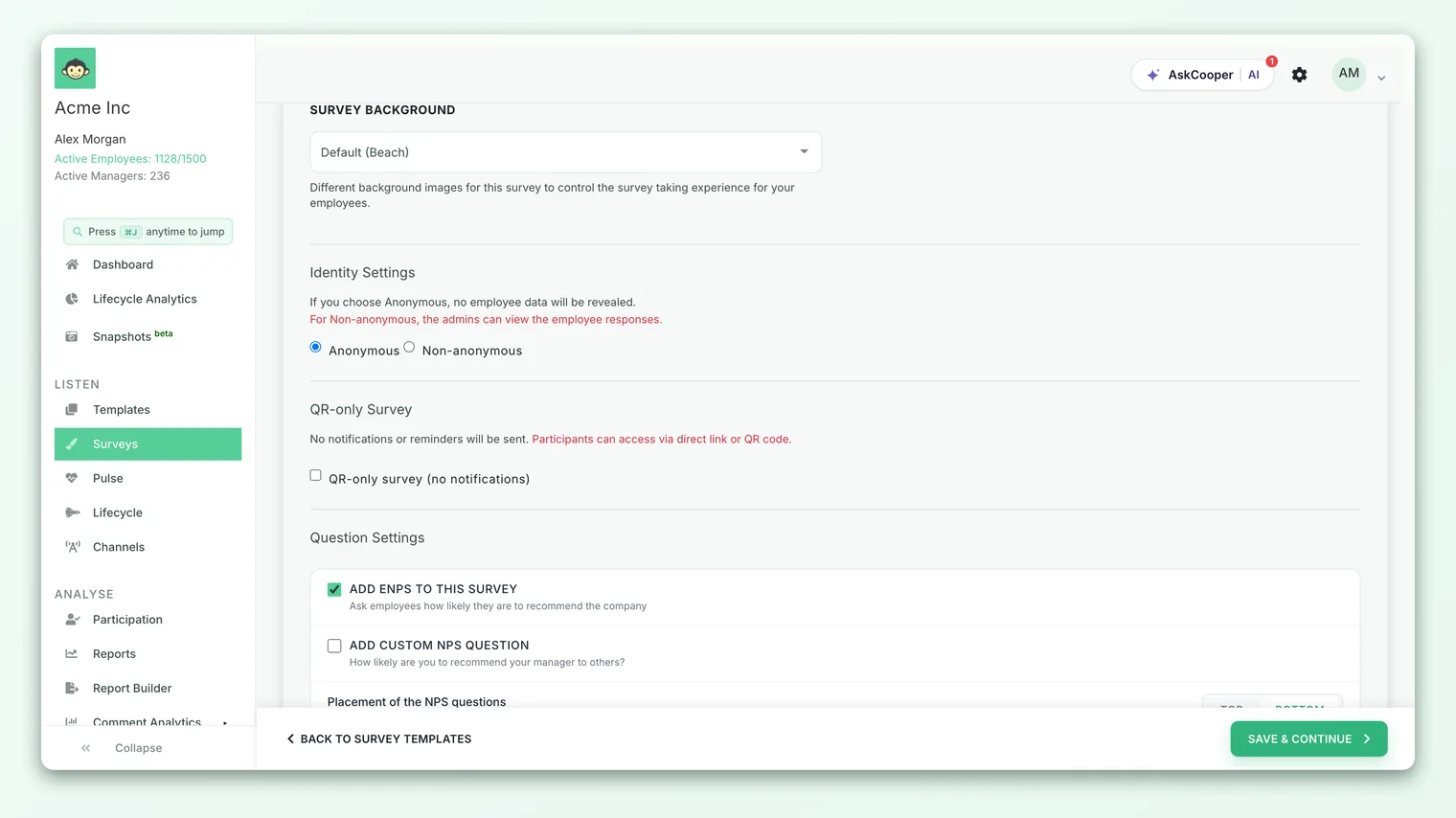
- 2Go to the basic details / questions area. This is where the standard eNPS toggle lives, alongside your engagement questions.
- 3Find the custom NPS options. With the capability enabled, you'll see one checkbox per available custom question, each labeled "Add custom NPS question - [your question wording]".
- 4Tick the ones you want. Select any custom questions to include in this survey. You can add several, and combine them with the standard eNPS.
- 5Save the survey. The selected questions are attached to the survey and will be asked on the same 0-10 scale as eNPS.
A custom eNPS question can be marked mandatory for a survey, so respondents must answer it before submitting. Whether a given question is required is a survey-level setting; if you need a custom question made mandatory, mention it when the question is being set up.
How custom eNPS is classified and scored
A custom eNPS question is classified exactly like the standard one. Every 0-10 answer falls into one of three groups:
| Group | Score given | Meaning |
|---|---|---|
| Promoters | 9-10 | Enthusiastic advocates |
| Passives | 7-8 | Satisfied but unenthusiastic |
| Detractors | 0-6 | Unhappy or critical |
The score is the same simple subtraction:
> Custom NPS = % Promoters − % Detractors
Passives count toward the total number of respondents (which shapes the percentages) but don't add to or subtract from the score directly. The result always lands between −100 and +100, and CultureMonkey reports it as a rounded whole number.
A worked example
Say your "Product NPS" custom question gets 150 responses:
- 75 Promoters (9-10) → 75 ÷ 150 = 50%
- 45 Passives (7-8) → 30% (counted in the total, not the score)
- 30 Detractors (0-6) → 30 ÷ 150 = 20%
Your Product NPS is:
> 50% − 20% = +30
If any of this feels unfamiliar, the eNPS guide walks through the same math, the meaning of each band, and what counts as a "good" score in more depth - all of it transfers directly to custom questions.
How custom eNPS reports
Each custom eNPS question is reported as its own metric, named by its type title - so a "Product NPS" question shows up as "Product NPS," clearly separate from your employee eNPS.
You can expect to:
- See it in survey reports. The custom score appears alongside eNPS and your engagement driver scores in the survey report.
- Break it down by demographic. Custom NPS supports the same heatmap-style breakdowns as eNPS - by team, location, manager, tenure, business unit, and other attributes - so you can find where advocacy is strong or weak.
- Pick it in NPS reporting. Where CultureMonkey lists NPS metrics for deeper analysis, your custom questions appear by type title next to the standard eNPS, so you can report on each independently.
Like all results, a custom eNPS breakdown is protected by anonymity thresholds. If a segment is too small, its score is hidden until enough people respond. See Survey anonymity. An empty breakdown usually means the group hasn't cleared the threshold yet - not that something is broken.
Best practices
- Name it clearly. The type title is what everyone sees in reports. "Product NPS" or "Onboarding NPS" beats a vague label - it removes any doubt about which score is which.
- Don't overload one survey. Each extra NPS question is a small ask. Include only the custom questions that are genuinely relevant to that survey's audience and purpose.
- Keep wording stable over time. Once you've asked a custom question, resist rewording it. Changing the text breaks the trend line, which is where most of the value lives.
- Pair the number with a reason. As with eNPS, the score tells you what but not why. Read it next to your open-text feedback and driver scores.
- Watch the trend, not the snapshot. A single custom NPS reading is noisy. Track it across cycles to see whether it's genuinely moving.
Limitations and things to know
- Wording is provisioned, not self-authored. You add custom questions to surveys yourself, but the exact text is set up for your account by CultureMonkey rather than typed freely in the builder.
- Same bands, no custom thresholds. The 0-6 / 7-8 / 9-10 classification is fixed to match standard NPS - you can't redefine which scores count as promoters or detractors.
- It's still one question. Like eNPS, a custom NPS is a single-question signal. It's a headline, not a diagnosis; use it with your fuller feedback data.
- Availability may be plan- or account-gated. Custom eNPS is enabled per account. If you don't see it, it likely hasn't been turned on for you yet.
Frequently asked questions
Can I write my own custom NPS wording in the survey builder?
Not directly. You select from custom questions that have been prepared for your account. To add new wording, ask your CultureMonkey contact to set it up - after that it appears as a selectable option.
Is a custom NPS scored differently from employee eNPS?
No. It uses the same 0-10 scale, the same Promoter (9-10) / Passive (7-8) / Detractor (0-6) bands, and the same % Promoters − % Detractors formula, reported as a rounded whole number.
Can I run several custom NPS questions at once?
Yes. You can create multiple custom questions and include more than one in the same survey - each reports separately under its own type title.
Can I use a custom NPS for customers or candidates rather than employees?
Yes. Custom eNPS is supported across engines, so it can capture advocacy from a candidate or customer audience as well as employees, depending on how your account is set up.
Why don't I see any custom NPS options in the builder?
The capability is enabled per account. If nothing appears, either custom eNPS isn't switched on for your account yet, or no custom questions have been created. Your CultureMonkey contact can enable both.
Where to go next
- Understand the scoring in depth: What is eNPS and how is it calculated?
- Build the survey to put it in: Create a survey from scratch
- See how questions and sections fit together: Survey question types and sections
Your feedback helps us improve the Help Center.