

Extend or reopen a survey deadline
How to push back the end date on a live CultureMonkey survey, what happens to reminders and reporting when you do, why a closed survey can't simply be reopened, and the cautions to keep in mind before you change a deadline.
On this page
You launched a survey, the deadline is approaching, and participation isn't where you'd like it to be - a big team was out on an offsite, a reminder went to spam, or leadership asked for "just a few more days." The natural question is: can I move the end date?
Yes, you can extend a live survey - push its closing date and time further into the future so more people can respond. But there are real limits on when you can do it, who can do it, and what happens to your reminders and reports once the deadline moves. There's also an important asymmetry: extending a survey that's still running is straightforward, but reopening a survey that has already closed is a different matter entirely.
This guide covers both - how to extend a running survey, what it does to the rest of your setup, why a closed survey can't simply be switched back on, and the cautions worth reading before you touch a deadline.
While a survey is still live (published or running and past its start), you can move its end date and time to a later point - as long as the new date is in the future. Once a survey has reached its scheduled end and been marked ended, it stays ended; there's no one-click "reopen." Extending doesn't reshuffle your reminders for you, and CultureMonkey will refresh cached reports so late responses are included.
The survey lifecycle, briefly
To understand what "extend" and "reopen" actually mean, it helps to know the states a survey moves through. In CultureMonkey a survey has one of four statuses:
| Status | What it means |
|---|---|
| Draft | Still being built; not yet sent to anyone. |
| Published | Finalized and scheduled, waiting for its start date/time to arrive. |
| Running | Live - participants can open it and submit responses. |
| Ended | Past its end date/time; closed to new responses and locked for reporting. |
A survey moves from running to ended automatically when the clock passes the end date and time you set: a background job marks any running survey whose end has passed as ended and stamps a completion time. This transition is one-directional - nothing in the product moves an ended survey back to running.
That single fact - the end transition is one-way - is why "extend" and "reopen" are two very different conversations.
Extending a live survey
Extending means changing the end date and time of a survey that is still live, so it keeps collecting responses past its original deadline. You're not restarting anything; you're simply telling the survey to stay open longer.
You'll find this under the survey's summary view, on a tab labelled Extend Survey, which sits alongside the other survey-summary tabs. When you open it, you'll see a small form pre-filled with the current end date and time, and a set of ground rules for what you're allowed to enter.
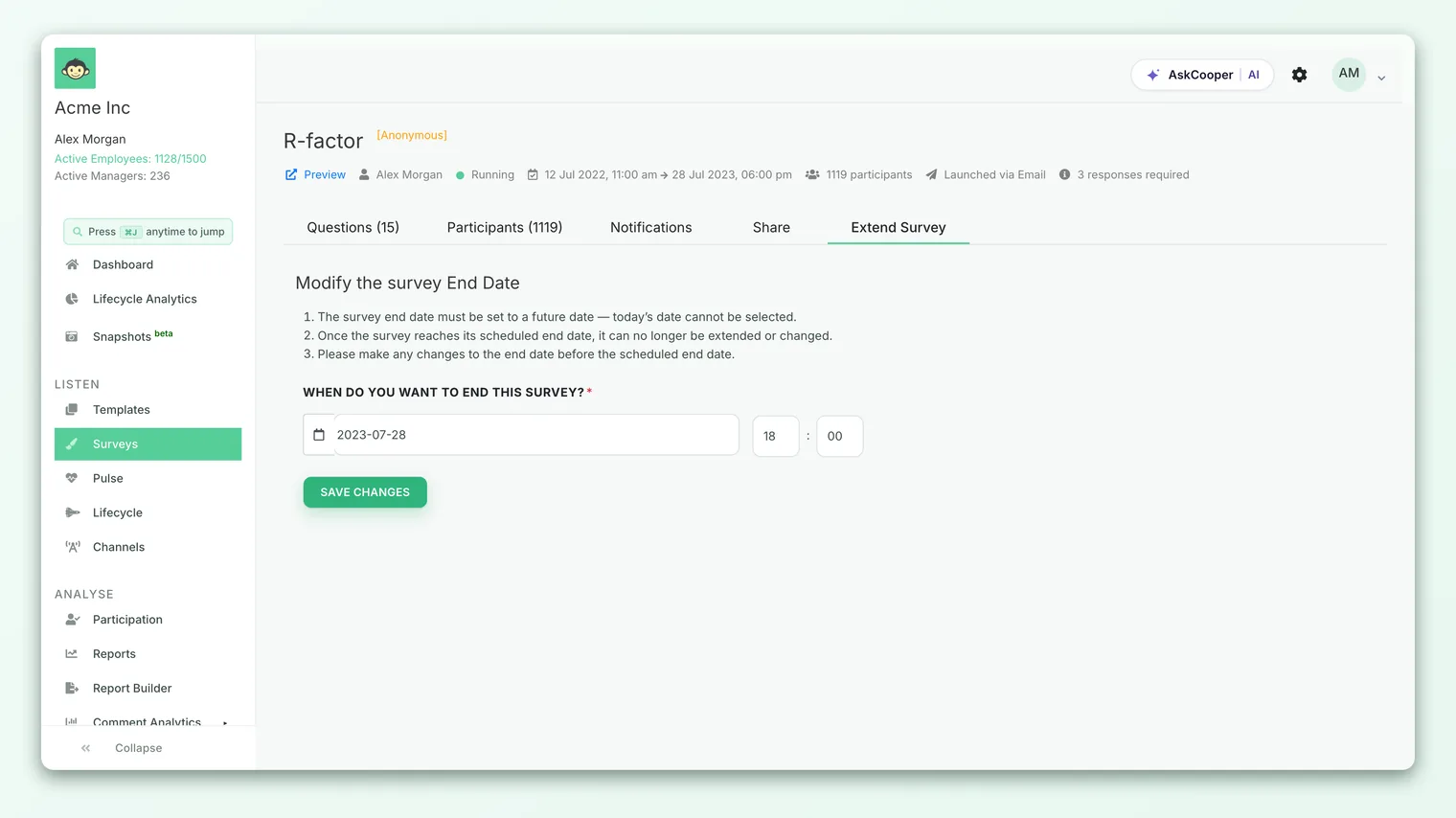
- 1Open the survey summary - go to the survey you want to keep open and find the Extend Survey tab in its summary navigation.
- 2Set a new end date - pick a date in the future. Today's date can't be selected, and past dates aren't allowed.
- 3Set the end time - choose the time on that day when the survey should close.
- 4Save changes - confirm the prompt. You'll see a "Survey extended successfully" confirmation, and the survey now stays open until the new deadline.
The rules the form enforces
The extend form is deliberately strict, and the constraints are worth understanding because they explain most of the "why can't I…?" questions:
- The new end date must be in the future. You can't set it to today, and you can't set it to a date that has already passed. The point of extending is to add time, so the target has to be later than now.
- You can't extend a survey on its final day. If the survey is scheduled to end today, the end date is locked and the form tells you so. Once a survey reaches its end date, "it can no longer be extended or changed." Make deadline changes before the last day, not on it.
- Make the change before the scheduled end. After a survey has ended, the extend option is gone entirely - you're now in "reopen" territory, which is a different story (see below).
Because you can't extend on the survey's final day - and definitely not after it closes - don't wait until the deadline to decide. If participation looks light two or three days out, that's the moment to extend. Waiting until the last morning means the option may already be locked.
Who can extend a survey
Extending isn't available to everyone by default, and that's intentional - a survey deadline is part of the promise you made to employees about the window they had to respond, so changing it is a deliberate, restricted action.
Three things all have to be true for the Extend Survey option to appear:
- It must be a regular survey, not a Lifecycle/autopilot survey. Automated lifecycle journeys run on their own schedules and aren't extended this way.
- The account-level extend setting must be turned on. This is a configuration flag, off by default on many accounts.
- You must be a super admin. The action is limited to the highest admin role; sub-admins and managers won't see it.
The Extend Survey tab only appears for super admins on accounts where the extend feature has been enabled. If you don't see it on a live survey, check both: your role, and whether the setting is switched on for your account. If it's off, reach out to your CultureMonkey contact to discuss enabling it.
If the option is missing on a survey you expect to be able to extend, the usual causes are: the survey is a Lifecycle/autopilot survey, the account setting isn't enabled, you're not a super admin, or the survey has already ended.
Reopening a survey that has already closed
Here's the important part: there is no "reopen" button for a survey that has ended. Once a survey passes its end date and time and is marked ended, that status is final within the product. Extending relies on the survey still being live; the moment it closes, that door shuts.
This is a design choice, not an oversight. An ended survey triggers a cascade of "the results are final now" activity - reports are generated, summaries and action suggestions can be produced, and the dataset is treated as complete. Quietly reopening it later would undermine everything built on top of that closed snapshot.
So if a survey has already closed and you still need responses, the practical path is not to resurrect it but to run a fresh collection:
- Clone the survey. Duplicate the closed survey to get an identical copy - same questions, same structure - that you can schedule and send again to the people who didn't respond. See Create a survey from scratch for how cloning and scheduling work.
- Send it to the non-respondents. Target the audience that missed the first round rather than re-surveying everyone, to avoid duplicate responses from people who already answered.
- Treat it as a top-up, not the same survey. Analyze it as its own cycle. Merging a late top-up into an already-reported survey isn't something you do by flipping a status back; it's a deliberate exercise.
Almost every request to reopen a closed survey traces back to low participation or a deadline that arrived sooner than expected. Both are far easier to solve before the survey closes - by extending in good time and nudging non-respondents with reminders - than after, when your only real option is to run again.
What extending does to reminders
Extending changes the survey's end date and time. It does not automatically add or reschedule the reminder emails you set up when you built the survey. Your existing reminder schedule stays exactly as configured.
That has a practical consequence: if all your reminders were scheduled to fire before the original deadline, simply pushing the end date out won't magically produce new nudges in the extra days you've added. The survey will be open, but quietly.
So when you extend, plan to prompt people again in the new window:
- Check your reminder schedule. Look at when your configured reminders were set to go out. If they've all already fired, the extra days may pass with no fresh nudge.
- Send a manual reminder if needed. Use the survey's reminder tools to nudge non-respondents during the extended window, so the extra time actually converts into responses.
- Tell people the deadline moved. A short, human message - "we've extended the survey to Friday, there's still time" - usually lifts participation more than a silent extension.
What extending does to reporting
While a survey is live, its results update as responses arrive, so late responses collected during the extended window naturally flow into participation counts and scores.
Extending also refreshes the survey's cached report outputs. CultureMonkey caches heavier artifacts - the report PDF, the executive summary documents, per-user report links - so they don't have to be regenerated on every view. When you change the end date, those cached files are cleared so they'll be rebuilt from the current, still-growing dataset. In practice: any report you'd already exported from this survey is now stale, and a freshly generated report will include the later responses.
If you downloaded or shared a report before extending, generate it again after the new responses are in. The pre-extension export won't include anyone who answered in the extra days.
Two related points worth keeping in mind:
- Anonymity thresholds still apply. Extending doesn't change how results are protected. If a small team's results were hidden for being below the response threshold, the extra responses might now push them over it - which is a good outcome, not a bug. If a breakdown still looks empty, see Why can't I see results yet?.
- The trend view treats this as one cycle. Because you extended rather than re-ran, the survey remains a single data point in your over-time trends, just with a later close and (hopefully) higher participation.
Cautions before you move a deadline
Changing a deadline is easy to do and easy to regret. A few things to weigh first:
- You're changing a promise. Employees were told a window. Extending it once, with a clear message, is fine. Doing it repeatedly teaches people that deadlines don't mean anything - and erodes the urgency that drives response rates.
- Watch downstream timing. If leadership readouts, action-planning sessions, or manager debriefs were scheduled around the original close, moving the end date pushes all of that. Extend, then reset expectations with whoever was waiting on the results.
- Don't extend endlessly chasing a number. A few extra days to catch a team that was travelling is sensible. Repeatedly extending to squeeze participation from a percent or two usually isn't - at some point, the responses you have are the responses you have.
- Once it's the final day, you're out of runway. The single most common surprise is discovering on the last morning that the option is locked. Decide early.
Frequently asked questions
Can I make a survey close earlier than planned?
The Extend Survey form is built around setting a future end date, so its natural use is pushing the deadline out. Setting an end date earlier than the current one to close a survey sooner isn't the intended flow.
I extended the survey but no new reminders went out. Why?
Because extending changes the end date, not your reminder schedule. Any reminders you configured fire on their own set dates. If those had already passed, send a manual reminder during the extended window to prompt the people who still haven't responded.
The survey already ended yesterday - can support reopen it for me?
CultureMonkey treats an ended survey as a completed, final dataset, and there's no supported way to switch it back to running. If you need more responses, clone the survey and send a fresh round to the people who didn't answer.
Why don't I see the Extend Survey option at all?
Most often one of four reasons: the survey is a Lifecycle/autopilot survey, the extend feature isn't enabled on your account, you're not a super admin, or the survey has already ended. Check each in that order.
Will extending mess up my existing report exports?
Any report you generated before extending won't include responses collected afterward, and CultureMonkey refreshes cached report files when you extend. Simply regenerate the report once the extra responses are in.
Where to go next
- Set deadlines correctly the first time: Set the basic survey details
- Build or clone a survey to run again: Create a survey from scratch
- Results not showing after you extended? Why can't I see results yet?
Your feedback helps us improve the Help Center.