

Identify and follow up with non-responders
How to find who hasn't answered your survey and nudge them to participate, without ever seeing their answers or breaking anonymity.
On this page
- The key idea: responded is not the same as their response
- What you can see: aggregate participation
- The safe way to follow up: reminders that target non-responders
- Can you get a named list of non-responders?
- Non-responders and anonymity: the guardrails
- A practical follow-up workflow
- Frequently asked questions
- Where to go next
You've launched a survey, responses are coming in, and now you want to give the people who haven't answered yet a gentle nudge. This is one of the most common and reasonable things a survey owner wants to do. It's also the moment where a lot of people worry: if I can chase non-responders, doesn't that mean I can see who said what?
The short answer is no. CultureMonkey deliberately separates two things that feel connected but aren't: who has responded and what they said. This guide explains that distinction in detail, shows you exactly how to find and follow up with non-responders, and is precise about what you can and cannot see at each step, so you can nudge participation with confidence and without eroding the trust that makes the survey worth running.
CultureMonkey tracks whether each person has submitted, but never links that fact to their answers. You can see aggregate participation ("42 people haven't responded yet") and send a reminder that automatically reaches only those non-responders, all without seeing a single individual's response. A named list of non-responders is a restricted, permission-gated export, not a routine feature, precisely because it touches identity.
The key idea: responded is not the same as their response
Every survey invitation carries a unique, private link tied to a participant record. When someone opens that link and submits, CultureMonkey records that this participant has a submission. That's it. The submission itself, the actual answers, is stored separately and, in an anonymous survey, is never joined back to the person's identity in any view an admin or manager can reach.
So the system genuinely knows two different things:
- Participation status - has this person submitted, yes or no. This is operational data used to send reminders and report a participation rate.
- Response content - the answers themselves. In an anonymous survey these are pooled and protected by the anonymity threshold, and never shown per person.
Think of it like a ballot box with a sign-in sheet at the door. The sign-in sheet tells you who has voted, so you know who still needs a nudge. The ballots inside are mixed together and unmarked, so knowing someone voted tells you nothing about how they voted. Following up with non-responders uses the sign-in sheet only. It never opens a ballot.
The whole value of an engagement survey rests on people believing their answers are safe. If chasing non-responders required (or even implied) that you could see individual responses, honesty would collapse. Keeping participation tracking and response content strictly separate is what lets you nudge people and keep the survey trustworthy at the same time.
What you can see: aggregate participation
The everyday, no-special-permissions view of non-responders is a count, not a list of names. On the survey's summary and reporting screens, CultureMonkey shows key participation stats, including how many people were invited, how many responded, and how many haven't yet.
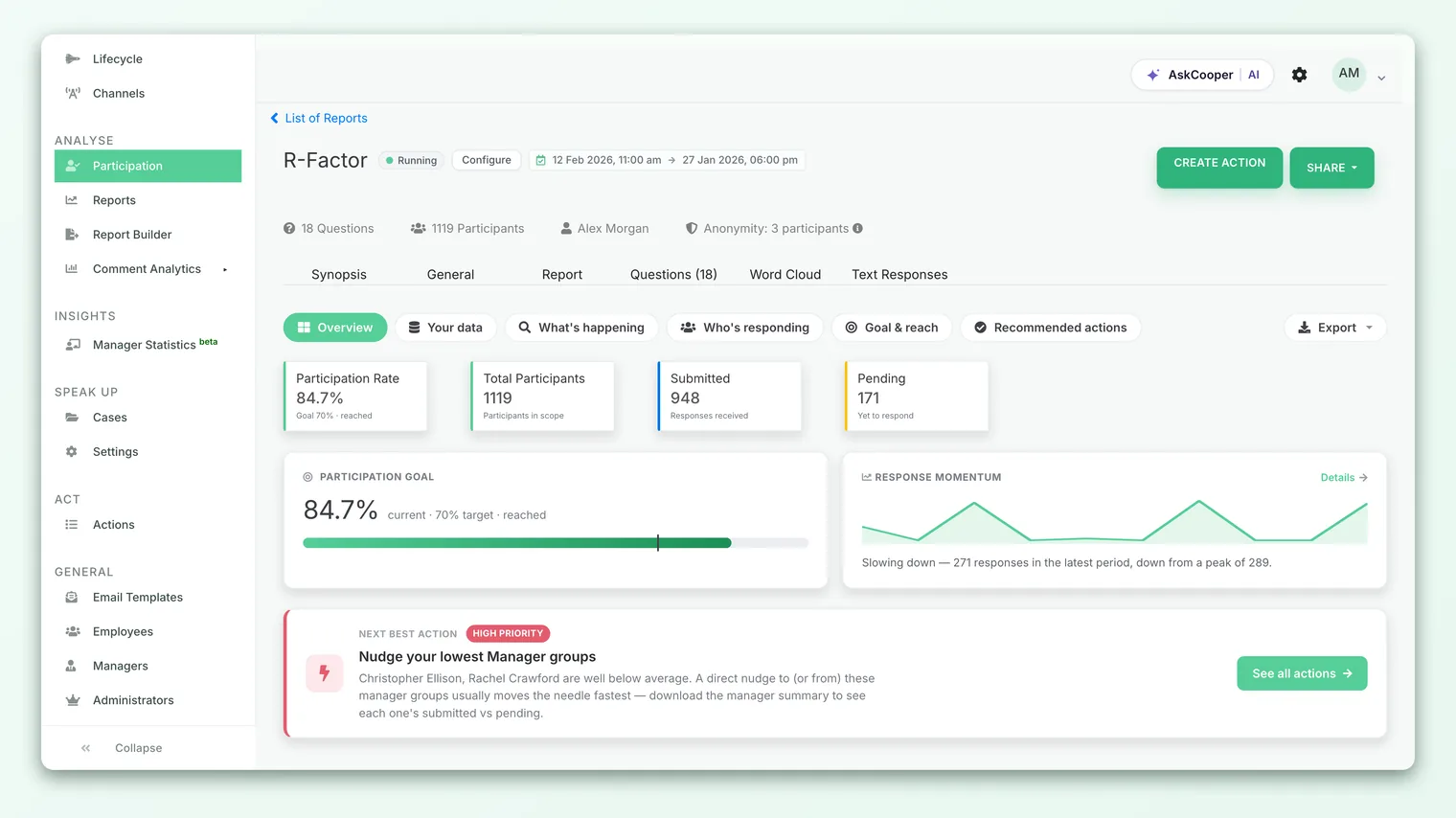
Behind these numbers, the "didn't respond" figure is simply the number of invited participants who don't yet have a submission (invited count minus responded count). It updates as people answer.
For managers, this participation view is scoped to your own team, and like every other result it obeys the anonymity threshold: if your slice of the audience is smaller than the minimum number of responses required (5 by default), even the pooled participation view can be withheld so that nothing can be inferred about individuals.
For a full walkthrough of reading these numbers over time, see Track survey participation.
The deliberate design choice here is that the routine tool for follow-up is a number ("42 haven't responded") plus a reminder mechanism, not a roster. You almost never need the names to improve participation, and the product is built so that you don't.
The safe way to follow up: reminders that target non-responders
Here's the part that resolves the whole tension. You don't need a list of non-responders to reach them, because CultureMonkey does the targeting for you. When you send a reminder, the system looks up every participant who was sent the survey but doesn't yet have a submission, and reminds exactly those people. Anyone who has already responded is skipped automatically.
This means:
- You never handle individual identities.
- Nobody who already answered gets a nagging duplicate.
- The nudge lands precisely where it's useful.
You can send reminders in two ways.
Scheduled reminders
When you set up a survey, you can schedule reminders in advance (for example, three days and six days after launch). Each scheduled reminder fires automatically and, again, reaches only the people without a submission at that moment. This is the "set it and forget it" approach and is usually enough on its own.
Manual reminders
When you want to nudge right now, use a manual reminder. From the survey, open the manual reminders screen and choose a channel.
- 1Open the survey - go to the survey you want to follow up on from your list of surveys.
- 2Open manual reminders - use the survey's actions to reach the manual reminders screen. You'll see the same participation key stats (responded vs. didn't respond) at the top.
- 3Pick a channel - choose Email, SMS, WhatsApp, Slack, or Teams, depending on how your team receives surveys. The button confirms before sending.
- 4Confirm and send - CultureMonkey queues the reminder and delivers it, within a couple of minutes, to every participant who still hasn't submitted.
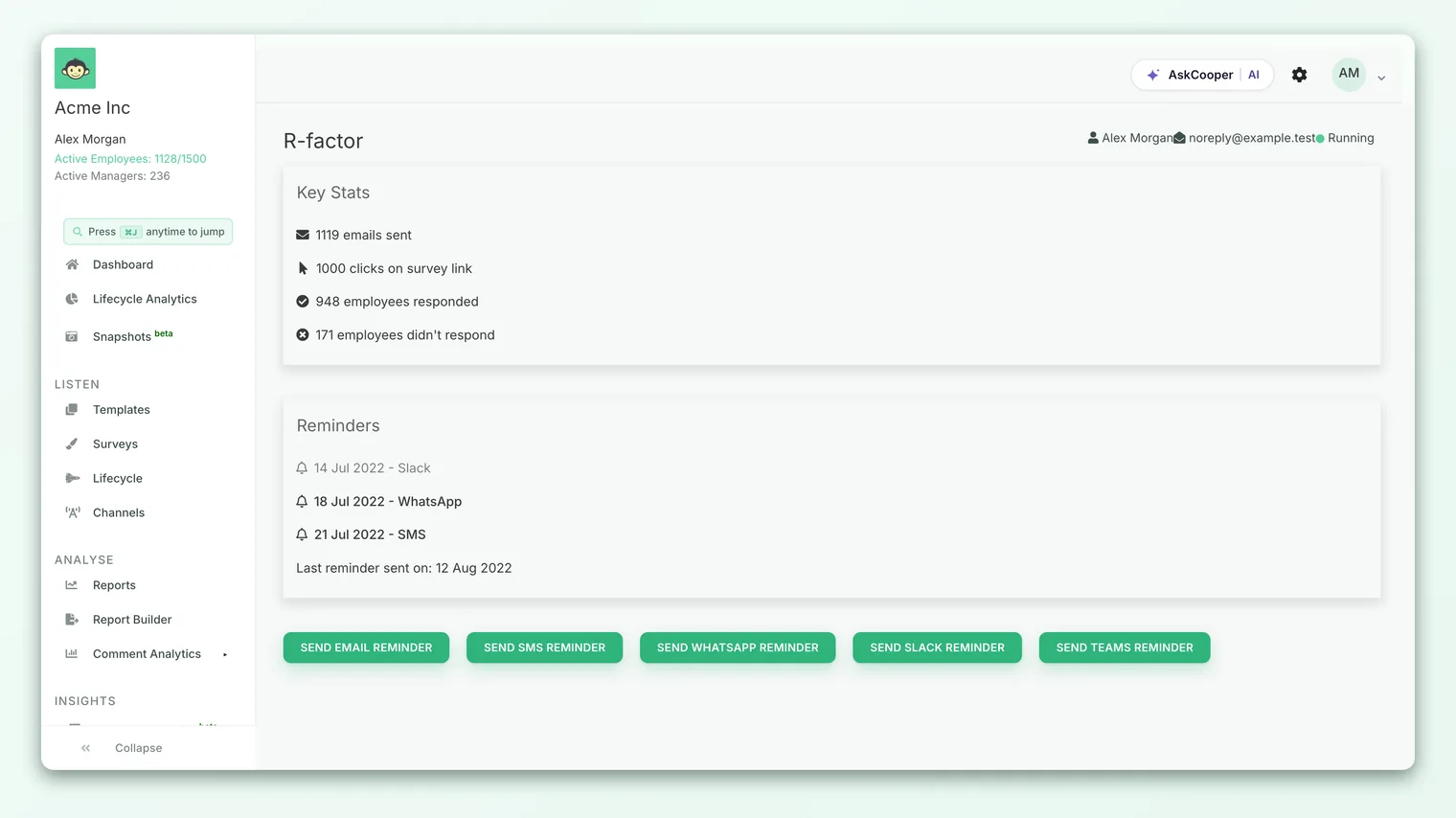
A few practical notes drawn from how reminders actually behave:
- One reminder per person per day. If a reminder has already gone out to someone today, CultureMonkey won't send them another the same day. Sending again is possible but it warns you first, so you can't accidentally spam people.
- Channel matters. The reminder goes out on the channel you pick. If your survey reaches people over Slack or Teams, remind on that channel rather than email so the nudge lands where they already are.
- Only invited, unanswered people are reminded. Someone who was never sent the survey, or who already responded, is never included.
- QR-only surveys can't be reminded. Because there's no addressable participant list behind an open QR code, reminders aren't available for QR-only surveys.
For the full reminder reference, including recurring reminders and channel setup, see Send manual reminders.
Because reminders are aggregate and automatic, the most effective thing you can do is improve the reminder itself: a warmer message, a clearer "why this matters," a better channel, and good timing. You'll lift participation far more this way than by trying to single people out.
Can you get a named list of non-responders?
This is the sensitive question, so here's the precise answer.
There is an export of unanswered participants in the system, and it does include names, employee IDs, email addresses, team, location, and manager. But it is not a routine, self-serve feature for survey owners or managers. In the product, this export is restricted:
- A named non-responder export is not available by default.
- It can be made available to a super admin where your organization has chosen to enable it. Check with your account admin.
In other words, obtaining a named non-responder list is a deliberate, permission-gated action, not something a manager or ordinary admin can do casually. This gating is intentional. A named non-responder list is identity data, so it's treated with the same care as any other identifying information.
Even where a named export is permitted, remember what it is and isn't. It tells you who hasn't answered, never what anyone answered. Using it to personally pressure individuals, publicly call out non-responders, or imply you can see their opinions, would undermine the anonymity the survey depends on. If you have access to it, treat it purely as an operational tool for closing participation gaps (for example, checking a delivery problem for one team), and prefer the reminder mechanism for actually following up.
If you find yourself wanting the named list, it's worth pausing to ask what you actually need. Most goals ("get more people to respond") are better served by a well-timed reminder. The named list is really only useful for diagnosing a delivery issue (say, a whole team that never received the invite because of a bad email domain), and even then, the fix is operational, not personal.
Non-responders and anonymity: the guardrails
To be completely clear about the limits, here's what the product will and won't let you do.
| You want to... | Can you? | How |
|---|---|---|
| See how many people haven't responded | Yes | Participation key stats on the report / reminder screen (subject to the threshold for small groups) |
| Send a reminder to only non-responders | Yes | Scheduled or manual reminders; targeting is automatic |
| See what a specific person answered | No | Anonymous responses are pooled and never linked to a person |
| Match a non-responder to a future response | No | There is no view that joins identity to answers |
| Get a named list of non-responders | Restricted | Permission-gated export, not a routine manager/admin action |
The reason the first two are easy and the last three are hard (or impossible) is the same design principle throughout CultureMonkey: operational data about participation is available; content data about responses is protected. Non-responder follow-up lives entirely on the operational side.
It's also worth noting that the participation view itself respects the anonymity threshold. If a manager's team is very small, CultureMonkey may withhold even the pooled participation numbers, because in a tiny group, knowing who hasn't responded can get uncomfortably close to knowing who has. When that happens, the reminder mechanism still works (it targets non-responders behind the scenes), but you won't see a breakdown.
A practical follow-up workflow
Putting it all together, here's a healthy rhythm for driving participation without ever touching individual identities:
- 1Launch with reminders pre-scheduled - set two or three reminders when you create the survey so follow-up happens automatically.
- 2Watch the participation rate, not names - check the responded vs. didn't-respond counts on the report. Aim for a trend, not a specific person.
- 3Send a manual reminder at the right moment - if the rate stalls, send a manual nudge on the channel your team actually uses. Keep the message warm and purposeful.
- 4Diagnose, don't chase - if one whole team is missing, that's usually a delivery problem (wrong emails, a channel not set up), not reluctance. Fix the delivery.
- 5Close the loop publicly - the single biggest driver of future participation is showing people that past feedback led to action. "You spoke, we acted" beats any reminder.
Frequently asked questions
Can I see who hasn't responded to my survey?
You can see how many people haven't responded through the participation stats, and you can send a reminder that automatically reaches exactly those people. Seeing a named list of non-responders is a restricted, permission-gated export, not a routine feature, because it involves identity data.
If I can send reminders only to non-responders, doesn't that mean the system knows who didn't answer?
Yes, and that's fine. The system tracks whether each person has submitted so it can remind the right people and calculate a participation rate. What it never does is link that participation status to the content of anyone's answers. Knowing someone hasn't voted tells you nothing about how they'd vote.
Will reminders annoy people who already responded?
No. Reminders target only participants without a submission. Anyone who has already answered is skipped automatically, so they won't receive a duplicate nudge.
How often can I remind people?
CultureMonkey won't send the same person more than one reminder per day. If you try to send again on the same day, it warns you first. Beyond that, use judgment: a couple of well-timed reminders lift participation; constant nudging causes fatigue.
Can I follow up with non-responders on a different channel than the original invite?
Yes. When you send a manual reminder you choose the channel (Email, SMS, WhatsApp, Slack, or Teams). Picking the channel your team checks most often is one of the most effective ways to reach the people who haven't engaged yet.
Why can't I see participation numbers for my small team?
Very small groups are subject to the anonymity threshold (5 responses by default). In a tiny team, showing participation details could indirectly reveal individuals, so CultureMonkey withholds the breakdown. Reminders still reach your non-responders; you just won't see a per-person or small-group view.
Where to go next
- See the full participation picture: Track survey participation
- Send the nudge: Send manual reminders
- Understand the protections: How anonymity keeps your feedback safe
Your feedback helps us improve the Help Center.