

Is my feedback anonymous in CultureMonkey?
A clear, honest answer for employees - how to tell whether a survey is anonymous, what your employer can and cannot see, the small-group threshold that protects you, and how to keep free-text comments from giving you away.
On this page
Is my survey response anonymous? In most CultureMonkey surveys, yes: your employer cannot see who gave which answer. But "most" is not "all", and you deserve a precise answer rather than a reassuring one. Some surveys are set up as non-anonymous on purpose, and even in an anonymous survey there are a couple of things worth understanding so you can answer with confidence.
This guide gives you the honest version: how to tell which kind of survey you're answering, exactly what your employer can and cannot see, the small-group rule that stops anyone from working out your answer by process of elimination, and one thing to watch for in open-text comments. No spin - just how it actually works.
Every CultureMonkey survey is either anonymous (your identity is hidden from everyone in your organization) or non-anonymous (admins can see who said what). The survey itself tells you which one it is before you answer. On top of that, an anonymity threshold hides any group's results until enough people have responded, so no single answer can be traced back to a person. The one thing that's on you: don't write your own name or obvious identifying details into a free-text comment.
Anonymous vs confidential: the two kinds of survey
CultureMonkey has exactly two identity modes, and every survey is set to one of them by whoever created it:
- Anonymous. Your responses are not linked to your name for anyone in your organization. When a survey is anonymous, no employee data is revealed alongside the answers. Admins, HR, and your manager see the results, never who gave them.
- Non-anonymous (sometimes called confidential). Admins can view individual employee responses. Your answers are still kept secure and private within the tool, but they are attributed to you. This mode exists for cases where a follow-up conversation is the whole point, like a one-on-one check-in or a manager-led review.
The difference is deliberate, and it's chosen up front. An anonymous survey is designed so that candor carries no personal risk. A non-anonymous survey trades some of that anonymity for the ability to follow up with you directly. Neither is a trick - the important thing is that you can always tell which one you're in before you answer.
Anonymous means your identity is hidden: no one in your organisation can connect your answers to you. Confidential means your answers are kept secure and private, but admins can see who gave them. If it matters to you, look for the word anonymous on the survey itself.
How to tell if a survey is anonymous
You don't have to take anyone's word for it. CultureMonkey states the identity mode on the survey itself, so you can check before you type a single word.
- On the survey or feedback form. An anonymous survey shows a line telling you your responses won't be tied to you - something along the lines of "Your feedback will be anonymous. [Your company] will not know you gave this feedback." A non-anonymous survey instead says your responses will be kept confidential, secure, and private. The wording your company uses may be lightly customized, but the meaning is the label above.
- In the invitation email or reminder. The notification that brings you to a survey carries the same promise. Anonymous invitations state plainly that the survey, your text feedback, and even the email notification itself are anonymous, and that your identity will never be revealed to anyone in your organization - including your manager, HR, and leadership.
- The rule of thumb. If you see the word anonymous, your identity is hidden. If you see confidential or non-anonymous, admins can see who you are. When in doubt, read the identity line on the form before answering.
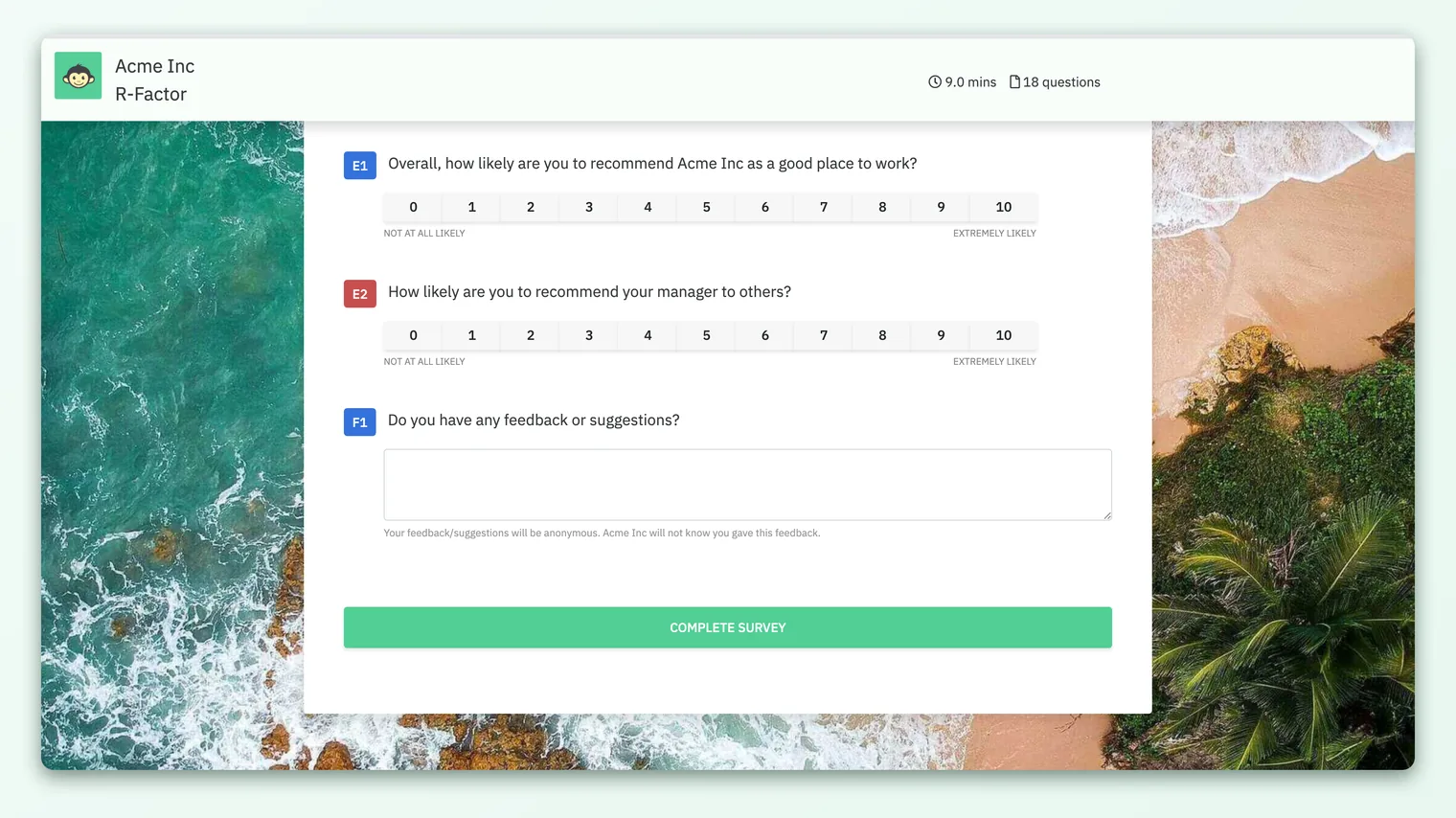
If a survey doesn't make its identity mode clear to you, it's completely reasonable to ask your HR or People team which mode it's in before you respond.
What your employer can and cannot see
This is the part people most want a straight answer on. Here it is, side by side.
| What they see | Anonymous survey | Non-anonymous survey |
|---|---|---|
| Your individual rating answers | No - never attributed to you | Yes - admins can view your responses |
| Your free-text comments | Yes as text, but not linked to your name | Yes, linked to you |
| Who has vs hasn't responded (participation) | Yes - completion is tracked so reminders can go out | Yes |
| Aggregated scores for a team | Yes, once the group is big enough | Yes |
| A single person's answer picked out | No | Only admins with access, by design |
A few things worth spelling out:
- Participation is always tracked, in both modes. The system knows whether you responded so it can stop sending you reminders and can report a completion rate. In an anonymous survey, knowing that you participated is kept separate from what you said - the two are not joined back together for anyone to read.
- In an anonymous survey, your manager never sees who said what. Managers see their team's pooled results only, and only when the team is large enough to clear the threshold below. They cannot drill into an individual response.
- Non-anonymous means admins genuinely can see your answers. We won't soften that. It's the right mode for some situations, but if you're in a non-anonymous survey, answer with the knowledge that your responses are attributed to you.
The small-group threshold that protects you
Hiding your name isn't enough on its own. If a "team" is just two people, then a manager reading the team's average could still guess who felt what. CultureMonkey closes that gap with an anonymity threshold: a minimum number of responses a group must have before its results are shown at all.
Here's how it works in plain terms:
- Until a group reaches the minimum number of responses, its results stay hidden. Nobody sees a score, a breakdown, or a comment for that group.
- This applies to every slice of the data - a small team, a single location, or a narrow filter combination. If any view would represent too few people, it's suppressed rather than shown.
- The result: no one can shrink the data down far enough to isolate your individual answer.
The exact number is set by your organization, but there are firm guardrails in the product. For anonymous surveys the threshold cannot be set below 3 responses, and the platform default is 5. In other words, an anonymous survey will never reveal a group's results based on just one or two people - that floor is built in and can't be turned off.
If you (or your manager) open a report and a team's results are blank or greyed out, that usually isn't a bug. It means the group hasn't cleared the anonymity threshold yet, so CultureMonkey is protecting the people in it. More responses, not fewer safeguards, is what makes the results appear. See Why can't I see results yet?.
This threshold is the single most important thing to understand about how your anonymity is protected in practice. Masking names stops the obvious leak; the threshold stops the sneaky one.
The one thing that's on you: free-text comments
Everything above is handled for you by the platform. There's exactly one place where your anonymity depends partly on you: open-text comment boxes.
In an anonymous survey, your comment is shown to admins as text with no name attached. That protection is real. But a comment can still give you away if the content points straight at you. For example:
- Writing your own name, or "as the only left-handed developer on the night shift..."
- Referring to a detail only one person could have said, like a specific incident only you were involved in.
- Naming a tiny team plus a unique role, which together narrow things down to one person.
None of this un-hides your name in the system. The risk is simply that a reader could infer who wrote it from what you wrote. So the guidance is simple:
Share what's happening and how it makes you feel, but avoid details that only you could have written. "Deadlines have been unrealistic this quarter and it's burning the team out" protects you. "Ever since I came back from my leave in March, my manager Priya has..." does not. Focus on the situation, not identifying specifics.
One more note on exports and filters. When admins export comments, your organization may apply extra protection that removes demographic details from small groups so a comment can't be narrowed to one person. But the safest habit, regardless of how your company has things configured, is to not self-identify in the first place.
Why anonymity is worth trusting
It's fair to be a little skeptical - trust is earned. A few reasons the protection here is more than a promise:
- The floor is enforced in code, not just policy. The minimum-response threshold for anonymous surveys can't be dialed below 3, and results genuinely won't render for groups under the limit. It isn't a setting an admin can quietly switch off for a single team.
- The mode is visible to you. You're told whether a survey is anonymous or not, on the form and in the email, every time. There's no hidden third mode.
- Managers are boxed in by the same rules. A manager sees pooled team results subject to the same threshold you're protected by. They don't get a special "see individuals" view in an anonymous survey.
Anonymity isn't a limitation to work around - it's the reason your honest answer is safe to give, and the reason your feedback is worth collecting in the first place.
Frequently asked questions
Can my manager see how I personally answered?
In an anonymous survey, no. Managers see their team's pooled results only, and only once the team is large enough to meet the anonymity threshold. They cannot open up an individual response. In a non-anonymous survey, admins can see attributed responses by design, so answer with that in mind.
Does the company know whether I responded at all?
Yes, in both modes - participation (whether you completed the survey) is tracked so CultureMonkey can stop reminding you and can report a completion rate. In an anonymous survey, the fact that you participated is kept separate from what you actually said.
My team is tiny. Won't people guess my answer?
This is exactly what the anonymity threshold prevents. If your group is smaller than the minimum number of responses (at least 3, often 5 or more for anonymous surveys), its results are hidden entirely rather than shown. Nobody sees a score they could reverse-engineer.
Is my free-text comment anonymous too?
The comment is shown without your name attached in an anonymous survey. The only way it could point back to you is if you write identifying details into it. Keep comments about the situation rather than about you, and they stay anonymous.
What if I want someone to follow up with me?
Then a non-anonymous survey (or a direct channel) is the right place, because anonymity by definition means no one can reach back to a specific person. If you have something you'd like addressed personally, use an identified channel or share proactive feedback where you choose how much to reveal.
How do I know the company isn't secretly matching answers to names?
For anonymous surveys, CultureMonkey does not attribute individual responses to employees anywhere admins can read them, and the small-group threshold blocks the workaround of filtering down to one person. If you want the deeper, technical explanation of how this is enforced, see How anonymity works (technical).
Where to go next
- The friendly overview of how you're protected: How anonymity keeps your feedback safe
- The detailed, technical version: How anonymity works (technical)
- Want to raise something on your own terms? Share proactive feedback any time
Your feedback helps us improve the Help Center.