

Submit and view proactive (anytime) feedback
How employees share feedback any time, without waiting for a survey - how to send it, how it stays anonymous, where admins see it, and how it flows into sentiment and topics.
On this page
Not every good idea, worry, or bit of praise arrives on the day a survey happens to be open. Something clicks in a meeting, a process starts to grate, a teammate does something worth calling out - and you want to say so now, not in six weeks when the next pulse lands.
That's exactly what proactive feedback (sometimes called anytime feedback) is for. It's a way to share what's on your mind with your organization at any moment, completely outside a survey window. You don't need a survey invitation, a link, or a login. You just send it, and it lands in the same place your leaders already read survey comments - carrying the same anonymity protections and feeding the same sentiment and topic analysis.
This guide explains how proactive feedback works from both sides: how you (as an employee) submit it, how your identity stays protected, where admins and managers see it, and how it flows into the wider picture of employee sentiment.
Proactive feedback is feedback you send any time, tied to no survey. You submit it by emailing or forwarding a message to your organization's dedicated CultureMonkey feedback address. It's matched to you by your work email so it can be routed correctly, but it appears to admins the same anonymous way survey comments do. It's scored for sentiment, tagged with topics and drivers, and shows up in the Feedback area under the Proactive source.
What "proactive" feedback means
CultureMonkey collects comments from a few different places. Most arrive as answers inside a survey or a lighter pulse. Proactive feedback is the one type that isn't tied to any of those. Internally, a comment is treated as proactive when it belongs to no survey, no survey submission, and no pulse - it stands on its own.
That single difference is what makes it powerful:
- It's not gated by timing. You don't wait for a cycle to open. If something matters today, you can raise it today.
- It's employee-initiated. Surveys ask you specific questions; proactive feedback lets you set the agenda and say what you think is important.
- It's continuous. Because people can share whenever, leaders get a steady trickle of signal between formal surveys, not just periodic spikes.
Think of surveys as scheduled check-ins and proactive feedback as the open door in between them. Both matter, and they complement each other.
How to submit proactive feedback
Submitting is deliberately low-friction: it works over plain email, so there's nothing new to learn and nothing to install.
Every CultureMonkey account has its own dedicated feedback email address, built from your organization's subdomain. It looks like this:
> your-company@feedback.culturemonkey.io
Organizations hosted in the EU data region use the matching @feedback.culturemonkey.eu address instead. Your HR or engagement team can tell you the exact address for your workplace, and admins can find it inside the Feedback area's help panel.
- 1Find your feedback address - ask your HR or engagement team, or look for it in the "How to get proactive feedback" help note inside CultureMonkey. It's the
your-company@feedback.culturemonkey.iostyle address. - 2Write or forward your message - open your normal email client and either compose a fresh message or forward an existing email (for example, a thread that captures the issue) to that address.
- 3Say what's on your mind - the body of the email becomes your feedback. There's no fixed format: a sentence or a few paragraphs both work.
- 4Send it - that's the whole submission. CultureMonkey receives the email, matches it to your workplace, and files it as proactive feedback.
Because forwarding works, you don't have to re-type a thought you already wrote somewhere. Spotted a customer email, a Slack export, or a note that captures the point? Forward it to your feedback address and let it speak for itself.
A couple of practical notes:
- Send from your work email. CultureMonkey identifies which employee record the feedback belongs to by matching the sender address to your registered work email. If you send from a personal account it doesn't recognize, the message can't be matched and won't be recorded.
- Your account must be active. Feedback is only accepted from active employee records, so a deactivated or not-yet-added account won't come through.
- There's no separate subject requirement. The message body is what's captured as the comment.
How your feedback stays anonymous
This is the question that matters most, so let's be precise about it.
To route your feedback correctly - to attach it to the right team, location, and driver breakdowns, and to make sure managers only see feedback from their own people - CultureMonkey has to know which employee record the message belongs to. That's why it matches your sender email to your account behind the scenes.
But knowing the record for routing is not the same as showing your name to anyone. When admins and managers read proactive feedback, it's presented the same anonymous way survey comments are: as a comment with its sentiment, drivers, and topics, not as "an email from [your name]." Leaders read what was said, not who sent it.
On top of that, proactive feedback sits under the same anonymity thresholds as the rest of CultureMonkey. When results are sliced by a small team or a narrow filter, the platform hides them until enough people have contributed, so no single comment can be traced back to an individual by process of elimination. If a breakdown looks empty, that protection is doing its job, not failing.
Your feedback is routed to the right team and driver breakdowns, but admins and managers only ever see the comment, its sentiment and its topics - never who sent it. Managers see only their own team's pooled feedback, and small groups are hidden by thresholds. If your organization has any doubt about how identified proactive feedback is in their specific configuration, an account admin can confirm it.
For the full picture of how identity, thresholds, and manager access all fit together, see How anonymity keeps your feedback safe.
Where admins and managers see it
Once your email arrives, it becomes a first-class piece of feedback. It doesn't sit in a separate inbox - it flows straight into the main Feedback area under Analyse, alongside every survey and pulse comment.
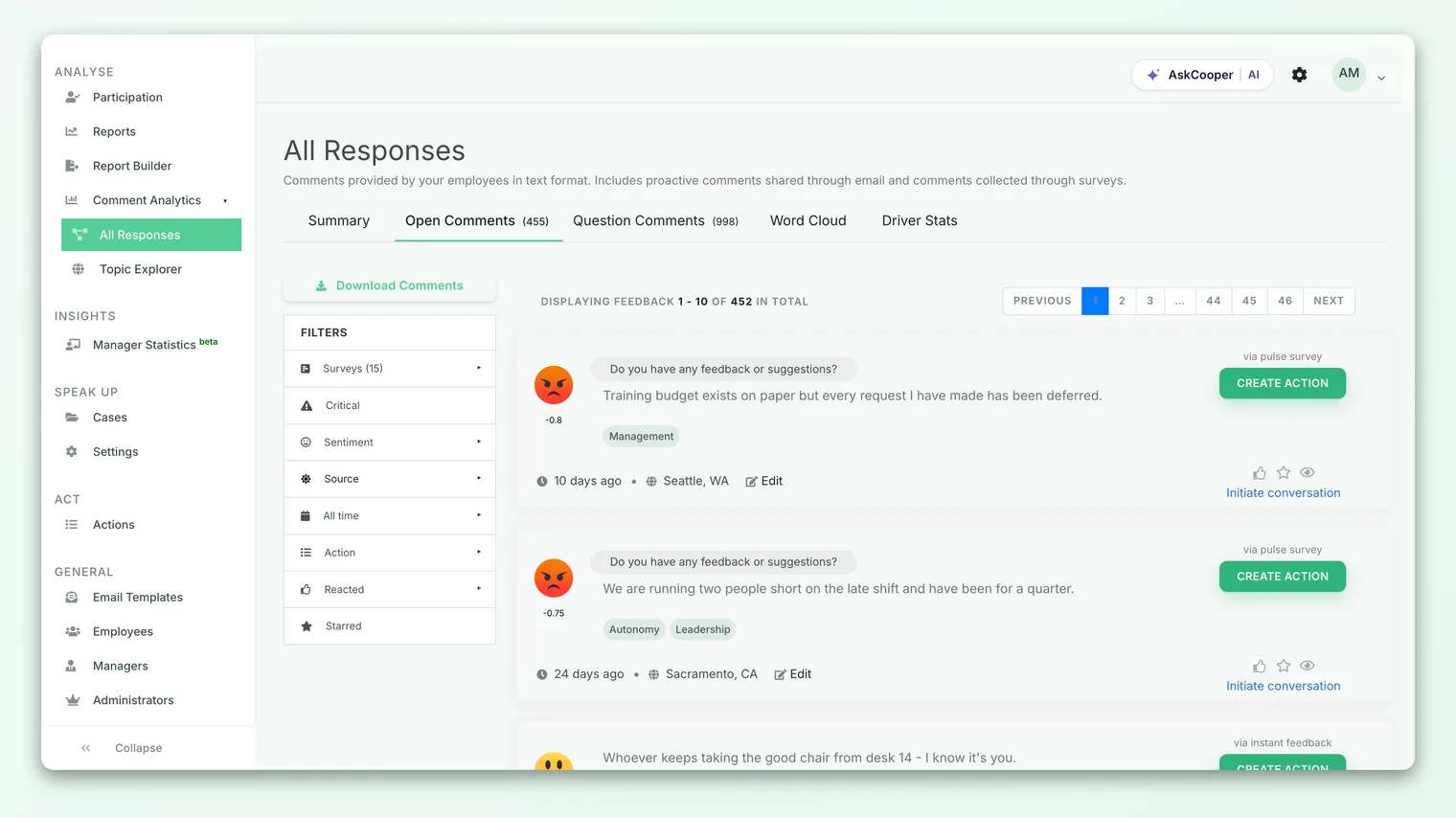
To look specifically at anytime feedback, an admin uses the Source filter in the left sidebar and chooses Proactive. That narrows the view to just the comments that arrived outside any survey. Each proactive item is also labelled as coming in "via instant feedback," so it's easy to tell at a glance where a comment originated even in the unfiltered list.
From there, proactive feedback behaves like any other comment. An admin can:
- 1Filter and search it - combine the Proactive source with sentiment (positive, neutral, negative), time range, or critical filters to focus on what matters most right now.
- 2Star and revisit it - bookmark an important comment so it's easy to find again later.
- 3Start a conversation - reply to open an anonymous two-way thread with you, so leaders can ask a follow-up question or close the loop, all without unmasking who you are.
- 4Turn it into an action - promote a comment into a tracked action plan with an owner and a due date, so the feedback actually leads somewhere.
For the full tour of filtering, starring, and reading comments, see Browse all feedback.
How it flows into sentiment and topics
Submitting proactive feedback isn't just dropping a note in a suggestion box that someone might read someday. The moment it arrives, it's put through the same analysis pipeline as every other comment.
Here's what happens automatically:
| Step | What happens | Why it matters |
|---|---|---|
| Sentiment scoring | The comment is scored as positive, neutral, or negative | It slots into sentiment breakdowns and trends immediately |
| Driver tagging | The text is matched to engagement drivers (like manager, workload, growth) | Your feedback shows up in the right driver-level view |
| Topic detection | AI groups the comment into auto-generated topics or themes | Recurring issues surface across many comments at once |
| Translation | If enabled, non-English text is translated for consistent reading | Feedback in any language is read and analyzed the same way |
Because of this, a single proactive comment doesn't just sit in isolation. It nudges your team's sentiment trend, contributes to the health score of whichever driver it touches, and may join a larger topic that leaders are already tracking. Ten people independently emailing about the same frustration will cluster into one visible theme, even though none of them coordinated.
Proactive feedback feeds average sentiment by driver and the AI topic view just like survey answers do. So even a quick, one-off email helps shape what leaders see as the organization's biggest strengths and pain points. To see how those themes are built, read Explore AI topics (Comment Analytics).
One nuance worth knowing: because proactive feedback isn't attached to a specific survey, it's generally treated as a company-wide signal rather than something scoped to a single survey's results. Some views that are built strictly around one survey may therefore not include it, while the broader Feedback area does.
Best practices for useful proactive feedback
Anytime feedback is most valuable when it's specific and actionable. A few habits make yours land well:
- Be concrete. "Standups are running 45 minutes and eating into focus time" is far more useful than "meetings are bad." Specifics point leaders toward a fix.
- One theme per message. If you have three unrelated things to raise, send three emails. That way each gets tagged to the right driver and topic instead of muddying one comment.
- Praise counts too. Proactive feedback isn't only for problems. Flagging what's working - a great onboarding, a supportive manager - tells leaders what to protect and repeat.
- Say what "good" looks like. If you can, hint at the outcome you'd want. It turns a complaint into a suggestion, which is easier to act on.
- Send it while it's fresh. The whole advantage of anytime feedback is timeliness. Capture the thought when you have it rather than saving it for a survey.
Limitations and things to know
Proactive feedback is simple by design, and that simplicity has a few edges worth understanding:
- It relies on email matching. Feedback must come from your recognized work email to be recorded. Messages from unrecognized addresses are discarded.
- There's no on-screen confirmation. Because it's an email flow, you won't get an in-app "thanks, received" toast the way a survey submission gives you. The message simply processes in the background.
- It's unstructured. Unlike a survey question, there's no scale or rating - just free text. That's a feature for expression, but it means proactive feedback contributes to sentiment and topics rather than to numeric scores like eNPS.
- Availability can vary by plan or configuration. Whether the proactive email channel is switched on for your organization is up to your account setup. If you're not sure it's active, ask your HR or engagement team.
None of these are reasons to hold back - they're just the shape of the tool. For quick, timely, honest input between surveys, proactive feedback is the most direct channel you have.
Frequently asked questions
Do I need to log in to CultureMonkey to send proactive feedback?
No. That's the point of it. You send or forward an email to your organization's feedback address from your normal inbox. There's no link to click or account to sign into.
Will my manager know it was me?
No. Your feedback is presented to admins and managers the same anonymous way survey comments are - they read the comment, its sentiment, and its topics, not your name. Managers also only ever see feedback pooled from their own team, and small groups are hidden by anonymity thresholds.
Can I send feedback in a language other than English?
Yes. If your organization has translation enabled, CultureMonkey translates non-English comments so they can be read and analyzed consistently alongside everything else.
What happens after I send it?
CultureMonkey scores your comment for sentiment, matches it to the relevant engagement drivers, and groups it into AI topics automatically. It then appears in the Feedback area, where leaders can read it, reply to open an anonymous conversation, or turn it into an action.
Can leaders reply to my proactive feedback?
Yes, through anonymous conversations. An admin can start a thread from your comment to ask a clarifying question or tell you what they're doing about it - all without learning who you are.
Is proactive feedback the same as a survey comment?
It carries the same analysis and protections, but it isn't tied to any survey. Survey comments answer a specific question in a specific cycle; proactive feedback is standalone input you initiate whenever you like.
Where to go next
- See where your feedback lands: Browse all feedback
- Understand how you're protected: How anonymity keeps your feedback safe
- See how themes are built from comments: Explore AI topics (Comment Analytics)
Your feedback helps us improve the Help Center.