

Reminders and the close in local-time surveys
How one-time reminders, recurring reminders, manual reminders, the close time and the days-left placeholder behave when a survey is sent at each employee's local time.
On this page
When a survey goes out at each employee's local time, its reminders and its close follow the same idea where they can. This guide covers what changes for each kind of reminder and for the close.
| In a local-time survey | |
|---|---|
| One-time reminders | Sent at the chosen time in each employee's own timezone |
| Recurring reminders | Sent at your organization's time |
| Send a reminder now | Sent now, at your organization's time |
| The close | By default, after the close time has passed in the last timezone; or one moment for everyone |
One-time reminders
Each one-time reminder goes out at the chosen time in every employee's own timezone, group by group, as the survey did. A reminder has to fit three rules, or the survey won't publish:
- At least 24 hours after the launch, because the last group can be sent up to a day after the first.
- Before the survey closes.
- Still ahead for everyone. A time that has already passed in some timezone is refused, with the timezone named.
Nobody is reminded before their own group has been sent the survey. You get one reminder summary with one total, not one per group. The launch plan shows reminders as, for example, "2 reminders, the first at 09:00 on 6 Mar, local time."
Recurring reminders
Recurring reminders on a local-time survey are sent at your organization's time, not in each employee's timezone, so some people may get them outside working hours. Employees whose group hasn't gone out yet are skipped until it has. The reminders page says so.
If reminder timing matters, schedule two or three one-time reminders instead of a recurring rule. They follow each employee's clock.
Send a reminder now
A reminder you send straight away goes to everyone who hasn't answered, at your organization's time. Employees whose group hasn't gone out yet are skipped. The confirmation warns you before it sends.
When the survey closes
On the launch step, Close at this time in offers two choices:
- Each employee's local time (the default): the survey "stays open until the close time has passed in the last timezone", so every region gets the same days to answer.
- Organization time: it "closes at one moment for everyone", at the close time in your organization's timezone.
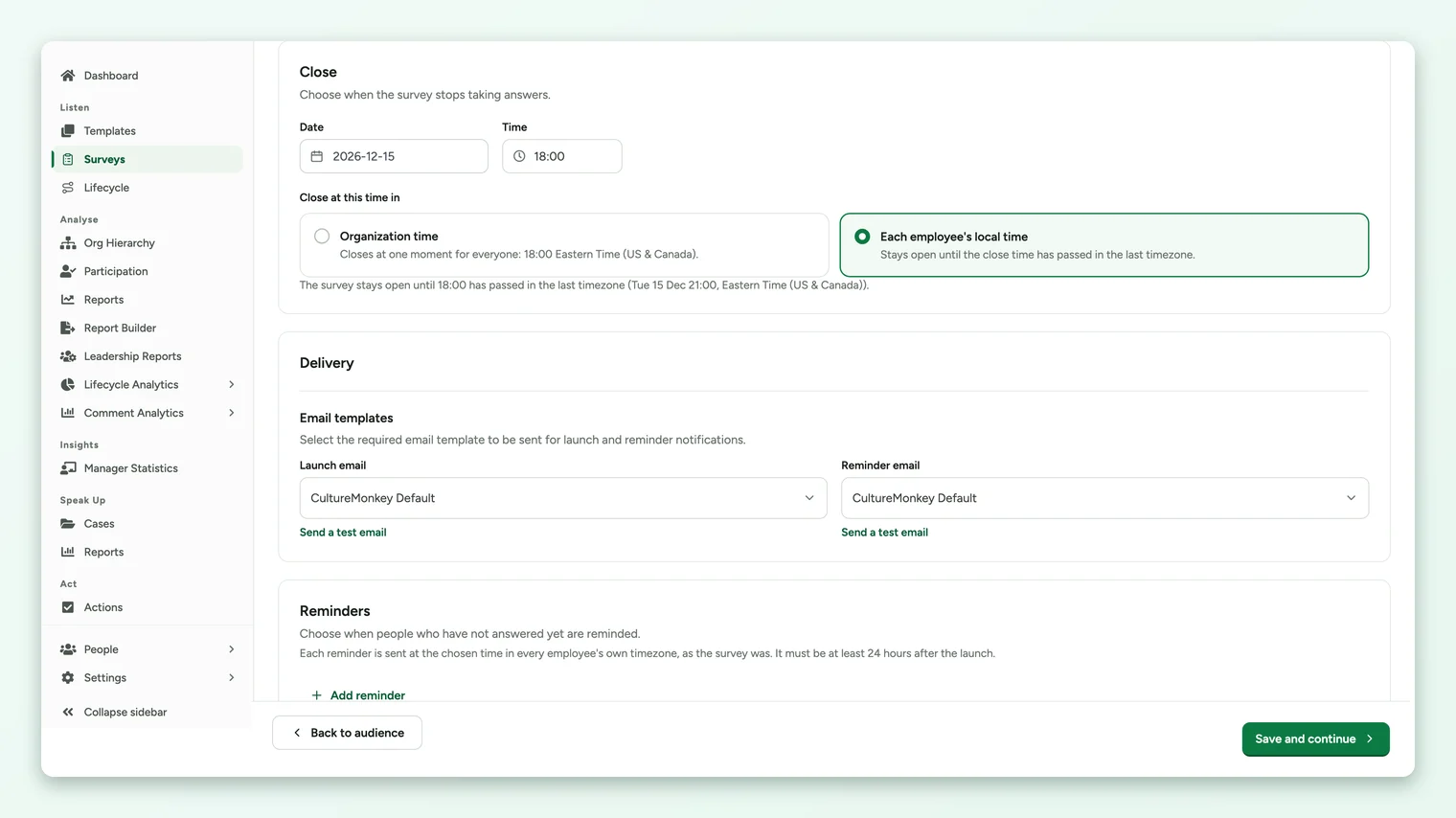
Either way, the close must be at least two hours after the last group is sent.
Extending the survey
Extending follows the same rules: the new close can't have passed already, and must be at least two hours after the last group is sent.
The days-left placeholder
Emails that use {{days_left}} count down to the survey's real close, including the extra time the last timezone gets.
Related
- Launch at local time: Send a survey at each employee's local time
- One-time reminders in general: Schedule a one-time reminder
Your feedback helps us improve the Help Center.