

Use the CultureMonkey question library
How to find and use CultureMonkey's built-in question library - a bank of pre-written, driver-mapped, benchmarked questions - in the survey builder, and why library questions keep your reporting consistent and comparable.
On this page
Writing good survey questions is genuinely hard. A question has to be unambiguous, unbiased, mapped to the right theme, and worded consistently enough that you can compare this cycle's answer to last cycle's. Rather than making you get all of that right from a blank page, CultureMonkey ships a question library: a bank of pre-written, research-backed questions that are already mapped to engagement drivers and already tied into benchmarks. When you build a survey, you can pull questions straight from that library instead of writing them yourself.
This guide covers where the library lives inside the survey builder, how to filter it and add a question, what it means that library questions come pre-mapped and benchmarked, how library questions differ from custom ones, and why leaning on the library is the single easiest way to keep your reporting comparable over time.
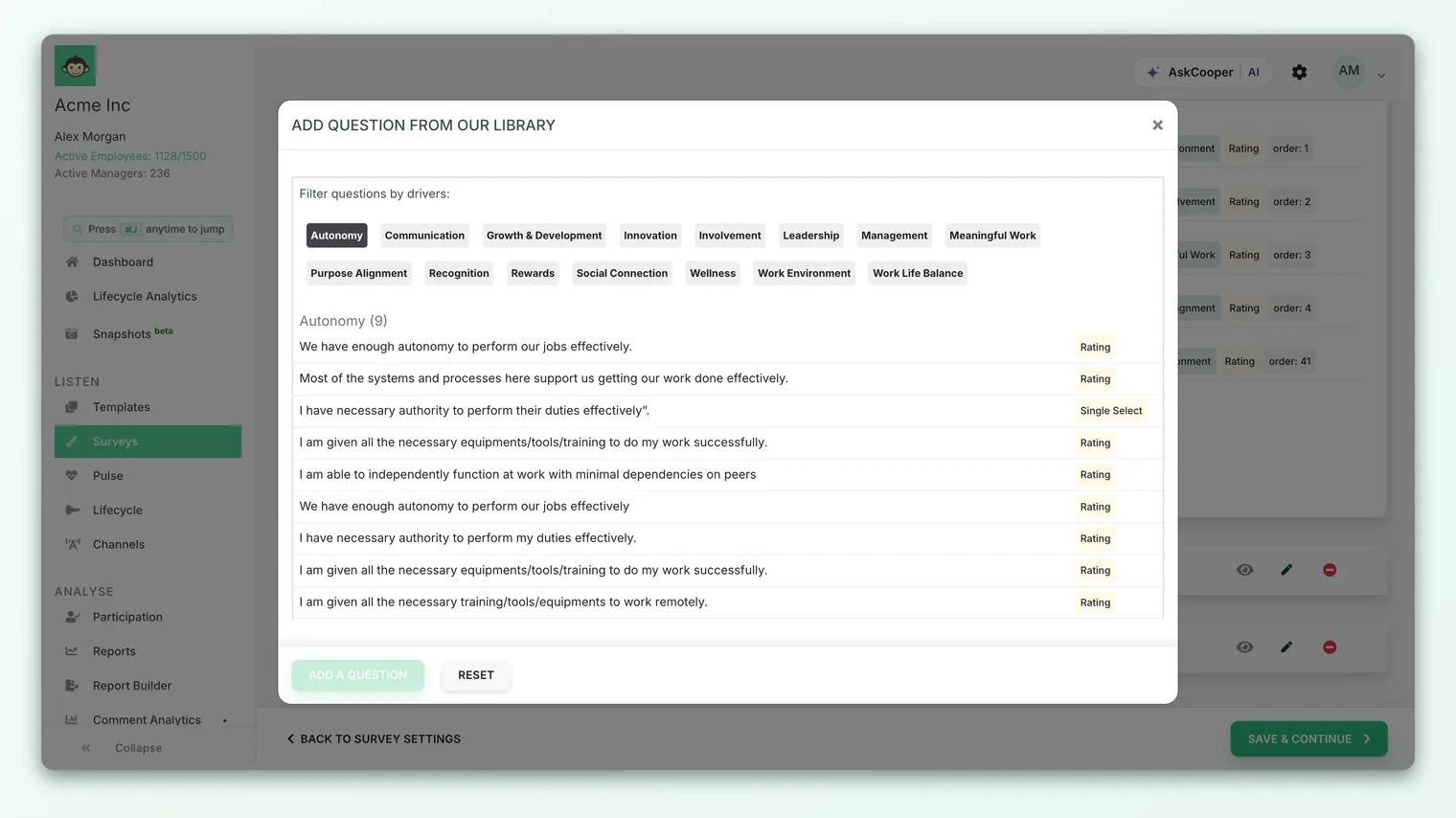
Inside the Questions step of the survey builder, each section has an Add question from our library button. It opens a picker that lets you filter questions by driver and browse the ready-made questions under each one. Click a question to add a copy to your survey. Because every CultureMonkey library question is already mapped to a standard driver - and those drivers carry industry benchmarks - using the library keeps your scores consistent and comparable without any extra work.
What the question library is
The question library is CultureMonkey's curated bank of survey questions. Each one was written and validated to measure a specific dimension of the employee experience, and each is permanently attached to one of CultureMonkey's default engagement drivers - Recognition, Leadership, Growth & Development, Work Life Balance and the rest of the standard set.
Think of it as the opposite of a blank text box. Instead of inventing "My manager gives me useful feedback" and then deciding which driver it belongs under, you open the library, look under Management, and pick a validated question that's already sitting there - driver mapping included. The questions span the different question types too - rating questions (the backbone of engagement measurement), single- and multiple-select, and free text - so you can build a whole survey from the library alone if you want to.
Behind the scenes, these questions are loaded into your account as a set of specially flagged questions (they're marked as library questions rather than belonging to any one survey). That flag is why they show up in the picker, why you can reuse them across as many surveys as you like, and why they can't be accidentally deleted from an individual survey - deleting a copy you added never touches the original in the bank.
A survey template is a whole survey - sections, questions, drivers and structure - ready to launch. The question library is the individual building blocks those templates are made from. Templates give you a finished starting point; the library lets you assemble or extend one question at a time. See Browse and use survey templates.
Where the library lives in the builder
The library is part of Step 2 - Questions of the survey builder, so you reach it the same way you reach any question editing. Go to Listen › Surveys, open a survey (or click Create a survey), and move to the Questions step.
Questions live inside sections, and every section gives you two buttons:
- Add question from our library - opens the library picker described below.
- Add custom question - opens a blank editor where you write your own question from scratch.
They sit side by side on purpose. For most engagement questions the library is the faster, safer choice; the custom option is there for the things the library doesn't cover. You can mix both freely within the same survey and the same section.
Because the library button belongs to a section, the question you pick lands in that section. If you want a question in a different part of the survey, open the library from the section where it belongs - or add it, then drag it into place afterward.
Filtering and adding a library question
Clicking Add question from our library opens a picker organized around your drivers. There's no long unsorted list to scroll - instead you filter down to the theme you're building for.
Here's the flow:
- 1Filter by driver - Along the top of the picker you'll see a row of driver "pills" (Filter questions by drivers). Click a driver - say Recognition - to show only the library questions mapped to it. The heading also shows how many questions that driver has available.
- 2Scan the questions - Each question in the list shows its text and its question type (Rating, Single select, and so on), so you can see at a glance what kind of answer it collects.
- 3Pick a question - Click the question you want. CultureMonkey adds a copy of it into your section, carrying its driver mapping and, for rating questions, its scale.
- 4Adjust if needed - The added question is now a normal question in your survey. You can reword it, change its scale, turn on comments, make it required, or move it - just like any custom question.
Because the picker is driver-first, the natural way to build is theme by theme: pick the drivers you care about this cycle (see Choose the right drivers for your survey), then work through them, pulling a couple of questions from each. If a driver's list looks short, that's expected - some themes simply have fewer standard questions than others.
The library picker filters by driver, not by a free-text search box. If you're hunting for a specific phrasing, browse the driver it would belong under. If nothing in the library says quite what you want, that's a good moment to write a custom question instead.
What "adding" actually does
When you add a library question, CultureMonkey doesn't move the original out of the bank - it copies it into your survey (options and all). Two things follow from that:
- The original is untouched. The same library question stays available for your next survey and everyone else's, so your scores line up across cycles because the same validated question is being reused.
- Your copy is fully editable. Once it's in your survey it behaves like any other question. Editing your copy - even rewording it heavily - never changes the library original. (Be aware, though, that rewording a question undercuts the comparability that made the library valuable; see the caution below.)
Pre-mapped to drivers - and why that matters
The most important thing about a library question is invisible in the picker: it already knows which driver it belongs to. That mapping is baked in when the library is loaded, not something you set.
This matters because every rating question in CultureMonkey must roll up to a driver - that's how individual answers become a driver score, and driver scores are what your reports, heatmaps, trends and action plans are built on. With a custom question, assigning the right driver is a judgment call you have to make (and can get wrong). With a library question, it's already correct.
| Library question | Custom question | |
|---|---|---|
| Wording | Pre-written and validated | You write it |
| Driver mapping | Already assigned, and correct | You assign it yourself |
| Question type & scale | Set (rating questions arrive with a scale) | You choose |
| Benchmark eligibility | Yes - via its standard driver | Only if mapped to a standard driver |
| Consistency across surveys | High - same question every time | Depends on you keeping it stable |
| Best for | Standard engagement themes | Company-specific or one-off questions |
A mis-mapped question doesn't just mislabel itself - it quietly distorts two drivers (the one it wrongly joins and the one it should have joined). Because the library removes that risk entirely for standard themes, it's the safest way to keep your data clean. See Choose the right drivers for your survey for how the mapping flows into reporting.
Leaning on the library doesn't mean never writing your own. Custom questions are exactly right for a company value, a specific program, or a one-time topic the standard set doesn't cover. The rule of thumb: use the library for the engagement standards, and reserve custom questions for what's unique to you.
Why the library helps benchmarking
Here's the payoff that makes the library more than a convenience. In CultureMonkey, industry benchmarks are keyed to drivers. A benchmark score exists for each standard driver within your industry - so a benchmark is something a driver has, not something an individual question has.
Follow the chain:
- A library question is permanently mapped to a standard driver.
- Answers to that question roll up into that driver's score.
- That standard driver carries an industry benchmark.
So every library question you add automatically feeds a driver that can be compared against your industry. You get external context - "is our Recognition score above or below companies like us?" - for free, simply by using library questions.
Write a custom question instead and map it to a custom driver, and that comparison disappears: custom drivers have no industry benchmark to line up against. The custom question still works perfectly for internal tracking, but it can't answer "how do we compare?" This is the deeper reason the library keeps you comparable: it doesn't just keep your wording consistent across your own cycles, it plugs you into the shared, driver-level benchmarks that let you compare outward too.
The moment you heavily reword a library question, you've created something the benchmarks and your own history weren't measured on - even though the driver mapping still holds. Light tweaks (localizing a term, adjusting tone) are usually fine; changing the meaning of the question quietly breaks the like-for-like comparison. If you need to ask something genuinely different, add it as a custom question rather than reshaping a library one.
Best practices
A few habits get the most out of the library:
- Start from the library, customize at the edges. Build the core of your engagement survey from library questions, then add a handful of custom questions only where the library can't reach. This is the fastest route to a rigorous survey.
- Pick drivers first, then questions. Decide which drivers matter this cycle, then use the driver filter to pull questions for each. It keeps the survey focused and the reports readable.
- Give important drivers a few questions. A driver score is an average, so a driver backed by one question is fragile. Where a theme matters, pull two or three library questions for it so its score is stable.
- Reuse the same questions cycle to cycle. The comparability you want over time comes from asking the same library questions each round. Resist the urge to reshuffle wording between surveys.
- Don't over-edit. If you find yourself rewriting a library question until it means something new, add a custom question instead and leave the library original intact.
Frequently asked questions
Where do I find the question library?
On Step 2 - Questions of the survey builder. Inside any section, click Add question from our library. There's no separate menu item - the library is reached from wherever you're adding questions.
Can I search the library by keyword?
The picker filters by driver, not by a free-text search. To find a question, click the driver it would belong under and browse the questions listed there. If nothing fits, write a custom question.
Can I edit a question after I add it from the library?
Yes. Once added, a library question is a normal question in your survey - you can reword it, change its scale, enable comments, make it required, or reorder it. Editing your copy never changes the original in the bank. Keep in mind that heavy rewording reduces the comparability that made the library useful.
Do library questions come with the right driver already set?
Yes. Every library question is permanently mapped to one of CultureMonkey's standard drivers when it's loaded. That's the main advantage over a custom question, where you have to assign the driver yourself.
Why is the library better for benchmarking than custom questions?
Because benchmarks are attached to drivers, and library questions are always mapped to standard drivers that carry an industry benchmark. A custom question mapped to a custom driver has no benchmark to compare against, so you lose the "how do we compare to our industry?" view.
Can I build a whole survey from the library?
Yes. The library spans the common question types and all the standard drivers, so many teams build an entire engagement survey from library questions alone - or start from a template, which is itself assembled from library questions.
Where to go next
- Build the survey around your library questions: Create a survey from scratch
- Understand the driver mapping behind it: Choose the right drivers for your survey
- Prefer a ready-made starting point? Browse and use survey templates
Your feedback helps us improve the Help Center.