

Choose the right drivers for your survey
What engagement drivers are, the default drivers CultureMonkey ships with, how each question is mapped to a driver, and how to pick default or custom drivers so your survey turns into clear, actionable reports.
On this page
A survey is only as useful as the reports it produces - and in CultureMonkey, drivers are what turn a pile of individual answers into a report you can actually act on. Before you launch, one of the most consequential choices you'll make is which drivers your survey uses and how each question maps to them. Get this right and your results roll up into clear, comparable themes; get it wrong and you're left staring at question-by-question numbers with no story.
This guide explains what drivers are and why they matter, walks through the default engagement drivers CultureMonkey provides, shows how to choose between default and custom drivers for a survey, explains how each question is tied to a driver and why that mapping is the whole point, and closes with how to choose drivers for your specific goal - plus the reporting payoff you get in return.
A driver is a theme of the employee experience - like Recognition, Leadership or Growth & Development - that a group of questions measures together. Every rating question you write is mapped to one driver, and results roll up into a driver score so you can see where engagement is strong or weak. CultureMonkey ships 15 research-backed default drivers; you can use those, or switch a survey to your own custom drivers. Pick your driver set on the Basic step of the survey builder, and map each custom question to a driver as you write it.
What drivers are - and why they matter
Employee engagement isn't one feeling. It's the sum of many experiences: the work itself, the people who manage you, whether you're recognized, whether you can grow, whether you feel you belong. Asking a single question can't capture all of that, so CultureMonkey asks several - and then groups them.
A driver is that grouping. It's a named theme of the employee experience, and behind it sits a set of rating questions that all measure the same underlying thing. Instead of reading twenty questions one at a time, you read a handful of drivers, each with a score that summarizes every question beneath it.
Why this matters: the overall engagement score tells you how engaged people are, but it can't tell you what to do. Drivers can. You can't "fix engagement" as an abstraction - but you can improve Recognition if that driver is scoring low. Drivers are the level at which insight becomes action: they're what you filter by, benchmark, track over time, and attach action plans to.
When leaders ask "so what do we do about this?", the answer almost always lives at the driver level. A low Growth & Development score points to a concrete area to invest in; a high Leadership score is a strength to protect. Design your survey so every rating question earns its place under a driver you'd be willing to act on.
A quick note on factors: some organizations like to think about engagement at an even higher level - grouping several related drivers into broad factors (for example, treating Leadership, Management and Communication as one "Leadership & Direction" family). This is a useful mental model when you present results to executives who want the ten-thousand-foot view. In CultureMonkey, the level you actually build, map and score against is the driver - that's the unit questions attach to and reports roll up into. Treat factors as a way to talk about clusters of drivers, and drivers as the thing you configure. See Understand drivers and factors for how this plays out in reporting.
The default engagement drivers
CultureMonkey ships every account with a set of 15 default engagement drivers, drawn from workplace-engagement research and refined across thousands of surveys. These cover the dimensions that consistently predict how engaged and committed people feel. Each comes pre-defined with a name and a description, and - crucially - the question library is already mapped to them, so you can build a rigorous, driver-based survey without writing a single question yourself.
Here are the default drivers and what each one measures:
| Driver | What it measures |
|---|---|
| Autonomy | The freedom employees have to do their work without micro-management - a focus on what gets done over how. |
| Work Environment | Whether the physical environment people work in supports them and brings positivity to their day. |
| Leadership | The trust and confidence employees have in company leadership, and whether leaders show genuineness toward their people. |
| Management | How employees experience their direct supervisors, processes and policies - the employee-manager relationship. |
| Work Life Balance | The balance between time spent on work and time for personal interests, family, and life outside the job. |
| Involvement | How involved employees feel in decisions that affect their work, and whether their ideas are heard and valued. |
| Communication | How effectively the organization communicates with employees, and whether people feel connected to its vision and updates. |
| Rewards | Whether employees feel fairly compensated, and how well the incentive and reward structure is working. |
| Recognition | Whether people are recognized for their work and effort - a strong lever on productivity, loyalty and retention. |
| Growth & Development | Whether the organization offers real opportunities for personal and career development. |
| Purpose Alignment | How aligned employees feel to the vision, mission and goals of the organization. |
| Innovation | How innovative the organization is in employees' eyes - often an early signal of where the business is lagging. |
| Wellness | The physical and mental wellbeing of employees - a driver worth monitoring closely. |
| Meaningful Work | Whether people feel their role fits the organization's mission and contributes to something bigger. |
| Social Connection | The quality of peer relationships - a growing factor in wellbeing, belonging and retention. |
You don't have to use all 15 in a single survey. A focused engagement survey might use eight to ten of these; a targeted pulse might use just two or three. Pick the drivers that match what you're trying to learn this cycle, and leave the rest for another survey.
The strength of the default drivers is comparability. Because they're standard and research-backed, your scores line up with industry benchmarks and stay consistent from cycle to cycle. Unless you have a specific reason to diverge, the defaults are the safest, most powerful choice.
Default drivers or custom drivers?
Every survey uses one of two driver sets, and you choose which on the Basic step of the builder (see Create a survey from scratch):
- Default drivers - the 15 research-backed drivers above, already mapped to the question library. This is the recommended default and the right choice for almost every engagement survey. It keeps your reporting consistent and lets you benchmark against your industry.
- Custom drivers - themes your organization defines itself, managed on the Custom Drivers settings page. Choose these when your organization measures something the standard set doesn't capture - a company-specific value, a bespoke competency framework, or a program you want to track under its own name.
This is the single most important rule to remember. A survey is either a default-driver survey or a custom-driver survey; you cannot combine default and custom drivers in the same survey. If you try to add a custom-driver question to a default-driver survey (or vice versa), CultureMonkey rejects it. Decide which set the survey uses before you start adding questions, because switching later means reworking every question's mapping.
If your account already defines custom drivers, you'll create and manage them under Custom Drivers in settings. There you can add a new driver by name, and remove ones you no longer need - though a custom driver can't be deleted while questions are still mapped to it, so you'll need to reassign or remove those questions first.
Custom drivers are perfect for tracking something unique to you. The trade-off is that they don't map to CultureMonkey's industry benchmarks - those exist only for the standard drivers. Use custom drivers deliberately, for the themes that genuinely need them, and lean on defaults for everything you'd want to compare externally.
How each question is tied to a driver
Here's the mechanism that makes all of this work: every rating question in a survey is mapped to exactly one driver. That mapping is not optional and not cosmetic - it's how an individual answer knows which theme it belongs to, and therefore which driver score it contributes to.
There are two ways a question gets its driver:
- Library and template questions come pre-mapped. When you pull a question from the library with Add question from our library, it already carries its driver. These questions were written and validated against specific drivers, so their mapping is consistent every time you use them - which is exactly why library-based surveys are so comparable across cycles.
- Custom questions are mapped by you. When you write your own rating question with Add custom question, you assign it to a driver as part of writing it. This is a required step: an unmapped rating question has nowhere to roll up to.
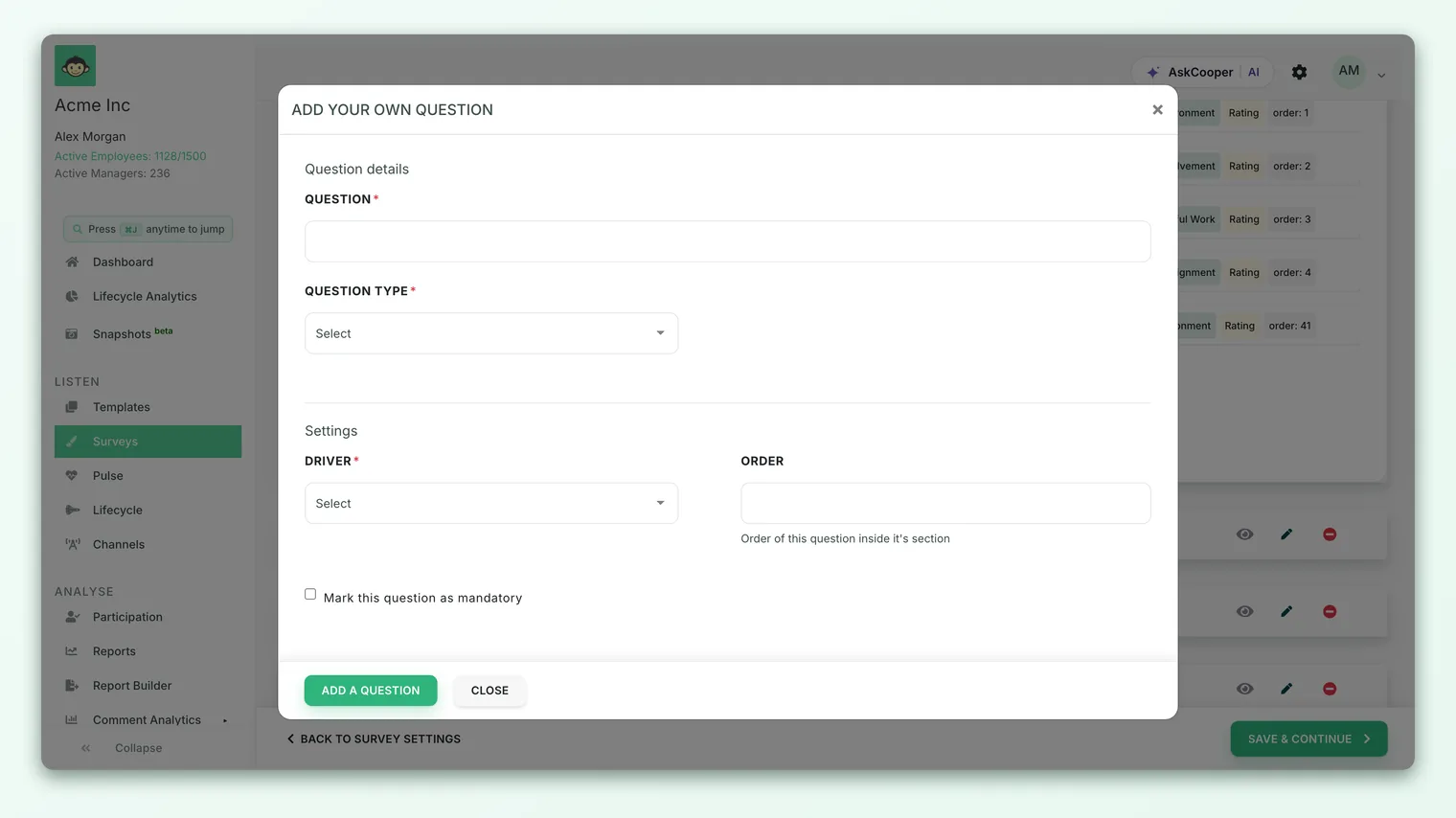
Why the mapping matters so much
The driver you assign to a question decides where that answer shows up in every report. Map a question about your manager to Management and its scores flow into the Management driver; map it - by mistake - to Communication, and you'll quietly distort both drivers. Because reports, benchmarks, heatmaps, trends and action plans all operate at the driver level, a wrong mapping doesn't just mislabel one question; it corrupts the theme.
- 1Write the question around a single theme. A good rating question measures one thing. "My manager gives me useful feedback" is clearly Management; a double-barreled question ("My manager and my pay are fair") can't map cleanly to any driver.
- 2Assign the matching driver. Pick the driver that the question actually measures, not the one you wish scored well.
- 3Prefer the library where you can. Library questions arrive pre-mapped and validated, sparing you the judgment call and keeping results comparable.
- 4Review your mapping before launch. Skim your question list and confirm each one sits under the right driver. Mappings lock when the survey goes live, so this is your last clean chance to fix them.
A driver score is an average of its questions' answers, so a driver backed by a single question is more fragile than one backed by three or four. Where a driver matters to you, give it a few questions so its score is stable and trustworthy.
Choosing the right drivers for your goal
The best driver set depends on what you're trying to learn. A few common goals and where to point your drivers:
| Your goal | Drivers to emphasize |
|---|---|
| Broad annual engagement read | A wide spread across the defaults - Leadership, Management, Recognition, Growth & Development, Communication, Work Life Balance, Purpose Alignment and more - for full diagnostic coverage. |
| Manager effectiveness focus | Management, Communication, Recognition, Involvement. |
| Retention risk | Growth & Development, Rewards, Recognition, Work Life Balance, Wellness. |
| Culture and belonging | Purpose Alignment, Meaningful Work, Social Connection, Leadership. |
| Wellbeing check-in (short pulse) | Wellness, Work Life Balance, Social Connection. |
| A company-specific program or value | A custom driver named for the program, plus defaults for context. |
Two principles guide the choice. First, measure what you're prepared to act on. There's no value in scoring a driver you have no intention or ability to improve - it just lengthens the survey. Second, stay consistent across cycles. If you want to track a driver over time, keep it (and ideally its questions) stable from survey to survey, so a change in the score reflects a change in reality, not a change in what you asked.
It's tempting to include every driver "just in case." Resist it. A tight survey built around the drivers that matter this cycle gets higher completion rates and produces sharper, more actionable reports than a long one that measures everything and prioritizes nothing.
The reporting payoff
Once responses come in, the driver structure you set up is what makes the reports readable. Rating answers are averaged up to a driver score for each theme, and from there almost everything in Analyse is organized by driver:
- Driver scores and heatmaps show every theme's score at a glance, so you immediately see strengths and focus areas (read a heatmap of driver scores).
- Drill-downs by segment let you compare a driver across teams, locations or managers - finding where a theme is strong or weak.
- Trends over time track each driver across cycles, so you can prove whether your actions are working.
- Benchmarks compare your default-driver scores against your industry.
- Action plans attach directly to a driver, closing the loop from "this theme scored low" to "here's what we're doing about it."
None of that is possible without clean driver mapping. The five minutes you spend choosing drivers and checking each question's mapping before launch is what buys you months of clear, comparable, actionable reporting afterward.
Frequently asked questions
How many drivers should a survey use?
As many as your goal needs and no more. A full annual engagement survey commonly spans eight to twelve drivers for good diagnostic coverage; a short pulse might use just two or three. Choose the drivers you'll actually act on, and give the ones that matter a few questions each so their scores are stable.
Can I mix default and custom drivers in one survey?
No. Each survey is either a default-driver survey or a custom-driver survey, and CultureMonkey won't let you combine the two sets in the same survey. Decide which set you're using on the Basic step before you add questions.
What happens to a rating question with no driver?
Every rating question must be mapped to a driver - an unmapped question has nowhere to roll up. Library and template questions come pre-mapped; when you write a custom question, assigning its driver is part of creating it.
Can I change a question's driver after the survey launches?
No. Questions and their mappings lock once the survey leaves Draft, so every respondent answers the same, consistently-mapped survey. Review your mappings during preview - that's your last chance to correct them.
Do custom drivers work with industry benchmarks?
No. Industry benchmarks exist for CultureMonkey's standard drivers. Custom drivers are great for tracking themes unique to your organization, but they won't have an external benchmark to compare against - so reserve them for the things the default set genuinely can't capture.
Do free-text questions map to drivers?
The driver structure is built around rating questions, which produce the numeric driver scores. Free-text comments feed the qualitative side - sentiment and topics - and can be viewed alongside drivers in feedback analytics, but they don't change a driver's score.
Where to go next
- Get the vocabulary first: Key concepts every new user should know
- Go deeper on the theme: Understand drivers and factors
- Build the survey around them: Create a survey from scratch
- Mapping drivers from Workday Peakon? How Peakon questions map to CultureMonkey drivers
Your feedback helps us improve the Help Center.