

Understand Speak Up case stages in CultureMonkey
A complete guide to the Speak Up case lifecycle - the five real stages from New to Closed, what each one means, who can move a case, what the reporter sees, and how the audit trail records every change.
On this page
- The five stages at a glance
- New: the report arrives
- Triage: deciding how to handle it
- Investigation: actively working the case
- Concluding: finalizing the outcome
- Closed: the case is settled
- Which moves are allowed
- Who can move a case
- What the reporter sees
- The audit trail
- Frequently asked questions
- Where to go next
Every report that lands in CultureMonkey Speak Up moves through a defined lifecycle, from the moment it arrives to the moment it's closed. That lifecycle is made up of stages, and knowing what each stage means (and who is allowed to move a case between them) is the difference between a whistleblowing process that's auditable and defensible and one that's a black box.
This guide covers the five real stages in the order a case travels through them, what each stage signals to your case team, what the reporter sees at every step, the rules that govern which move is allowed next, and how each change is written to a permanent audit trail.
A CultureMonkey Speak Up case moves through five stages: New, Triage, Investigation, Concluding, and Closed. Only certain moves are allowed at each step. The case team sees the internal stage name, while the reporter sees a simpler status (Received, Under review, Resolved, Closed). Every transition is logged, and the log can never be edited or deleted.
The five stages at a glance
Speak Up uses exactly five stages. These are the internal names your case team works with:
| Stage | What it signals internally | What the reporter sees |
|---|---|---|
| New | The report has just arrived and nobody has looked at it yet. | Received |
| Triage | Someone is reviewing the report to decide how to handle it. | Received |
| Investigation | The case is being actively worked and looked into. | Under review |
| Concluding | The investigation is wrapping up and an outcome is being finalized. | Resolved |
| Closed | The case is complete and settled. | Closed |
Notice that two internal stages (New and Triage) both appear to the reporter as Received. That's deliberate. Your team needs to distinguish "nobody has picked this up yet" from "someone is actively deciding what to do," but the person who filed the report doesn't need that internal detail. They just need to know their report was safely received. More on the reporter's view below.
New: the report arrives
Every case starts life in New. This is the state a report is in the instant a reporter submits it through your Speak Up portal, before any member of your case team has acknowledged it.
A New case is essentially an inbox item. It has a unique report number, a category, a risk level (inherited from the category), and whatever the reporter chose to share. What it doesn't yet have is a human owner who has looked at it. That's the whole point of this stage: it's the signal that says this needs attention and hasn't had any yet.
From New, a case can only go two directions: forward to Triage, or straight to Closed. It can't leap ahead to Investigation. This forces a deliberate first review before any investigation begins.
The first time a case team member moves a case out of New (or takes any managing action on it), the case is quietly stamped as acknowledged. This acknowledgement timestamp is what the acknowledgement SLA is measured against, so simply picking a case up and moving it forward is enough to record that your team responded.
Triage: deciding how to handle it
Triage is the review stage. A case here has been picked up, and someone is deciding what should happen to it: is this a genuine issue that needs a full investigation, a duplicate, something that can be resolved quickly, or something outside the scope of Speak Up?
Triage exists so that not every report is forced down the same heavyweight path. Some reports need a formal investigation; others can be understood and closed with a short exchange. This stage is where that judgment call gets made.
From Triage, a case can move forward to Investigation or, if a full investigation isn't warranted, jump directly to Closed. What it can't do is move backward to New. Once a case has been triaged, it never returns to the unreviewed state, which keeps the history honest.
Investigation: actively working the case
When a case reaches Investigation, your team is actively looking into what was reported. This is usually the longest-lived stage and the one where most of the real work happens: gathering facts, exchanging messages with the reporter, reviewing attachments, and consulting internally.
Investigation is also the point where the reporter's view changes for the first time. Up to now they've seen Received; once the case enters Investigation, their status updates to Under review. That shift is a meaningful signal to the reporter that their report is being taken seriously and worked on.
From Investigation, a case moves forward to Concluding when the work is nearly done, or straight to Closed if it can be wrapped up directly.
While a case is under investigation, your team can exchange messages that are marked as internal. These are never visible to the reporter, no matter what stage the case is in. Only non-internal messages reach the reporter's side of the conversation.
Concluding: finalizing the outcome
Concluding is the wind-down stage. The investigation is essentially finished and an outcome is being finalized, documented, and communicated. Think of it as the stage between "we've figured out what happened" and "this case is formally done."
When a case reaches Concluding, the reporter's status changes to Resolved. This tells them the substance of their report has been addressed, even though the case may not be formally closed for record-keeping purposes yet.
Concluding is also the first stage that allows a step backward. From here, a case can move on to Closed, but it can also return to Investigation if concluding the case surfaces something that needs more work. That safety valve means you're never forced to close a case prematurely just because you moved it to Concluding a little early.
Closed: the case is settled
Closed is the terminal stage. The case is complete, the outcome is recorded, and no further action is expected. When a case is closed, the moment of closure is timestamped, and the reporter's status becomes Closed.
Closing a case is not a dead end, though. A closed case can be reopened by moving it back to Investigation if new information comes to light. This is the only move allowed out of Closed, and it exists precisely for the situation where a matter you thought was settled turns out not to be.
Everywhere in Speak Up, a case counts as "open" as long as it is in any stage other than Closed. That's how your case list, filters, and any feedback SLA decide whether a case still needs attention.
Which moves are allowed
Stages don't move in a free-for-all. Speak Up enforces a specific set of allowed transitions, so a case can never skip a step it shouldn't or slide back into a state that would break the audit story. Here is exactly what each stage permits:
| Current stage | Can move to |
|---|---|
| New | Triage, Closed |
| Triage | Investigation, Closed |
| Investigation | Concluding, Closed |
| Concluding | Closed, or back to Investigation |
| Closed | Investigation (reopen) |
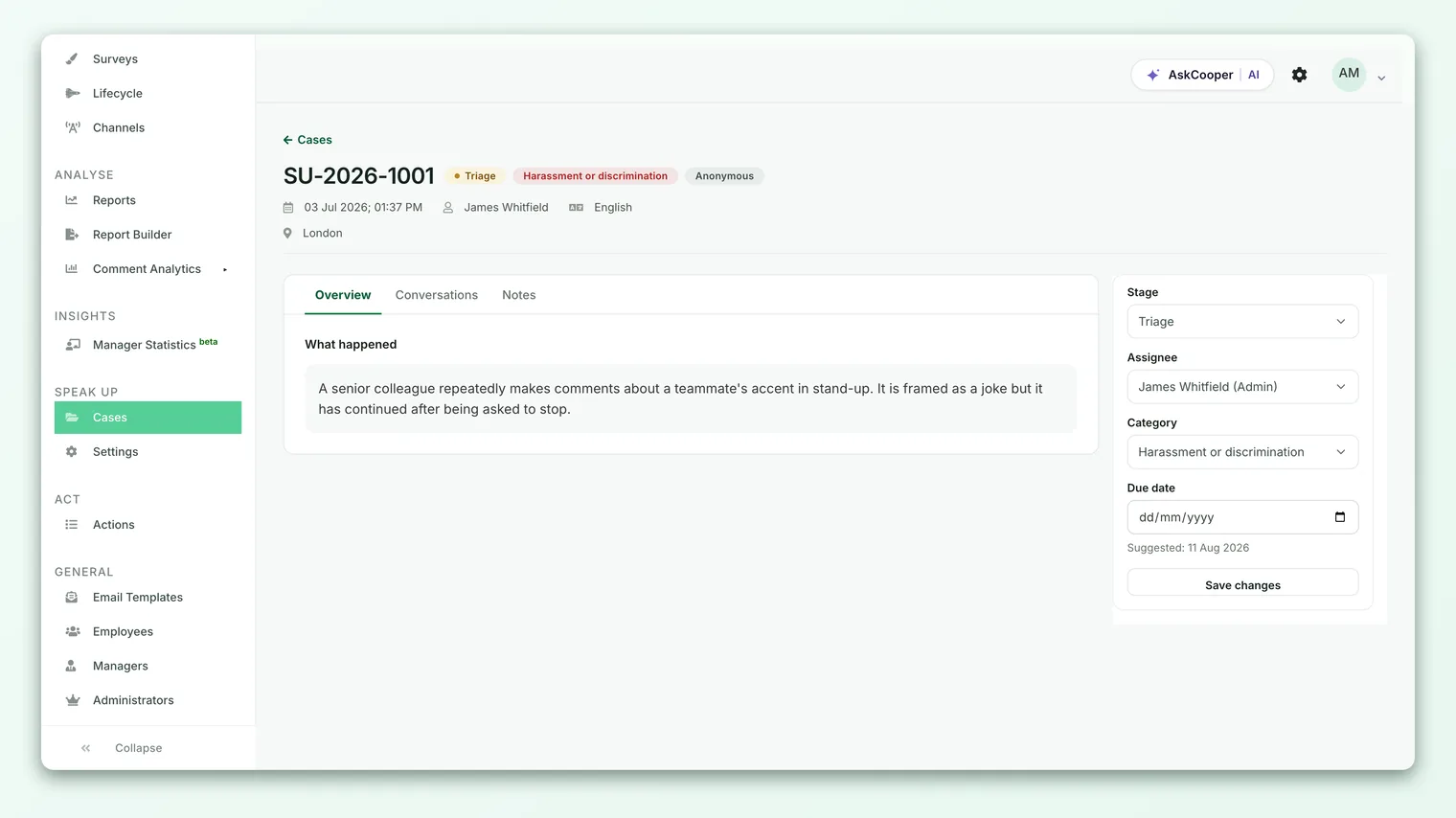
Two patterns are worth calling out. First, Closed is always reachable from any active stage. You never have to march a case through Investigation and Concluding just to close something that clearly doesn't need it. Second, the only backward moves allowed are Concluding back to Investigation and Closed back to Investigation (reopening). There is no path back to New or Triage from anywhere. Once a case has been triaged, that decision is permanent in its history.
If someone attempts a move that isn't on this list, Speak Up refuses it and shows an error rather than quietly allowing it. For the step-by-step of actually performing a move, see Transition a case to the next stage.
Who can move a case
Not everyone with Speak Up access can change a case's stage. Access is governed by roles, and stage changes are reserved for case managers.
Speak Up has three access roles:
| Role | Can view cases | Can change stage and assign |
|---|---|---|
| Admin | Yes, all cases | Yes |
| Member | Yes, assigned categories | Yes |
| Viewer | Yes, assigned categories | No |
Both Admin and Member roles can manage a case, which includes moving it between stages and assigning it to a team member. The Viewer role can view and follow cases in the categories it's granted, but cannot move them. The Admin role additionally sees every case regardless of category, whereas Members and Viewers see only the cases in the categories they've been assigned.
Moving a case is a case-management action. If you can open a case and read it but don't see the option to change its stage, your role is view-only for that case. Ask a Speak Up Admin to adjust your access or reassign the case.
What the reporter sees
The reporter never sees your internal stage names. They see a simpler, reassuring status that maps from the internal stage:
| Internal stage | Reporter status |
|---|---|
| New | Received |
| Triage | Received |
| Investigation | Under review |
| Concluding | Resolved |
| Closed | Closed |
This mapping is intentional. The reporter gets a clear, calm sense of progress (their report was received, it's under review, it's been resolved, it's closed) without exposure to the internal mechanics of who is triaging what. When a stage change crosses one of these boundaries, the reporter is notified, so they always know when their case has genuinely progressed. A move from New to Triage, by contrast, doesn't change what they see, because both read as Received.
Assignment is separate from stage. Assigning a case to a specific team member doesn't move it to a new stage, and it doesn't change the reporter's status. Stage answers "where is this in the lifecycle," while assignee answers "who owns it." See Assign a case to a team member for more on ownership.
The audit trail
Every meaningful thing that happens to a case is written to an immutable audit trail. This is what makes Speak Up defensible: you can show, in order, exactly what happened to a report and who did it.
Each stage change records an audit event that captures the stage the case moved from, the stage it moved to, who made the move (the acting case manager, or the system), and the exact time it happened. The same audit log also records other lifecycle moments, including:
- Case created when the report first arrives
- Stage changed for every transition between stages
- Assignee changed when ownership moves to a different team member
- Message sent and attachment uploaded as the case is worked
- Case closed when the case reaches its terminal stage
The critical property of this log is that it cannot be altered. Audit events can't be edited and can't be deleted once written. That immutability is what turns a list of activity into genuine evidence: nobody can quietly rewrite the history of how a report was handled.
Because transitions are permanent audit events, moving a case is not a casual action. Reopening a closed case, for example, is itself recorded as a stage change with a timestamp and an actor. Treat each move as a documented decision, because that's exactly what it becomes.
Frequently asked questions
Can I skip a stage, for example move straight from New to Investigation?
No. From New, the only forward move is to Triage (or straight to Closed). Every case that gets investigated is triaged first. This enforces a deliberate initial review before any investigation starts.
Can a case go backward to an earlier stage?
Only in two specific ways. Concluding can return to Investigation, and a Closed case can be reopened back to Investigation. There is no path back to New or Triage from any later stage.
Why does the reporter see "Received" for two different stages?
Because New and Triage are internal distinctions your team needs (untouched vs. being reviewed) but the reporter doesn't. Both map to Received so the reporter gets a clean signal without seeing your internal handling.
Does assigning a case change its stage?
No. Assignment and stage are independent in CultureMonkey. You can reassign a case at any stage without moving it, and moving a case doesn't change who it's assigned to.
Who is allowed to close or reopen a case?
Any case manager, meaning a member with the Admin or Member role. The Viewer role can view cases but cannot change their stage, so it cannot close or reopen them.
Can I edit the case history if a mistake was made?
No. CultureMonkey keeps audit events immutable by design. A wrong move is corrected by making a new, valid transition (which is itself logged), never by editing or deleting the record of what happened.
Where to go next
- Actually move a case: Transition a case to the next stage
- Understand the whole feature: What is Speak Up?
- Give a case an owner: Assign a case to a team member
- How investigations run end to end: Workplace investigation software
Your feedback helps us improve the Help Center.