

What is CultureMonkey Speak Up?
An introduction to CultureMonkey's Speak Up module - the anonymous concern-reporting and whistle-blowing platform that lets employees raise sensitive issues safely, and gives your organization a structured, confidential way to investigate and resolve them.
On this page
Speak Up is CultureMonkey's dedicated channel for raising serious concerns: harassment, discrimination, fraud, safety violations, ethical breaches, and anything else an employee needs to report but may not feel safe reporting through normal channels. It's a whistle-blowing platform built into the same product you already use for engagement surveys, designed from the ground up to protect the person who comes forward.
Related release: Speak Up (July 1, 2026). See every dated change on Product Updates.
This guide explains what Speak Up is for, how it keeps a reporter anonymous, how a report travels from submission to resolution, and when your organization should reach for it. It's a conceptual overview. The step-by-step articles linked throughout go deeper on each piece.
CultureMonkey Speak Up gives employees a confidential, optionally anonymous way to report misconduct. A reporter submits a case, receives a unique report number, and can keep talking to your case team through a secure two-way channel without ever revealing who they are. Behind the scenes, a small, trusted group of reviewers moves each case through a defined set of stages until it's resolved and closed.
Why Speak Up exists
Most feedback is safe to give openly. Engagement surveys, pulses, and open-text comments are perfect for the everyday work of understanding how people feel. But some concerns are different. When an employee wants to report something serious - a manager behaving inappropriately, a financial irregularity, a safety risk being ignored - the ordinary feedback loop isn't enough. The stakes are higher, the fear of retaliation is real, and the details are sensitive.
Speak Up is built for exactly these moments. It gives people a route to raise a concern that is:
- Safe. A reporter can stay completely anonymous. Nothing in the system ties an anonymous report back to a name, an email address, or an employee record.
- Confidential. Only a small, named group of trusted reviewers can see a case, and even then only the categories they're responsible for.
- Structured. Every report becomes a formal case that moves through defined stages, with a full audit trail, so nothing gets lost and nothing gets buried.
- Two-way. The reporter and your case team can keep talking after submission, so a case team can ask clarifying questions and the reporter can add detail, all without breaking anonymity.
The result is a system your people can trust with their hardest disclosures, and one that helps your organization take those disclosures seriously.
Survey feedback and Speak Up reports are kept in entirely different parts of the product, with different access controls. A concern raised in Speak Up never shows up in a survey report, and survey administrators don't automatically get access to Speak Up cases. That separation is what makes the trust possible.
How Speak Up protects anonymity
Anonymity isn't a checkbox in Speak Up. It's designed into how the data is stored. This matters because a reporter is only as safe as the weakest link in the chain, so it's worth understanding what actually happens.
When someone submits a report, they choose a reporting mode:
- Anonymous - the default. No name and no email are stored on the case. There is nothing on the record that identifies the person.
- Identified - the reporter chooses to share their name and email, for example because they're comfortable being contacted directly. This is only available if your organization has turned it on.
Whichever mode is chosen at submission is locked in permanently. A case that was reported anonymously can never be flipped to reveal an identity later, by anyone, including administrators. The reporting mode is immutable once the report is created.
A few more design choices reinforce this:
- No login, no account. A reporter doesn't sign in with their work credentials. They reach the portal through a public link, so submitting a report leaves no trace in your normal authentication logs.
- A report number instead of an identity. Every case is assigned a unique reference like
SU-2026-00042. That number, not a name, is how the reporter and the case team refer to the case. - Optional password, not personal details. If a reporter wants to check back on their case later, they set a password of their own choosing at submission. The report number plus that password lets them return. Your team never sees the password, only whether it matched.
- Optional email notifications, encrypted and walled off. A reporter can choose to receive an email alert when there's an update, without revealing their address to the case team. If they provide one, it's encrypted and stored separately from the case, deliberately never attached to the case record itself. Reviewers can't read it.
For the full picture of how each of these works, see How Speak Up protects your anonymity.
The system won't attach a name to an anonymous report, but a reporter can still identify themselves in the free-text description ("I'm the only person on the night shift, and..."). It's worth reminding people that the strongest protection comes from both the platform and thoughtful wording.
The reporter-to-resolution flow
At a high level, every Speak Up case follows the same journey. Here's the whole thing end to end, from the reporter's first click to a closed case.
- 1A reporter opens the portal. They reach a public Speak Up landing page through a link your organization shares. There's no login. See Access the Speak Up portal.
- 2They submit a report. The reporter picks a category (the type of concern), describes what happened, and can optionally attach files. They choose anonymous or identified mode, and can set a password if they want to follow up later.
- 3The case is created and numbered. The system generates a unique report number, records the submission in an audit trail, and, if auto-assignment is on, routes the case to the right reviewer for that category.
- 4The case team is notified. The trusted reviewers responsible for that category see the new case in their Speak Up queue and acknowledge it, usually within a service-level target your organization sets.
- 5The two of you talk, safely. The case team can send messages to the reporter and the reporter can reply, all through the secure channel tied to the report number. The team can also keep internal notes that the reporter never sees.
- 6The case is investigated and resolved. The reviewers work the case through its stages, gathering detail, forming a conclusion, and deciding on any outcome or action.
- 7The case is closed. Once resolved, the case is closed. Depending on your settings, the reporter can be told the outcome. The full history stays on record.
Under the hood, a case moves through five internal stages: new, triage, investigation, concluding, and closed. Reviewers can only move a case along valid paths (for example, a case in triage can go to investigation or be closed, but it can't skip straight ahead), and every change is logged. The reporter sees a simpler, friendlier version of this: their case reads as received, then under review, then resolved, then closed. For a full walk-through of what each stage means and who does what, see The stages of a Speak Up case.
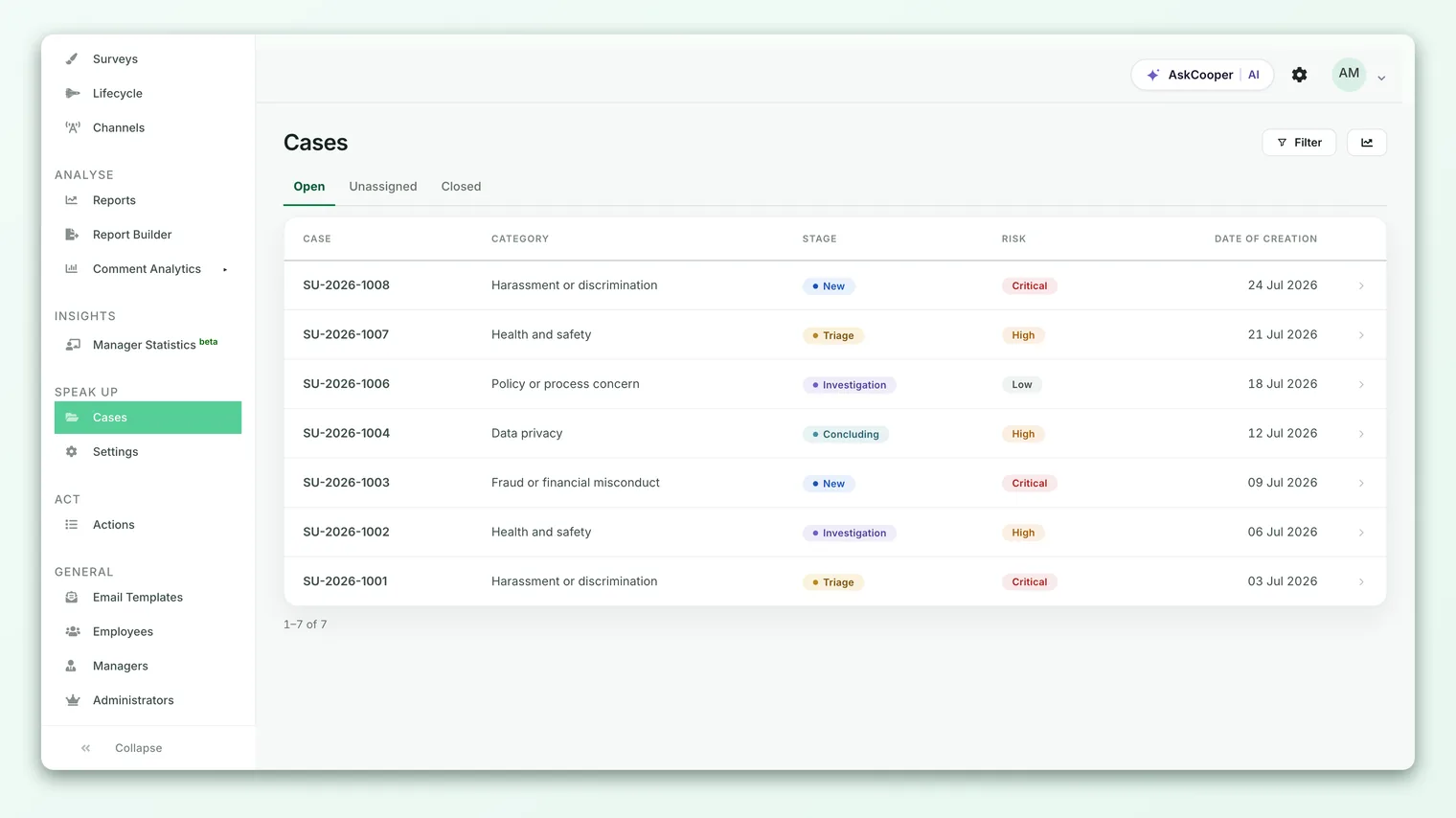
Who can see a Speak Up case
Access to Speak Up is deliberately narrow. Being an administrator of your CultureMonkey account does not, by itself, grant access to Speak Up cases. Instead, a specific set of people are given Speak Up access, each with a role:
| Role | Typical use | What they can see |
|---|---|---|
| Admin | The Chief Compliance Officer or program owner | Every case, across all categories, plus settings |
| Member | Compliance and investigation staff | Cases in the categories they're assigned to |
| Viewer | HR partners who follow and reply to cases | Cases in the categories they're assigned to |
The key idea is category scoping. A reviewer only sees the categories they've been assigned. Someone responsible for "Workplace safety" won't see a "Financial misconduct" case unless they're assigned to that category too. The Admin role is the exception, with visibility across everything, so there's always full oversight.
This scoping is what lets you route sensitive concerns to exactly the right people and no one else. It also means a reporter's concern about their own HR partner can be handled by a different reviewer entirely.
Categories, risk, and routing
Every report belongs to a category that the reporter chooses at submission - things like harassment, discrimination, fraud, or a safety concern. Categories do more than label a report. They shape how it's handled:
- Risk level. Each category carries a risk level (critical, high, medium, or low). That risk flows onto the case, helping reviewers prioritize the most serious concerns first.
- Intake questions. A category can define its own follow-up questions, so a fraud report can ask for different details than a harassment report.
- Routing. Categories drive who sees the case (through category scoping) and, when auto-assignment is on, which specific reviewer the case lands with. Auto-assignment spreads new cases evenly across the reviewers who cover that category, so no one person is overloaded.
Your organization defines its own categories, in as many supported languages as it needs, so the portal speaks to reporters in their own language.
When to use Speak Up
Speak Up is for serious, sensitive concerns that need confidentiality and a formal response. Reach for it when someone needs to report things like:
- Harassment, bullying, or discrimination
- Fraud, theft, or financial irregularities
- Safety or health violations
- Conflicts of interest or ethical breaches
- Retaliation against someone who raised a concern
- Any serious misconduct where the reporter needs to stay anonymous
It is not the right tool for everyday feedback. General opinions about workload, culture, tooling, or management style belong in your engagement and pulse surveys, where they can be aggregated, trended, and acted on at scale. A good rule of thumb: if the concern is about how work feels, use a survey; if it's about something wrong that needs to be investigated, use Speak Up.
The value of Speak Up grows the more people know it exists and trust it. Many organizations link to their Speak Up portal from the intranet, the employee handbook, and onboarding, so that when someone needs it, they already know where to go.
Turning Speak Up on
Speak Up is a distinct module rather than part of the core survey experience, so it has to be enabled for your account before it appears. This is controlled by an account-level setting.
Until it's enabled, the Speak Up area is hidden and the reporter portal isn't reachable. Once it's on, an administrator with Speak Up access can configure the portal - categories, reviewers and their roles, service-level targets, supported languages, and the trust messaging shown to reporters - before sharing the public link with employees.
If you don't see Speak Up in your account and think you should, your account owner or CultureMonkey contact can confirm whether it's enabled for you.
Frequently asked questions
Is Speak Up really anonymous?
Yes, when a reporter chooses anonymous mode. The case stores no name and no email, the reporting mode can never be changed to reveal an identity, and any optional notification email is encrypted and kept separate from the case so reviewers can't read it. The main thing outside CultureMonkey's control is whether a reporter identifies themselves in what they write.
Can an administrator unmask an anonymous reporter?
No. There's no identity stored on an anonymous case to reveal, and the anonymous setting is locked in permanently at submission. Even a full administrator cannot flip an anonymous case to identified.
How does a reporter follow up on their report?
At submission, a reporter can set a password of their own choosing. Later, they return to the portal and enter their report number plus that password to reopen the secure conversation and see updates. They can also opt in to email alerts without exposing their address to the case team.
Who gets notified when a report comes in?
The reviewers assigned to that report's category. If auto-assignment is on, the case is also routed to a specific reviewer to own it. The Admin role always has visibility across all cases.
How is Speak Up different from an engagement survey?
Surveys collect broad, aggregated feedback to measure and improve the employee experience. Speak Up handles individual, serious concerns that need confidentiality and a formal, tracked investigation. They live in separate parts of CultureMonkey with separate access controls, and a Speak Up report never appears in survey results.
Does every report have to be anonymous?
No. If your organization enables identified reporting, a reporter can choose to share their name and email, for instance when they're comfortable being contacted directly. Anonymous remains the default and is always available.
Where to go next
- Get to the portal: Access the Speak Up portal
- Understand the protections: How Speak Up protects your anonymity
- Follow a case end to end: The stages of a Speak Up case
- See the whole module: Anonymous reporting software
Speak Up runs from the portal a reporter opens to the case an investigator closes. The whole path:
- Turn it on: Enable and configure the CultureMonkey Speak Up portal
- Get to the portal: Access the CultureMonkey Speak Up portal
- Raise a case: Raise an anonymous or identified case in CultureMonkey Speak Up
- Set up categories: Configure case categories in CultureMonkey Speak Up
- Roles and trust copy: Configure roles, access and trust copy
- How reporters stay anonymous: How CultureMonkey Speak Up protects reporter anonymity
- See every case: View, filter and track all cases
- The stages a case moves through: Understand Speak Up case stages in CultureMonkey
- Move a case on: Transition a case through stages
- Assign an investigator: Assign cases to investigators
- Notes and replies: Add case notes and message the reporter
- Attach evidence: Attach files to a case
- Response-time targets: Set SLA targets for CultureMonkey Speak Up cases
Your feedback helps us improve the Help Center.