

Start a conversation from a piece of feedback
How to reply to anonymous feedback and open a private, two-way thread with the author - how anonymity is preserved at every step, what the employee sees, and how to control who on your team can start these conversations.
On this page
Some of the most valuable feedback you receive is also the most frustrating: a sharp, specific comment left anonymously, with no way to ask "tell me more" or "here's what we're doing about it." CultureMonkey closes that gap. From almost any piece of textual feedback, you can start a conversation with the person who left it - a private, two-way thread - without ever learning who they are.
This guide walks through how to initiate a conversation from feedback, exactly how anonymity is protected at each step, what the employee experiences on their end, and how to control which admins and managers are allowed to start these threads.
Open a piece of feedback, click Initiate conversation, and type a message. CultureMonkey delivers it to the anonymous author through a secure, tokenized link (no account or login required on their side). They can reply, you can reply back, and the whole exchange stays anonymous. You never see the person's name; they never lose their anonymity by talking to you.
Why start a conversation at all
Anonymous feedback tells you what someone thinks. A conversation tells you why, and lets you actually respond. That two-way loop is where anonymous feedback stops being a suggestion box and becomes a dialogue.
Starting a conversation is the right move when you want to:
- Ask a clarifying question. "You mentioned the new shift roster isn't working - can you say which part specifically?"
- Close the loop. Tell the person what you heard and what you're changing because of it. Employees who see their feedback lead to action are far more likely to stay engaged.
- De-escalate something urgent. If a comment hints at a serious issue, you can respond immediately and privately without exposing the person.
- Show that feedback is safe. Every time an anonymous message gets a thoughtful reply, your people learn that speaking up is worthwhile and that anonymity really holds.
The key promise, and the reason this feature is designed so carefully, is that none of this costs the employee their anonymity. They can talk to you as much or as little as they want, and remain unidentified the entire time.
How anonymity is preserved
Before you start using conversations, it helps to understand why they stay anonymous. The protection isn't a policy or a promise, it's built into how the feature works.
When you initiate a conversation, CultureMonkey does not attach your reply to the employee's name or email in any way you can see. Instead, it generates a random, unguessable access key for that thread (a long, URL-safe token) and delivers your message to the employee through a link built on that key. On your side of the exchange, the person on the other end is only ever labeled as an anonymous employee.
Three design choices keep the wall in place:
- A random token, not an identity. The employee reaches the thread through a link like
/e/feedback/<access-key>, where the access key is a randomly generated string. Nothing in that link reveals who they are to you, and nothing you do reveals who you are pretending to be to them beyond "an admin." - You never see the author. Throughout the conversation, their side is attributed to "an employee, anonymously." CultureMonkey is explicit about this in the interface: feedback is marked as "Left by an employee anonymously," with a note that the platform "ensures the anonymity of each employee at every stage of communication."
- The employee stays in control. The person can choose to reply or not, and can say as much or as little as they like. Talking to you never de-anonymizes them.
CultureMonkey never reveals identity, but an employee can still accidentally give themselves away in what they write ("as the only nurse on the night shift..."). That's a normal limitation of any anonymous channel, not a flaw in the conversation feature. It's worth reassuring people that you won't try to guess who they are. For the bigger picture, see How anonymity keeps your feedback safe.
Before you start
A few things to have in place first:
- You need feedback to reply to. Conversations begin from a specific piece of textual feedback (an open-text comment or a free-text survey answer), so you'll be working inside the Feedback report.
- You need permission. By default, Account Admins and Survey Admins can initiate conversations. Whether sub-admins and managers can is controlled by an account setting, covered in Control who can start conversations below.
- Conversations happen one comment at a time. Each thread is tied to one piece of feedback. If the same person left several comments, each is its own separate, independent thread.
Account Admins and Survey Admins can start conversations from feedback out of the box. Sub-admin and manager access is gated by account settings your Account Admin controls. Guests viewing a shared report link can never initiate a conversation.
Start a conversation, step by step
Here's the flow from an admin's point of view.
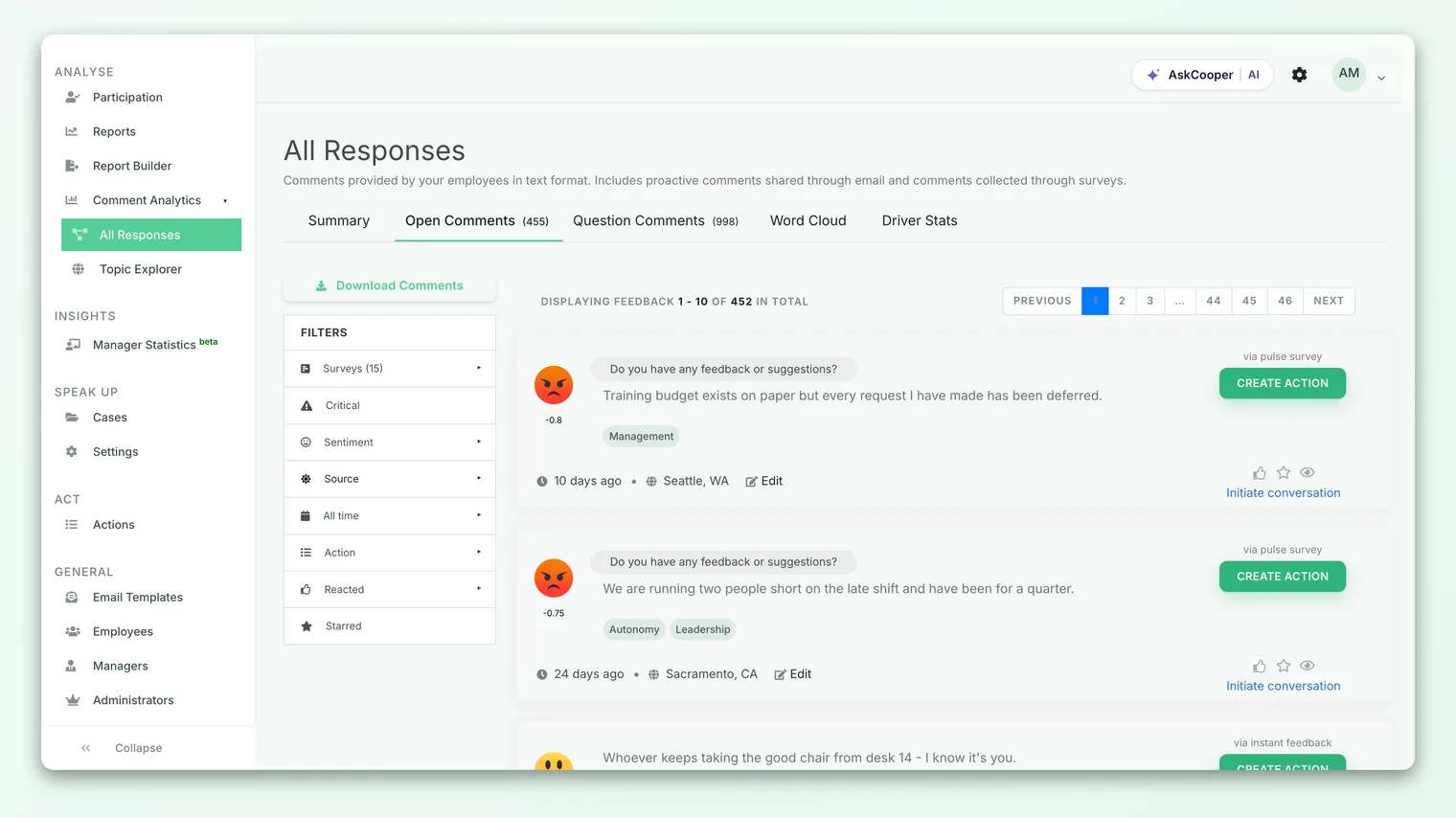
- 1Open the Feedback report. Go to Analyse > Feedback and find the comment you want to respond to. Textual comments and free-text survey answers both support conversations.
- 2Click Initiate conversation. On the feedback card (or in its context menu), choose Initiate conversation. This opens a "Message to employee" panel.
- 3Write your first message. Keep it warm and specific. A good opener acknowledges what they said and asks one clear question, or tells them what you're doing about it.
- 4Send the message. Click Send message. CultureMonkey generates the thread's secure access key and emails your message to the anonymous author through their private link.
- 5Watch for a reply. Once the employee responds, the option on that feedback changes to View messages, with a count of how many messages the thread now holds. Click it to read and continue the exchange.
That's it. There's no separate setup, no need to know an email address, and no way to accidentally reveal who you're writing to. CultureMonkey handles the routing behind the anonymous link.
Because the employee is anonymous, they've taken a small risk by speaking up. A reply that's genuinely curious ("thank you, this is useful, can you tell me more about...") lands far better than one that sounds defensive. The tone of your first message shapes whether they reply at all.
What the employee sees
The person who left the feedback doesn't need a CultureMonkey login, and they don't have to hunt for anything. Here's their experience.
When you send your first message, they receive an email (subject line along the lines of "Hello anonymous! Your feedback has been answered!") that addresses them warmly and links straight to the conversation. That link uses the random access key, so it works only for them and only for this specific thread.
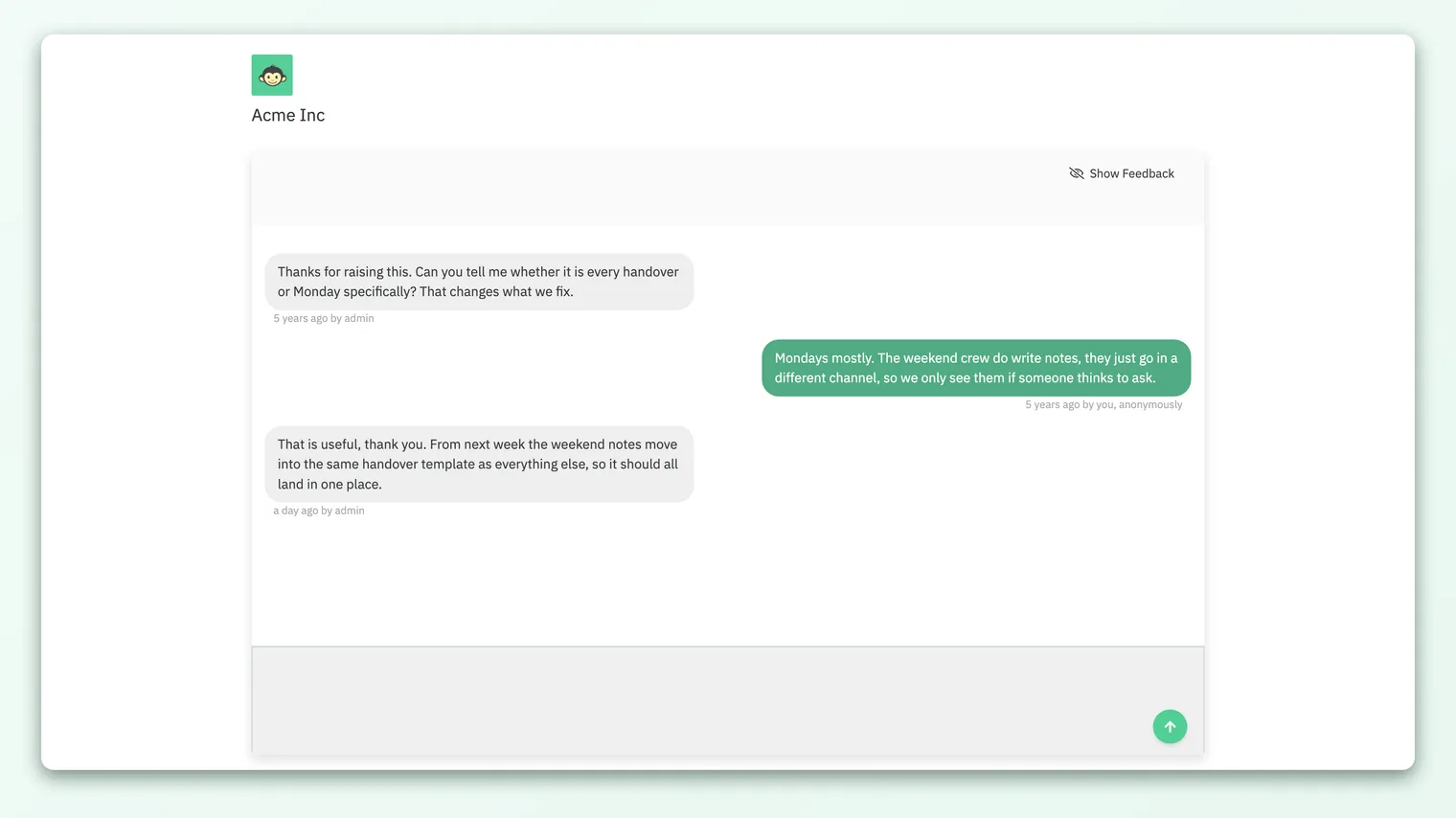
Opening the link takes them to a simple, private conversation screen. There they see:
- Their original feedback, shown as "Left by an employee anonymously," so they know exactly which comment this thread is about.
- Your message, and any earlier ones, laid out as a chat. Their own messages are marked "by employee, anonymously"; your messages appear as coming from an admin.
- A reply box. They can type a response and send it, and the conversation continues. If either side comes back later, further messages generate a fresh email nudge (only when the other person is away), so nobody has to sit and watch the screen.
The employee never has to identify themselves to participate. They reply through the same anonymous link, and their replies reach you inside CultureMonkey without ever attaching their name.
Resolving a conversation
A conversation doesn't have to run forever. When the matter is settled, either side can mark the thread as resolved. Once resolved, the exchange is closed and the reply box is disabled, which signals that the loop is complete. You'll still be able to read the full history; it just won't accept new messages unless reopened.
Resolving is a good habit for a couple of reasons. It gives the employee a clear sense of closure ("this was heard and handled"), and it keeps your conversation list focused on the threads that still need attention. For managing threads over time, see Track and manage feedback conversations.
Control who can start conversations
Not every organization wants every admin or manager to be able to open a private line to an anonymous employee. Because a conversation is a sensitive action (it creates a direct channel to someone who chose to stay anonymous), CultureMonkey lets an Account Admin restrict who can initiate one.
Two account settings govern this, one for each non-super-admin role:
| Role | Setting that hides the option | Effect when enabled |
|---|---|---|
| Sub-admin | Hide Initiate conversation for sub-admins | Sub-admins can read feedback but won't see an Initiate conversation option |
| Manager | Hide Initiate conversation for managers | Managers can read feedback but won't see an Initiate conversation option |
A few things worth knowing about how this gating behaves:
- Super admins (Account Admins) are never restricted by these settings. The controls apply only to the sub-admin and manager roles.
- It hides the entry point, not just the button. When the setting is on for a role, the option to start a conversation simply doesn't appear for that role on any feedback card. People in that role can still read feedback (subject to their other permissions); they just can't open a new thread.
- Guests can never initiate. If someone is viewing feedback through a shared, view-only report link (with no logged-in account), the option to start a conversation is always hidden, regardless of these settings.
Some organizations want conversations to run through a small, trained group (for example, the People team) so that responses are consistent and considerate. Hiding the option for managers or sub-admins is how you route all anonymous dialogue through the right people, without taking away their ability to read feedback.
Best practices
A conversation is a relationship, even an anonymous one. A few habits make them land well:
- Reply quickly. The value of "we heard you" fades fast. A same-day or next-day response tells people the channel is real.
- Ask, don't defend. Your first message should invite more, not justify a decision. Curiosity keeps the thread open.
- Never try to unmask. Don't ask "which team are you on?" or otherwise fish for identity. It breaks trust instantly and undercuts the whole point of anonymous feedback.
- Close the loop out loud. When you act on what you learned, say so. "You raised X, and here's what changed" is one of the strongest trust-builders you have.
- Resolve when done. Marking a thread resolved gives both sides closure and keeps your active list clean.
Frequently asked questions
Will I ever find out who left the feedback?
No. The conversation is designed so that the author's identity is never exposed to you. You see them only as "an employee, anonymously," and CultureMonkey routes your messages to them through a random access key rather than anything tied to their name.
Does the employee have to log in to reply?
No. They receive an email with a private link built on the thread's access key and can read and reply straight from there, without a CultureMonkey account or password.
Can managers start conversations, or only Account Admins?
Account Admins and Survey Admins can by default. Whether sub-admins and managers can is controlled by two account settings, one for sub-admins and one for managers. If your managers don't see the option, one of these is likely switched on.
What happens if the employee never replies?
Nothing breaks. Your message is delivered, and the thread simply waits. Replying is entirely the employee's choice, and choosing not to reply doesn't affect them in any way.
Can I start more than one conversation with the same person?
Not as a single thread. Each conversation is tied to one specific piece of feedback. If the same person left several comments, each comment is its own separate, anonymous thread, and you'd start each one independently.
Is this different from creating an action on feedback?
Yes. Creating an action turns feedback into a task or plan for your team to work on internally. A conversation is a direct, private exchange with the anonymous author. They're complementary: you might start a conversation to understand an issue and create an action to fix it.
Where to go next
- Manage your threads: Track and manage feedback conversations
- Understand the guarantees: How anonymity keeps your feedback safe
- See the metric behind the comments: What is eNPS and how is it calculated?
Your feedback helps us improve the Help Center.