

Group follow-up questions with sub-drivers
How sub-drivers work in CultureMonkey - a second taxonomy that groups the rating follow-up questions asked underneath your survey questions, so their scores roll up on their own instead of blending into driver scores.
On this page
When someone gives a low rating in a survey, the most useful thing you can do next is ask why. CultureMonkey lets you attach a follow-up question to a specific answer on a rating scale, so a person who picks 1 or 2 gets asked a targeted question the rest of the room never sees. Those follow-ups collect the sharpest data in the whole survey - and they need somewhere to be grouped. That's what a sub-driver is for.
A sub-driver groups your rating follow-up questions the way a driver groups your ordinary survey questions. You manage the list in CultureMonkey at Organisation Settings > Sub-drivers. Every rating follow-up must be assigned to one; free-text follow-ups don't use them. Follow-up scores roll up to their sub-driver separately from driver scores, and appear as a Sub Drivers section in the heatmap drill-down.
What a sub-driver is
A sub-driver is a label you create once and then reuse across surveys. It has one job: to gather rating follow-up questions that are all asking about the same underlying thing, so they can be scored together.
The parallel with drivers is exact, and it's the fastest way to understand it. A driver like Recognition gathers several ordinary survey questions and gives you one score for the theme. A sub-driver like Workload gathers several rating follow-ups and gives you one score for that theme. Same idea, one level down, on a different set of questions.
The list is account-wide, not per-survey. Create Manager support once and every survey you build afterwards can point its follow-ups at it, which is what makes the scores comparable from one survey cycle to the next.
Why follow-ups need their own grouping
The obvious question is why a follow-up can't just inherit the driver of the question that triggered it. The answer is that it would quietly corrupt your driver scores.
A follow-up is only ever answered by the slice of people who gave a particular rating - usually the unhappy ones. If those answers were folded into the parent driver, the driver's score would be computed from a deliberately skewed sample: everybody's rating, plus an extra helping of the low raters' opinions. The driver would drift downward for reasons that have nothing to do with what changed at work.
So CultureMonkey keeps them apart on purpose. A follow-up question never carries a driver, which is precisely what keeps its answers out of every driver-scored surface. It carries a sub-driver instead, and its answers roll up there.
A driver score answers "how does the organisation feel about this theme?" - it's a whole-population number. A sub-driver score answers "among the people who already told us something was wrong, how bad is this particular cause?" - it's a diagnostic number. Don't put them side by side and compare them; they're measuring different populations.
Where to manage sub-drivers
Sub-drivers live in Organisation Settings > Sub-drivers, directly below Drivers in the settings menu. You need admin access to the settings area to see it.
The screen is deliberately plain: a short explanation, one field to add a sub-driver, and the current list with a Rename and a Delete control on each row. There's nothing else to configure - no weights, no thresholds, no per-survey settings. A sub-driver is just a name that questions can point at.
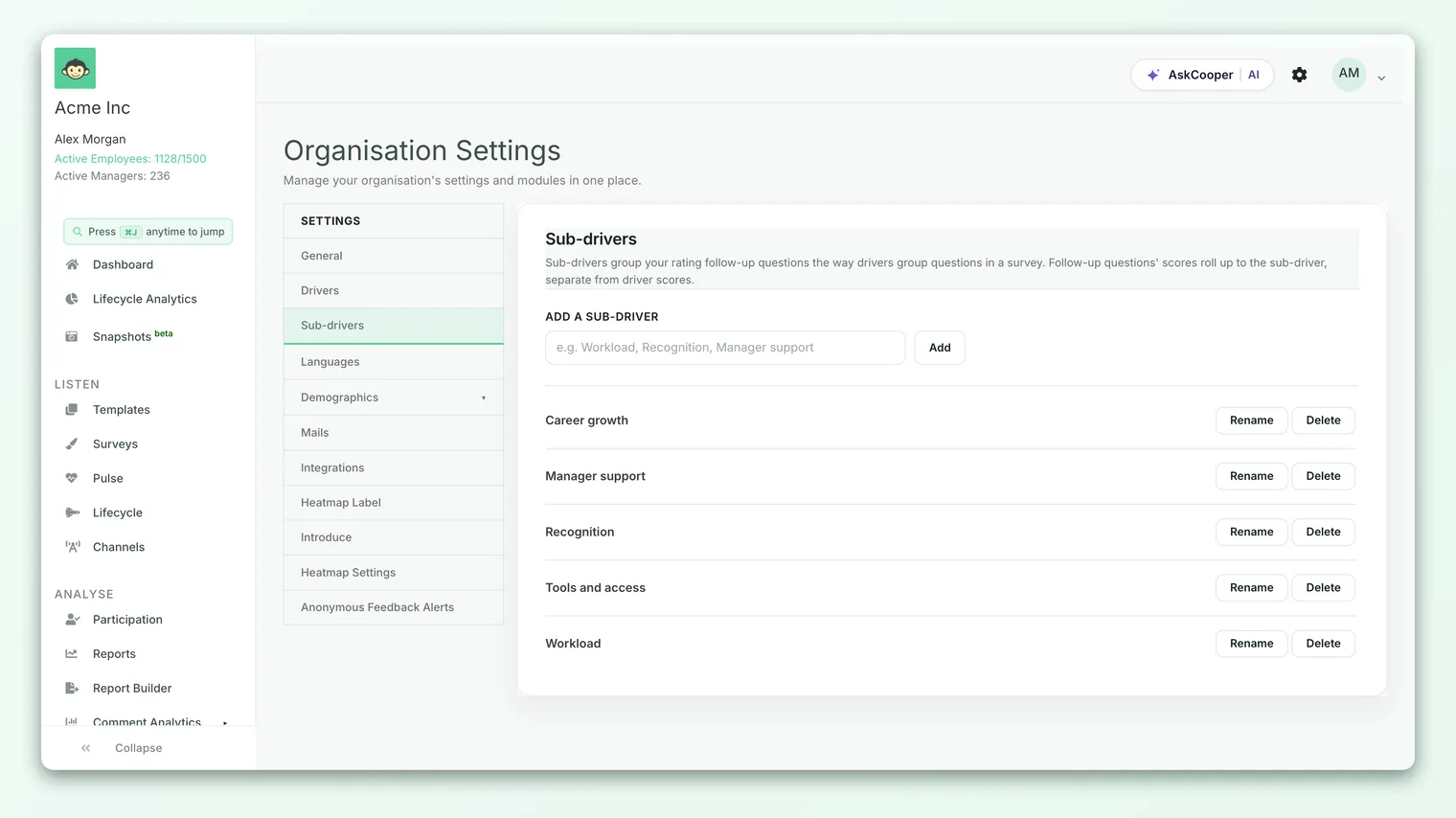
Create a sub-driver
- 1Go to Organisation Settings > Sub-drivers.
- 2Type a name into the Add a sub-driver field - something like Workload, Recognition, or Manager support.
- 3Click Add. The new sub-driver appears in the list immediately and is available to every survey from that moment.
Names must be between 2 and 120 characters, and they have to be unique - CultureMonkey won't let you add a second Workload, and it ignores capitalisation when it checks, so workload counts as the same name. If you try, you'll get an error rather than a duplicate row.
You don't need the full taxonomy on day one. Add sub-drivers as you write follow-ups and discover what they're actually about. Five well-chosen names that each gather several questions are worth far more than twenty that gather one question each.
Rename a sub-driver
Click Rename on any row. The name turns into an editable field; change it and click Save, or Cancel to back out.
Renaming is safe and non-destructive. Every question already pointing at the sub-driver keeps pointing at it, and past scores stay attached - you're changing the label, not regrouping anything. That makes renaming the right move whenever a sub-driver's meaning has drifted, or you simply picked a clumsy name the first time.
Delete a sub-driver
Click Delete and confirm. This only works while nothing is using the sub-driver.
If a survey has a follow-up question mapped to it, the Delete control is disabled and hovering it explains why: a live survey has this sub-driver mapped to a question, so it can't be deleted yet. This is a hard guarantee, enforced in the database as well as the interface - there is no way to orphan a question by deleting the sub-driver underneath it.
To retire one that's in use, repoint its questions at a different sub-driver first, then come back and delete it. If the surveys involved have already run, consider renaming it to something like Workload (retired 2026) instead, so the historical scores keep a name that makes sense.
Assigning a sub-driver to a follow-up
You don't assign sub-drivers from the settings screen - you assign them in the survey builder, on the follow-up question itself. When you add a follow-up to a specific answer on a rating question, the question form offers a sub-driver dropdown listing everything from your settings list.
| Follow-up type | Sub-driver |
|---|---|
| Rating follow-up | Required. The question can't be saved without one, because its answers need somewhere to roll up. |
| Free-text follow-up | Not used. There's no score to roll up, so free-text follow-ups don't take a sub-driver at all - they're read as comments. |
The full mechanics of building follow-ups - which answers can trigger them, how many you can attach, and how they appear to the respondent - are covered in Conditional and follow-up questions.
Where sub-driver scores show up
Sub-driver scores surface where you'd want them: at the moment you've spotted a weak spot in the heatmap and are asking what's behind it.
Click a cell in the driver heatmap to open the drill-down, and above the list of questions you'll find a Sub Drivers section. Each row is one sub-driver reachable from the driver you clicked, scored on that group's answers to the rating follow-ups underneath it. Rows are ordered worst score first, so the most actionable cause is at the top.
Expand a row to see the individual follow-up questions that make up its score, also worst first. A sub-driver can gather a lot of follow-ups, so long lists show the first eight with a control to reveal the rest.
Some rows may show a dash instead of a score. That means the group you drilled into gave no answers to those particular follow-ups - which is itself worth seeing, so the row stays visible rather than being hidden. If no sub-driver in the drill-down has a score, the section doesn't render at all.
Follow-ups are answered by a subset of a subset, so their counts get small quickly. The same anonymity threshold that governs the rest of your reporting governs these scores, which is a common reason a sub-driver row shows a dash for a small team but a number for the organisation as a whole.
How to name them well
A sub-driver only earns its keep if the questions inside it genuinely belong together. A few habits that help:
- Name the cause, not the symptom. Workload and Tools and access are causes you can act on. Unhappy is a symptom, and everything would end up in it.
- Keep them narrower than drivers. A sub-driver sits under a driver in practice, so if a name feels like it could be a driver, it's probably too broad.
- Reuse before you add. Check the list first. Two sub-drivers meaning almost the same thing split one score into two weaker ones.
- Write them so a manager understands them. These names appear in the drill-down that managers read. Avoid internal shorthand and project code names.
- Expect the list to be short. Most accounts settle at somewhere between five and fifteen. If yours is growing past that, some of them are probably duplicates in different words.
Frequently asked questions
What's the difference between a driver and a sub-driver?
The set of questions they group. A driver groups ordinary survey questions that everyone answers. A sub-driver groups rating follow-up questions, which only the people who gave a particular rating ever see. They're scored separately and never mix.
Do sub-driver scores change my driver scores?
No, and that's the point of the separation. CultureMonkey excludes follow-up answers from driver scores, your engagement score, and the rest of the driver-scored reporting. Adding follow-ups to a survey will not move those numbers.
Can I reuse one sub-driver across several surveys?
Yes - the list is account-wide and reuse is the intended pattern. Pointing each cycle's follow-ups at the same sub-drivers is what lets you watch a cause improve over time instead of getting a fresh set of unrelated labels every survey.
Why is the Delete button greyed out?
CultureMonkey greys it out because a survey has a follow-up question mapped to that sub-driver. Repoint those questions at a different sub-driver and Delete becomes available again. If the survey has already run, renaming is usually the better option so the historical scores keep a sensible label.
I created a sub-driver but see no scores. Why?
A sub-driver has no score of its own - it takes one from the rating follow-ups assigned to it. Until a survey with those follow-ups has run and collected answers, there's nothing to roll up. Check that a rating follow-up actually points at it, that the survey has responses, and that the group you're drilling into clears the anonymity threshold.
Where to go next
- Build the follow-ups themselves: Conditional and follow-up questions
- Get the driver taxonomy right first: Choose the right drivers for your survey
- See sub-driver scores in context: Drill down into driver performance
Your feedback helps us improve the Help Center.