

Conditional and follow-up questions
How to ask a follow-up question based on a previous answer - for example, asking detractors "what's the reason?" - including which triggers are supported, how to set one up, and how conditional answers show up in reporting.
On this page
Not every question should be asked of every person. If someone rates their manager a perfect 5, asking them "what went wrong?" is jarring - but asking the person who scored a 1 exactly that is one of the most useful questions in the whole survey. Conditional questions let you do this: they show a follow-up question only when a respondent gives a particular answer to the question above it.
Related releases: eNPS Conditional Questions (July 15, 2026) and Conditional Questions (June 10, 2026). See every dated change on Product Updates.
This is the survey-design equivalent of a good conversation. You ask the main question, listen to the answer, and then ask the natural next thing - "why?" - of just the people whose answer makes that question worth asking. The result is a shorter survey for most respondents and richer, more specific feedback where it counts.
Turn on Enable conditional questions for a rating or single-select question, choose which answer should act as the trigger (a specific rating value or a specific option), and type the follow-up you want to ask. When a respondent picks that answer, CultureMonkey shows the follow-up inline; when they pick anything else, they never see it. Follow-ups are always open-text, and their answers get their own view in reporting.
This article covers question-level logic - showing one question based on the answer to another. If instead you want to show or hide an entire section of a survey based on a demographic or an earlier response, that's a different tool: see Show or hide a section by rule.
What a conditional question is
A conditional question is a follow-up attached to a parent question. It has three parts:
- A parent question - the question whose answer decides what happens next. This must be a rating question or a single-select (multiple-choice) question.
- A trigger - the specific answer that reveals the follow-up. For a rating question this is a particular point on the scale (say, a 1 or a 2); for a single-select question it's a particular option.
- The follow-up itself - the question you want to ask the people who gave that answer. Follow-ups are always open-text, so they're designed to capture the why behind a score or a choice.
The classic use is the eNPS-style loop: ask "how likely are you to recommend us as a place to work?", then ask only the low scorers "what's the main reason for your score?" You get the number from everyone and the explanation from exactly the people you most need to hear from. (For the eNPS metric itself, see What is eNPS and how is it calculated?.)
What triggers are supported
CultureMonkey supports two kinds of trigger, depending on the parent question's type.
| Parent question type | Trigger you choose | Example |
|---|---|---|
| Rating (scale or smiley) | A specific value on the scale | "When respondent selects 1 - Very sad, ask: What would make this better?" |
| Single-select (multiple choice) | A specific option | "When respondent selects No, ask: What's stopping you?" |
A few things to understand about how triggers work:
- The trigger is a single, exact answer. Each condition watches for one value or one option. It isn't a range or a threshold - so to ask the same follow-up of everyone who scored 1, 2, or 3 on a 5-point scale, you'd add three conditions (one per value), each pointing at the same follow-up wording.
- Smiley scales use the label, not just the number. On a smiley-style rating question the trigger dropdown shows the value alongside its label -
1 - Very sad,2 - Sad, and so on - so you're choosing the feeling, not just a digit. - *The trigger always reads the same question's answer. A follow-up is driven by the answer to the question it hangs off - not by the answer to some other question elsewhere in the survey. There's currently no cross-question or compound ("answered A and* B") logic at the question level.
The Enable conditional questions toggle appears only on rating and single-select questions. Open-text, multi-select, and other question types can't act as a parent. This is by design - a follow-up needs a discrete, predictable set of answers to trigger on.
How to set up a follow-up question
Conditional questions live inside the survey builder, on the individual question you want to attach the follow-up to. You'll find them while editing any survey or reusable survey template.
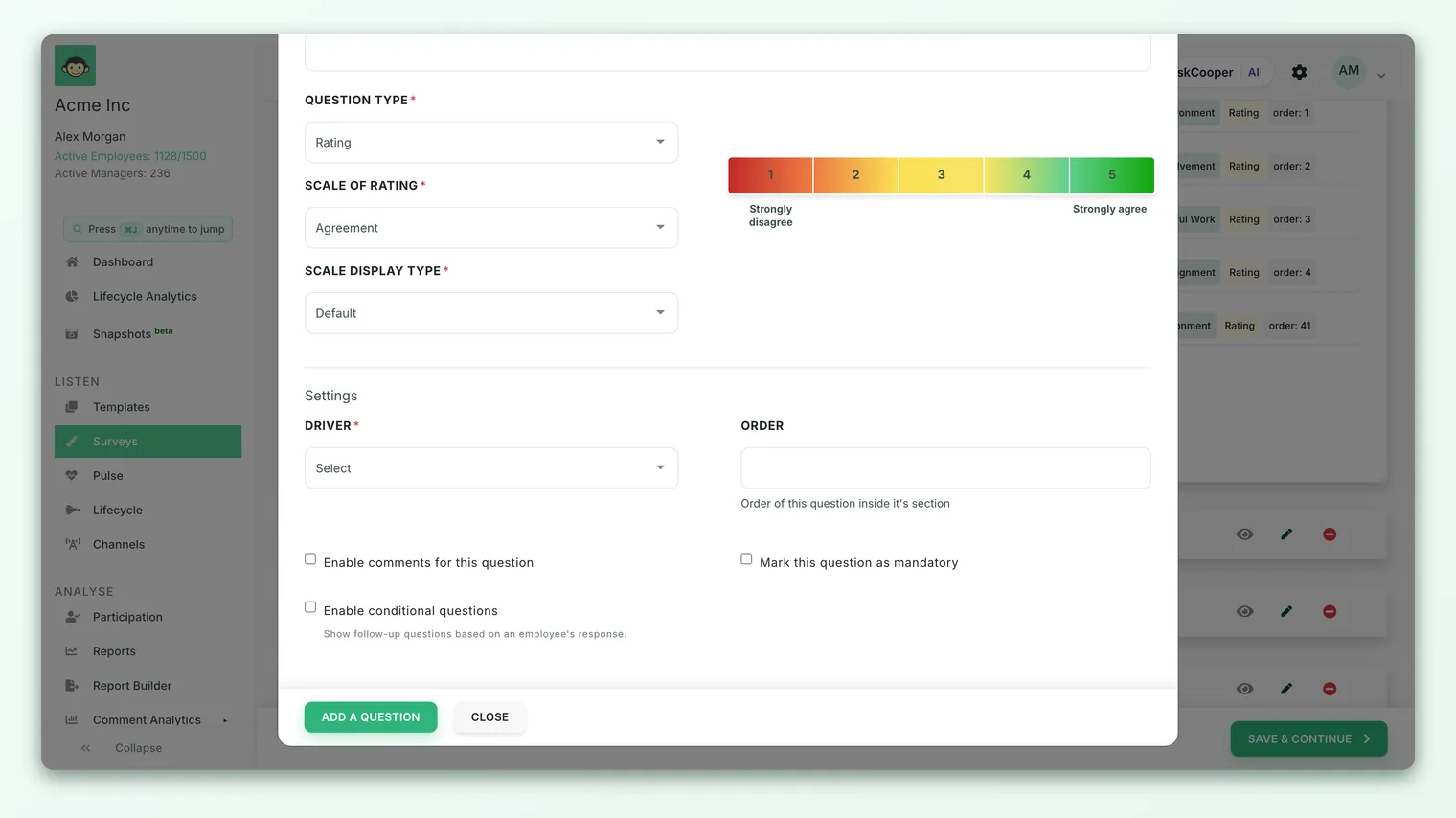
- 1Open the question - in the survey builder, edit the rating or single-select question you want to add a follow-up to.
- 2Turn on conditional questions - tick Enable conditional questions ("Show follow-up questions based on an employee's response"). A conditional-questions panel appears beneath the question.
- 3Add a condition - click Add conditional question.
- 4Choose the trigger - under When respondent selects, pick the rating value or the option that should reveal the follow-up.
- 5Write the follow-up - under Ask this follow-up question, type the question you want that group to answer (up to 300 characters).
- 6Decide if it's required - tick Required if respondents must answer the follow-up before submitting; leave it unticked to make the follow-up optional.
- 7Save - the condition appears in the list as a
WHEN … ASK …row. Add more conditions the same way, and drag the rows by their handle to reorder how multiple follow-ups appear.
Each WHEN … ASK … row is editable in place: use the pencil icon to change the wording or the required flag, and the minus icon to delete it.
If you maintain reusable survey templates, you can attach conditional questions there. Every survey created from that template inherits the follow-ups, so you don't have to rebuild your "why?" questions each cycle.
Limits and guardrails
A few product rules shape what you can build:
- A per-trigger cap. You can attach more than one follow-up to the same trigger, but only up to a set limit per trigger (the default is 3). This keeps a single answer from unleashing a wall of follow-ups.
- The follow-up must be a different question. A question can't be its own follow-up.
- Changing the parent's type or scale clears its follow-ups. If you switch a rating question to a different scale, or change its question type, its conditional questions are removed (and the toggle switches off), because the old triggers no longer make sense. Set the parent up the way you want before you build follow-ups on it.
- Turning the toggle off deletes the follow-ups. Disabling Enable conditional questions permanently removes the follow-ups attached to that question - the builder asks you to confirm first. This can't be undone.
Conditional questions are gated by an account-level setting. If you don't see the Enable conditional questions toggle on your rating and single-select questions, the feature isn't enabled for your account - contact your CultureMonkey admin or your customer success manager to have it turned on.
How it changes the respondent's path
For the person taking the survey, conditional questions are invisible until they're relevant - which is exactly the point.
- Follow-ups stay hidden by default. When the survey loads, every follow-up block is hidden. The respondent just sees the parent question.
- They appear the moment the trigger is chosen. As soon as someone selects the trigger answer - clicks the smiley, picks the option - the matching follow-up slides into view, right below the parent, ready to answer.
- They disappear if the answer changes. If the respondent changes their mind and picks a different answer, the follow-up hides again and its content is set aside, so nobody is stuck with a leftover question from an answer they no longer hold.
- Required follow-ups are only required when shown. A follow-up marked Required blocks submission only for the people who actually triggered it. Everyone else sails past - they were never asked, so they're never blocked.
The effect is a survey that feels appropriately short to most people and appropriately curious with the few who signalled something worth exploring. Nobody rating everything a 5 gets interrogated; the person who rated something a 1 gets a chance to say why while it's fresh.
Making a follow-up Required guarantees you'll hear from everyone who triggered it, but it also raises the cost of an honest low score - a detractor now has to write something to finish. If your goal is to make it safe to score low, consider leaving the "why?" optional. You'll get fewer comments, but the ones you get are freely given.
How conditional answers show up in reporting
Because follow-ups are open-text, their answers flow into reporting as comments tied to the parent question - not as a separate score. The number on the parent question (your eNPS, your rating average) is calculated from everyone's rating exactly as before; the follow-up simply adds the why underneath it.
In the survey report, a parent question that has follow-ups gets a dedicated conditional-questions view. It's organised so you can read the reasons grouped by the answer that prompted them:
- Tabs per trigger. Each trigger - each rating value or option that has a follow-up - gets its own tab (for example, "Rating 1", "Rating 2", or the option label), so you can jump straight to the detractors' reasons without wading through everyone else's.
- A picker for multiple follow-ups. If a single trigger has more than one follow-up, a dropdown lets you switch between them within that tab.
- The answers themselves. Each response is shown as open text, along with a sentiment score and how long ago it was submitted, paged a few at a time so long lists stay manageable.
- An empty state where nobody triggered. If no one gave the triggering answer, the tab simply says there are no responses yet for that option - which is itself a useful signal.
You can also export conditional-question responses from the report, so the reasons behind a score can travel into a spreadsheet alongside the rest of your analysis.
Follow-up answers are protected by the same anonymity thresholds as every other result in CultureMonkey. If too few people triggered a follow-up, its responses stay hidden until enough have answered, so no individual's comment can be traced back to them. An empty conditional view can mean "nobody triggered it" or "not yet enough responses to show safely."
Best practices
- Reserve follow-ups for the answers that need explaining. The best use is asking low scorers "why?" and, sometimes, high scorers "what's working so well?". Attaching a follow-up to every possible answer defeats the purpose and lengthens the survey for everyone.
- Ask one clear thing. A follow-up is open-text, so make it a single, specific prompt - "What's the main reason for your score?" beats "Tell us everything about your experience."
- Mind the per-trigger cap. Just because you can add up to three follow-ups per trigger doesn't mean you should. One good "why?" usually beats three.
- Set the parent up first. Because changing a question's type or scale wipes its follow-ups, finalise the parent question before building conditions on it.
- Preview before you send. Take the survey yourself, trigger each condition, and confirm the right follow-up appears (and that a Required one blocks submission as intended).
Conditional questions vs section visibility rules
These two features solve related-but-different problems, and it's worth knowing which to reach for.
| Conditional questions | Section visibility rules | |
|---|---|---|
| What it controls | Whether a single follow-up question appears | Whether an entire section of the survey appears |
| What it reacts to | The answer to the question directly above it | Demographics or earlier answers/rules |
| Typical use | "Ask detractors why?" | "Only show the 'New joiner' section to people in their first 90 days" |
| Follow-up format | Always open-text | Any questions in the section |
If you're adding a "why?" to one question, use conditional questions. If you're tailoring whole blocks of the survey to different audiences, use section visibility rules.
Frequently asked questions
Can I trigger a follow-up on a range of scores, like "any rating below 3"?
Not with a single condition - each condition watches for one exact value. To cover a range, add one condition per value (for example, a condition for 1 and a condition for 2), each pointing at the same follow-up wording. They'll behave as one "low score" follow-up.
Can a follow-up be a rating or multiple-choice question?
No. Follow-ups are always open-text, because their job is to capture the reasoning behind an answer. If you need a structured follow-up, add it as a normal question in the survey instead.
Can I show a question based on the answer to a different question?
At the question level, no - a follow-up reacts only to the answer of the question it's attached to. To vary the survey based on an earlier answer or a demographic across questions, use section visibility rules.
Do follow-up answers affect the eNPS or rating score?
No. CultureMonkey calculates the parent question's score from the ratings alone. Follow-up answers are context - the why - and appear as comments in the conditional-questions view, not in the number itself.
Why can't I see the "Enable conditional questions" toggle?
Either the question isn't a rating or single-select type (only those can have follow-ups), or the feature isn't enabled for your CultureMonkey account. If it's the latter, ask your admin or CSM to turn it on.
What happens to a follow-up if I change the question afterwards?
Changing the parent question's type or its rating scale removes its follow-ups and switches the feature off, because the old triggers no longer apply. Rebuild the follow-ups after you've finalised the question.
Where to go next
- Tailor whole sections, not just questions: Show or hide a section by rule
- Build the survey these questions live in: Create a survey from scratch
- Understand the metric behind the classic "why?" follow-up: What is eNPS and how is it calculated?
Your feedback helps us improve the Help Center.