

Updates on Org Hierarchy Trace a driver score to its questions, and see eNPS by manager
Click a low driver score for one manager's team to see the questions causing it, without leaving the hierarchy. Manager rows also show eNPS next to the Overall score.
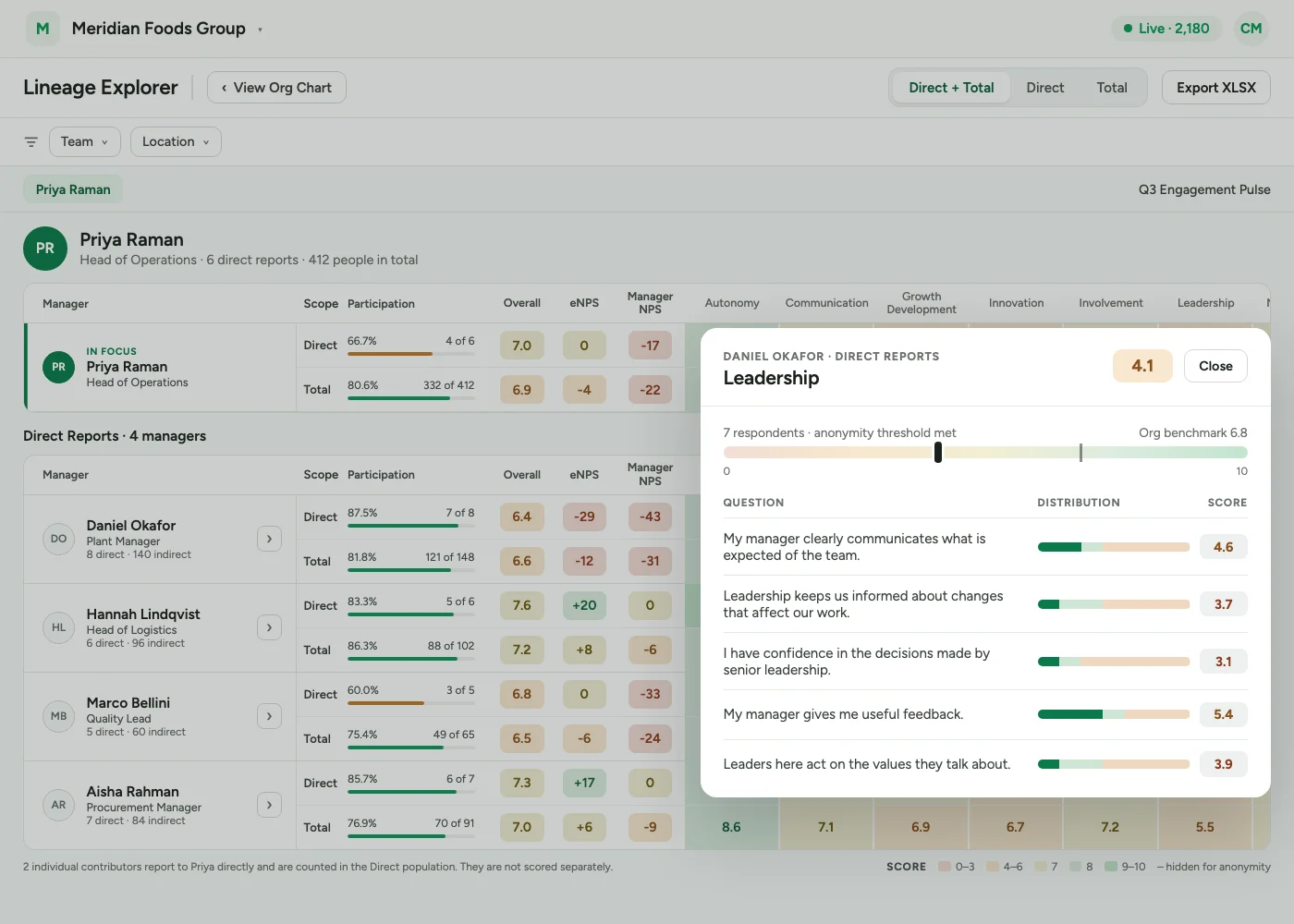
A driver score now opens the questions behind it. In the Lineage Explorer, click any driver score to see how each question in that driver scored for that manager and the row you clicked, so a low driver can be traced to the questions causing it without leaving the hierarchy. The grid also shows eNPS, and each custom eNPS question, for every manager.
Org Hierarchy, including these Lineage Explorer updates, is available on request through your Success Manager.
Click a driver score to see its questions
To open the questions behind a driver score:
- 1Open Org Hierarchy and select a manager.
- 2Choose Open lineage explorer.
- 3Click any driver score in the grid.
A window opens listing every question in that driver. For each question you see:
- Score: the question's own score.
- Distribution: a bar splitting responses into favourable, neutral and unfavourable.
- Responses: the number of responses behind the bar.
Your organisation's average for the same questions is marked alongside, on the same 0-10 track, so a score reads as high or low for your organisation rather than in the abstract.
It follows the row you click
The people behind the breakdown always match the row the score came from:
| Opened from | Who the breakdown covers |
|---|---|
| Direct row | That manager's direct reports |
| Total row | The manager plus everyone below them |
When the group behind a row is below your account's anonymity threshold, its question breakdown is not shown.
The same bands as the rest of CultureMonkey
The favourable, neutral and unfavourable split uses your account's heatmap bands and adapts to the survey's scale. With the default bands:
| Survey scale | Unfavourable | Neutral | Favourable |
|---|---|---|---|
| Five-point | 1-2 | 3 | 4-5 |
| Ten-point | 1-4 | 5-7 | 8-10 |
| Percentage | 1-49 | 50-79 | 80-100 |
A question shown as favourable here is favourable everywhere else in CultureMonkey.
eNPS for every manager
The Lineage Explorer grid now has an eNPS column, plus one column for each custom eNPS question the survey asked. They sit next to Overall, ahead of the driver scores, on both Direct and Total rows. Total covers a manager's direct and indirect reports together.
- eNPS appears only when a specific survey is selected. It is not shown in the Current Hierarchy view, which covers all surveys.
- Custom eNPS columns appear, if your account uses custom eNPS, for the custom eNPS questions that were answered on that survey. This is the same rule the reports heatmap uses, so both screens show the same set of columns.
- A custom eNPS question that has since been retired keeps its column if it was answered while it was live.
Who can use it
| Role | Access |
|---|---|
| Super Admin | Yes |
| Sub Admin | Yes, for the part of the organisation they can see, when your account also gives Sub Admins access to Org Hierarchy |
| Manager, Report View Only | No |
New to Org Hierarchy? The February release covers the Current and Survey-Based views.
See what a warmer engagement platform looks like
Book a walkthrough and we will show you the features on this page, live in your workspace.