

Updates on Conditional Questions Rating follow-ups, grouped under sub-drivers
Conditional Questions can now ask a rating follow-up, so the reason behind a low or high score becomes something you can measure. Rating follow-ups are grouped under sub-drivers and reported on their own, separate from every overall score.
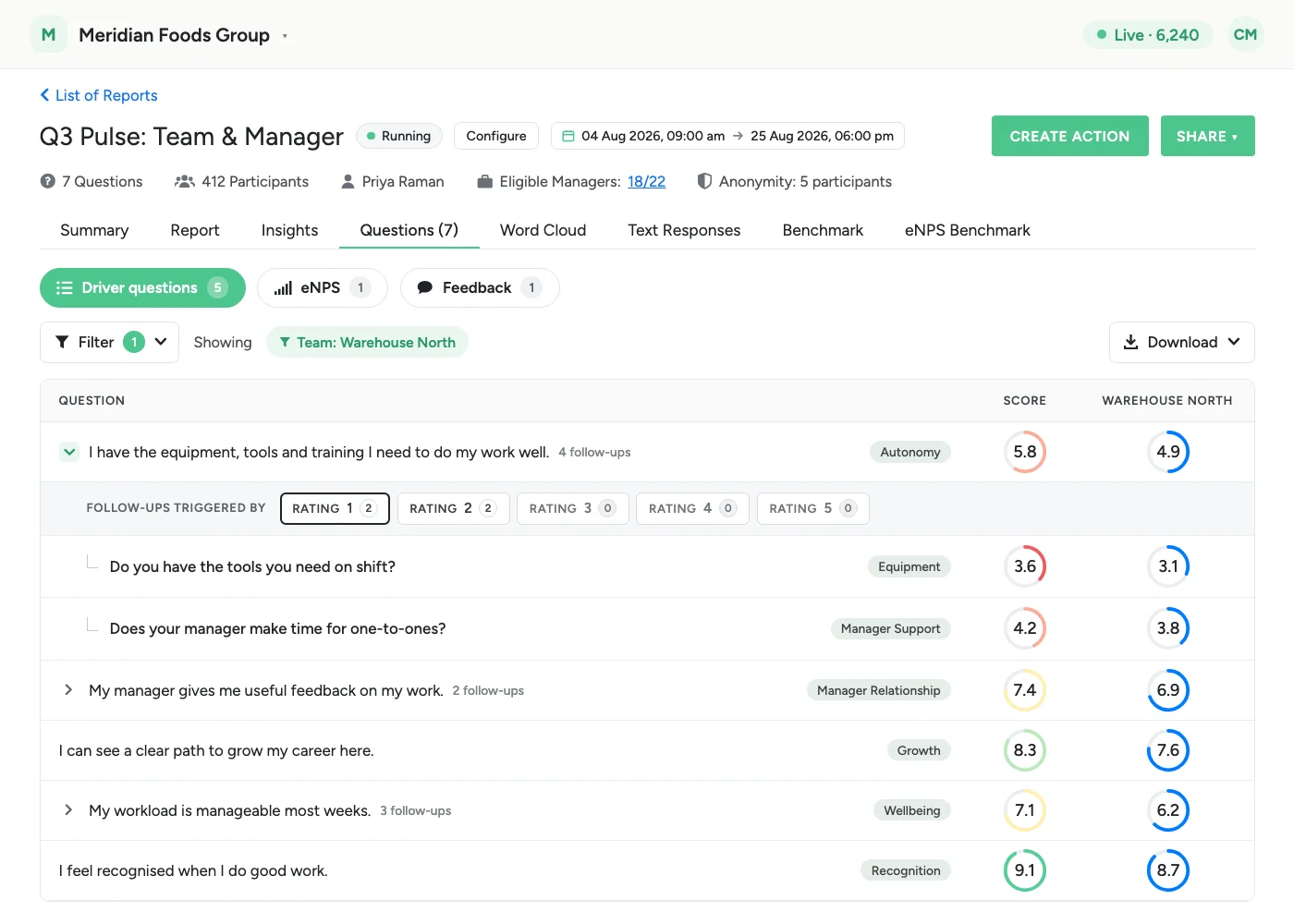
A follow-up question can now be a rating question. Until now, a conditional follow-up asked for free text. It can now ask for a rating instead, so you can measure the why behind a low or high score rather than only read it. Rating follow-ups are grouped under a new layer called sub-drivers, and their scores are reported in places of their own.
Rating follow-ups are part of Conditional Questions: accounts that use Conditional Questions have them too.
Sub-drivers
Sub-drivers are a grouping of your own, separate from drivers. Every rating follow-up must be assigned one. Super Admins create and manage them on the Sub-drivers settings page.
A sub-driver that is in use cannot be deleted. The page shows how many follow-ups use it and asks you to reassign them first.
Adding a rating follow-up
In the survey builder, rating and single-select questions now offer two options: Add free text follow-up and Add rating follow-up. A rating follow-up opens with the Agreement scale already selected. From there, the admin building the survey chooses:
- Rating scale: keep Agreement or pick another.
- Display style: the default bar, smiley or stars.
- Sub-driver: the group the follow-up belongs to.
A live preview shows the scale as participants will see it.
- Grouped by answer: follow-ups triggered by the same answer sit together in the builder, and the triggering answer is picked once for the whole group.
- Same limit per answer: the existing cap on follow-ups for a single answer (3 by default) still applies. That includes moving a group onto an answer that already has follow-ups: if the move would go over the cap, it is blocked with an explanation rather than partly applied.
- Type is fixed: a follow-up's type is set when it is added. To turn a free-text follow-up into a rating one, remove it and add it again.
- Copies carry over: duplicating a survey, or copying between a survey and a template, keeps rating follow-ups along with their scale and sub-driver.
What participants see
Participants only see a rating follow-up if they pick a triggering answer on the parent question. If they then change that answer so the follow-up no longer applies, the rating they gave is cleared and not submitted.
Reporting
Rating follow-up scores are shown in three places:
- Questions report: a parent question with follow-ups shows a chevron and a follow-up count. Expand it to see a row of chips, one per answer the parent offers with the number of follow-ups on each, and the indented follow-up rows for the selected answer. Each row carries a sub-driver pill and its score in the report's own columns. The view opens on the first answer that actually has follow-ups.
- Follow-up detail page: each rating follow-up has its own page with its score, distribution and demographic breakdown. Open it from the question switcher, where it is listed directly under its parent. Where a question shows its driver, a follow-up shows its Associated sub driver.
- Heatmap drill-down: when you click a driver and demographic cell, a new sub-driver section sits below the question list. It scores the sub-drivers reached through those questions' rating follow-ups, and each one expands to its individual follow-ups. A sub-driver with no responses in that cell shows a dash instead of disappearing, so gaps in coverage stay visible.
On the Questions report, section and question-type filters apply to parent questions only, and their follow-ups move with them. The demographic filter applies to follow-up rows as well. If a parent question is hidden to protect anonymity, its follow-ups are hidden too.
Super Admins see every survey's follow-up scores. Sub Admins and Managers see them only within what they already have access to.
Overall scores stay the same
Rating follow-ups never change survey, driver or engagement scores. They are left out of every overall score: the survey score, driver scores, the heatmap, the manager dashboard, focus areas, the engagement trendline and the PDF report. A follow-up is only asked of the people who gave one particular answer, so its average describes that group alone and would distort an overall score.
Exporting
The score export gives rating follow-ups a sheet of their own, with a Triggered by column naming the answers that trigger each follow-up. The column appears only when the report actually contains follow-ups, so every other export is unchanged. Follow-ups hidden behind a collapsed parent or an unselected answer chip are still exported.
New to Conditional Questions? The June release covers free-text follow-ups on rating and single-select questions, and the July release extends them to eNPS.
See what a warmer engagement platform looks like
Book a walkthrough and we will show you the features on this page, live in your workspace.