

CultureMonkey anonymity thresholds explained
How CultureMonkey's dashboard anonymity threshold works - the default minimum group size of 5, the hard floor of 3, how it differs from the survey response threshold, and whether an admin can change it.
On this page
- What a threshold actually protects against
- The default: a group of 5
- The hard floor: never below 3
- Where the dashboard threshold applies
- Dashboard threshold vs survey response threshold
- Can an admin change the threshold?
- What people experience when a group is below the threshold
- Frequently asked questions
- Where to go next
Anonymity is the promise that makes honest feedback possible. If your people believe an individual answer can be traced back to them, they hold back - and the data you collect stops being trustworthy. The anonymity threshold is the mechanism CultureMonkey uses to keep that promise on your reporting surfaces: it sets the smallest group of people whose combined results are allowed to appear.
This guide is for account admins. It explains the dashboard anonymity threshold specifically: the default minimum group size of 5, the hard floor of 3 below which no group is ever shown, how this differs from the survey-level response threshold, exactly where it applies, and whether you can change it.
The dashboard anonymity threshold is the minimum number of people a group needs before its aggregated scores show up on the Dashboard heatmap, Pulse reporting, and Lifecycle Analytics. The system default is 5. It can be raised, but it can never be set below 3 - that is a hard floor built into CultureMonkey. This is a reporting-level control and is separate from the per-survey response threshold.
What a threshold actually protects against
CultureMonkey aggregates. A score on a heatmap tile is never one person's answer; it is an average across everyone in that cell. But aggregation only protects identity while the group is large enough. If a "team" or a filtered slice contains just one or two people, the "aggregate" is effectively that individual, and anyone reading the report could infer how a specific colleague answered.
The threshold is the guardrail that prevents this. When a group is smaller than the threshold, CultureMonkey suppresses its result entirely rather than risk exposing an individual. You will see the tile hidden, greyed out, or replaced with a "not enough responses" style message instead of a number.
This matters most exactly where it is easiest to slip up: narrow filters. A department of 300 is safe, but the moment someone filters "Engineering + Singapore + tenure under 6 months," the underlying group can shrink to a handful of people without anyone noticing. The threshold enforces the floor automatically so no filter combination can leak a single person's response.
The default: a group of 5
Out of the box, the dashboard anonymity threshold is 5. A group must contain at least 5 qualifying people for its aggregated score to be displayed.
This is the value every account uses until an admin configures something different. Five is a deliberate, conservative choice: large enough that no single answer meaningfully swings the average or can be reverse-engineered, small enough that most real teams still get to see their own data.
The hard floor is 3, but the shipped default is 5 because a group of 3 is still quite exposed. In a group of three, if two people give a high score and one gives a low one, the low outlier is easy to guess. Five gives a more comfortable margin, which is why CultureMonkey defaults there rather than at the minimum it allows.
The hard floor: never below 3
The threshold is configurable (more on that below), but it is not unlimited. CultureMonkey enforces a hard floor of 3: the value can be raised as high as you like, but it can never be set below 3.
This is not a soft recommendation - it is validated at the data layer. Any attempt to save a dashboard anonymity threshold below 3 is rejected. The reason is simple: showing an aggregate for a group of one or two people is never anonymous, so the product refuses to allow a configuration that would make it possible.
| Value | Allowed? | What it means |
|---|---|---|
| 1 or 2 | No | Rejected. Would expose individuals; blocked by validation. |
| 3 | Yes | The absolute minimum. Use only with good reason. |
| 5 | Yes (default) | The shipped default and the recommended setting for most accounts. |
| 8, 10, 20… | Yes | Stricter. More privacy, but more small groups hidden. |
There is also a safety net in the reporting engines: if the stored value is ever missing or somehow non-positive, the code falls back to the default of 5 rather than treating "no threshold" as "show everything." Anonymity fails safe, not open.
Where the dashboard threshold applies
The dashboard anonymity threshold governs the aggregated, cross-survey reporting surfaces - the places where scores are rolled up across people and demographics. Specifically, it drives the anonymity checks on:
- The Dashboard heatmap (scores by team, location, and other demographics).
- Pulse reporting heatmaps.
- Lifecycle Analytics heatmaps and breakdowns.
- Score-over-time and demographic breakdown charts, where any cohort below the threshold is dropped so it cannot be surfaced.
- The manager dashboard score cards, when manager-dashboard anonymity checking is turned on for your account.
- Feedback / text response views, which are withheld when the contributing group is below the threshold.
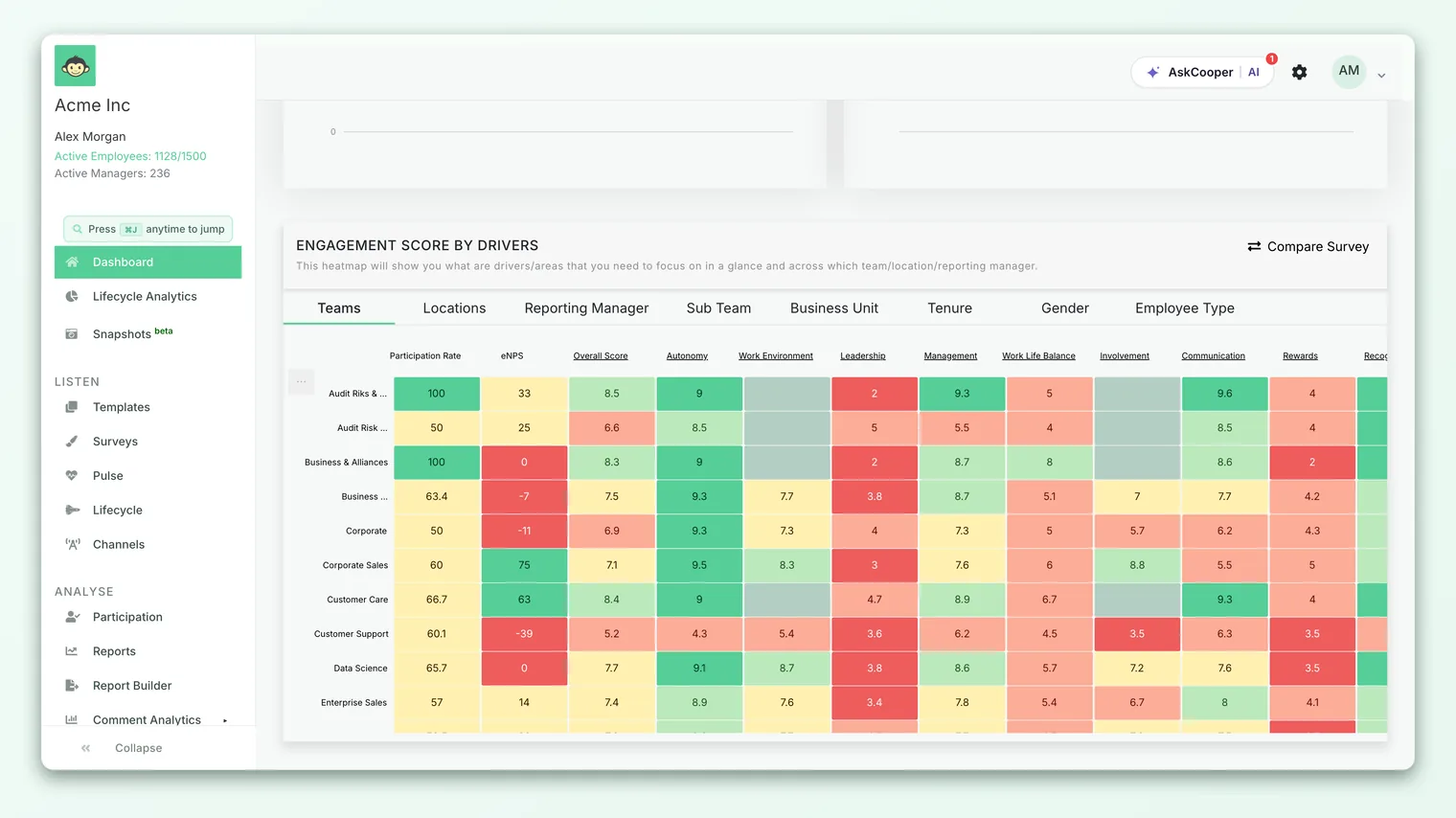
In each of these places the rule is applied as a strict minimum on the number of distinct people behind the cell. If the count is below the threshold, the cell is not rendered - there is no partial or blurred score, just no data for that group.
Some accounts count group size by distinct participants and others by distinct submitted responses, depending on an account-level anonymity setting. Either way the threshold number is the same; only what gets counted changes. If you are unsure which mode your account uses, ask your CultureMonkey contact.
Dashboard threshold vs survey response threshold
This is the distinction that trips people up, so it is worth being precise. CultureMonkey has two different minimums, and they operate at different levels.
| Dashboard anonymity threshold | Survey response threshold | |
|---|---|---|
| Level | Reporting / dashboard (account-wide) | A single survey |
| Controls | Minimum group size to display an aggregated score on heatmaps and analytics | Minimum number of responses before that survey's report unlocks at all |
| Default | 5 | 3 for anonymous surveys |
| Scope | Every rolled-up demographic slice, across surveys | The one survey it is set on |
| Covered in | This article | The response threshold for a survey |
Think of it this way. The survey response threshold decides whether a particular survey's report opens - it is the gate on a single survey, defaulting to a minimum of 3 responses for anonymous surveys. The dashboard anonymity threshold is a higher-level guard that sits across your aggregated reporting: even once a survey's report is open, any individual demographic slice of it must still meet the dashboard threshold before its tile appears.
The two work together. A survey can clear its own response threshold (enough people answered overall) while a narrow filter inside that report is still hidden because that particular slice falls below the dashboard threshold. Neither one overrides the other; a group has to satisfy whichever rule applies to the surface you are looking at.
For everything about the per-survey minimum - how it is set, how it behaves for anonymous versus identified surveys, and how to adjust it - see The response threshold for a survey. This article stays on the dashboard side.
Can an admin change the threshold?
Yes, the dashboard anonymity threshold is configurable at the account level - it is not hard-coded to 5. What you cannot do is set it below the hard floor of 3.
The value lives as an account setting, the dashboard anonymity threshold. When it is left blank, your account uses the default of 5. When a value is entered, that value is used everywhere the threshold applies. The setting's own help text states the rule plainly: enter a value greater than or equal to 3, and the dashboard heatmap, pulse reports heatmap, and lifecycle analytics heatmap will run their anonymity checks against it.
The dashboard anonymity threshold is an account-level configuration rather than a self-serve toggle in the standard admin menus. To change it, contact your CultureMonkey account manager or support and tell them the value you want (which must be 3 or higher). They will confirm the change and make sure it applies consistently across your reporting surfaces.
- 1Decide your target value. Anything 3 or above is valid. Most accounts should stay at 5 unless they have a specific reason to move.
- 2Weigh the trade-off. Raising it strengthens privacy but hides more small groups; the only reason to lower it toward 3 is if too many legitimate teams are being suppressed.
- 3Request the change. Give your CultureMonkey contact the exact number. Values below 3 will be rejected.
- 4Re-check your dashboards. After the change, revisit the heatmap and a few narrow filters to confirm the groups you expect are now visible (or hidden) as intended.
Choosing a value
- Stay at 5 if you have no strong reason to change. It is the tested default and balances privacy against visibility well for most organizations.
- Raise it (to 8, 10, or more) if you operate in a high-sensitivity environment, have works-council or regulatory commitments, or simply want a wider privacy margin. The cost is that more small teams will see no data.
- Lower it toward 3 only deliberately. This is the minimum the product allows, and it should be a considered decision - typically for a small organization where a 5-person floor hides too many real teams. Never treat 3 as a way to "see everything"; it is still an anonymity floor, just a thinner one.
If your account uses Candidate Lifecycle Analytics, that dashboard has its own separate threshold (also defaulting to 5, also floored at 3) so candidate reporting can be tuned independently of employee reporting. It behaves the same way; it is just a different setting.
What people experience when a group is below the threshold
For admins and managers, a suppressed group looks like missing data: an empty heatmap tile, a greyed-out score, or a message explaining that there are not enough responses to display results. This is working as designed - it is the threshold doing its job, not a bug or a data-loss issue.
For employees, the effect is invisible but reassuring: it is the reason they can answer honestly. Because the platform will never surface a group too small to be anonymous, no manager can drill down far enough to isolate one person's response. When you communicate about surveys, this is a point worth making - the anonymity threshold is a concrete, enforced protection, not just a policy statement.
If a report or slice you expected is not showing, the cause is almost always a group under one of the two thresholds. Why can't I see results yet? walks through diagnosing exactly which one and what to do about it.
Frequently asked questions
What is the default dashboard anonymity threshold?
Five. Every account starts with a minimum group size of 5 on its dashboard, heatmap, and analytics surfaces unless an admin has configured a different value.
Can I turn the threshold off completely?
No. There is no "off." The lowest the dashboard threshold can go is 3, and that limit is enforced at the data layer. Anonymity protection cannot be disabled, only tuned within the allowed range.
Why is a group of 4 hidden when my threshold is 5?
Because 4 is below 5. The check is a strict minimum: a group must meet or exceed the threshold to be shown. To display that group you would need either a 5th qualifying respondent or a lower (but still 3 or higher) threshold.
Is this the same as the response threshold I set on a survey?
No. The survey response threshold decides whether an individual survey's report opens at all (default 3 for anonymous surveys). The dashboard anonymity threshold is an account-wide floor on the size of any aggregated demographic group shown in reporting. They are separate controls that both have to be satisfied.
How do I actually change it?
Contact your CultureMonkey account manager or support with the value you want (3 or higher). The threshold is an account-level configuration; your CultureMonkey contact applies it so it takes effect consistently across all reporting surfaces.
Does raising the threshold delete any data?
No. Responses are still collected and still count toward larger aggregates. Raising the threshold only changes when a group becomes visible; it never removes underlying data.
Where to go next
- Understand the bigger picture: How anonymity works
- Set the per-survey minimum: The response threshold for a survey
- Chasing a missing report? Why can't I see results yet?
- For the employees taking the survey: Is my feedback anonymous in CultureMonkey?
- Candidate reporting: Candidate Lifecycle Analytics and silent candidates
Your feedback helps us improve the Help Center.