

View driver-level sentiment in feedback
How to see which engagement drivers your comments skew positive or negative on - reading driver tags on feedback, the Driver Stats view, and the top positive and negative drivers behind your feedback.
On this page
- Driver tags versus driver scores
- How a comment gets its driver tags
- Reading the Driver Stats view
- Top positive and top negative drivers
- Reading the mix within one driver
- How this differs from average sentiment by driver
- Turning driver-level sentiment into action
- Anonymity and small groups
- Frequently asked questions
- Where to go next
Your feedback inbox can hold hundreds of comments, and reading them one by one only gets you so far. What you usually want to know is sharper: which parts of the employee experience are people happy about, and which parts are they frustrated with? That's a driver-level question, and the Feedback area is built to answer it. Every comment carries the engagement drivers it speaks to, so you can step back from individual messages and see, theme by theme, where the mood is warm and where it's cold.
This guide is about reading that driver-level view inside your feedback: the driver tags attached to each comment, the Driver Stats chart that plots every driver's sentiment, and the top positive and top negative drivers that summarize the whole set. It's the qualitative companion to your rating scores. Where a driver score tells you how people rated a theme on a scale, driver-level sentiment tells you how people feel about it in their own words.
CultureMonkey matches every feedback comment to one or more engagement drivers and gives it a sentiment (Happy, Neutral, or Sad). Group those two together and you can see which drivers your comments skew positive or negative on. The Driver Stats view charts the average sentiment of the feedback tagged to each driver, and the Feedback summary calls out your top positive and top negative drivers. Read it to find the themes to celebrate and the ones to act on.
Driver tags versus driver scores
Before you read the view, it helps to separate two things that sound alike.
A driver score comes from your rating questions. People answer a 0-10 scale, and CultureMonkey averages those answers into a number per theme. That's covered in Understand drivers and factors, and it's a quantitative measure of how a theme rates.
Driver-level sentiment comes from your comments. When someone writes open text, CultureMonkey reads the tone (positive, negative, or neutral) and also matches the comment to the drivers it's about. So a comment like "my manager never acknowledges good work" gets a negative sentiment and a Recognition tag. Do that across every comment and you can ask: of all the feedback tagged Recognition, how positive or negative is it on balance?
The two views answer different questions and are strongest together. A driver can score reasonably on ratings while the comments about it run negative, or the reverse. When the number and the sentiment disagree, that gap is usually where the real story is.
If you only take one thing from this article: driver-level sentiment reads your comments, not your rating scales. It tells you how people talk about a theme, which is exactly the color the raw score can't give you.
How a comment gets its driver tags
Every comment that reaches your feedback carries two pieces of tagging that make driver-level sentiment possible.
- A sentiment tag. CultureMonkey scores the tone of the comment automatically and shows it as Happy, Sad, or Neutral. Under the hood this is a sentiment score, and a threshold decides the label: clearly positive comments read Happy, clearly negative ones read Sad, and the middle band (including short or genuinely mixed comments) reads Neutral. For the full mechanics, see How sentiment scores work.
- One or more driver tags. The comment is matched to the engagement drivers it's about, shown as small driver pills on the card (for example Recognition, Leadership, or Work Life Balance). A comment can carry more than one driver if it touches more than one theme.
Both tags are generated automatically, and both can be corrected. If your account has feedback sentiment editing switched on, an admin can open a comment and fix the sentiment or adjust the driver tags by hand. Corrections are respected everywhere downstream, so fixing an obvious miss improves the driver-level view too. Managers can read the tags within their scope; editing them is an admin action.
Tone reading struggles with sarcasm, mixed messages, and one-word answers. Treat driver-level sentiment as a way to sort and prioritize your reading, not as a precise metric to report to the board. Skim by driver and sentiment to find where to look, then actually read the comments.
Reading the Driver Stats view
The clearest single place to see driver-level sentiment is the Driver Stats view in your Feedback area. It plots every driver that your feedback touches against the average sentiment of the comments tagged to it, so you can read the whole emotional landscape in one chart.
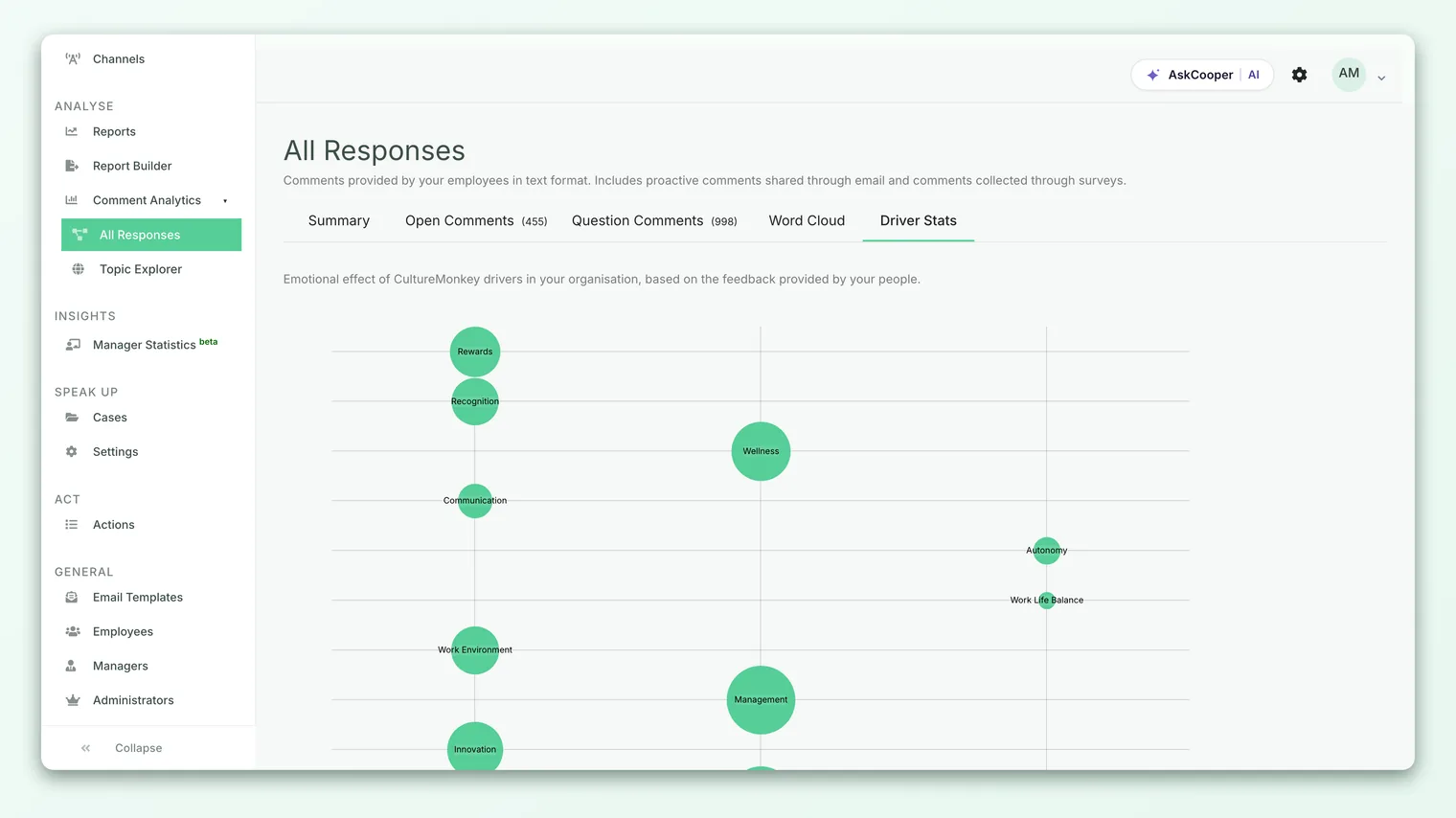
Here's what the chart is doing. For each driver, CultureMonkey gathers every comment tagged to that driver, averages their sentiment scores, and places the driver on the scale according to that average. A driver whose comments run warm lands on the positive side; a driver whose comments run cold lands on the negative side. The result reads at a glance: the themes people feel good about pull one way, the themes they're frustrated with pull the other.
To read it well:
- 1Open the Feedback area from the Analyse section, then open the Driver Stats view.
- 2Scan the extremes first. The drivers furthest to the positive side are your strengths; the ones furthest to the negative side are where the mood is worst. The extremes are where your attention pays off.
- 3Note the middle. Drivers sitting near neutral either have genuinely balanced feedback or a mix of strong positive and strong negative comments that cancel out. Those are worth opening up, because the average can hide a split.
- 4Cross-check with scores. Where a driver's sentiment surprises you against its rating score, that gap is your cue to read the actual comments behind it.
Because the chart is built only from comments that carry a driver tag, a driver with very little tagged feedback won't say much. Read the strongest signals, and treat a driver with only a handful of comments as directional rather than definitive.
Top positive and top negative drivers
You don't have to read the whole chart to get the headline. The Feedback summary distills driver-level sentiment into two short lists: your top positive drivers and your top negative drivers.
These are built from the same averaging as the Driver Stats chart. CultureMonkey works out each driver's average sentiment, sorts the ones that come out positive from most to least positive, sorts the ones that come out negative from most to least negative, and presents each as a ranked list. The top positive list is "what people are happiest about, in order"; the top negative list is "what people are most frustrated with, in order."
This is the fastest read in the whole area. If you have two minutes before a leadership meeting, the top negative list tells you where to point attention, and the top positive list tells you what's genuinely working so you can protect and build on it. For a deeper, cross-all-feedback breakdown of the same idea, see Average sentiment by driver.
A driver isn't called positive or negative arbitrarily. Its average sentiment is compared against two cut-offs: comfortably above the midpoint reads Positive, comfortably below reads Negative, and the band in between reads Neutral. That's why a driver with genuinely mixed feedback often lands as Neutral rather than being forced to one side. The same thresholds decide the Happy/Sad/Neutral label on individual comments. See How sentiment scores work.
Reading the mix within one driver
Averages are useful, but a single number can hide a divided workforce. A driver that averages out neutral might be genuinely balanced, or it might be half glowing and half furious. To tell the difference, read the mix of comments within the driver rather than just its average.
The practical move is to filter your feedback by sentiment and read the results with a driver in mind. Switch the feedback list to the Sad comments and look for the driver you care about among the driver pills; then do the same for the Happy comments. If a driver shows up strongly in both, you've found a theme that divides people, and that split is often more actionable than a calm average would suggest.
A worked example. Suppose Work Life Balance averages out close to neutral. Filtered to Sad, you find a cluster of comments about weekend on-call from one team; filtered to Happy, you find comments praising flexible hours from another. The neutral average was true and also useless: the real finding is that flexibility works where it's offered and hurts where it isn't. That's a specific action, and you'd never have seen it from the average alone.
The drivers sitting near the middle of the Driver Stats chart are the easiest to skip and often the most interesting. A near-neutral average can mean "nobody cares" or "the room is split down the middle." The only way to know is to read the positive and negative comments for that driver side by side.
How this differs from average sentiment by driver
Two related views can blur together, so it's worth being precise.
| Driver-level sentiment (this view) | Average sentiment by driver | |
|---|---|---|
| Where you read it | Inside your Feedback area, on comments and the Driver Stats view | As a cross-all-feedback analytic |
| The question it answers | For the feedback I'm looking at, which drivers run positive or negative? | Across all feedback, what's each driver's overall sentiment? |
| Best for | Reading and acting on the comments in front of you | A standing, organization-wide read on driver sentiment |
They share the same underlying idea - group comments by driver, average their sentiment - and they'll broadly agree. The difference is scope and intent. Driver-level sentiment is what you use while you're reading feedback and deciding what to do. Average sentiment by driver is the wider analytic you return to over time. Link between them rather than treating them as one thing.
Turning driver-level sentiment into action
Reading is only worth it if it changes something. A simple loop:
- 1Start with the top negative driver. It's your loudest signal. Open the feedback tagged to it and read the actual comments, not just the tag.
- 2Find the specific complaint. Averages point you at a theme; the comments name the problem. "Recognition is negative" becomes "people say good work goes unacknowledged in team meetings," which you can actually fix.
- 3Protect the top positive driver. Your strengths are fragile. Knowing what people love lets you keep doing it on purpose instead of by accident.
- 4Create an action. From a comment card you can turn a finding into an action plan tied to the relevant driver, so the loop closes from "this theme runs negative" to "here's what we're doing about it."
- 5Re-read next cycle. Watch whether a driver's sentiment warms up after you act. Movement in driver-level sentiment is honest evidence that your changes landed.
Anonymity and small groups
Driver-level sentiment lives on comments, and comments are protected by the same anonymity threshold as everything else in CultureMonkey. If you filter feedback down to a small team or a narrow slice, and the group falls under the threshold (5 by default), the comments are hidden so no individual can be identified. That means a driver breakdown can look thin or empty for a small group even when you know people responded.
This is expected behavior, not an error. Widen the filter, or wait for more responses, and the feedback reappears. Resist the urge to reverse-engineer who said what about a driver: the moment employees suspect their comments can be traced, the honesty that makes driver-level sentiment valuable disappears.
Frequently asked questions
Is driver-level sentiment the same as a driver's rating score?
No. A driver's rating score is the average of the 0-10 answers to the rating questions mapped to that driver. Driver-level sentiment is the tone of the comments tagged to that driver. They can point in the same direction or disagree, and when they disagree the gap is usually the most useful thing on the page.
Why does a driver show up as Neutral when I know people feel strongly?
Because the label reflects the average sentiment of the comments, and strong positive and strong negative comments can cancel out to something in the middle. A neutral driver is often a divided one. Filter to the Happy and Sad comments for that driver and read them side by side to see the split.
Can a single comment count toward more than one driver?
Yes. A comment that touches several themes can carry multiple driver tags in CultureMonkey, so it contributes to the sentiment of each of those drivers. That's why the driver counts across a set of feedback can add up to more than the number of comments.
Why is a driver missing from the Driver Stats view?
CultureMonkey builds the view only from comments that carry a tag for that driver. If no feedback has been matched to a driver, it won't appear, and a driver with only a comment or two won't say much. Read the drivers with real volume behind them and treat thin ones as directional.
Can I fix a driver tag that looks wrong?
If your account has feedback sentiment editing enabled, an admin can open a comment and correct both its sentiment and its driver tags. The correction flows through to the driver-level view, so fixing an obvious mismatch improves the summary for everyone. Managers can read the tags within their scope but don't edit them.
Where to go next
- Understand the tone scoring behind the tags: How sentiment scores work
- See the wider, cross-all-feedback analytic: Average sentiment by driver
- Learn how drivers work as a reporting concept: Understand drivers and factors
Your feedback helps us improve the Help Center.