

Open-ended (free-text) questions
How free-text questions work in CultureMonkey - how to add them, what respondents can type, why they carry no score, how their answers surface in the Feedback section with sentiment and word clouds, what they mean for anonymity, and how to write ones that get honest, useful answers.
On this page
Not everything worth knowing fits on a rating scale. When you want people to tell you what they think in their own words - the reason behind a low score, an idea you didn't think to ask about, a story a number can never capture - you reach for a free-text question.
Free-text (also called open-ended or open-text) questions ask for a written answer instead of a rating or a choice from a list. They are the qualitative half of a good survey: rating questions tell you how much, free-text questions tell you why. This guide covers how to add one, what respondents can type, why these answers never carry a score, exactly where the responses show up in your reports, what free text means for anonymity, and how to write questions that earn honest, useful answers.
Add a free-text question on Step 2 - Questions of the CultureMonkey survey builder by choosing the Free Text question type. Respondents type an open answer; there's no scale and no score, so free-text questions don't roll up into driver or engagement numbers. Their answers surface in Analyse › Feedback under the Free Text Responses category, complete with automatic sentiment and a word cloud. Because the text is written in the respondent's own words, treat it with the same anonymity care as any other response.
What a free-text question is
A free-text question presents a prompt and an empty box. The respondent writes whatever they want - a sentence, a paragraph, a single word - and moves on. There are no predefined options, no rating scale, no smiley faces. It's the digital equivalent of "tell me more."
That openness is the whole point. A rating question can only return what you thought to ask; a free-text question can return what you didn't. It's where employees raise the thing that's actually on their mind, name a specific manager or process, or give you the concrete example that turns a vague trend into an obvious fix.
Because the answer is unstructured, a free-text question behaves differently from every scored question type in CultureMonkey:
- It has no rating scale and no options.
- It produces no numeric score, so it never contributes to an engagement driver average, the overall score, or eNPS.
- Its value lives entirely in the reading - in the Feedback section, augmented by automatic sentiment and keyword analysis.
CultureMonkey gives you two ways to collect written feedback, and they're not the same thing. A free-text question is a standalone question whose entire answer is the text. A comment is an optional note attached to a rating or choice question - you turn it on with enable comments so someone can explain the score they just gave. Both are qualitative and both land in the Feedback section, but they answer different needs. More on the distinction below.
How to add one
Free-text questions are added on Step 2 - Questions of the survey builder, the same place you add every other question. If you're new to the builder, walk through Create a survey from scratch first.
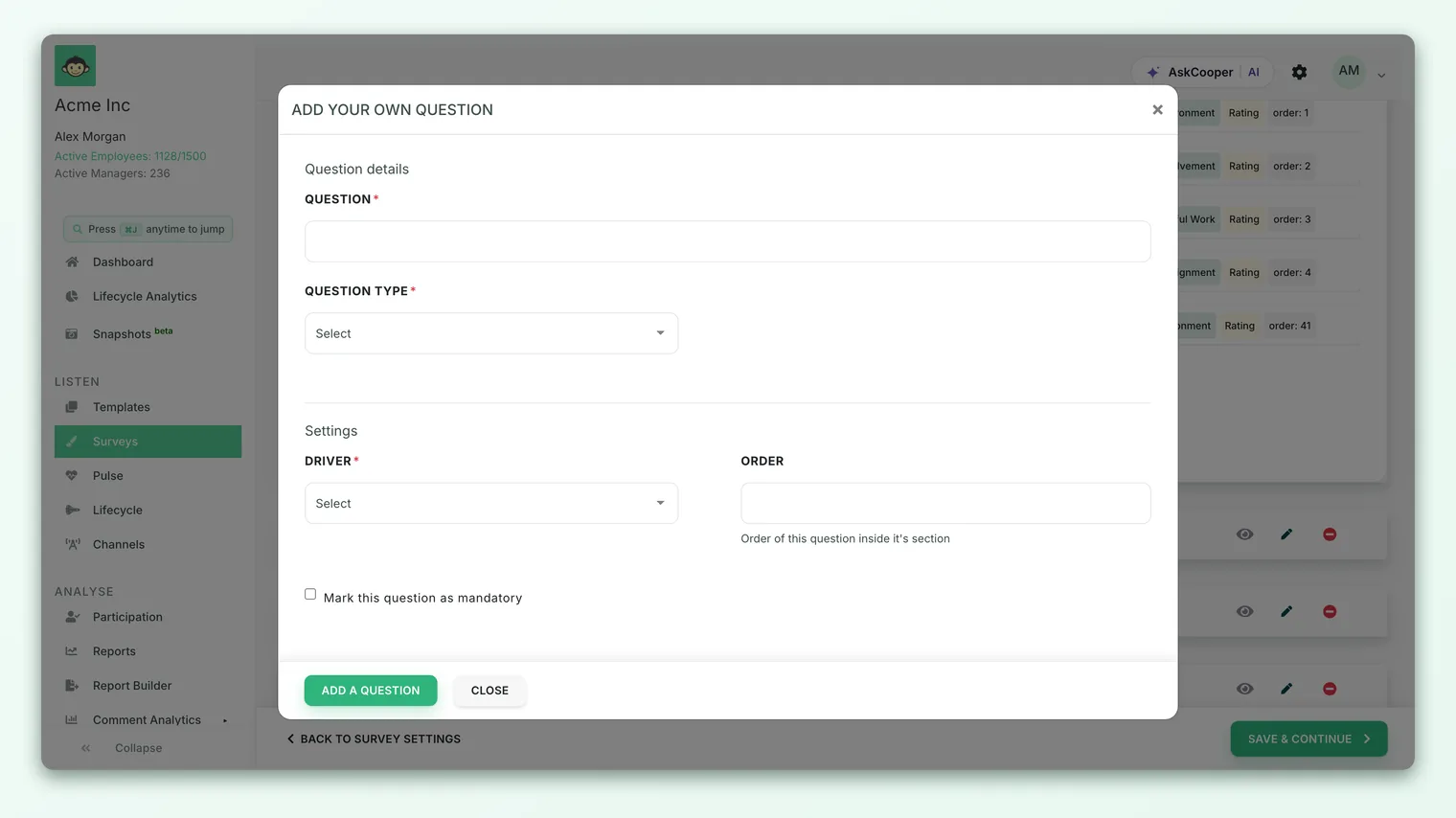
- 1Open the question editor - On the Questions step, click Add custom question (or edit an existing question). The question editor opens.
- 2Choose the Free Text type - In the Question type dropdown, select Free Text. The rating scale, scale-display and options controls disappear, because none of them apply to an open answer.
- 3Write your prompt - Enter the question title - the exact wording respondents will read. This is doing all the work, so make it specific (see the best-practice section).
- 4Set whether it's required - Toggle mandatory on if you want an answer before the survey can be submitted, or leave it optional so people can skip it. Open questions are often best left optional.
- 5Assign a driver (optional) - You can still map a free-text question to a driver for organizational tidiness, but note it won't affect that driver's score - free text has no number to average.
- 6Save the question - The question joins your section. Drag it to reorder it if you like.
You can also pull ready-made open-ended prompts from Add question from our library; library free-text questions come pre-worded and mapped, so they're a quick, validated starting point.
What respondents can type - and any limits
On the survey form, a free-text question renders as an open input where the respondent types their answer. There is no fixed character limit enforced on the answer, so people aren't cut off mid-thought. In practice, keep your prompt focused and people will keep their answers focused too; the box invites as much or as little as they want to give.
A few behaviors worth knowing:
- Blank answers on optional questions are fine. If the question isn't mandatory, respondents can leave it empty and continue.
- Very short "non-answers" are recognized. CultureMonkey automatically treats throwaway responses like "na", "none", "nothing" or "no comment" as neutral, so they don't distort your sentiment view. This keeps the signal in your feedback clean without you having to weed those out by hand.
- Answers can be translated. If your account runs multilingual surveys, free-text answers can be machine-translated in the reporting views so you can read responses written in other languages.
There is deliberately no way to attach a rating scale to a free-text question. If you find yourself wanting a scored version of an open question - "rate your manager, then explain" - the right pattern is a rating question with comments enabled, not a free-text question. That gives you the number and the words.
Why free-text questions have no score
This is the most important thing to understand about open-ended questions: they are qualitative by design and produce no metric.
A rating question resolves to a value that CultureMonkey can average - across a team, a driver, a whole survey. A free-text answer is a sentence. There's nothing to average, so a free-text question:
- Never appears in your driver scores. Even if you map it to a driver, it contributes no points to that driver's average.
- Never moves the overall engagement score or eNPS. Those are built purely from scored questions.
- Won't show up in the heatmap or score comparisons. Those views are built for numbers.
What you get instead is richer: the actual words, plus a layer of automatic analysis that turns a pile of comments into something you can scan. That analysis is where free text earns its place, and it lives in the Feedback section.
Where free-text answers show up in reporting
Open-ended answers don't appear in the scored Reports views - they appear in Analyse › Feedback, the home for everything qualitative. This is the single most useful thing to know when you go looking for your open responses.
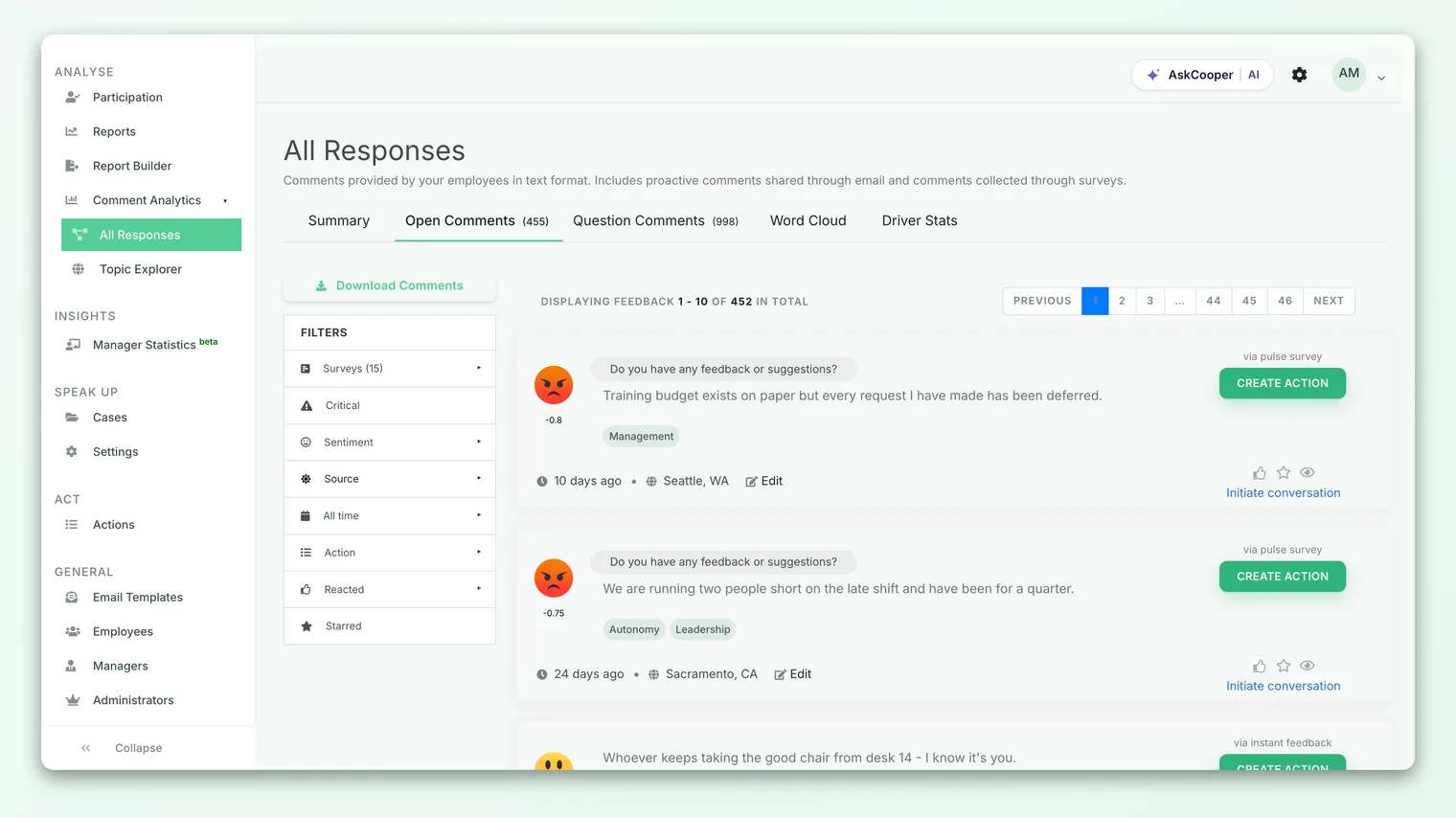
Inside Feedback, written responses are split into response categories so you always know what you're reading:
| Response category | What it contains |
|---|---|
| Open Feedback | The standard open-feedback box that appears at the end of a survey (the general "anything else?" field) |
| Free Text Responses | Answers to the free-text questions you added |
| Question Comments | Optional comments people attached to a rating, single-select or multiple-select question |
Your free-text answers live under Free Text Responses. Keeping the three categories separate matters: a comment explaining a specific rating is a different kind of signal from a standalone open question, and CultureMonkey doesn't blur them together.
Sentiment and themes
Every written response is run through sentiment analysis and tagged as broadly positive, neutral or negative, so you can filter the pile down to, say, only the critical comments and read those first. Sentiment is computed automatically after submission.
You can also switch to a word cloud view, which surfaces the most frequent keywords and themes across your free-text answers. It's the fastest way to see, at a glance, what a hundred open responses are collectively about - the words that keep coming up are your themes. From there you can drill into the responses behind any keyword.
Filtering and export
Like the rest of CultureMonkey, the Feedback views can be filtered by demographic - team, location, manager or custom attribute - so you can read what a specific group said (subject to anonymity thresholds, below). You can also export free-text responses. The export tooltip in the Feedback section distinguishes exporting question comments from exporting open comments, matching the response categories above, so you get exactly the slice you meant.
Free text and anonymity
Open-ended answers deserve extra care, precisely because they're written in the respondent's own words.
A rating of "3 out of 5" reveals nothing about who gave it. A sentence like "my manager Priya keeps rescheduling our 1:1s" can inadvertently identify the writer - or the person they're talking about - no matter how anonymous the survey technically is. CultureMonkey protects this in two ways:
- Anonymity thresholds still apply. The Feedback section is gated by the same minimum-response thresholds as the rest of your reporting. If a group is too small - a tiny team, or a very narrow filter - its free-text responses are hidden so an individual can't be identified from what they wrote. If a filtered view comes up empty, that's the threshold doing its job. See Set survey anonymity and Response thresholds explained.
- Identity mode is respected. In an anonymous survey, free-text answers aren't tied to a name in the reporting views. In an identified survey they can be, which is a reason to be thoughtful about asking sensitive open questions when responses are attributable.
The single biggest driver of honest open feedback is trust. If people fear their exact words will be read back to their manager and traced to them, they'll write "everything's fine" - the least useful answer there is. Be explicit in your survey intro about anonymity, and honor it. Candor is fragile.
Best practices for asking open questions
A free-text question is only as good as its prompt. A vague prompt gets vague answers; a sharp one gets gold.
- Ask one thing. "What would improve your day-to-day work, and how's your manager, and what about pay?" gets a muddle. Split it, or pick the one that matters most.
- Be specific and concrete. "Any feedback?" invites "no." "What's one thing that slowed you down this month?" invites a real, actionable answer.
- Anchor it to something. Open questions work brilliantly as a follow-up to a rating - "You rated onboarding low; what would have helped?" Pair a free-text question with the rating it explains, or use CultureMonkey's conditional questions to reveal it only when a rating is low.
- Use them sparingly. Typing takes effort. One or two well-placed open questions get thoughtful answers; five in a row get abandoned or filled with "n/a." Let rating questions carry the volume and reserve free text for where words genuinely beat numbers.
- Keep them optional (usually). Forcing an open answer produces filler. An optional prompt gets fewer responses but far better ones.
- Prefer a comment box when you want the number too. If your real goal is "score plus reason," enable comments on a rating question instead of adding a separate free-text question. You'll keep the metric and still get the words.
- Close the loop. Reading open feedback and visibly acting on it is the strongest way to get more of it next time. "You spoke, we acted" turns a one-off vent into an ongoing conversation.
Frequently asked questions
Do free-text answers affect my engagement score or eNPS?
No. Free-text questions are purely qualitative - they carry no rating, so they never contribute to driver averages, the overall engagement score, or eNPS. Those numbers come only from scored questions.
Where do free-text responses appear - Reports or Feedback?
Feedback. Open-ended answers show up in Analyse › Feedback under the Free Text Responses category, not in the scored Reports views. Sentiment and a word cloud are applied there automatically.
What's the difference between a free-text question and enabling comments?
A free-text question is a standalone question whose whole answer is the text. Comments are an optional note attached to a rating or choice question, turned on with enable comments, so someone can explain the score they gave. Both are qualitative; free-text answers appear under Free Text Responses and comments under Question Comments.
Is there a character limit on answers?
There's no fixed limit enforced on the answer - the field accepts long, detailed responses. Keeping your prompt focused is the best way to keep answers focused.
Can I see who wrote a specific comment?
Only in an identified survey, and only when the group is large enough to clear the anonymity threshold. In an anonymous survey, free-text answers aren't attributed to individuals, and small groups are hidden entirely to protect respondents.
Will short "no comment" answers skew my sentiment?
No. CultureMonkey automatically treats throwaway responses like "na", "none" and "nothing" as neutral, so they don't distort your positive/negative breakdown.
Where to go next
- Build the survey around it: Create a survey from scratch
- Protect open answers: Set survey anonymity
- Understand what stays hidden: Response thresholds explained
- Read and act on the words: Read and act on feedback
Your feedback helps us improve the Help Center.