

Tag survey questions with question tags
How question tags work in CultureMonkey: create tags in Settings, add up to three to a question and put them in order, build parent and child tags from that order, tag questions in bulk with an import file, and how tags turn into a tag-wise report.
On this page
Drivers group questions by CultureMonkey's engagement model. Question tags group them by your own themes, such as Onboarding, Compliance or Leadership, across any driver and any survey. Once questions are tagged, every survey report that uses them gets a Tags view that scores each theme.
Create tags under Settings > Tags. Add up to three to each question in the survey builder, in order: the first tag on a question becomes the parent of the second, so the order builds a tree of themes. Tagged surveys get a Tags view under the report's Questions tab, with a score and a report for every tag.
Tags appear in Settings, in the survey builder and in reports only on accounts with question tags on. CultureMonkey turns these settings on for your account. A Super Admin can ask their Customer Success Manager or CultureMonkey support to change them.
Create and manage tags
- 1Go to Settings and select Tags.
- 2Under Add a tag, type a name, such as Onboarding, and select Add.
- 3Each tag in the list shows how many questions and surveys use it. Select Rename to change a name everywhere it's used.
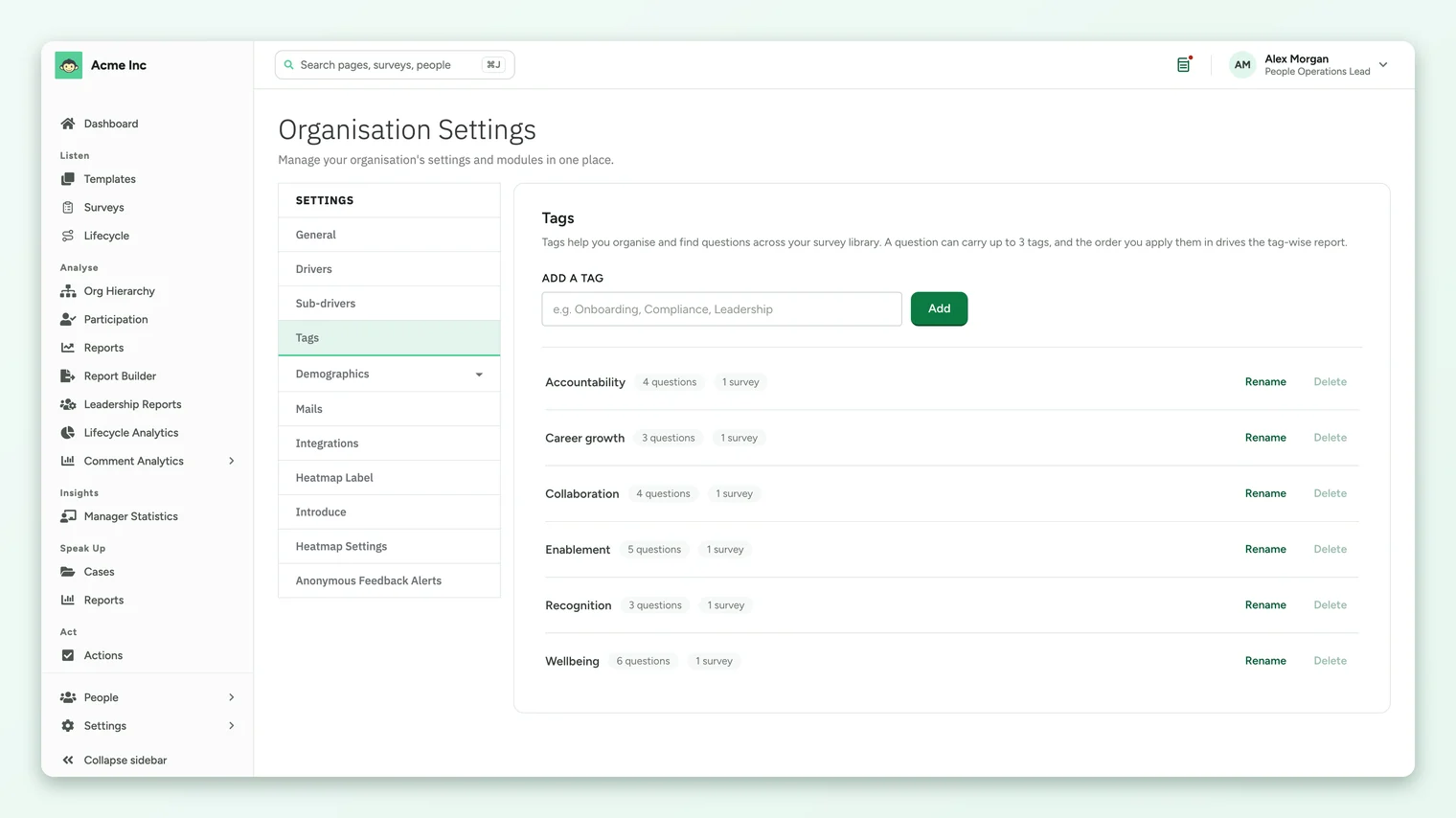
You can only delete a tag that isn't on any question. If it's in use, Delete is greyed out and tells you how many questions carry it. Remove it from those questions first.
Add tags to a question
- 1Open the survey in the builder and add or edit a question.
- 2In the question's form, find Tags and pick a tag from Add a tag…. Repeat to add more.
- 3Drag a tag by its handle to change the order. The order matters, as the next section explains.
- 4Save the question.
- A question can carry up to three tags. Your account can be set to a different limit, and the form tells you the limit as you add.
- Questions you add from the library keep the tags they had in the library.
- Only rating questions are scored, so tags on open-text questions don't add to a tag's score.
Tag order builds parent and child tags
The order of tags on a question decides how tags nest in the report. The first tag is the parent of the second, and the second is the parent of the third. For example, tagging a question Enablement then Career growth puts Career growth under Enablement in the report.
- Keep the order consistent. If one question has Enablement then Career growth and another has Career growth then Enablement, the report can't nest both ways and keeps the first order it finds.
- A tag can sit under more than one parent. It then appears under each of them.
- A parent's score comes from its own questions, never from an average of the tags under it.
Tag many questions at once
When you import questions, list tags in the optional tags column, separated by commas, in the order you want them. Tags that don't exist yet are created for you, and the import tells you which new tags it will create before it does. A question with more tags than the limit is rejected with Too many tags!
How tags are scored
- A tag's score is the average rating across all of its questions, weighted by how many people answered each one. A heavily answered question counts for more than a lightly answered one.
- A question with several tags counts in full toward each of them.
- Scores use your account's scale, the same as the rest of the report.
Good tagging habits
- 1Agree a short list first. Five to ten themes your leadership actually discusses work better than dozens of narrow tags.
- 2Tag every rating question. Untagged questions still count in the overall score, but in no tag, and the report flags how many there are.
- 3Use parent and child tags on purpose. Put the broad theme first and the narrower one second, the same way on every question.
- 4Tag the library, so future surveys built from it are tagged from the start.
Where to go next
- Read the results: Read the Tags view and a tag's report
- Compare with drivers: Understand drivers and factors
Your feedback helps us improve the Help Center.