

Raise an anonymous or identified case in CultureMonkey Speak Up
How to choose between reporting anonymously and sharing your identity in Speak Up, what each choice means for follow-up, and how to keep getting updates even while you stay anonymous.
On this page
- The choice: anonymous or identified
- What "anonymous" actually means
- What "identified" actually means
- How the two modes compare
- Your report number and passphrase
- Getting updates while staying anonymous
- Choosing your mode: a quick decision guide
- What happens after you submit
- Frequently asked questions
- Where to go next
When something at work doesn't sit right, CultureMonkey Speak Up gives you a private, secure way to report it. The very first choice you make when raising a case is how much of yourself to share: you can report anonymously, keeping your identity hidden, or you can report as identified, sharing your name and contact details with the people who will handle your case.
There is no wrong answer here. Both routes reach the same case team and follow the same secure process. The difference is in how the team can reach you and how updates flow back. This guide walks through exactly what each choice means, how the mechanics work under the hood, and (importantly) how you can still get updates even when you report anonymously.
Anonymous reporting hides your identity completely. CultureMonkey never stores your name and email. You get a report number and a passphrase to log back in and follow up. Identified reporting shares your name and email with the assigned case team only. Either way, you can add a private notification email so updates reach you, and it is never shown to the case team. Your reporting mode is locked in the moment you submit, so choose before you send.
The choice: anonymous or identified
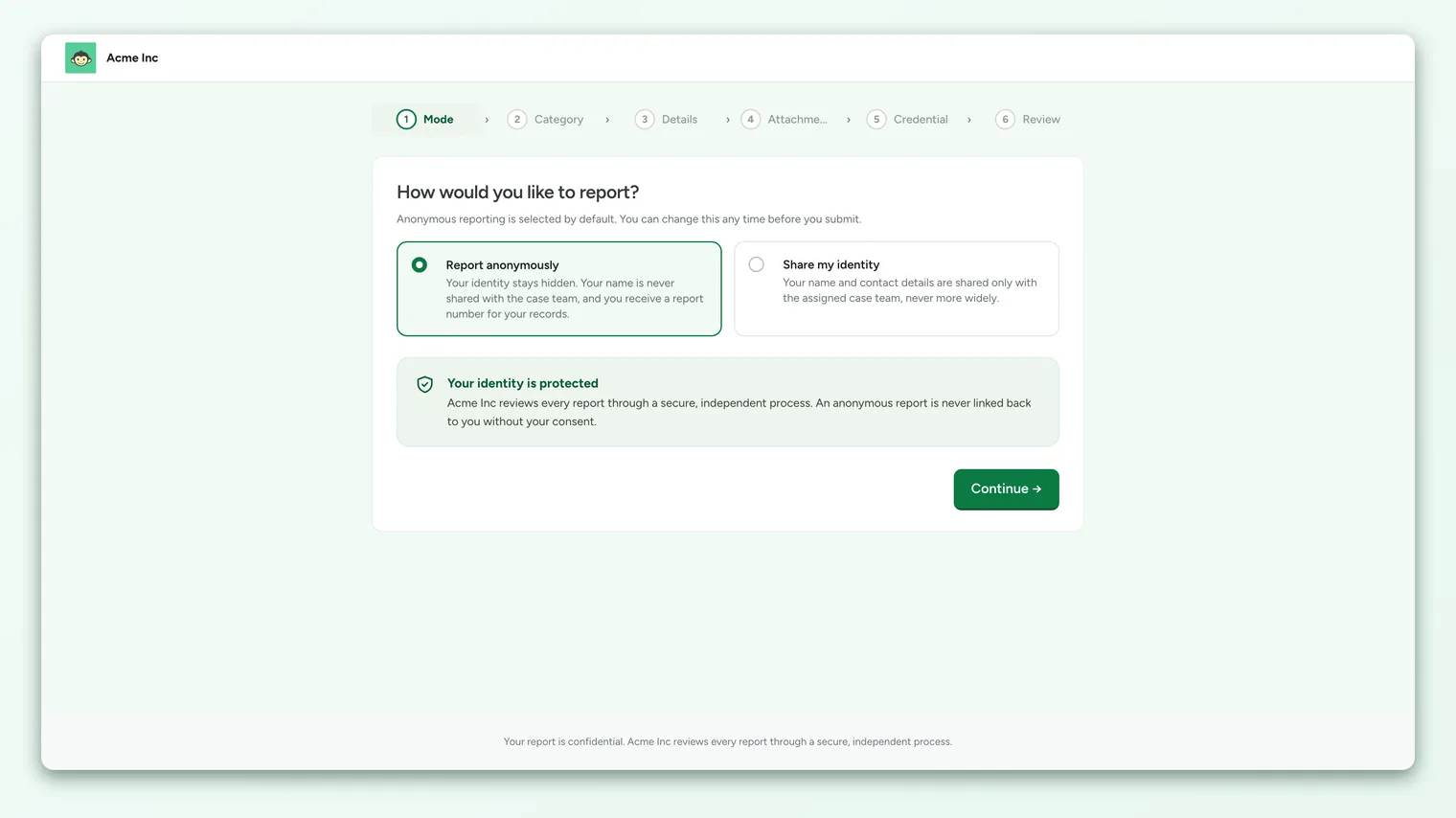
When you start a new report, the first step of the form asks: "How would you like to report?" Anonymous reporting is selected by default, and you can change it any time before you submit. You'll see two options:
- Report anonymously - your identity stays hidden. You receive a report number and passphrase so you can follow up securely.
- Share my identity - your name and contact details are shared only with the assigned case team, never more widely.
That second point matters. Choosing "Share my identity" does not broadcast your name across your organization. It shares your contact details with the small group of authorized case handlers assigned to your report, and no one else.
If your organization has identified reporting turned on, the form opens on the anonymous option. You have to actively choose to share your identity. If your organization has turned identified reporting off entirely, every report is anonymous and you won't see this step at all.
What "anonymous" actually means
Anonymous reporting isn't a label or a promise. It's built into how the case is stored. When you submit anonymously:
- No name is captured. The name field simply isn't part of an anonymous submission.
- No email is captured. There is no email tied to your identity on the case record.
- The case team sees the report, not the reporter. Handlers see your category, your description, your guided answers, and any files you attach. They do not see who you are.
Because your identity was never recorded, there is no hidden field for someone to look up later. Your organization reviews every report through a secure, independent process, and an anonymous report is never linked back to you without your consent.
The trade-off is that the team has no way to contact you directly. That's where your report number and passphrase come in, and they become your only way back into the conversation.
What "identified" actually means
When you choose to share your identity, the form adds a short step for your contact details: your name and your email. These are shared only with the assigned case team, who use them to reach you about your report.
Identified reporting is a good fit when:
- You're comfortable being known to the handlers and want the most direct line of communication.
- Your concern may need the team to follow up with you specifically (for example, to confirm details only you would know).
- You want updates to reach you by email without having to log back in.
Some organizations ask identified reporters to verify their email with a one-time code before submitting. If that's turned on, you'll enter your email, receive a 6-digit code, and confirm it. The code is valid for about 10 minutes. This step only appears when your organization has email verification enabled for identified reports.
Even as an identified reporter, your details don't travel beyond the case team. They're not attached to any wider report, export, or dashboard that other people in your organization can see.
How the two modes compare
Here's the practical difference between the two at a glance:
| Report anonymously | Share my identity | |
|---|---|---|
| Your name | Never captured or stored | Shared with the assigned case team |
| Your email | Never captured or stored | Shared with the assigned case team |
| How the team reaches you | Only through your case portal (report number + passphrase) | Directly, plus your case portal |
| How you follow up | Log back in with report number + passphrase | Log back in, or reply to email updates |
| Getting updates | Add a private notification email (optional) | Comes to the email you provided |
| Best when | You want your identity fully protected | You're comfortable being known to handlers |
Both modes give you the same secure two-way messaging with the case team. The only real difference is whether the team knows who you are.
Your report number and passphrase
Whichever mode you choose, when you submit you're given a report number in the format SU-2026-00042. This is the reference for your case. Alongside it, you set a passphrase (a password of at least 8 characters) so you can log back in.
Two things are worth stressing:
- Save both, together. Your report number and passphrase are the only way back into your case. Your organization cannot recover them for you. If you lose them, you lose access to that case conversation.
- Store them somewhere safe and private. Write them down, save them in a password manager, or download the confirmation PDF the form offers you. Keep them away from work devices or accounts if you're worried about being identified.
Speak Up deliberately keeps no record that could reveal who you are, and that includes any way to reset a lost passphrase from the reporter side. If you set a passphrase, keep it. The one exception is if you add a notification email, which unlocks a limited recovery path (covered below).
The "Track report" option for anonymous reporters
If you're reporting anonymously, setting a passphrase is what lets you come back and check on the case. On the credentials step you'll see a Track report toggle with the hint: "Set a password so you can log back in with your report number and follow up on this case."
If you want to be able to reply to the case team and see their responses, turn this on and set a passphrase. If you'd rather submit and walk away with no way back in, you can skip it, but then the report becomes a one-way message: the team receives it, but you won't be able to log in to see updates or answer questions. For most concerns, tracking is the better choice because handlers often need to ask a clarifying question, and a case moves faster when you can answer.
Getting updates while staying anonymous
This is the part people most often miss: you can stay fully anonymous and still be notified when something happens on your case.
Inside your case portal, after you've submitted, you can add a notification email. This is a private address you choose, and it exists purely to alert you (for example, when the case team replies or the status changes). It's designed so your anonymity is never compromised:
- It's encrypted at rest. The address is stored encrypted, not in plain text.
- The case team can never see it. There is no screen, export, or report anywhere on the handler side that shows your notification email. It's deliberately kept separate from the case record so it can't leak through any admin view.
- It's optional and removable. You can add it, change it, or delete it at any time from your portal.
So the notification email gives you the convenience of an identified reporter (updates land in your inbox) without giving up the protection of anonymous reporting (the team still has no idea who you are). It's the best of both worlds when you want to stay hidden but not out of the loop.
Adding a notification email also unlocks a limited password-recovery path. If you forget your passphrase, you can request recovery for your report number, and if a notification email is on file, a recovery message is sent to that address. To protect your anonymity, the portal always shows the same neutral confirmation whether or not an email is on file, so no one can use it to test which report numbers exist. Without a notification email, there is no recovery, which is another reason to add one.
Choosing your mode: a quick decision guide
Still unsure? Use this as a starting point:
- 1Lead with your comfort. If being known to the handlers would stop you from reporting at all, choose anonymous. Speaking up matters more than the label on your case.
- 2Think about follow-up. If your concern will likely need back-and-forth (details, dates, context only you have), make sure you can reply. That means identified, or anonymous with the Track report passphrase set.
- 3Decide how you want updates. Want them in your inbox? Add a notification email (works in either mode) or go identified. Happy to log in and check? A report number and passphrase are enough.
- 4Remember it's locked at submission. You can flip between anonymous and identified freely while filling in the form, but once you submit, the mode is fixed. Choose deliberately on that last review screen.
What happens after you submit
Once you send your report, you land on a confirmation screen showing your report number and a reminder to keep it and your passphrase safe. From there, your case moves into a secure review process, and you can log back in any time to check its status or message the team.
You'll see a simple, reporter-friendly status rather than the team's internal workflow labels:
| What you see | What it means |
|---|---|
| Received | Your report has arrived and is being reviewed. |
| Under review | The team is actively looking into your concern. |
| Resolved | The team has reached a conclusion. |
| Closed | The case is complete. Replies are turned off. |
Many organizations aim to acknowledge a new report within a set time (often about a week), and your confirmation screen will tell you if a target applies. To pick the conversation back up later, head to Access the Speak Up portal and log in with your report number and passphrase.
Frequently asked questions
Can I change from anonymous to identified after I submit?
No. Your reporting mode is fixed the moment you submit and can't be changed afterward, in either direction. If you want to be identified, choose "Share my identity" before you send. If you've already submitted anonymously and want the team to know who you are, you can always tell them in a message inside your case portal.
If I report anonymously, can anyone figure out who I am?
Your name and email are never captured on an anonymous report, so there's no stored identity to look up. The case team sees your report, not you. The main thing to be mindful of is the content you write: try not to include details that would only point to you unless you're comfortable doing so. The form even reminds you to avoid sharing more personal information than the team needs.
Will the case team see my notification email?
No. CultureMonkey encrypts the notification email and keeps it completely separate from your case record. There is no place on the handler side where it can be viewed, exported, or joined to your case. It exists only to send you alerts.
What if I lose my report number or passphrase?
If you added a notification email, you can request a recovery message to that address for your report number. If you didn't add one, there is no way to recover access, because CultureMonkey Speak Up intentionally keeps nothing that could reveal your identity. This is why saving both, and optionally adding a notification email, matters so much.
I don't want to track the case at all. Can I just send and leave?
Yes. If you report anonymously and skip the Track report passphrase, your report is still delivered to the case team as a one-way message. You simply won't be able to log back in to see replies or answer follow-up questions. It's a valid choice, but for most concerns, being reachable helps the team resolve things.
Does choosing identified share my name with my manager or coworkers?
No. Identified reporting shares your name and email only with the authorized case handlers assigned to your report. It is never surfaced to your manager, your team, or anyone else in your organization through Speak Up.
Where to go next
- Log back in to your case: Access the Speak Up portal
- Understand the protections in depth: How anonymity works in Speak Up
- New to speaking up? Start a report from your organization's Speak Up landing page, then come back here to choose your mode.
- Reporting without a login or a phone line: Anonymous reporting hotline
Your feedback helps us improve the Help Center.