

Required questions and the skip / "not applicable" option
How to make a question mandatory or optional, how the skip / "not applicable" choice works, and why skipped answers are left out of your averages and response counts.
On this page
Every question you add to a survey carries two small but important decisions: must an employee answer it, and if the question doesn't apply to them, should they be able to say so? CultureMonkey gives you both controls right in the question editor - a mandatory toggle that forces an answer, and a skip / "not applicable" option that lets people opt out of a question honestly rather than guessing.
Getting this pair right matters more than it looks. Force too many answers and people rush or fabricate responses; leave everything optional and your response counts get thin. This guide explains exactly what each control does, how a skipped answer is treated in your scores and reports, and when to reach for one over the other.
Mark a question mandatory and an employee can't submit the survey until they answer it. Turn on the skip option and they get a "Question not applicable" choice instead of a real answer. CultureMonkey deliberately leaves a skipped response out of the calculation entirely - it doesn't count toward the question's average score and it isn't counted as a response - so it never distorts your results.
Mandatory vs optional questions
By default, a question is optional - an employee can move past it without answering. When you mark a question mandatory, the survey won't accept a submission until that question has an answer. It's a hard stop, not a nudge.
You'll find the control in the question editor as a checkbox labelled "Mark this question as mandatory." Tick it and the question is required; leave it clear and the question stays optional.
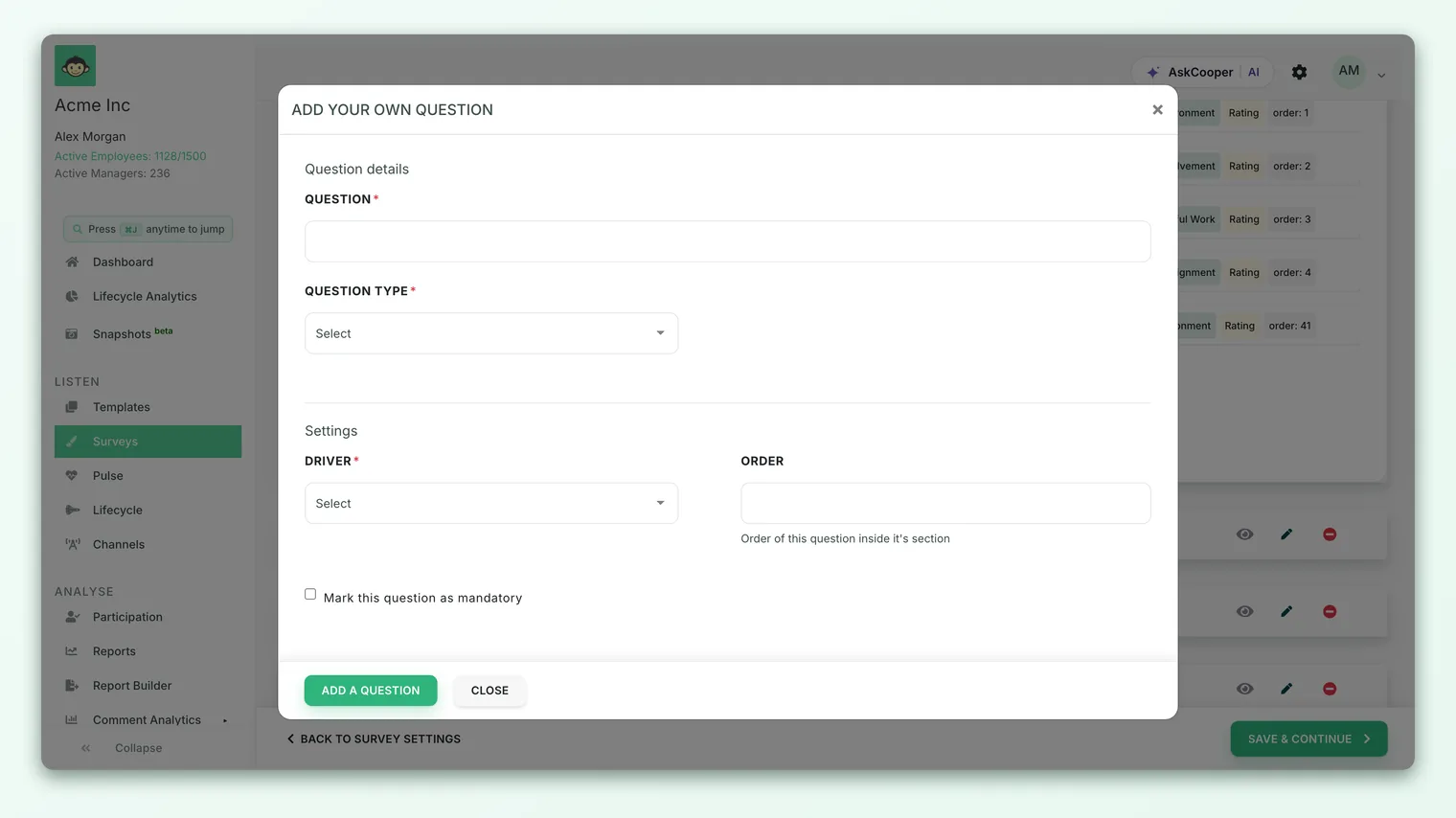
When a respondent tries to submit with a mandatory question left blank, CultureMonkey blocks the submission and flags the empty question so they can complete it. Nothing is saved until every required question - and every required conditional follow-up that was shown to them - has a value.
A survey where everything is required feels like an interrogation, and it pushes tired or rushed respondents to click something just to get to the end. Reserve mandatory for the questions you genuinely can't analyze without - your core rating questions, an eNPS question - and let the rest stay optional. Higher-quality answers beat a full-but-forced grid.
How "required" is enforced
At submission time CultureMonkey gathers every required question that the employee was actually shown and checks that each one has an answer. If a required question is blank - and hasn't been explicitly skipped (more on that below) - the submission is rejected with a "this field is required" error against that question.
This check respects the survey the employee actually saw. If a question lived inside a hidden section or a conditional branch that never displayed for that person, it isn't held against them - only the required questions genuinely presented to them must be answered.
What the skip / "not applicable" option does
Sometimes a question simply doesn't apply. Asking a brand-new hire to rate "the quality of your last performance review" or asking someone who's never used a benefit to rate it forces a meaningless answer. The skip option solves this by giving respondents an explicit way out.
When you enable it on a question, employees see an extra choice - a checkbox labelled with your skip text (the default is "Question not applicable"). Selecting it lets them satisfy the question without supplying a rating or a comment. It's the honest alternative to a made-up middle answer.
Two settings control this on each question:
- Enable skip answer - the on/off toggle that adds the skip choice to the question.
- Skip Answer Text - the exact wording employees see. Leave it blank and it defaults to "Question not applicable"; override it with something more specific like "I haven't used this benefit" or "Doesn't apply to my role."
The "Enable skip answer" controls appear in the question editor only when your account has the setting turned on. If you don't see them, an Account Admin can enable the option for your workspace.
Mandatory and skip together
These two controls are designed to work as a pair. You can make a question mandatory and enable the skip option at the same time - and that's often the smartest combination. The employee must engage with the question, but "not applicable" counts as a valid response, so they're never forced to invent a rating. The submission check treats a skipped question as answered: it won't block someone for skipping a mandatory question when the skip option is on.
How skipped answers are treated in scoring and reporting
This is the part that makes the skip option safe to use: a skipped answer is excluded from your results entirely. It is not a low score, a neutral score, or a zero that quietly drags down an average. It's simply left out of the math.
When an employee marks a question "not applicable," CultureMonkey records the response as skipped and deliberately keeps it out of the reporting data. Concretely:
- It doesn't count toward the average score. The question's average is calculated only from people who gave a real rating. Skips are removed from that pool, so they can't pull the number up or down.
- It doesn't count as a response. The response count and participation figures for that question reflect only actual answers. Ten ratings and three skips show as ten responses, not thirteen.
- It carries no comment or sentiment. Any comment field is cleared on a skip, so nothing flows into your open-text or sentiment analysis for that question.
In other words, a skipped question behaves as though that person was never asked it - which is exactly the behavior you want. The people for whom the question genuinely doesn't apply are removed from the denominator, so the score you see reflects only the people it actually applies to.
It's tempting to assume "not applicable" lands as a low score. It doesn't - it's removed from the calculation. This is good for accuracy, but it means a question with lots of skips is being scored by a smaller group than its raw audience suggests. Always read the response count next to the score so you know how many people it's really based on.
A worked example
Suppose 100 people are shown a rating question with the skip option enabled:
- 70 give a real rating (some high, some low) → these 70 form the score.
- 30 mark it "not applicable" → these 30 are set aside.
The question's average score is calculated from the 70 ratings only, and the response count reads 70, not 100. If those 30 skips had instead been counted as zeros, the average would look far worse than the actual experience of the people the question applies to. The skip option is what keeps the number honest.
Best practices
- Make your anchor questions mandatory, and little else. Your key drivers and eNPS question earn a required flag; "nice to have" questions usually don't.
- Pair mandatory with skip for anything conditional on experience. Questions about reviews, onboarding, specific tools, or benefits are prime candidates - require engagement, but allow an honest "not applicable."
- Write specific skip text. "Doesn't apply to my role" tells you more, and reassures the respondent more, than a generic default.
- Watch the response count, not just the score. A high skip rate on a question is itself a signal - it may mean the question is poorly targeted, or that it belongs behind a conditional branch so only the right people ever see it.
- Don't over-skip. If nearly everyone skips a question, it probably doesn't belong in this survey at all.
Frequently asked questions
Does a skipped answer count as a response?
No. Skips are excluded from the response count and from participation for that question. A question answered by 40 people and skipped by 10 shows 40 responses.
Does skipping lower the average score?
No. Skipped answers are removed from the calculation before the average is worked out, so they can't raise or lower it. The score reflects only people who gave a real rating.
Can a question be both mandatory and skippable?
Yes, and it's a common, deliberate combination. The employee must engage with the question, but choosing "not applicable" counts as a valid answer, so they're not forced to fabricate a rating to move on.
What happens if someone leaves a mandatory question blank?
The survey won't submit. CultureMonkey blocks the submission and flags the unanswered required question so the respondent can complete it. Enabling the skip option gives them a legitimate way to satisfy the question without a rating.
Can I change the wording of the skip option?
Yes. Each question has its own Skip Answer Text field. Leave it blank to use the default "Question not applicable," or enter your own phrasing per question.
Are mandatory questions marked for respondents?
Yes - required questions are indicated in the survey so employees know which ones they can't skip past, and they're labelled as mandatory in your reports too.
Where to go next
- Build the survey these options live in: Create a survey from scratch
- Collect the "why" behind a rating: Add comments to a question
- Show questions only to the right people: Set up conditional questions
- Reading a thin result set? Why can't I see results yet?
Your feedback helps us improve the Help Center.