

Updates on Speak Up A deadline on every case, and analytics that show the channel works
Speak Up arrived in July as a reporting portal and a case workspace. Since then it has gained a deadline on every case, a dated record of every stage, and analytics that answer the question a quiet channel raises: is nothing wrong, or does nobody trust it?
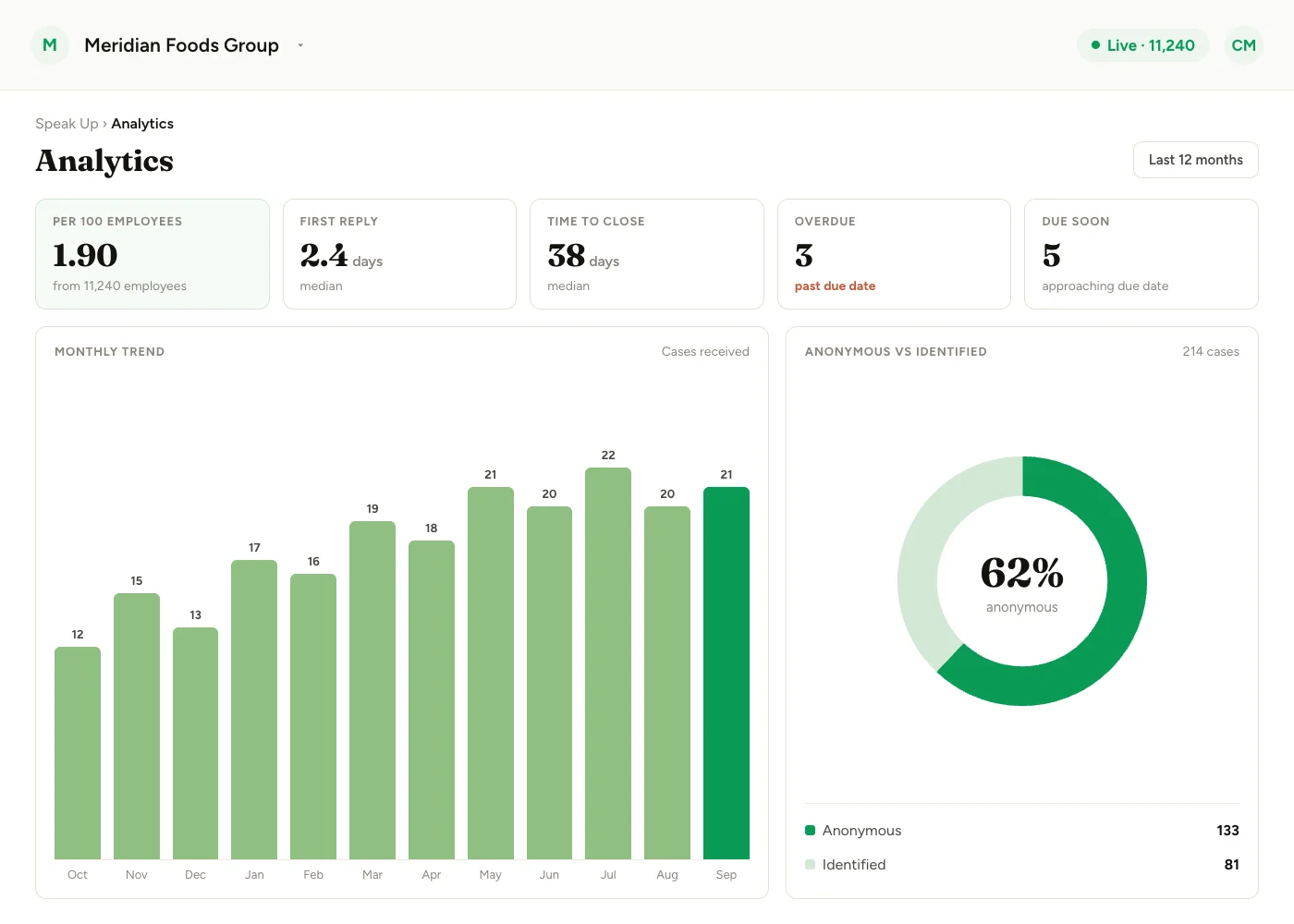
Every report now comes with a clock. A concern raised through Speak Up gets two dates the moment it is submitted: one for acknowledging it and one for concluding it. Your team sees when either slips, and the new analytics show how quickly cases are answered and whether people are using the channel at all.
Everything on this page is included for accounts that already use Speak Up. To enable Speak Up for your organisation, contact your Success Manager.
A deadline on every case
When a report is submitted, Speak Up stamps two due dates onto the case, with no one on your team having to set them:
| Deadline | Default | Met when |
|---|---|---|
| Acknowledgment | 7 days | Someone on the case team first moves the case out of New |
| Resolution | 3 months | The case is closed |
Both defaults follow the timelines in the EU Whistleblowing Directive, and both can be changed in your Speak Up settings. Each case keeps the dates that were in effect when it came in, so changing a target applies to new cases rather than rewriting open ones.
Once either date passes without the matching action, the case is flagged as overdue in three places: the case header, the case list and Speak Up analytics. The reporter sees the acknowledgment promise too, on the confirmation screen after they submit.
The acknowledgment clock stops when someone acts on the case, such as moving it into Triage, not when it is opened. Triage promptly, even when the investigation itself will take weeks.
The date of every stage
A new tab on each case records the date of every stage change, from New through Triage, Investigation and Concluding to Closed. How long a case has spent at each step can be read from the case itself.
Analytics that show the channel works
The Speak Up dashboard already showed cases by stage and by category. It now adds:
- Response times: time to first reply and time to close.
- Overdue and due-soon counts, so slipping cases surface before they are late.
- A monthly trend of cases coming in.
- Anonymous versus identified share of reports.
- Reports per 100 employees, calculated from the headcount CultureMonkey already holds.
Reports per 100 employees is the number that tells a quiet channel apart from a trusted one. The most widely published median is 1.65 (NAVEX, 2025 data). Analytics keeps the same category scoping as the case queue, so a Member sees the numbers for their own categories only.
Where cases are kept
- EU storage: for EU customers, Speak Up cases are stored in the EU.
- Retention: cases are kept until you delete them.
- One channel for a group: a single reporting channel can run across a group's companies.
- Security scope: Speak Up cases sit inside CultureMonkey's SOC 2 and ISO 27001 scope.
New to Speak Up? The July release covers the reporting portal, anonymity, roles and the case workflow.
See what a warmer engagement platform looks like
Book a walkthrough and we will show you the features on this page, live in your workspace.