

Send candidates to CultureMonkey with the API
Authenticate, create, update, bulk-sync, read and delete candidates through the CultureMonkey candidate API, with fields, errors and limits.
On this page
To send candidates to CultureMonkey with the API, call the candidate endpoints under /api/v1/custom/candidates with your account's API key in the Authorization header and a JSON body. You can create one candidate per call, create or update up to 100 in a single bulk call, update a candidate by its External ID, and read or delete candidates. This is how an ATS or integration tool keeps CultureMonkey's candidate list current without anyone uploading files.
This guide is for the developer or integration owner. It covers authentication, every endpoint, the fields each call accepts, how CultureMonkey resolves jobs, people, locations and custom attributes, the error responses, and the limits to design around.
Use your CultureMonkey account's API key (the same key as the employee API) as Authorization: Bearer <key>, and send Content-Type: application/json on every call, GET included. A new candidate needs first_name, email_address, external_id, current_status, job.external_id, hiring_manager_email and primary_recruiter_email. For ongoing syncs, the bulk endpoint creates or updates up to 100 candidates per call. The API is inbound only: nothing is sent back to your ATS.
Before you start
- Get the API key. The key is account-wide and is shown in the employee-side settings under Integrations, in the API KEY field, with a copy button. There is no separate candidate key. See Generate CultureMonkey API keys and use the API for where it lives and how to keep it safe.
- Know your host. Candidate endpoints are served from the same CultureMonkey host as your employee API calls.
- Add the people first. Hiring managers and recruiters are matched by email to existing CultureMonkey employees. Load employees before candidates.
Every request carries two headers:
Authorization: Bearer YOUR_API_KEYContent-Type: application/json
The Authorization value is two words separated by a space, and the key is the second word. A missing header returns 401 "No Authorization Token", a wrong key returns 401 "401 Unauthorized Api-Key", and a missing or wrong content type returns 400, even on a GET.
Endpoints
| Method and path | What it does |
|---|---|
GET /api/v1/custom/candidates | Lists candidates, 100 per page at most. Optional page, per_page, status (active by default, or inactive) and candidate_id |
POST /api/v1/custom/candidates | Creates one candidate. Always a new record |
GET /api/v1/custom/candidates/:external_id | Returns one candidate by External ID |
PUT /api/v1/custom/candidates/:external_id | Updates one candidate by External ID |
PUT /api/v1/custom/candidates/:external_id/update_stage | Same update, with the success message "Candidate Stage Updated successfully". Convenient for status-change events |
DELETE /api/v1/custom/candidates/:external_id | Deletes one candidate by External ID |
POST /api/v1/custom/candidates/bulk-candidate-import | Creates or updates up to 100 candidates |
Create a candidate
Send a POST with these required fields:
| Field | Type | Notes |
|---|---|---|
first_name | string | |
email_address | string | Must be a valid email |
external_id | string | Your ATS ID for the candidate. Must be unique |
current_status | string | Free text, for example Applied, Interviewing, Offered, Hired or Rejected. Use consistent spelling |
job | object | Must include external_id (the requisition ID) |
hiring_manager_email | string | Email of an existing employee |
primary_recruiter_email | string | Email of an existing employee |
Optional fields: last_name, phone_number, gender, candidate_id, employee_type, is_active ("true" or "false"), date_of_hire and date_of_joining (YYYY-MM-DD), primary_recruiter_manager_email, location (an object with name and optional country, region, city), question_language_id for the candidate's survey language, and custom_attributes (an object of key and value pairs). The job object can also carry title, profile, category, family, family_group, level_hierarchy (an object such as L2 and L3 names) and requisition_location.
A minimal request body looks like this:
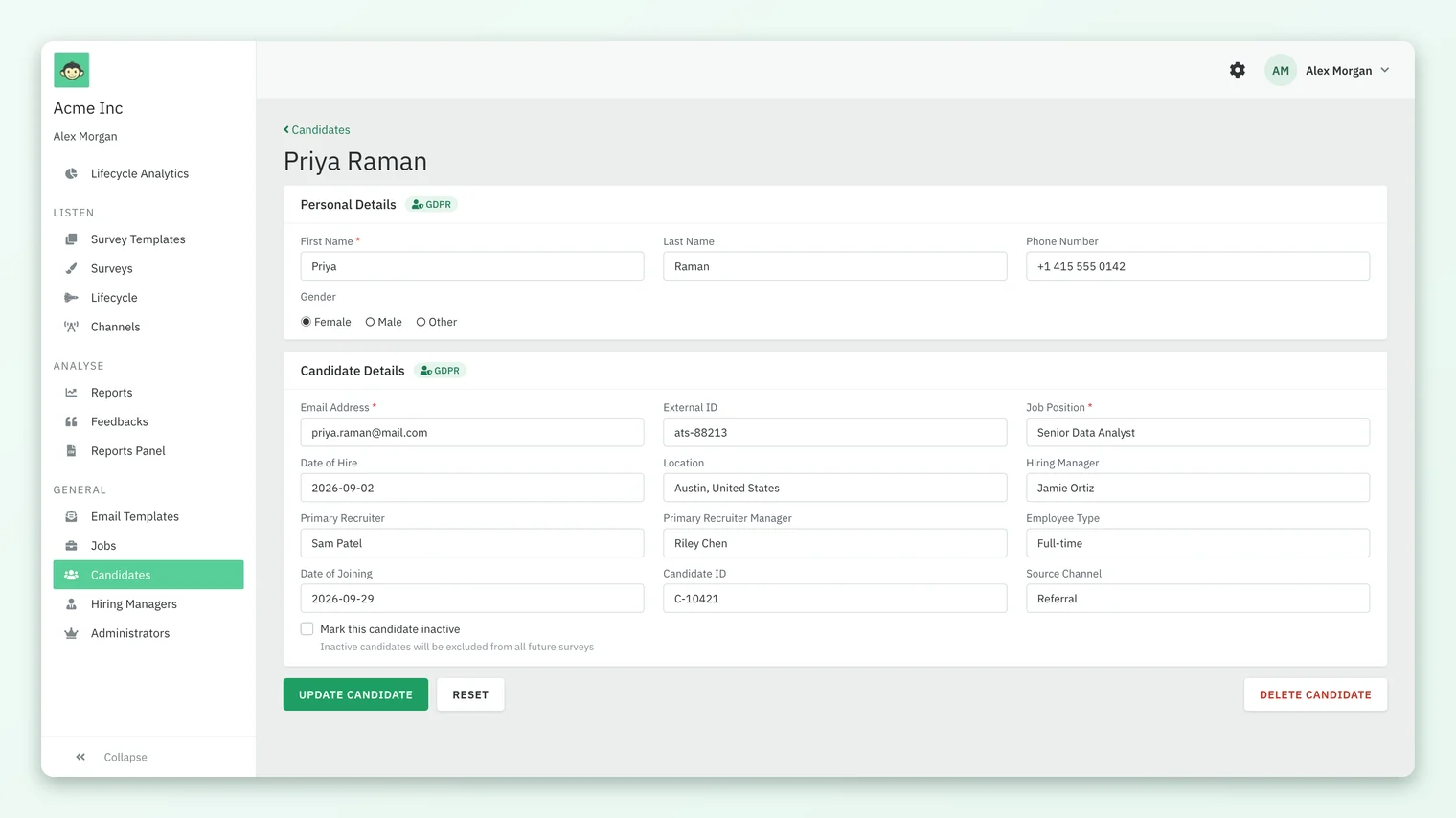
{"first_name": "Priya", "last_name": "Raman", "email_address": "priya.raman@mail.com", "external_id": "ats-88213", "current_status": "Hired", "job": {"external_id": "REQ-2041", "title": "Senior Data Analyst"}, "hiring_manager_email": "jamie.ortiz@acme.com", "primary_recruiter_email": "sam.patel@acme.com", "date_of_joining": "2026-09-29", "custom_attributes": {"source_channel": "Referral"}}
A successful call returns the candidate: id, candidate_id, name, email, phone, gender, external_id, employee_type, current_status, is_active, the recruiter and hiring manager emails, both dates, custom_attributes, location and a nested job. The record then appears on the Candidates list like any other.
Update candidates
PUT /api/v1/custom/candidates/:external_id changes one candidate. Only external_id and current_status are required in the body; send whatever else changed. The External ID lookup is an exact match. The update_stage path behaves the same way and is a natural fit for "status changed" events from your ATS.
For regular syncs, prefer the bulk endpoint. Send {"candidates": [ ... ]} with up to 100 candidate objects, each carrying the create fields. Each candidate is matched on the anchor field (External ID unless your account uses email), ignoring case; a match is updated and anything else is created. Add "api_anchor_flag": "email_address" or "external_id" to choose the anchor for one call. If you anchor on External ID and a candidate has none on file yet, CultureMonkey falls back to matching by email, which lets a later sync attach IDs to records first loaded by CSV.
The bulk response reports message ("Success", "Partially Succeed" or "Failed to create"), saved_count, failed_count, total_count, an errors list with the offending request, and the anchors that were saved. Any failure makes the response a 422, so read the counts rather than the status code alone.
Read and delete candidates
GET /api/v1/custom/candidates returns a page of candidates plus meta with total_page, per_page, page and total_count. Pages hold at most 100 records, whatever per_page you ask for, so loop over page until you reach total_page. GET /api/v1/custom/candidates/:external_id returns one candidate, or 404 "Candidate not found".
DELETE /api/v1/custom/candidates/:external_id removes the candidate from CultureMonkey's lists and from future surveys. The record is marked deleted rather than erased. To pause surveys for someone who is still in your pipeline, send is_active as "false" instead.
How the API resolves related records
| Value you send | What CultureMonkey does |
|---|---|
job.external_id | Finds the job by External ID, ignoring case, or creates it. Job fields you send overwrite the stored ones |
location.name, requisition_location.name | Finds the location or creates it |
hiring_manager_email, primary_recruiter_email | Finds the employee. An unknown email fails the candidate with "Hiring Manager with email ... not found" or "Primary Recruiter with email ... not found" |
primary_recruiter_manager_email | Finds the employee. An unknown email is left blank without an error, so check it on your side |
custom_attributes | Keys are lowercased and spaces become underscores. Dropdown values must be one of the configured options. An unknown key creates a new Textbox attribute |
Because an unknown custom_attributes key quietly creates a new Textbox attribute, a typo such as sourcechannel produces a second, unwanted attribute. Create your attributes in CultureMonkey first and use their exact keys.
Errors and limits
| Response | Meaning |
|---|---|
| 401 | Missing Authorization header or wrong key |
| 400 | Content-Type is not application/json |
| 404 | Candidate not found by External ID, or the request could not be built, for example an unknown hiring manager or a date such as "date_of_hire (...) is not a valid date format. Please use YYYY-MM-DD" |
| 422 | The candidate could not be saved (for example a duplicate External ID or an invalid email), a bulk call with any failure, or more than 100 candidates in one bulk call ("Limit exceeded! Cannot process more than 100 candidates.") |
Requests are rate limited to 1,000 per minute and 30 per second from one IP address. For a large first load, use bulk calls of 100 with a short pause between them, or load the backlog once with a CSV import.
Frequently asked questions
Is there a separate API key for candidates?
No. CultureMonkey uses one API key per account for both the employee and candidate APIs. Anyone holding it can change candidate and employee data, so keep it in a secrets store.
Does the API send anything back to our ATS?
No. The API only receives data and answers read requests. There are no webhooks or outbound calls; if your ATS needs CultureMonkey data it has to request it.
Should we use the single create call or the bulk call?
Use bulk for syncs. The single create call always adds a new record and fails if the External ID already exists, while bulk updates existing candidates and creates new ones in the same call.
How do we move a candidate to a new stage?
Update current_status with a PUT (either path). Lifecycle stages are set up by CultureMonkey to match status values and custom attributes, and a daily run enrolls candidates who match. See How candidate lifecycle stages and surveys work.
Can we set a candidate's survey language?
Yes, with question_language_id. It matters only where multilingual candidate surveys are turned on for your account. See Candidate survey channels and languages.
Is the email address unique?
The External ID must be unique. Email is not enforced as unique, so if you anchor bulk calls on email, make sure your ATS sends one email per person.
Where to go next
- Find and protect the key: Generate CultureMonkey API keys and use the API
- Load a backlog from a file: Import candidates from a CSV in CultureMonkey
- Prepare custom fields: Add custom attributes to candidate records
- See how status drives surveys: How candidate lifecycle stages and surveys work
- On the website: Candidate experience ATS integration
Your feedback helps us improve the Help Center.