

How candidate lifecycle stages and surveys work in CultureMonkey
How CultureMonkey lifecycle stages decide which candidates get which survey, what the daily run does, and how to read, enable and disable stages on the Lifecycle page.
On this page
- What is a lifecycle stage?
- Who sets the stage conditions?
- What happens each day?
- Can a candidate get the same survey twice?
- The Lifecycle page
- Enable or disable a stage
- How do you stop surveys for one candidate?
- What about rejected or declined candidates?
- Reminders for stage surveys
- Frequently asked questions
- Where to go next
In CultureMonkey Candidate Experience, a lifecycle stage is a point in the hiring journey, such as after applying or after an offer, with one survey attached. CultureMonkey sets up your stages and the candidate conditions behind each one. Once you enable a stage, a daily run adds every newly matching candidate to that stage's survey and sends it, and each candidate receives each stage survey at most once.
Related release: Candidate Experience: bulk job imports and dedicated recruiting email (February 25, 2026). See every dated change on Product Updates.
This article explains how stages are defined, what the daily run does, what every item on the Lifecycle page means, how to enable or disable a stage, and how to stop surveys reaching a particular candidate.
CultureMonkey sets up your lifecycle stages and their conditions; there is no screen for editing conditions. You enable or disable each stage from Lifecycle, CONFIGURE. An enabled stage runs every day: it finds active candidates who now match its conditions, adds them to the stage survey and sends it to anyone who has not had it. Nobody gets the same stage survey twice. Keep candidate status and fields current, because that is what moves candidates between stages.
What is a lifecycle stage?
Each stage has three parts:
- A name, shown on the Lifecycle timeline, such as Application, Interview or Offer.
- A survey, created from the stage's survey template the first time the stage is enabled.
- Conditions on candidate fields that decide who belongs in the stage.
Stage names, templates and conditions are agreed with CultureMonkey when the module is set up for your account, so the stages you see match your own hiring process.
Who sets the stage conditions?
CultureMonkey does. Conditions are configured on your account rather than on a settings screen, so to add a stage or change who falls into one, ask your CultureMonkey Success Manager. It helps to know how conditions behave when you ask for one:
| Rule | What it means in practice |
|---|---|
| Conditions use candidate fields | Standard fields such as current status, job, hiring manager, primary recruiter, location, employee type or date of joining, and your candidate custom attributes |
| Several conditions must all match | "Status is Offered" and "Job category is Engineering" only enrolls engineering candidates with an offer |
| A list of values means any of them | "Status is Rejected or Declined" enrolls candidates with either value |
| Matching ignores case and spaces at the ends | "offered", "Offered" and " Offered " all match |
| Only active candidates are enrolled | Inactive and deleted candidates are skipped |
The current status field is free text in CultureMonkey, so it holds whatever your ATS or import sends. Agree the exact values with CultureMonkey, and keep sending the same spelling.
There is no "send N days after an event" setting on a stage. A candidate is enrolled on the first daily run after they start matching the conditions. If timing matters, send the status change to CultureMonkey at the moment you want the survey to go.
What happens each day?
An enabled stage has a scheduled run each day. On each run CultureMonkey:
- 1Finds matching candidates. It looks for active candidates who match the stage conditions and are not already in the stage survey.
- 2Adds them as participants. Newly matching candidates join the stage survey.
- 3Sends the survey. Anyone in the stage who has not yet been sent the survey receives it, including anyone missed on an earlier run.
- 4Schedules the next run for the following day. The date appears as Next survey on the Lifecycle page.
When you enable a stage, its first run is the next day. Stage surveys have no end date, so a candidate can answer whenever they get to it. If a run fails, CultureMonkey retries it automatically a few hours later.
Can a candidate get the same survey twice?
No. Once a candidate is a participant in a stage's survey, later runs of that stage skip them, even if they still match the conditions. A candidate can still receive several surveys over their journey: one for each stage whose conditions they meet.
The Lifecycle page
Open Lifecycle in the candidate sidebar. The Stages tab shows a timeline of your stages; click a stage to see its details underneath.
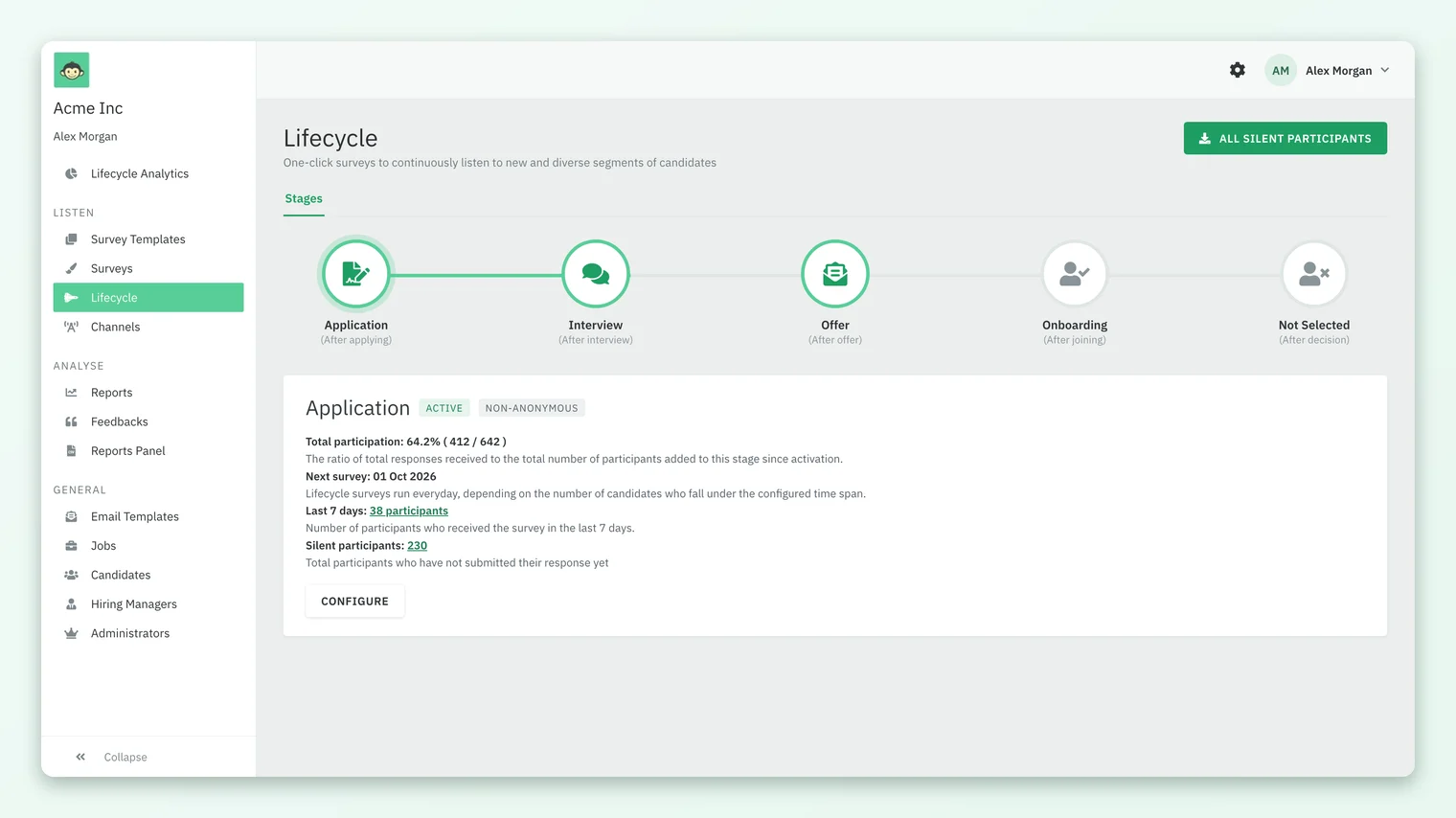
| Item | What it tells you |
|---|---|
| ACTIVE or INACTIVE | Whether the stage is currently enrolling and sending |
| ANONYMOUS or NON-ANONYMOUS | The identity setting of the stage survey. See Are candidate survey answers anonymous? |
| Total participation | Responses divided by participants since the stage was activated, for example 64.2% ( 412 / 642 ) |
| Next survey | The date of the next daily run |
| Last 7 days | How many candidates received the survey in the past week. Click the number to see them |
| Silent participants | Candidates who have received the survey and not answered. For non-anonymous stages the number opens a list you can download |
| All silent participants | A header button that exports non-responders across every non-anonymous stage as a CSV |
If no stages have been set up for your account yet, the page shows Listen. Throughout. with a prompt to contact CultureMonkey.
Enable or disable a stage
Click CONFIGURE under a stage to open its settings. The window shows the stage's survey template (hover it to preview), the live survey's participation, and, when email templates are turned on for your account, the First Email Template and Reminder Email Template the stage uses.
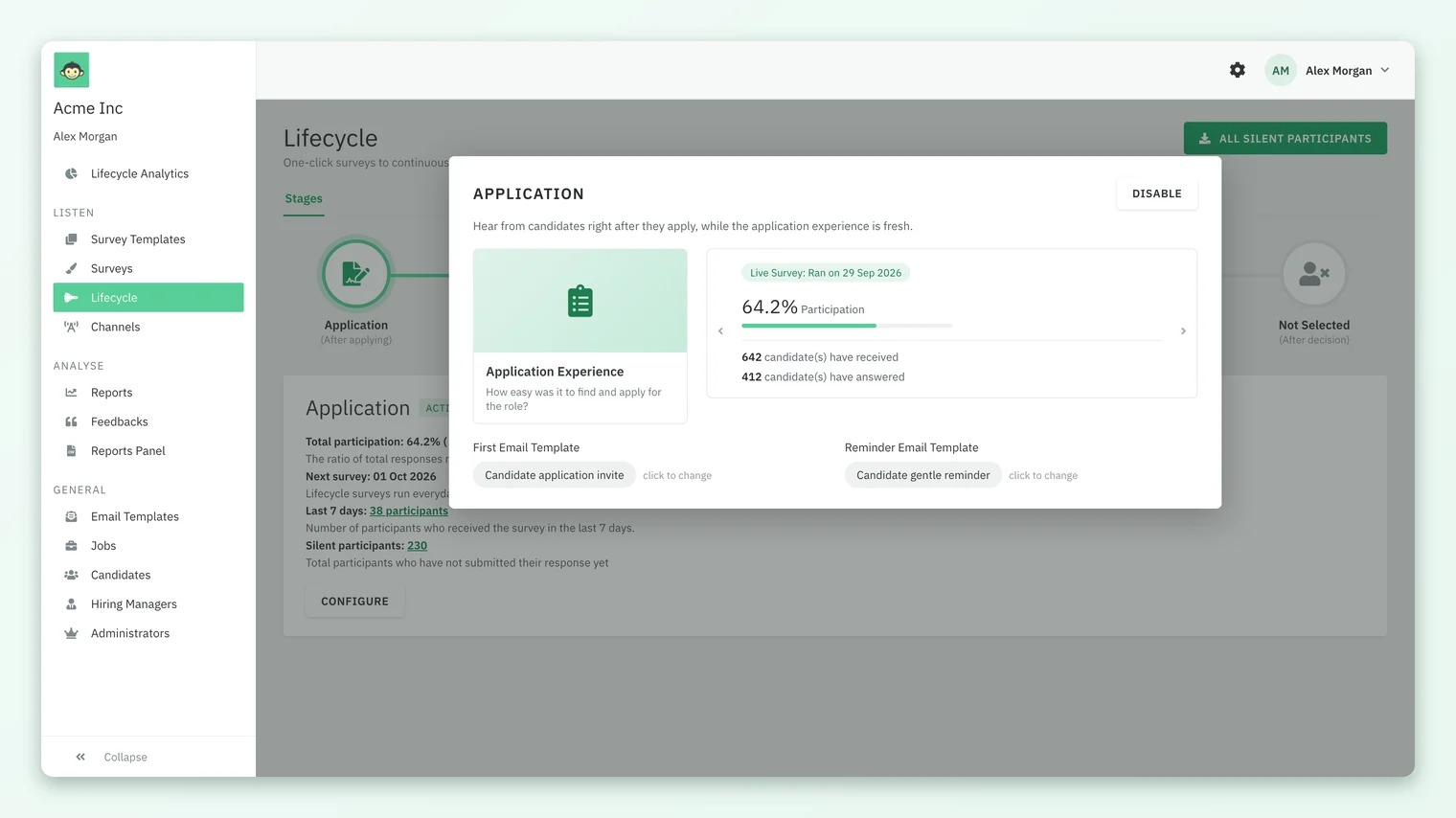
- ENABLE activates an inactive stage. Its first run is the next day. If you see CONTACT US instead of ENABLE, stages on your account are enabled by CultureMonkey: ask your Success Manager.
- DISABLE stops future runs. Candidates who already received the survey can still answer it.
- Email templates are changed by clicking the current template name and choosing another. See Candidate survey emails, placeholders and sender settings.
The disable confirmation refers to "Employees". On the candidate side it means candidates: those who already have the survey can still respond.
How do you stop surveys for one candidate?
Mark the candidate inactive. On the candidate's edit form, tick Mark this candidate inactive ("Inactive candidates will be excluded from all future surveys"), or send is_active as false through the API or your CSV import. Inactive candidates are skipped by every stage. Deleting a candidate also removes them from future runs.
What about rejected or declined candidates?
CultureMonkey has no special handling for rejected candidates. They are surveyed only if one of your stages has a condition that matches them, for example a stage for a current status of Rejected. Whether you survey candidates who were not selected is your choice; agree it with CultureMonkey when your stages are set up, and make sure the status your ATS sends matches the condition.
Reminders for stage surveys
Stages do not create reminders automatically. To nudge non-responders, use Send Reminder on the stage's card in Lifecycle Analytics, which reminds everyone who has not yet answered that stage's survey. Reminders only go to people who were sent the survey and have not submitted, and a candidate stops receiving reminders for a stage survey 30 days after it was sent to them.
Frequently asked questions
Can I add a new stage myself?
No. Stages and their conditions are set up by CultureMonkey. Ask your CultureMonkey Success Manager, and describe the candidate field values that should put someone into the stage.
Why is an enabled stage not sending to anyone?
Usually because no active candidate matches its conditions. Check that candidates are active and that the field values, especially current status, are spelled the way the condition expects. Conditions are ANDed, so a single mismatched field excludes the candidate.
When does a newly enabled stage send its first survey?
On the next day's run. The Lifecycle page shows the date as Next survey.
If a candidate goes back to an earlier status, are they surveyed again?
No. A candidate who is already a participant in a stage's survey is never added to it again, whatever their status does later.
Does disabling a stage delete its responses?
No. Disabling stops future runs only. Existing responses stay in your reports, and candidates who already received the survey can still answer.
Why can't I open the list of silent participants?
The list and its download are only available for non-anonymous stages. For anonymous stages the Lifecycle page shows the count only, which protects respondents' identity.
Where to go next
- The whole module: What is Candidate Experience in CultureMonkey?
- Keep candidate data current: How candidate data gets into CultureMonkey
- Write the stage emails: Candidate survey emails, placeholders and sender settings
- Read stage results: Candidate Lifecycle Analytics and silent candidates
- On the website: Candidate experience journey map
Your feedback helps us improve the Help Center.