

Are candidate survey answers anonymous in CultureMonkey?
What candidate surveys reveal: identified records, anonymous and non-anonymous surveys, minimum responses, comment context and named downloads.
On this page
It depends on the survey. Candidate records in CultureMonkey are always identified, because the system needs your name and email address to send you the right survey at the right point in your hiring process. What changes from survey to survey is what the employer sees: each candidate survey is set up as either Anonymous or Non-anonymous, and only a non-anonymous survey lets the employer see who gave which answers.
This page is written for candidates and for the admins who run candidate surveys. It explains what is identified, what each survey type reveals, the minimum-response rules that protect small groups, and the one place where named responses can be downloaded.
CultureMonkey knows who you are, so surveys reach the right person and reminders stop once you answer. In an Anonymous survey, your employer sees grouped results only, no report appears until at least 3 people have answered (by default), and small groups are hidden. Written comments still carry your job, recruiter, hiring manager and location, but not your name. In a Non-anonymous survey, admins can download your answers with your name.
Why are candidate records identified?
Candidate surveys are triggered by where you are in a hiring process: after an interview, at offer, when you join. To send the right survey to the right person, your employer's candidate record for you includes details such as your name, email address, the job you applied for, your recruiter and your hiring manager. CultureMonkey also records whether you have submitted a survey, so that reminders go only to people who have not answered yet.
So "anonymous" in CultureMonkey never means "the system does not know who you are". It means the employer's reports do not connect your answers to your name.
Anonymous and non-anonymous candidate surveys
Whoever builds the survey chooses one of two options under Identity Settings, and the survey's page shows [Anonymous] or [Non-anonymous] next to its name. The on-screen help text refers to "employee" data; for candidate surveys it applies to candidate data in exactly the same way.
| Anonymous | Non-anonymous | |
|---|---|---|
| Who can see your individual answers | Nobody at the employer; reports are grouped | Candidate admins, through a named download |
| Minimum responses before a report appears | 3 by default, and never fewer than 3 | Can be as low as 1 |
| Named download (Participant Details (with name)) | Not available | Available to Super Admins |
| Named list of candidates who have not answered | Not available; counts only | Available for lifecycle stage surveys |
| Comments | Shown with job, recruiter, hiring manager and location, without your name | Shown the same way, and included with your name in the named download |
What protects respondents in an anonymous survey?
Several minimum-response rules sit between an individual answer and the screen:
- Report threshold. A survey's report does not appear until it has at least its minimum number of submissions, shown on the survey page as "N responses required". For anonymous surveys this defaults to 3 and cannot go lower. Changing it is done by CultureMonkey on request.
- Heatmap groups. A job, recruiter or other group with fewer respondents than that minimum is left off the heatmap. If a filter narrows the whole survey below it, every score is hidden.
- Drill-down and search. Driver drill-down and demographic search skip groups below the minimum too.
- Sub Admins. A Sub Admin only sees a report once enough of the candidates in their own scope have answered.
- Lifecycle Analytics. The stage dashboard uses its own candidate threshold, 5 by default and never below 3, before showing a group on its score cards.
The general principles behind these rules are covered in CultureMonkey anonymity thresholds explained and Set survey anonymity in CultureMonkey.
Comments are the part of an anonymous survey most likely to identify someone. Each comment card shows the candidate's job, primary recruiter, hiring manager and location. If only one person applied for a particular role with a particular recruiter, their comment is effectively attributable. Admins should treat comment cards as sensitive and avoid sharing them outside the recruiting team, and candidates may want to leave identifying details out of free text.
Where are named responses available?
Only in Reports Panel, and only for non-anonymous surveys with at least one submission. A Super Admin picks the survey, chooses the report type Participant Details (with name) and clicks Download Report; the file arrives by email.
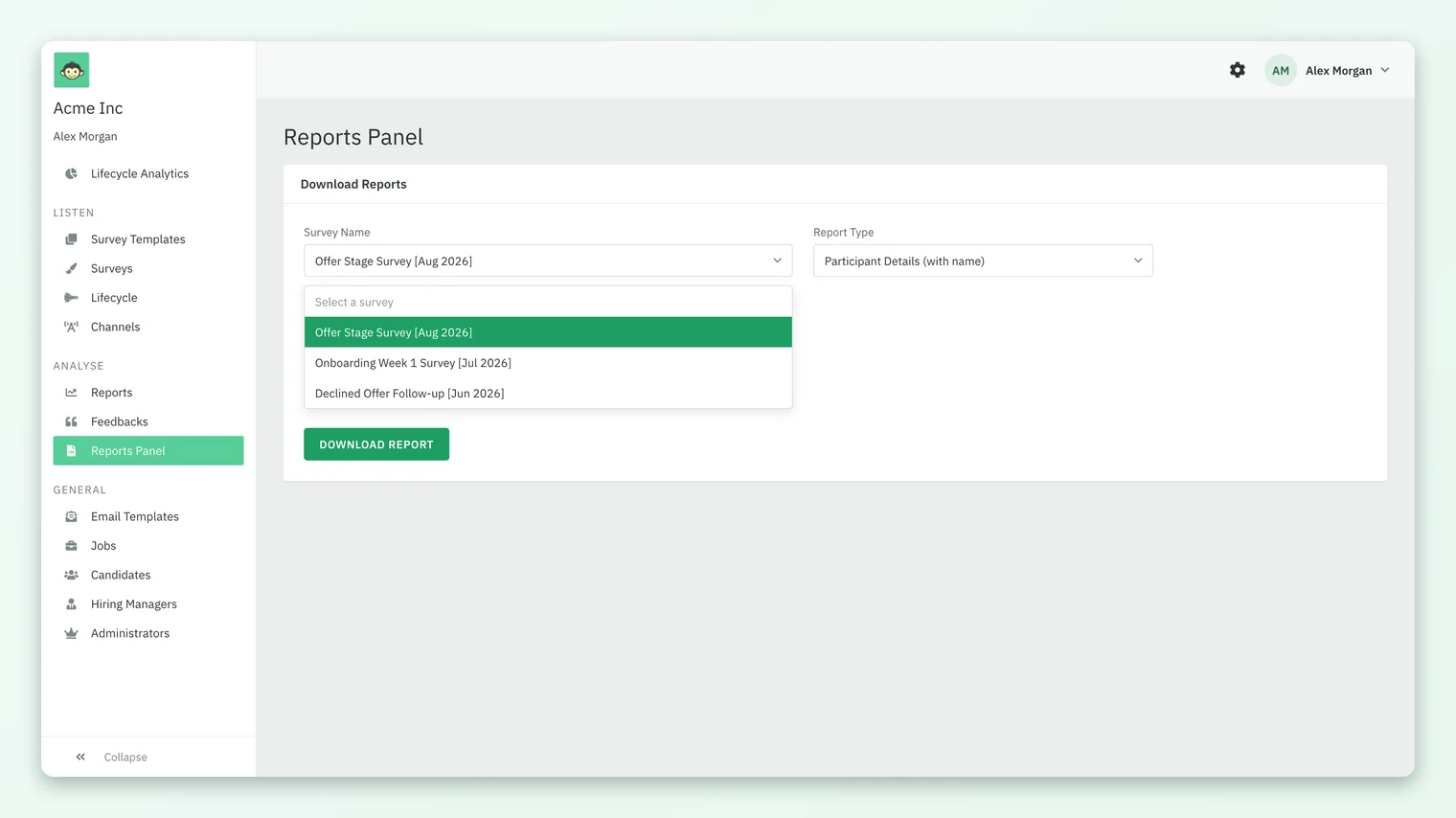
The file lists every participant, including those who did not answer, with their ID, full name, job details, recruiter, hiring manager, location, gender, dates, every answer, the time they submitted, their feedback and their NPS score. Anonymous surveys never appear in the survey list, so no named export can be made for them. Sub Admins cannot open Reports Panel.
Choosing anonymous or non-anonymous (for admins)
Choose Anonymous when you want candid feedback on the interview experience, the recruiter or the offer process, and where you only need patterns. Choose Non-anonymous when you genuinely need to follow up with individuals, for example to chase candidates who have not answered a stage survey by name or to contact someone about a specific complaint. Whichever you pick, tell candidates in the survey email which kind of survey it is, so their expectations match what you can see.
What candidates can expect
- You will be recognized by the system. That is how the survey reached you and how reminders know to stop.
- In an anonymous survey, your employer sees your answers only as part of groups of at least 3, and your comment without your name, but with the job, recruiter, hiring manager and location attached.
- In a non-anonymous survey, candidate admins at the employer can download your answers with your name.
- If you are unsure which kind of survey you have, ask the recruiter or the company that sent it. They can see the survey's identity setting.
Frequently asked questions
Does my employer know I took the candidate survey?
CultureMonkey records whether you submitted, so reminders stop. In an anonymous survey admins see only counts of who responded; in a non-anonymous survey they can see names, including a list of who has not answered a stage survey yet.
Can my recruiter or hiring manager see my answers?
Not by default. Hiring managers and recruiters have no login to candidate results unless an admin makes them a Sub Admin, and even then they see results for their own candidates only, with no names attached, because Sub Admins cannot open the named download.
What is the minimum number of responses for a candidate report?
Each survey has its own minimum. For anonymous surveys CultureMonkey defaults it to 3 and never allows fewer; for non-anonymous surveys it can be as low as 1.
Does an anonymous survey show who has not answered?
No. For an anonymous survey admins see how many candidates responded and how many did not, but not who. Named lists of candidates who have not answered exist only for non-anonymous lifecycle stage surveys.
Are my comments shown with my name?
Comments are shown as written, without your name, alongside your job, recruiter, hiring manager and location. Your name appears with a comment only in the named download for a non-anonymous survey.
Can an admin raise the minimum response count?
Yes, through CultureMonkey. A higher minimum gives more protection but delays reports on low-volume roles; ask your CultureMonkey Success Manager to change it for a survey.
Where to go next
Your feedback helps us improve the Help Center.