

How candidate NPS is calculated in CultureMonkey
How candidate NPS is worked out from promoters and detractors, where it appears, and why it is labelled eNPS, cNPS or e-NPS.
On this page
Candidate NPS in CultureMonkey is calculated exactly like eNPS: the percentage of candidates who score 9 or 10 (promoters) minus the percentage who score 0 to 6 (detractors), on a question asking how likely they are to recommend your company based on their candidate experience. The result runs from -100 to +100.
This guide covers how to add the question to a candidate survey, the exact calculation with a worked example, where the score appears (and why it carries different labels on different screens), and how to read it.
Tick Add eNPS to this survey when you build a candidate survey. Candidates answer on a 0 to 10 scale, and CultureMonkey counts 9 to 10 as promoters, 7 to 8 as passives and 0 to 6 as detractors. Score = % promoters minus % detractors, rounded to two decimal places. You will see it labelled eNPS, cNPS or e-NPS depending on the screen, but it is the same number worked out the same way.
How do I add the NPS question to a candidate survey?
- 1Create or edit a candidate survey under Surveys.
- 2On the survey form, tick Add eNPS to this survey.
- 3Choose where the question sits: Top or Bottom of the survey.
- 4Save and launch as usual.
The question candidates see is "Overall, how likely are you to recommend <your company> based on your candidate experience?" If you want different wording, CultureMonkey can set a custom question title for your account: ask your CultureMonkey Success Manager.
Accounts with custom NPS questions turned on also see checkboxes labelled Add custom NPS question followed by the question title. Those use the same 0 to 10 scale and the same buckets, and each custom question is scored on its own. The employee-side guide, Custom eNPS-style questions in CultureMonkey, explains the idea.
How is candidate NPS calculated?
| Answer | Bucket | Effect on the score |
|---|---|---|
| 9 or 10 | Promoter | Adds |
| 7 or 8 | Passive | Counts in the total, adds nothing |
| 0 to 6 | Detractor | Subtracts |
The formula is: (promoters / all respondents) minus (detractors / all respondents), multiplied by 100, rounded to two decimal places. Passives matter even though they are not added or subtracted, because they make up part of the total you divide by.
A worked example. 201 candidates answered the question: 96 promoters, 62 passives and 43 detractors.
- Promoters: 96 / 201 = 47.76%
- Detractors: 43 / 201 = 21.39%
- Candidate NPS: 47.76 minus 21.39 = 26.37
The general eNPS explainer, What is eNPS and how does CultureMonkey calculate it?, covers the same maths for employees; the candidate version differs only in who answers and how the question is worded.
Where does candidate NPS show up?
On the Report tab of a candidate survey report, the NPS card has a VIEW BREAKDOWN link. It opens a details window with a bar for each answer from 0 to 10, the question text, the promoter, passive and detractor counts, and reference guidance.
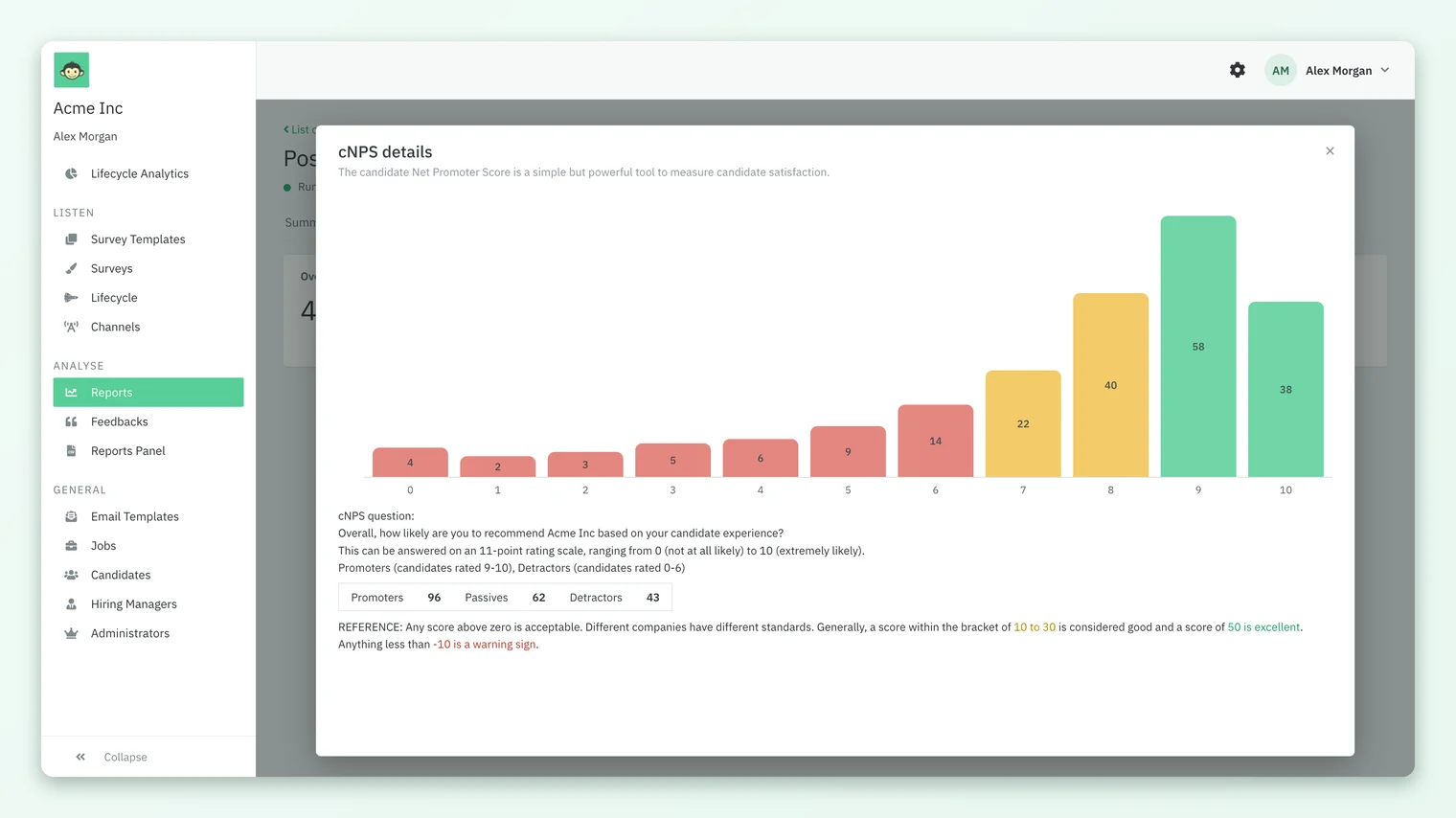
The label changes from screen to screen, so here is where to look and what each place calls it:
| Where | Label on screen | What it covers |
|---|---|---|
| Report tab card | eNPS | The whole survey, or your scope if you are a Sub Admin |
| Breakdown window | cNPS details | The 0 to 10 distribution behind the card |
| Heatmap row | e-NPS | Each group on the demographic tab you picked |
| Lifecycle Analytics | eNPS SCORE | One lifecycle stage, or all stages together |
| Participant Details export | cNPS Score | Each named respondent, non-anonymous surveys only |
All five labels refer to the same candidate NPS calculation. "cNPS" and "eNPS" are not two different metrics in the candidate module.
Why might two candidate NPS numbers not match?
Because each screen works the score out for a different set of respondents. When two numbers disagree, one of these is almost always the reason:
- Scope. A Sub Admin's score only counts the candidates their access covers, so it will differ from a Super Admin's score for the same survey.
- Group versus whole survey. Each column in the heatmap's e-NPS row is one group; only the Overall column matches the Report tab card. Groups below the survey's minimum response count are not shown at all.
- Stage versus Overall. In Lifecycle Analytics, a stage's eNPS SCORE covers that stage survey, while Overall combines every lifecycle stage survey.
- Main versus custom questions. Custom NPS questions are scored separately from the main recommendation question and never blended into it.
- Rounding. Scores are rounded to two decimal places, so a total worked out by hand from rounded percentages can be a hundredth or two away.
What is a good candidate NPS?
The breakdown window gives the same guidance CultureMonkey uses for eNPS: any score above zero is acceptable, a score between 10 and 30 is generally considered good, 50 is excellent, and anything below -10 is a warning sign. Different companies hold themselves to different standards, so your own trend matters more than a single threshold.
A few habits make the number more useful:
- Read it per stage. A candidate who has just been rejected answers differently from one who has just accepted an offer. Compare stages in Lifecycle Analytics rather than averaging them in your head.
- Check the count first. With a small number of respondents, one or two answers can swing the score by many points. The breakdown window shows exactly how many people are behind it.
- Use the heatmap row to find the gap. The e-NPS row on the heatmap shows which job, recruiter or hiring manager is pulling the score down.
Frequently asked questions
Is candidate NPS calculated differently from eNPS?
No. CultureMonkey uses identical maths for both: 9 to 10 are promoters, 7 to 8 passives, 0 to 6 detractors, and the score is % promoters minus % detractors. Only the question wording and the respondents differ.
Why does the card say eNPS when the window says cNPS?
The labels are generated differently on different screens. The card uses the general eNPS label, while the breakdown window prefixes NPS with the first letter of the module, which gives cNPS. They are the same score.
Can candidate NPS be negative?
Yes. When detractors outnumber promoters the score is below zero, down to -100 if every respondent scores 0 to 6.
Can I change the wording of the candidate NPS question?
CultureMonkey can set a custom title for the candidate NPS question on your account. Ask your CultureMonkey Success Manager, and keep the 0 to 10 recommendation format so the score stays comparable.
Do Sub Admins see the company-wide candidate NPS?
No. A Sub Admin's NPS is calculated only from the candidates their access covers, so it can differ from the number a Super Admin sees for the same survey.
Why is the NPS card missing from my candidate report?
The card only appears when the survey includes the question, that is when Add eNPS to this survey was ticked. Edit the survey to add it for future responses.
Where to go next
Your feedback helps us improve the Help Center.