

Survey hiring managers when a new hire joins
How CultureMonkey sends a survey to a new hire's hiring manager on the date of joining, what has to be in place, and how to write the invitation.
On this page
CultureMonkey can survey a new hire's hiring manager automatically on the day the new hire joins. Each morning, CultureMonkey finds candidates whose date of joining is today and sends the hiring-manager survey to each one's hiring manager, one invitation per joiner. It is a way to hear how the hiring process worked from the manager's side, alongside what candidates tell you.
Related release: Candidate Experience: bulk job imports and dedicated recruiting email (February 25, 2026). See every dated change on Product Updates.
This article covers what triggers the survey, what has to be in place for it to work, how to write the email so it reads well for a manager, and what hiring managers can and cannot see in CultureMonkey.
When CultureMonkey turns hiring-manager surveys on for your account and links the survey to use, a daily run finds every active candidate whose Date of Joining is today in your account's time zone and sends the survey to that candidate's hiring manager. A manager with three joiners that day gets three invitations, each about one joiner. Use a custom email template that greets the manager with {{hiring_manager_name}} and names the joiner with {{candidate_name}}. Hiring managers answer the survey; they do not log in to see results.
How is the survey triggered?
A run each morning looks for candidates who meet all of these at once:
- The candidate is active (not marked inactive or deleted).
- The candidate's Date of Joining is today, in the time zone set for your account.
- The candidate has a hiring manager.
Each matching candidate is added to the hiring-manager survey, and the invitation goes to that candidate's hiring manager rather than to the candidate. The run happens early each day, so the invitation is waiting for the manager on the new hire's first day.
The run only looks at today's date. A Date of Joining set to a past day, or corrected after the start day has passed, never triggers the survey for that joiner. Send the date to CultureMonkey before the new hire starts.
What needs to be in place?
| Requirement | Who handles it | How |
|---|---|---|
| Hiring-manager surveys turned on for your account | CultureMonkey | Ask your CultureMonkey Success Manager |
| The survey hiring managers receive | You, with CultureMonkey | Build the survey in Surveys; CultureMonkey links it as your account's hiring-manager survey. One survey is used for all joiners |
| A Date of Joining on each candidate | You | API field date_of_joining (YYYY-MM-DD), the Date of Joining column in a CSV import, or the candidate form |
| A hiring manager on each candidate | You | API field hiring_manager_email, the Hiring Manager Email column in a CSV import, or the Hiring Manager field on the form |
| The hiring manager exists as an employee | You | The email must match an existing employee in CultureMonkey, or the candidate cannot be saved with that hiring manager |
For how each field gets in, see Send candidates to CultureMonkey with the API and Import candidates from a CSV in CultureMonkey.
One invitation per joiner
The survey is sent once for each joining candidate, not once per manager. If Priya Nair has three new hires starting on Monday, she receives three invitations that morning, each tied to one of the three joiners. That is deliberate: each response is about one specific hire, and placeholders in the email resolve to that hire.
If managers in your organization often take on several people at once, say so in the email, for example "You'll receive one short survey for each new team member joining today."
Reminders for the hiring-manager survey also go to the hiring manager, not to the candidate, and only for invitations the manager has not yet answered.
Write the email for the manager
The built-in survey email greets the recipient with the participant's first name. For this survey the participant is the joining candidate, so without a custom template a manager would receive an email that opens "Hi" followed by the new hire's name. Always attach a custom email template to the hiring-manager survey.
| Placeholder | Resolves to in this survey |
|---|---|
{{hiring_manager_name}} | The hiring manager's name. Use it in the greeting |
{{candidate_name}} | The joining candidate's name |
{{job_requisition_title}} | The title of the joiner's job |
{{requisition_id}} | The job's External ID |
{{recruiter_name}} | The joiner's primary recruiter |
{{survey_response_url}} | The link to the survey |
A subject such as "{{candidate_name}} starts today: how was hiring for {{job_requisition_title}}?" makes it obvious which hire each invitation is about. Templates are created under Email Templates and attached on the survey's Settings step; see Candidate survey emails, placeholders and sender settings.
The Hiring Managers page
Hiring Managers in the candidate sidebar lists every employee who is set as the hiring manager on at least one candidate. It is read-only: people appear here because a candidate record names them, not because they were added on this page. Use the Active Hiring Managers and Inactive Hiring Managers tabs, and search by employee ID, name, email or phone.
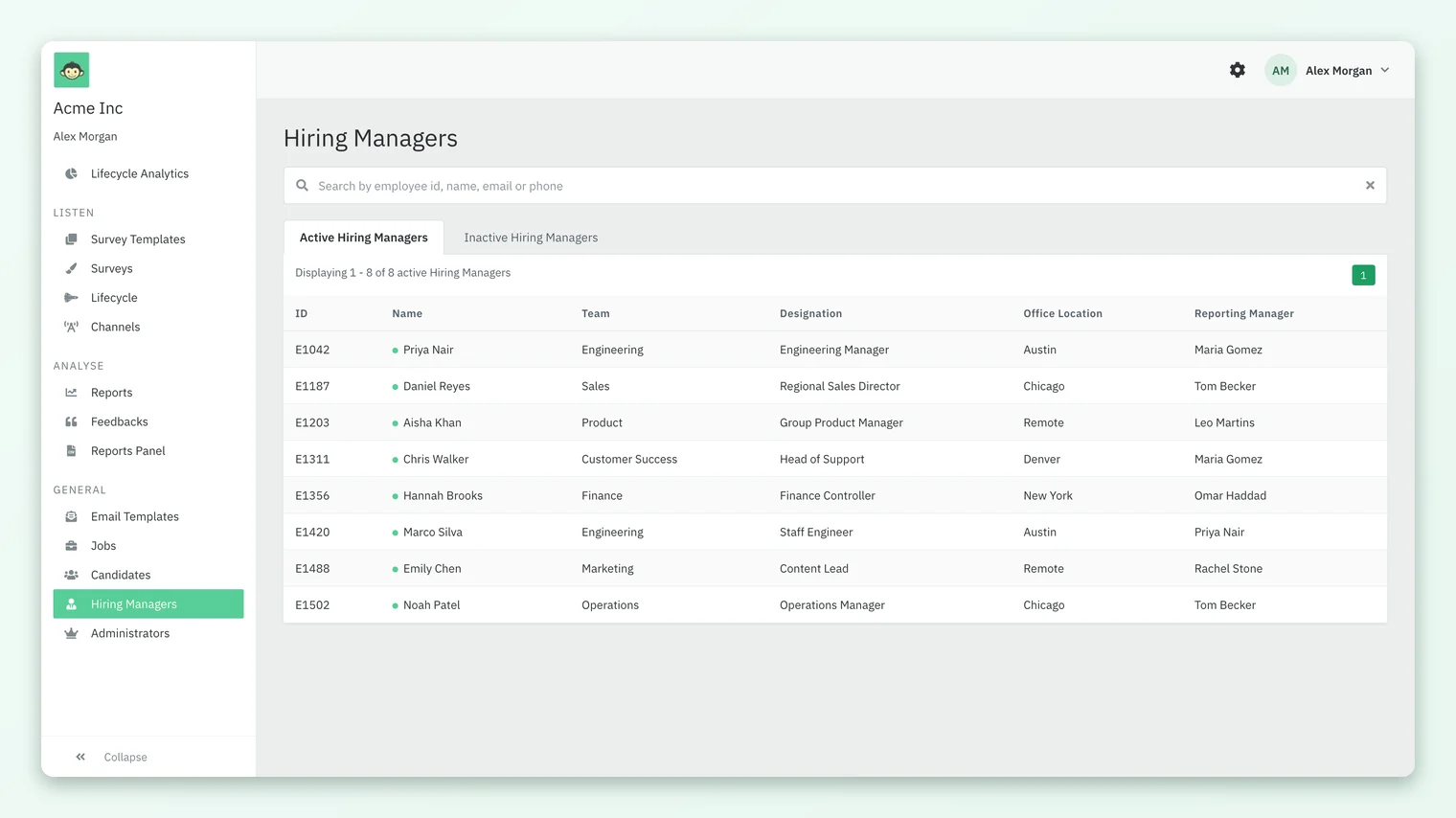
If someone you expect is missing, check the candidate records: the hiring manager's email in your import or API call must match their employee record exactly. The page is available to Super Admins.
What can hiring managers see?
Hiring managers receive the hiring-manager survey. They do not have a login to the candidate workspace and cannot see candidate results for their own hires by default. There is no hiring-manager role in Candidate Experience.
If a hiring manager needs to see results, a Super Admin can invite them as a Sub Admin scoped to their own name under the Hiring Manager attribute. They would then see surveys and reports for their candidates only. Sub Admin scoping is turned on by CultureMonkey; see Candidate Super Admins, Sub Admins and access.
Responses to the hiring-manager survey appear under Reports like any other candidate survey, once the survey has enough responses to meet its response threshold.
Frequently asked questions
Can we choose a different day, such as a week after joining?
No. The survey goes on the candidate's date of joining itself. There is no setting for a delay before or after that date.
Can we use different surveys for different teams?
No. Your account uses one hiring-manager survey for all joiners. If you need different questions for different groups, ask your CultureMonkey Success Manager about using lifecycle stages instead.
Why did a manager not receive a survey for a new hire?
The usual causes are a Date of Joining that was missing or wrong on the start day, a candidate marked inactive, or a hiring manager email that did not match an employee. The run only checks the current day, so a date fixed afterwards does not send the survey.
Why does the invitation greet the manager by the new hire's name?
Because no custom email template is attached to the survey. The default email greets the participant, who is the joining candidate. Attach a CultureMonkey email template that opens with {{hiring_manager_name}}.
Do hiring managers get reminders?
Reminders for the hiring-manager survey go to the hiring manager, and only for invitations they have not answered yet.
Can hiring managers see how candidates rated them?
Not by default. They need a Sub Admin login scoped to their own hiring-manager value, which a Super Admin can create once CultureMonkey has turned Sub Admin scoping on.
Where to go next
- Write the invitation: Candidate survey emails, placeholders and sender settings
- Get joining dates in: Send candidates to CultureMonkey with the API
- Give a manager access: Candidate Super Admins, Sub Admins and access
- The whole module: What is Candidate Experience in CultureMonkey?
- On the website: Hiring manager feedback survey
Your feedback helps us improve the Help Center.