

Reorder questions and sections
How to change the order of questions within a section, rearrange whole sections by drag-and-drop, and control where the eNPS block appears - and how each choice shapes the respondent's experience.
On this page
The order in which employees meet your questions matters more than it looks. A survey that opens with a warm, easy question and builds toward the more reflective ones feels considered; one that jumps straight into a sensitive topic can put people on the back foot before they've settled in. CultureMonkey gives you full control over sequence - the order of questions inside a section, the order of the sections themselves, and where the eNPS block sits relative to everything else.
This guide covers all three, how each one is stored and applied, and how the arrangement you choose flows through to what respondents actually see.
Drag sections into the order you want using the handle on the left of each section (this appears once you have more than one saved section). Set a question's place within its section using the Order field in the question editor. Choose whether the eNPS questions appear at the Top or Bottom of the survey with the Placement of the NPS questions setting. CultureMonkey lets you do all of this while the survey is still a draft.
Where ordering lives in the builder
Everything to do with sequence is set on Step 2 (Questions) of the survey builder, the same screen where you add sections and questions. eNPS placement is the one exception - it lives on Step 1 (Survey details) alongside the other survey-level settings.
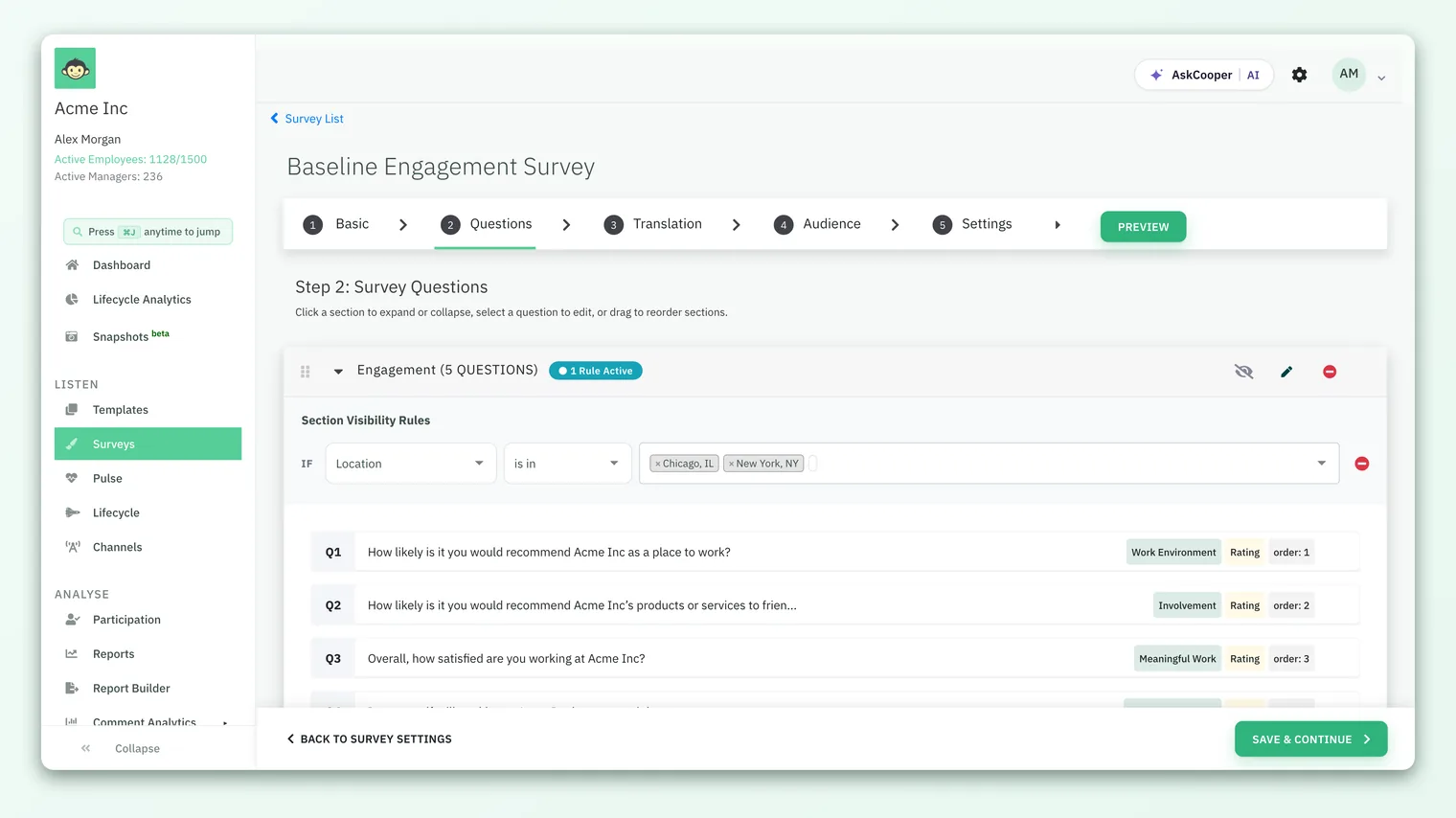
The helper text at the top of the step captures the two mechanics - drag to reorder sections, and select a question to edit its position - which we'll take in turn.
You can rearrange sections and questions freely while the survey is a draft. Once a survey is published and collecting responses, the Questions step is locked so that everyone answers the same survey in the same order - changing the sequence mid-flight would make results inconsistent. Plan your order before you publish.
Reorder whole sections by drag-and-drop
Sections are the big movable blocks of your survey, and you rearrange them by dragging.
- 1Find the drag handle. Each saved section shows a grab handle on its left edge. It only appears once you have more than one section - with a single section there's nothing to reorder.
- 2Drag the section up or down. Grab the handle and move the section card to its new position. A hint line confirms that dragging is available.
- 3Let go. As soon as you drop the section, the new order is saved automatically in the background - there's no separate save button for ordering. A toast appears only if something goes wrong.
Under the hood, each section carries an order number, starting at 1. When you drop a section, CultureMonkey renumbers every section in the list from top to bottom (1, 2, 3…) in a single, all-or-nothing update. If the save fails for any reason, the list snaps back to its previous order and you'll see a "Could not save section order" message - so you're never left with a half-applied arrangement.
The handle is hidden until a section has been saved and there's more than one section to shuffle. If you don't see a handle, save the section you're editing (or add a second one) and it will appear.
Reorder questions within a section
Questions inside a section aren't dragged - each question has an explicit Order value that you set in the question editor. Lower numbers come first.
- 1Open the question. On the Questions step, click the question you want to move. Its editor opens.
- 2Set the Order field. Find the Order field (labelled "Order of this question inside its section") and type the position you want - 1 for first, 2 for second, and so on.
- 3Save the question. The list re-sorts by the new order values the next time the section renders.
To insert a new question between the second and third, either give it an order between them or renumber the ones after it. Questions with the same order value fall back to the order they were created in, so giving each a distinct number keeps the sequence unambiguous.
The list of questions inside each section always displays in this sorted order, and the little order: label next to each question in the builder shows exactly what value it currently holds - a handy way to spot two questions that have accidentally been given the same number.
A section can hold both ordinary questions and grid questions. Both types use the same Order field and are merged into a single sorted list, so a grid block can sit wherever you place it in the sequence - first, last, or anywhere in between.
Where the eNPS questions go: Top or Bottom
If your survey includes the eNPS question, it isn't part of any section - it's a distinct block that CultureMonkey places either before or after all of your sections. You control this with the Placement of the NPS questions setting on the survey details step.
There are exactly two choices:
| Setting | What the respondent sees |
|---|---|
| Top | The eNPS (and its optional follow-up) is the first thing in the survey, before any section. |
| Bottom | The eNPS block comes last, after every section has been answered. |
By default, the eNPS block sits at the Bottom, so most surveys end on the recommendation question. Both are legitimate designs, and the right one depends on what you're optimising for:
- Top captures the eNPS score even from people who don't finish the whole survey - useful when advocacy is your headline metric and you want the highest possible response count on that one question.
- Bottom lets employees answer the specific driver questions first and form a considered overall impression before they're asked the big "would you recommend us" question. This tends to produce a more thoughtful score.
If eNPS is the number your leadership watches most, put it at the Top so you never lose it to drop-off. If you'd rather people reflect before they rate, leave it at the Bottom (the default). There's no wrong answer - just be consistent across cycles so your trend stays comparable.
The same placement rule applies whether you're using the standard eNPS question or a custom eNPS question - the Top / Bottom choice governs where that whole block lands.
How order shapes the respondent experience
Everything above comes together at survey time. When an employee opens the survey, CultureMonkey builds the page in this sequence:
- If eNPS placement is Top, the eNPS block is rendered first.
- Sections are rendered in their saved order (1, 2, 3…).
- Within each section, questions appear in their Order sequence.
- If eNPS placement is Bottom, the eNPS block is rendered last.
So the respondent's journey is a direct, predictable reflection of the three settings you've configured. There's no separate "preview order" to maintain - what you arrange in the builder is exactly what people answer.
One thing worth knowing: if you use section visibility rules to show or hide sections for different audiences, hidden sections simply drop out of the sequence for those respondents. The remaining sections keep their relative order - a rule never reshuffles them, it only removes the ones that don't apply. So the order you set is stable; visibility just filters it.
When you build a survey from a template, it inherits the template's section and question order as a starting point. Rearranging the survey afterwards changes only that survey - it doesn't alter the underlying template. To change the default order for future surveys, reorder the template itself.
Best practices for sequencing
- Open easy, close reflective. Lead with a light, low-effort question so people warm up, and save the more considered items for later.
- Group by theme. Keep related questions in the same section and order sections so the survey tells a coherent story rather than hopping between topics.
- Mind the finish line. Whatever sits last is what people leave thinking about - a common reason teams place eNPS or an open-text question at the very end.
- Number questions with gaps if you like. Assigning orders like 10, 20, 30 leaves room to slot a new question in later without renumbering everything.
- Do it before you publish. Lock in your order while the survey is still a draft; you can't rearrange once responses start arriving.
Frequently asked questions
Why can't I see a drag handle on my section?
The handle appears only when a section has been saved and there's more than one section to reorder. If you have a single section, or you're still editing an unsaved one, there's nothing to drag - add or save a second section and the handle shows up.
Can I drag questions to reorder them like sections?
Not currently. CultureMonkey orders questions by the numeric Order field in each question's editor, while sections use drag-and-drop. Set a question's position by editing its Order value.
Two questions have the same order number - what happens?
They'll appear together in the sequence, falling back to the order they were created in. Give each question a distinct Order value to keep the sequence unambiguous.
Does reordering affect my reports or historical data?
No. Order controls the sequence respondents see; it doesn't change how answers are scored or grouped in reports. Rearranging a draft before launch is purely about the respondent experience.
Can I change the order after the survey is published?
No. CultureMonkey locks the Questions step once a survey leaves draft status, so that everyone answers the same survey in the same order. Finalise your sequence before publishing.
Where do I set whether eNPS appears first or last?
On the survey details step, under Placement of the NPS questions - choose Top or Bottom. The default is Bottom.
Where to go next
- Build the blocks you're ordering: Add and edit survey sections
- Add the recommendation question: Add eNPS questions to a survey
- Show sections to the right people: Show or hide sections with rules
- Start a survey from the beginning: Create a survey from scratch
Your feedback helps us improve the Help Center.