

Updates on Org Hierarchy Survey hierarchies set at launch, Total counts and employee snapshots
A survey's org hierarchy now stays as it was when the survey launched, and you can download who reported to whom at that point.
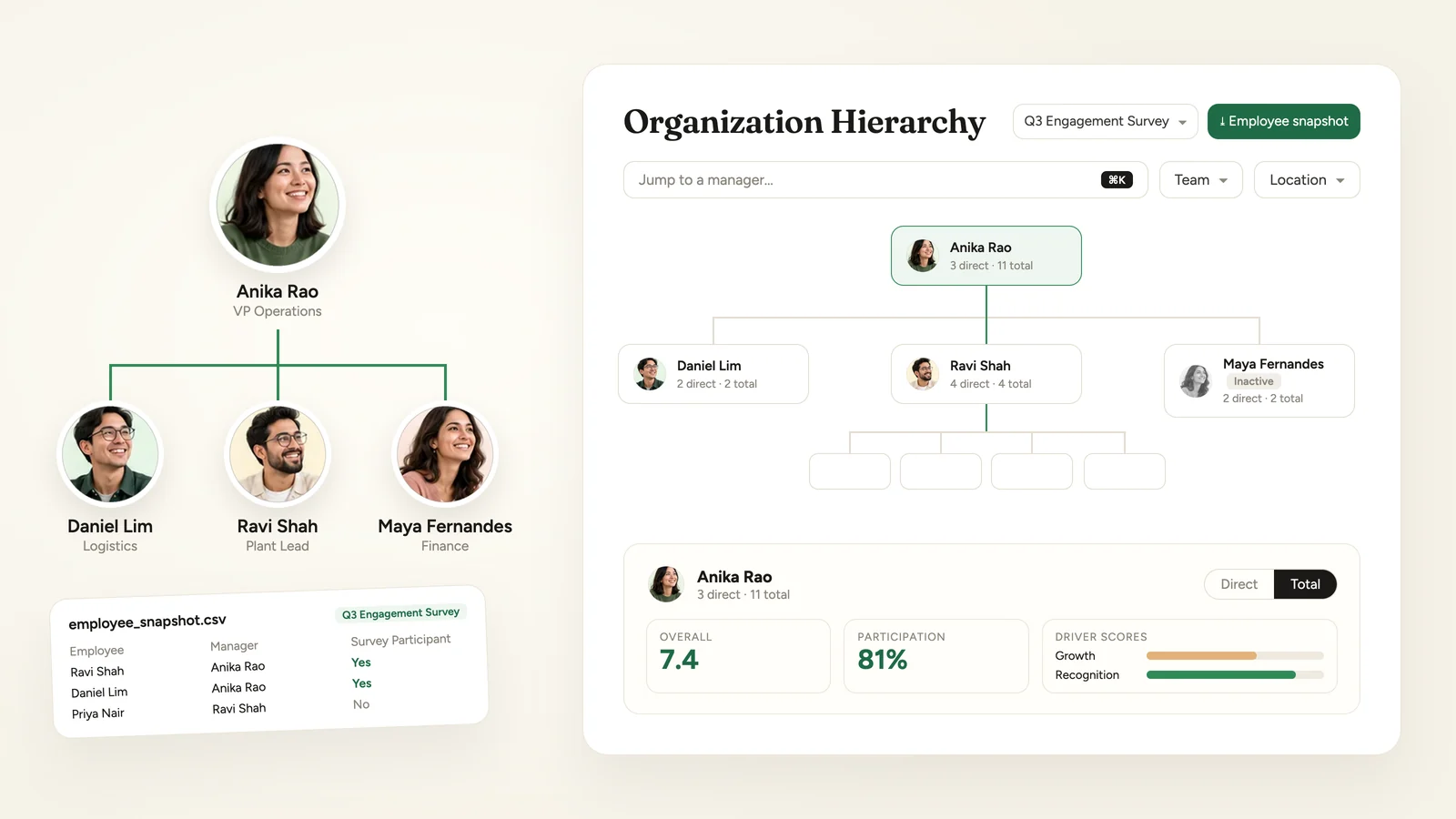
A survey's org hierarchy is now set when the survey launches. Changes to reporting lines after launch no longer move people around in that survey's chart, while its scores keep updating as responses come in. Super Admins can download the hierarchy a survey launched with as an employee snapshot.
Org Hierarchy is available on request through your Success Manager.
Each survey keeps the hierarchy it launched with
When an employee survey launches, its org hierarchy is built from the participants and every manager above them. After that:
- Changes to an employee's manager after launch do not change that survey's hierarchy. Each participant's demographic details are kept as they were at launch too.
- Scores update as each response comes in.
- Participants added after launch join the hierarchy under their manager.
- Current hierarchy still follows your organisation as it stands today.
Download the employee snapshot
- 1Open Org Hierarchy and choose a survey in the Survey picker.
Choose a survey in the Survey picker. - 2Click Employee snapshot in the header.
Employee snapshot appears in the header once a survey is selected.
The CSV lists each participant and the managers above them, with their manager and demographic details as recorded when the survey launched. A Survey Participant column marks each row Yes or No. A snapshot of more than 5,000 people is emailed to you; smaller ones download straight away.
Email addresses and the names of teams, locations and other groups in the file show their current values. The employee snapshot is for Super Admins, and is also on the classic view.
Total counts on cards
The second count on each card is now Total reports, all levels below: the manager's direct reports plus everyone below them. Until now it counted indirect reports only. The manager panel header shows the same pair, for example 8 direct · 142 total, and says Total is the same as Direct when the two match.
Inactive managers stay in the chart
A manager who is inactive or deleted stays in the chart, tagged Inactive, while an active employee still reports to them directly, so the people below them stay connected.
Team and Location filters by default
The filter bar now shows Team and Location by default, on the org chart and in the Lineage Explorer. An account with its own list of filters keeps it.
Open a survey's hierarchy from its report
Survey reports now have an Org Hierarchy link in the header, next to Configure survey. It opens Org Hierarchy with that survey already selected, in the view you last used. The link appears for admins who can open Org Hierarchy, on surveys that have an org hierarchy, and not on shared reports.
Who can use it
| Role | Access |
|---|---|
| Super Admin | Everything on this page, including the employee snapshot |
| Sub Admin | The chart, filters and report link, for the part of the organisation they can see, when your account also gives Sub Admins access to Org Hierarchy. Not the employee snapshot |
| Manager, Report View Only | No |
The 6 October release made the new org chart the default view and walks through it.
See what a warmer engagement platform looks like
Book a walkthrough and we will show you the features on this page, live in your workspace.